Fuzzing Parameters
For stack-based buffer overflow exploitation, we usually follow five main steps to identify and exploit the buffer overflow vulnerability:
- Fuzzing Parameters
- Controlling EIP
- Identifying Bad Characters
- Finding a Return Instruction
- Jumping to Shellcode
Usually, the first step in any binary vulnerability exercise is fuzzing various parameters and any other input the program accepts to see whether our input can cause the application to crash. If any of our input successfully causes the program to crash, we review what caused the program to crash. If we see that the program crashed because our input overwrote the EIP register, we likely have a stack-based buffer overflow vulnerability. All that is left is to exploit this vulnerability successfully, which can vary in difficulty depending on the OS, program architecture, and protections.
Let's start by debugging a local program called Free CD to MP3 Converter, which can be found in the Windows VM below.
Identifying Input Fields
As discussed in the previous section, we can either open our program with x32dbg or run it separately and attach to it. It is always preferable to run it separately and attach to it to ensure we would debug it exactly as it is when run normally. This may not make a lot of difference for basic programs like this one, but other programs that rely on various libraries may face some differences, which is why we prefer attaching to a process. Once our debugger is attached to Free CD to MP3 Converter, we can start fuzzing various input fields.
Depending on the program's size, there may be various input fields to fuzz. Examples of potential input fields include:
These are the main parameters we usually fuzz, but many other parameters may be exploitable as well.
As any program may have many of these types of parameters, and each may have to be fuzzed with various kinds of inputs, we should attempt to select parameters with the highest possibilities of overflows and start fuzzing them. We should look for a field that expects a short input, like a field that sets the date, as the date is usually short so that the developers may expect a short input only.
Another common thing we should look for is fields that are expected to be processed somehow, like the license number registration field, as it will probably be run on a specific function to test whether it is a correct license number. License numbers also tend to have a specific length so that developers may be expecting a certain length only, and if we provide a long enough input, it may overflow the input field.
The same applies to opened files, as opened files tend to be processed after being opened. While developers may keep a very long buffer for opened files, certain files are expected to be shorter, like configuration files, and if we provide a long input, it may overflow the buffer. Certain file types tend to cause overflow vulnerabilities, like .wav files or .m3u files, due to the vulnerabilities in the libraries that process these types of files.
With that in mind, let's start fuzzing some fields in our program.
Fuzzing Text Fields
We go through the program's various menu items, and as we just mentioned, the license registration fields are always a good candidate for overflows, so let's start fuzzing them.
Let's start by creating a very large text payload, like 10,000 characters, and input them into our field. We can get our text payload with python, as follows:
Fuzzing Parameters
PS C:\Users\htb-student\Desktop> python -c "print('A'*10000)"

AAAAA...SNIP....AAAA
Now we can copy our payload and paste it in both fields of the registration window, and click Ok:
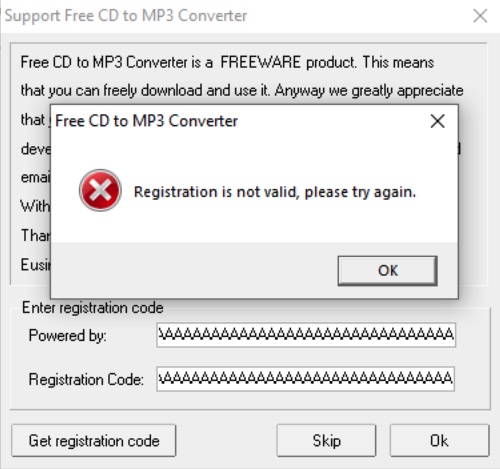
As we can see, the program does not crash and just tells us Registration is not valid.
Try fuzzing other fields that accept a text input using the same above payload, and see if any of them causes the program to crash.
Fuzzing Opened File
Now let's move to fuzzing the program with opened files. Both the program's File menu and clicking on the Encode button seem to accept .wav files, which is among the files that tend to cause overflows. So, let's try to fuzz the program with .wav files.
First, we'll repeat what we did above to generate our text payload and write the output to a .wav file, as follows:
Fuzzing Parameters
PS C:\Users\htb-student\Desktop> python -c "print('A'*10000, file=open('fuzz.wav', 'w'))"
Note: There are much more advanced methods of fuzzing parameters, by automatically sending various types of input fields and parameters to attempt and crash the program. In our case, we are starting with a basic example of a simple long string.
Now, while being attached to x32dbg, let's try to open our payload file, by clicking on the Encode icon:
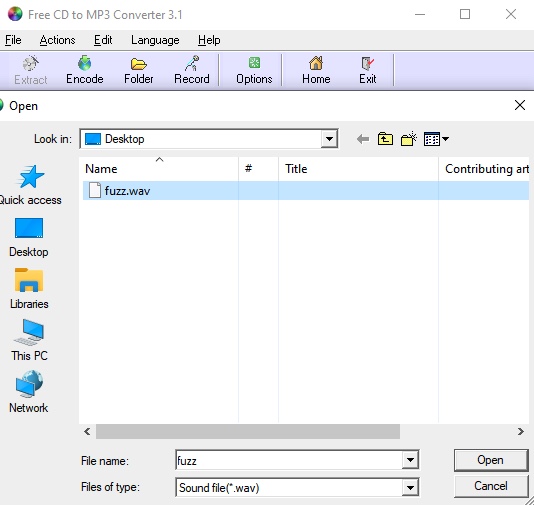
The program may get
pausedat some points of the debugging due to breakpoints or
INT3instructions, so we can simply click on the
Runbutton located at the top bar to continue the execution:


Tip: If we want to skip breaking on the built in breakpoints, we can select Options > Preferences > Events, and un-tick everything under Break on. Once we do so, the program should stop breaking every time we run it, and will only break when we crash it on an overflow.
Once we open the file, we see that the program crashes, and the debugger pauses with a message saying First chance exception on 41414141:

The message indicates that the program tried to execute the address 41414141. In ASCII, the upper case A has hex code 0x41, so it looks like the program tried to go to address AAAA, which means that we have successfully changed the EIP address.
We can confirm that by checking the registers window on the top right:
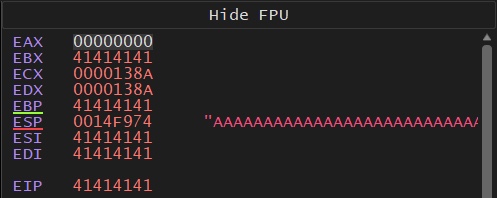
As we can see, we indeed overwrote both EBP and EIP, and then the program tried to execute our overwritten EIP address.
We can even check the stack on the bottom right window and see that our buffer is filled with A's:
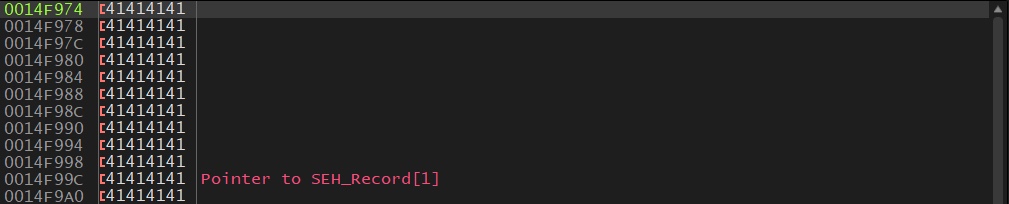
This shows that we are controlling the EIP, so we may exploit this vulnerability to execute the shellcode we write to memory.