Linux Structure
Linux, as you might already know, is an operating system used for personal computers, servers, and even mobile devices. However, Linux stands as a fundamental pillar in cybersecurity, renowned for its robustness, flexibility, and open-source nature. In this section we are going to cover the Linux structure, history, philosophy, architecture, and file system hierarchy—essential knowledge for any cybersecurity professional. You can think of this as your first driving lesson for a new car, getting a basic understanding of the vehicle, what it consists of, and why it is the way it currently is.
To begin, let's define what Linux is. Linux is an operating system, just like Windows, macOS, iOS, or Android. An operating system (OS) is software that manages all the hardware resources of a computer, facilitating communication between software applications and hardware components. Unlike some other operating systems, Linux comes in many different distributions—often called "distros"—which are versions of Linux tailored to various needs and preferences.
History
Many events led up to creating the first Linux kernel and, ultimately, the Linux operating system (OS), starting with the Unix operating system's release by Ken Thompson and Dennis Ritchie (whom both worked for AT&T at the time) in 1970. The Berkeley Software Distribution (BSD) was released in 1977, but since it contained the Unix code owned by AT&T, a resulting lawsuit limited the development of BSD. Richard Stallman started the GNU project in 1983. His goal was to create a free Unix-like operating system, and part of his work resulted in the GNU General Public License (GPL) being created. Projects by others over the years failed to result in a working, free kernel that would become widely adopted until the creation of the Linux kernel.
At first, Linux was a personal project started in 1991 by a Finnish student named Linus Torvalds. His goal was to create a new, free operating system kernel. Over the years, the Linux kernel has gone from a small number of files written in C under licensing that prohibited commercial distribution to the latest version with over 23 million source code lines (comments excluded), licensed under the GNU General Public License v2.
Linux is available in over 600 distributions (or an operating system based on the Linux kernel and supporting software and libraries). Some of the most popular and well-known being Ubuntu, Debian, Fedora, OpenSUSE, elementary, Manjaro, Gentoo Linux, RedHat, and Linux Mint.
Linux is generally considered more secure than other operating systems, and while it has had many kernel vulnerabilities in the past, it is becoming less and less frequent. It is less susceptible to malware than Windows operating systems and is very frequently updated. Linux is also very stable and generally affords very high performance to the end-user. However, it can be more difficult for beginners and does not have as many hardware drivers as Windows.
Since Linux is free and open-source, the source code can be modified and distributed commercially or non-commercially by anyone. Linux-based operating systems run on servers, mainframes, desktops, embedded systems such as routers, televisions, video game consoles, and more. The overall Android operating system that runs on smartphones and tablets is based on the Linux kernel, and because of this, Linux is the most widely installed operating system.
Linux is an operating system like Windows, iOS, Android, or macOS. An OS is software that manages all of the hardware resources associated with our computer. That means that an OS manages the whole communication between software and hardware. Also, there exist many different distributions (distro). It is like a version of Windows operating systems.
With the interactive instances, we get access to the Pwnbox, a customized version of Parrot OS. This will be the primary OS we will work with through the modules. Parrot OS is a Debian-based Linux distribution that focuses on security, privacy, and development.
Imagine Linux as a thriving company where its components are the dedicated employees, each with specific roles and responsibilities to keep operations running smoothly. The architecture serves as the organizational structure, outlining how these employees are arranged into departments and how they communicate to achieve efficiency and productivity. The philosophy represents the company's culture and core values, guiding how these employees work individually and collaboratively, promoting principles like simplicity, transparency, and cooperation to reach common goals.
Philosophy
The Linux philosophy centers on simplicity, modularity, and openness. It advocates for building small, single-purpose programs that perform one task well. These programs can be combined in various ways to accomplish complex operations, promoting efficiency and flexibility. Linux follows five core principles:
Components
Linux Architecture
The Linux operating system can be broken down into layers:
File System Hierarchy
The Linux operating system is structured in a tree-like hierarchy and is documented in the Filesystem Hierarchy Standard (FHS). Linux is structured with the following standard top-level directories:
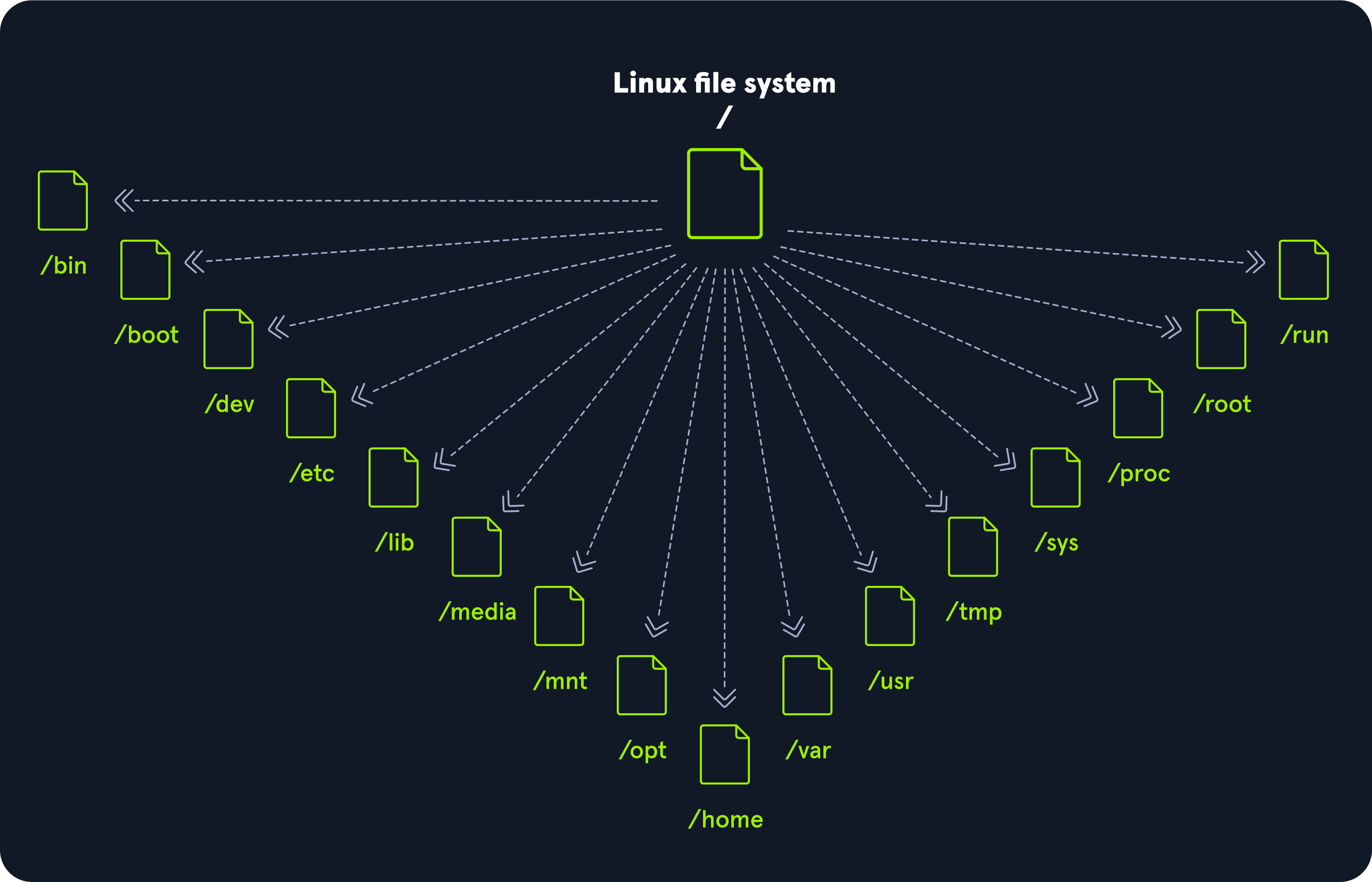
Linux Distributions
Linux distributions - or distros - are operating systems based on the Linux kernel. They are used for various purposes, from servers and embedded devices to desktop computers and mobile phones. Linux distributions are like different branches or franchises of the same company, each tailored to serve specific markets or customer preferences. While they all share the same dedicated employees (components), organizational structure (architecture), and corporate culture (philosophy), each distribution offers its own unique products and services (software packages and configurations), customizing the experience to meet diverse needs—all while operating under the unified brand and values of Linux. Each Linux distribution is different, with its own set of features, packages, and tools. Some popular examples include:
- Ubuntu
- Fedora
- CentOS
- Debian
- Red Hat Enterprise Linux
Many users choose Linux for their desktop computers because it is free, open source, and highly customizable. Ubuntu and Fedora are two popular choices for desktop Linux and beginners. It is also widely used as a server operating system because it is secure, stable, and reliable and comes with frequent and regular updates. Finally, we, as cybersecurity specialists, often prefer Linux because it is open source, meaning its source code is available for scrutiny and customization. Because of such customization, we can optimize and customize our Linux distribution the way we want and configure it for specific use cases only if necessary.
We can use those distros everywhere, including (web) servers, mobile devices, embedded systems, cloud computing, and desktop computing. For cyber security specialists, some of the most popular Linux distributions are but are not limited to:
The main differences between the various Linux distributions are the included packages, the user interface, and the tools available. Kali Linux is the most popular distribution for cyber security specialists, including a wide range of security-focused tools and packages. Ubuntu is widespread for desktop users, while Debian is popular for servers and embedded systems. Finally, red Hat Enterprise Linux and CentOS are popular for enterprise-level computing.
Debian
Debian is a widely used and well-respected Linux distribution known for its stability and reliability. It is used for various purposes, including desktop computing, servers, and embedded system. It uses an Advanced Package Tool (apt) package management system to handle software updates and security patches. The package management system helps keep the system up-to-date and secure by automatically downloading and installing security updates as soon as they are available. This can be executed manually or set up automatically.
Debian can have a steeper learning curve than other distributions, but it is widely regarded as one of the most flexible and customizable Linux distros. The configuration and setup can be complex, but it also provides excellent control over the system, which can be good for advanced users. The more control we have over a Linux system, the more complex it feels to become. However, it just feels that way compared to the options and possibilities we get. Without learning it with the required depth, we might spend way more time configuring “easy” tasks and processes than when we would learn to use a few commands and tools more in-depth. We will see it in the Filter Contents and Find Files and Directories sections.
Stability and reliability are key strengths of Debian. The distribution is known for its long-term support releases, which can provide updates and security patches for up to five years. This can be especially important for servers and other systems that must be up and running 24/7. It has had some vulnerabilities, but the development community has quickly released patches and security updates. In addition, Debian has a strong commitment to security and privacy, and the distribution has a well-established security track record. Debian is a versatile and reliable Linux distribution that is widely used for a range of purposes. Its stability, reliability, and commitment to security make it an attractive choice for various use cases, including cyber security.
Introduction to Shell
It is crucial to learn how to use the Linux shell, as there are many servers based on Linux. These are often used because Linux is less error-prone as opposed to Windows servers. For example, web servers are often based on Linux. Knowing how to use the operating system to control it effectively requires understanding and mastering Linux’s essential part, the Shell. When we first switched from Windows to Linux, does it look something like this:
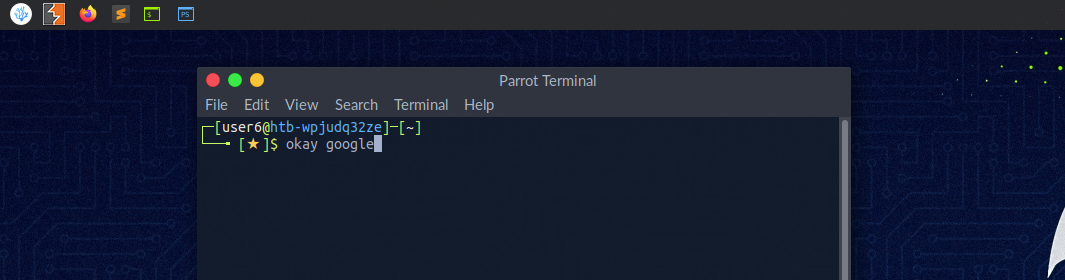
A Linux terminal, also called a shell or command line, provides a text-based input/output (I/O) interface between users and the kernel for a computer system. The term console is also typical but does not refer to a window but a screen in text mode. In the terminal window, commands can be executed to control the system.
We can think of a shell as a text-based GUI in which we enter commands to perform actions like navigating to other directories, working with files, and obtaining information from the system but with way more capabilities.
Terminal Emulators
Terminal emulation is software that emulates the function of a terminal. It allows the use of text-based programs within a graphical user interface (GUI). There are also so-called command-line interfaces (CLI) that run as additional terminals in one terminal. In short, a terminal serves as an interface to the shell interpreter.
Imagine you're in a large office building where the shell is the main server room that processes all the company's data and commands. The terminal is like a receptionist's desk that serves as a point of communication to the server room. You go to the receptionist (terminal) to deliver instructions or requests to the server room (shell).
Now, suppose you're working remotely. Terminal emulation software acts like a virtual receptionist's desk on your computer screen (the GUI), allowing you to interact with the server room without being physically present in the office. It emulates the function of the actual receptionist's desk, enabling you to use text-based programs and commands within a graphical environment.
Additionally, command-line interfaces (CLI) that run as additional terminals within one terminal are like having multiple virtual receptionist desks open on your screen simultaneously. Each one allows you to send different instructions to the server room independently, but through the same main interface. In essence, the terminal serves as your gateway to communicate with and control the core operations managed by the shell.
Terminal emulators and multiplexers are beneficial extensions for the terminal. They provide us with different methods and functions to work with the terminal, such as splitting the terminal into one window, working in multiple directories, creating different workspaces, and much more. An example of the use of such a multiplexer called Tmux could look something like this:
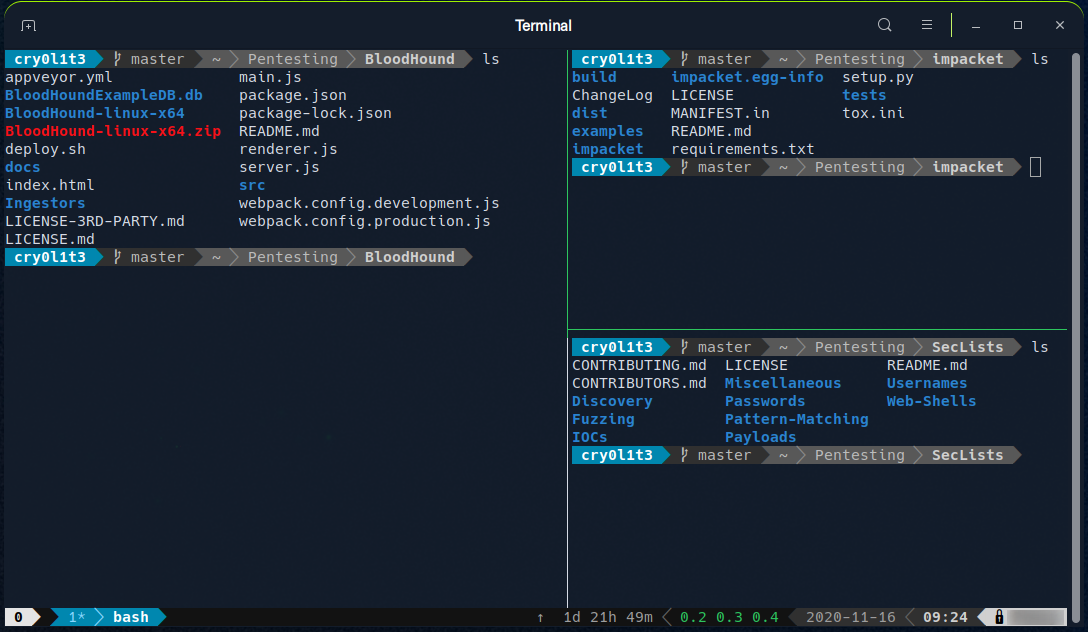
Shell
The most commonly used shell in Linux is the Bourne-Again Shell (BASH), and is part of the GNU project. Everything we do through the GUI we can do with the shell. The shell gives us many more possibilities to interact with programs and processes to get information faster. Besides, many processes can be easily automated with smaller or larger scripts that make manual work much easier.
Besides Bash, there also exist other shells like Tcsh/Csh, Ksh, Zsh, Fish shell and others.