Theory of Protection
Confidentiality, Integrity, and Availability are at the heart of every Infosec practitioner's role. Without maintaining a balance between them, we cannot ensure the safety and security of our enterprises. We keep this balance by ensuring we audit and account (Accounting) for each file, object, and host in our environment; by validating users have correct permissions (Authorization) to view and utilize those items; and ensuring that each user's identity is validated (Authentication) before granting them access to any enterprise resources. Most breaches can be tied back to losing one of those three tenets. This module will focus on attacking and bypassing the tenet of Authentication by compromising user passwords in many different operating systems, applications, and encryption types. Let's take a second to discuss authentication and its components in a bit more detail before diving into the exciting part, attacking passwords.
Authentication
Authentication, at its core, is the validation of your identity by presenting a combination of three main factors to a validation mechanism. They are;
- Something you know (a password, passcode, pin, etc.).
- Something you have (an ID Card, security key, or other MFA tools).
- Something you are (your physical self, username, email address, or other identifiers.)
The process can require any or all of these authentication descriptors. These methods will be determined based on the severity of the information or systems accessed and how much protection they need. For example, doctors are often required to utilize a Common Access Card (CAC) paired with a pin-code or password to access any terminals that input or store patient data. Depending on the maturity of the organization's security posture, they could require all three types (A CAC, password, and pin from an authenticator app, for example).
Another simple example of this is access to our email address. The proof of information, in this case, would be the knowledge of the email address itself and the associated password. For example, a cell phone with 2FA can be used. The third aspect can also play a role: the user's presence through biometric recognition such as a fingerprint or facial recognition.
In the previous example, the password is the authentication identifier that can be bypassed with different TTPs. This level is about authenticating the identity. Usually, only the owner and authenticating authority know the password. Authorization is carried out if the correct password is given to the authentication authority. Authorization, in this case, is the set of permissions that the user is granted upon successful login.
The Use of Passwords
The most common and widely used authentication method is still the use of passwords, but what is a password? A password or passphrase can be generally defined as a combination of letters, numbers, and symbols in a string for identity validation. For example, if we work with passwords and take a standard 8-digit password that consists only of upper case letters and numbers, we would get a total of 36⁸ (208,827,064,576) different combinations of passwords.
Realistically, it doesn't need to be a combination of those things. It could be a lyric from a song or poem, a line from a book, a phrase you can remember, or even randomly generated words concatenated together like "TreeDogEvilElephant." The key is for it to meet or exceed the security standards in place by your organization. Using multiple layers to establish identity can make the entire authentication process complicated and costly. Adding complexity to the authentication process creates further effort that can add to the stresses and workload a person may have during a typical workday. Complex systems can often require inconvenient manual processes or additional steps that could significantly complicate the interaction and user experience (UX). Consider the process of shopping at an online store. Creating an account on the store website can make the authentication and checkout processes much faster than manually inputting your personal information each time you wish to make a purchase. For this reason, using a username and password to secure an account is the most widespread method of authentication that we will see again and again while keeping in mind this balance of convenience and security.
PandaSecurity has compiled statistics on various aspects of passwords that give us a good overview of how and in what way passwords are used worldwide. Of interest to us would be the entry describing 24% of Americans have used passwords like password, Qwerty, or 123456. So, in theory, we could successfully compromise systems using these three passwords at many different organizations due to their widespread use.
Another interesting statistic was created by Google. This statistic shows us, for example, other passwords used by 24% of Americans. We can also see that 22% used their name, and 33% used the name of their pet or children. Another critical statistic for us is the password re-use of an already used password for more than one account, 66%. This means that 66% of all Americans, according to this statistic, have used the same password for multiple platforms. Therefore, once we have obtained or guessed a password, there is a 66% chance that we could use it to authenticate ourselves on other platforms with the user's ID (username or email address). This would, of course, require that we are able to guess the user's user ID, which, in many cases, is not difficult to do.
One aspect of this statistic that is somewhat more difficult to understand is that only 45% of Americans would change their passwords after a data breach. This, in turn, means that 55% still keep the password even though it has already been leaked. We can also check if one of our email addresses is affected by various data breaches. One of the best-known sources for this is HaveIBeenPwned. We enter an email address in the HaveIBeenPwned website, and it checks in its database if the email address has already been affected by any reported data breaches. If this is the case, we will see a list of all of the breaches in which our email address appears.
Digging In
Now that we have defined what a password is, how we use them, and common security principles, let's dive into how we store passwords and other credentials.
Credential Storage
Every application that supports authentication mechanisms compares the given entries/credentials with local or remote databases. In the case of local databases, these credentials are stored locally on the system. Web applications are often vulnerable to SQL injections, which can lead to the worst-case scenario where the attackers view the entirety of an organization's data in plain text.
There are many different wordlists that contain the most commonly used passwords. An example of one of these lists is rockyou.txt. This list includes about 14 million unique passwords, and it was created after a data breach of the company RockYou, which contained a total of 32 million user accounts. The RockYou company stored all the credentials in plain text in their database, which the attackers could view. after a successful SQL injection attack.
We also know that every operating system supports these types of authentication mechanisms. The stored credentials are therefore stored locally. Let's look at how these are created, stored, and managed by Windows and Linux-based systems in more detail.
Linux
As we already know, Linux-based systems handle everything in the form of a file. Accordingly, passwords are also stored encrypted in a file. This file is called the shadow file and is located in /etc/shadow and is part of the Linux user management system. In addition, these passwords are commonly stored in the form of hashes. An example can look like this:
Shadow File
Credential Storage
root@htb:~# cat /etc/shadow...SNIP...
htb-student:$y$j9T$3QSBB6CbHEu...SNIP...f8Ms:18955:0:99999:7:::
The /etc/shadow file has a unique format in which the entries are entered and saved when new users are created.
The encryption of the password in this file is formatted as follows:
The type (id) is the cryptographic hash method used to encrypt the password. Many different cryptographic hash methods were used in the past and are still used by some systems today.
However, a few more files belong to the user management system of Linux. The other two files are /etc/passwd and /etc/group. In the past, the encrypted password was stored together with the username in the /etc/passwd file, but this was increasingly recognized as a security problem because the file can be viewed by all users on the system and must be readable. The /etc/shadow file can only be read by the user root.
Passwd File
Credential Storage
sasorirose@htb[/htb]$ cat /etc/passwd...SNIP...
htb-student:x:1000:1000:,,,:/home/htb-student:/bin/bash
The x in the password field indicates that the encrypted password is in the /etc/shadow file. However, the redirection to the /etc/shadow file does not make the users on the system invulnerable because if the rights of this file are set incorrectly, the file can be manipulated so that the user root does not need to type a password to log in. Therefore, an empty field means that we can log in with the username without entering a password.
- Linux User Auth
Windows Authentication Process
The Windows client authentication process can oftentimes be more complicated than with Linux systems and consists of many different modules that perform the entire logon, retrieval, and verification processes. In addition, there are many different and complex authentication procedures on the Windows system, such as Kerberos authentication. The Local Security Authority (LSA) is a protected subsystem that authenticates users and logs them into the local computer. In addition, the LSA maintains information about all aspects of local security on a computer. It also provides various services for translating between names and security IDs (SIDs).
The security subsystem keeps track of the security policies and accounts that reside on a computer system. In the case of a Domain Controller, these policies and accounts apply to the domain where the Domain Controller is located. These policies and accounts are stored in Active Directory. In addition, the LSA subsystem provides services for checking access to objects, checking user permissions, and generating monitoring messages.
Windows Authentication Process Diagram
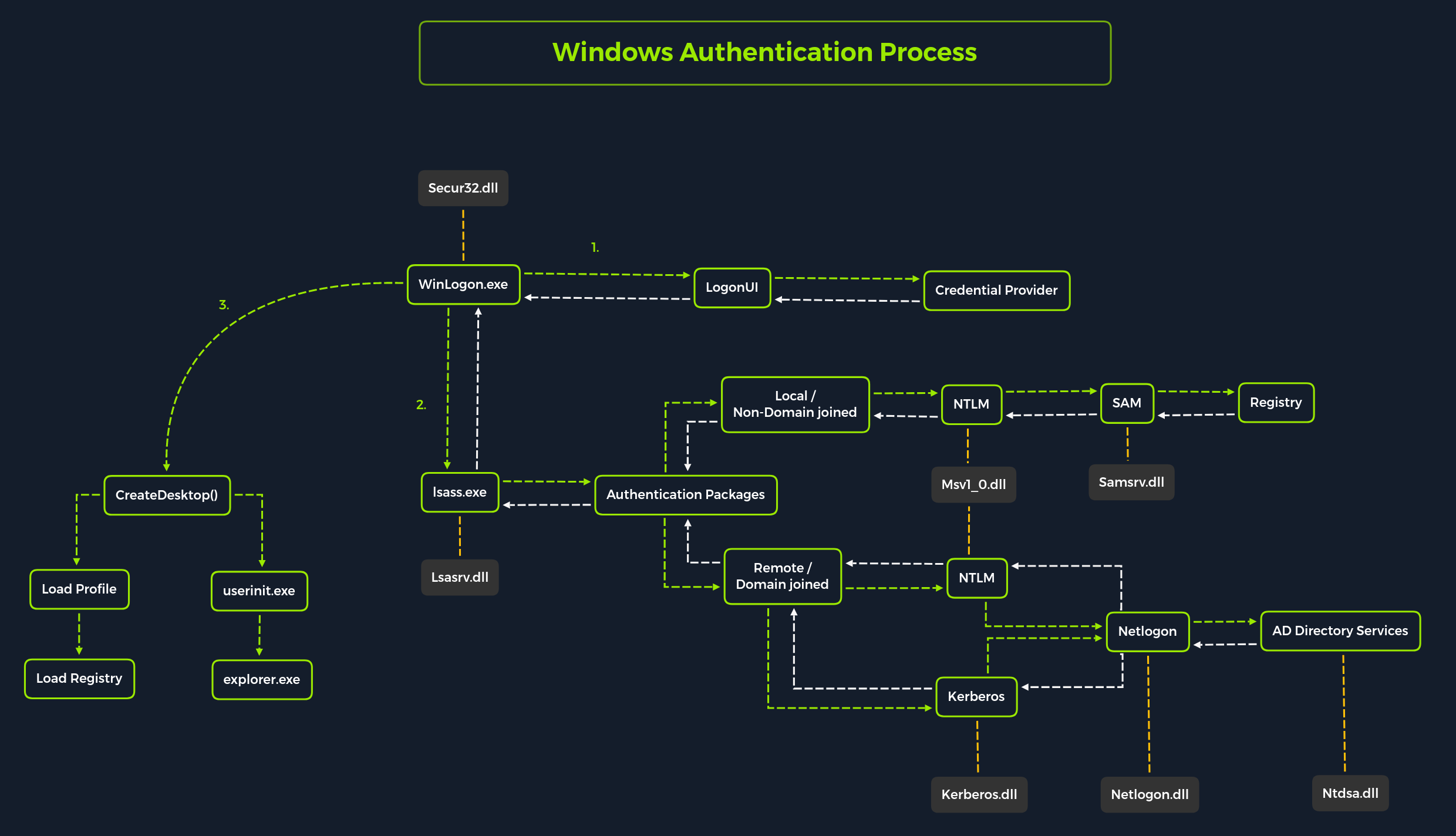
Local interactive logon is performed by the interaction between the logon process (WinLogon), the logon user interface process (LogonUI), the credential providers, LSASS, one or more authentication packages, and SAM or Active Directory. Authentication packages, in this case, are the Dynamic-Link Libraries (DLLs) that perform authentication checks. For example, for non-domain joined and interactive logins, the authentication package Msv1_0.dll is used.
Winlogon is a trusted process responsible for managing security-related user interactions. These include:
- Launching LogonUI to enter passwords at login
- Changing passwords
- Locking and unlocking the workstation
It relies on credential providers installed on the system to obtain a user's account name or password. Credential providers are COM objects that are located in DLLs.
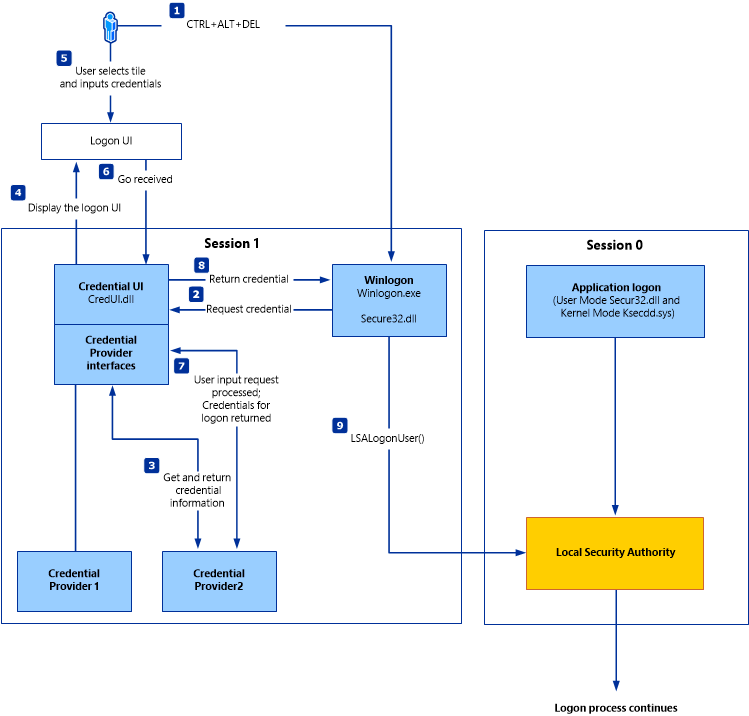
Winlogon is the only process that intercepts login requests from the keyboard sent via an RPC message from Win32k.sys. Winlogon immediately launches the LogonUI application at logon to display the user interface for logon. After Winlogon obtains a user name and password from the credential providers, it calls LSASS to authenticate the user attempting to log in.
LSASS
Local Security Authority Subsystem Service (LSASS) is a collection of many modules and has access to all authentication processes that can be found in %SystemRoot%\System32\Lsass.exe. This service is responsible for the local system security policy, user authentication, and sending security audit logs to the Event log. In other words, it is the vault for Windows-based operating systems, and we can find a more detailed illustration of the LSASS architecture here.
Source: Microsoft Docs.
Each interactive logon session creates a separate instance of the Winlogon service. The Graphical Identification and Authentication (GINA) architecture is loaded into the process area used by Winlogon, receives and processes the credentials, and invokes the authentication interfaces via the LSALogonUser function.
SAM Database
The Security Account Manager (SAM) is a database file in Windows operating systems that stores users' passwords. It can be used to authenticate local and remote users. SAM uses cryptographic measures to prevent unauthenticated users from accessing the system. User passwords are stored in a hash format in a registry structure as either an LM hash or an NTLM hash. This file is located in %SystemRoot%/system32/config/SAM and is mounted on HKLM/SAM. SYSTEM level permissions are required to view it.
Windows systems can be assigned to either a workgroup or domain during setup. If the system has been assigned to a workgroup, it handles the SAM database locally and stores all existing users locally in this database. However, if the system has been joined to a domain, the Domain Controller (DC) must validate the credentials from the Active Directory database (ntds.dit), which is stored in %SystemRoot%\ntds.dit.
Microsoft introduced a security feature in Windows NT 4.0 to help improve the security of the SAM database against offline software cracking. This is the SYSKEY (syskey.exe) feature, which, when enabled, partially encrypts the hard disk copy of the SAM file so that the password hash values for all local accounts stored in the SAM are encrypted with a key.
Credential Manager
Source: Microsoft Docs.
Credential Manager is a feature built-in to all Windows operating systems that allows users to save the credentials they use to access various network resources and websites. Saved credentials are stored based on user profiles in each user's Credential Locker. Credentials are encrypted and stored at the following location:
Credential Storage
PS C:\Users\[Username]\AppData\Local\Microsoft\[Vault/Credentials]\
There are various methods to decrypt credentials saved using Credential Manager. We will practice hands-on with some of these methods in this module.
NTDS
It is very common to come across network environments where Windows systems are joined to a Windows domain. This is common because it makes it easier for admins to manage all the systems owned by their respective organizations (centralized management). In these cases, the Windows systems will send all logon requests to Domain Controllers that belong to the same Active Directory forest. Each Domain Controller hosts a file called NTDS.dit that is kept synchronized across all Domain Controllers with the exception of Read-Only Domain Controllers. NTDS.dit is a database file that stores the data in Active Directory, including but not limited to:
- User accounts (username & password hash)
- Group accounts
- Computer accounts
- Group policy objects
We will practice methods that allow us to extract credentials from the NTDS.dit file later in this module.
Now that we have gone through a primer on credential storage concepts, let's study the various attacks we can perform to extract credentials to further our access during assessments.
John The Ripper
John the Ripper (JTR or john) is an essential pentesting tool used to check the strength of passwords and crack encrypted (or hashed) passwords using either brute force or dictionary attacks. It is open-source software initially developed for UNIX-based systems and first released in 1996. It has become a staple of security professionals due to its various capabilities. The "Jumbo" variant is recommended for those in the security field, as it has performance optimizations and additional features such as multilingual word lists and support for 64-bit architectures. This version is more effective in cracking passwords with greater accuracy and speed.
With this, we can use various tools to convert different types of files and hashes into a format that is usable by John. Additionally, the software is regularly updated to keep up with the current security trends and technologies, ensuring user security.
Encryption Technologies
Attack Methods
Dictionary Attacks
Dictionary attacks involve using a pre-generated list of words and phrases (known as a dictionary) to attempt to crack a password. This list of words and phrases is often acquired from various sources, such as publicly available dictionaries, leaked passwords, or even purchased from specialized companies. The dictionary is then used to generate a series of strings which are then used to compare against the hashed passwords. If a match is found, the password is cracked, providing an attacker access to the system and the data stored within it. This type of attack is highly effective. Therefore, it is essential to take the necessary steps to ensure that passwords are kept secure, such as using complex and unique passwords, regularly changing them, and using two-factor authentication.
Brute Force Attacks
Brute force attacks involve attempting every conceivable combination of characters that could form a password. This is an extremely slow process, and using this method is typically only advisable if there are no other alternatives. It is also important to note that the longer and more complex the password, the more difficult it is to crack and the longer it will take to exhaust every combination. For this reason, it is highly recommended that passwords be at least 8 characters in length, with a combination of letters, numbers, and symbols.
Rainbow Table Attacks
Rainbow table attacks involve using a pre-computed table of hashes and their corresponding plaintext passwords, which is a much faster method than a brute-force attack. However, this method is limited by the rainbow table size – the larger the table, the more passwords, and hashes it can store. Additionally, due to the nature of the attack, it is impossible to use rainbow tables to determine the plaintext of hashes not already included in the table. As a result, rainbow table attacks are only effective against hashes already present in the table, making the larger the table, the more successful the attack.