Introduction
As web applications become more advanced and more common, so do web
application vulnerabilities. Among the most common types of web
application vulnerabilities are Cross-Site Scripting (XSS)
vulnerabilities. XSS vulnerabilities take advantage of a flaw in user
input sanitization to "write" JavaScript code to the page and execute it
on the client side, leading to several types of attacks.
What is XSS
A typical web application works by receiving the HTML code from the
back-end server and rendering it on the client-side internet browser.
When a vulnerable web application does not properly sanitize user input,
a malicious user can inject extra JavaScript code in an input field
(e.g., comment/reply), so once another user views the same page, they
unknowingly execute the malicious JavaScript code.
XSS vulnerabilities are solely executed on the client-side and hence
do not directly affect the back-end server. They can only affect the
user executing the vulnerability. The direct impact of XSS
vulnerabilities on the back-end server may be relatively low, but they
are very commonly found in web applications, so this equates to a medium
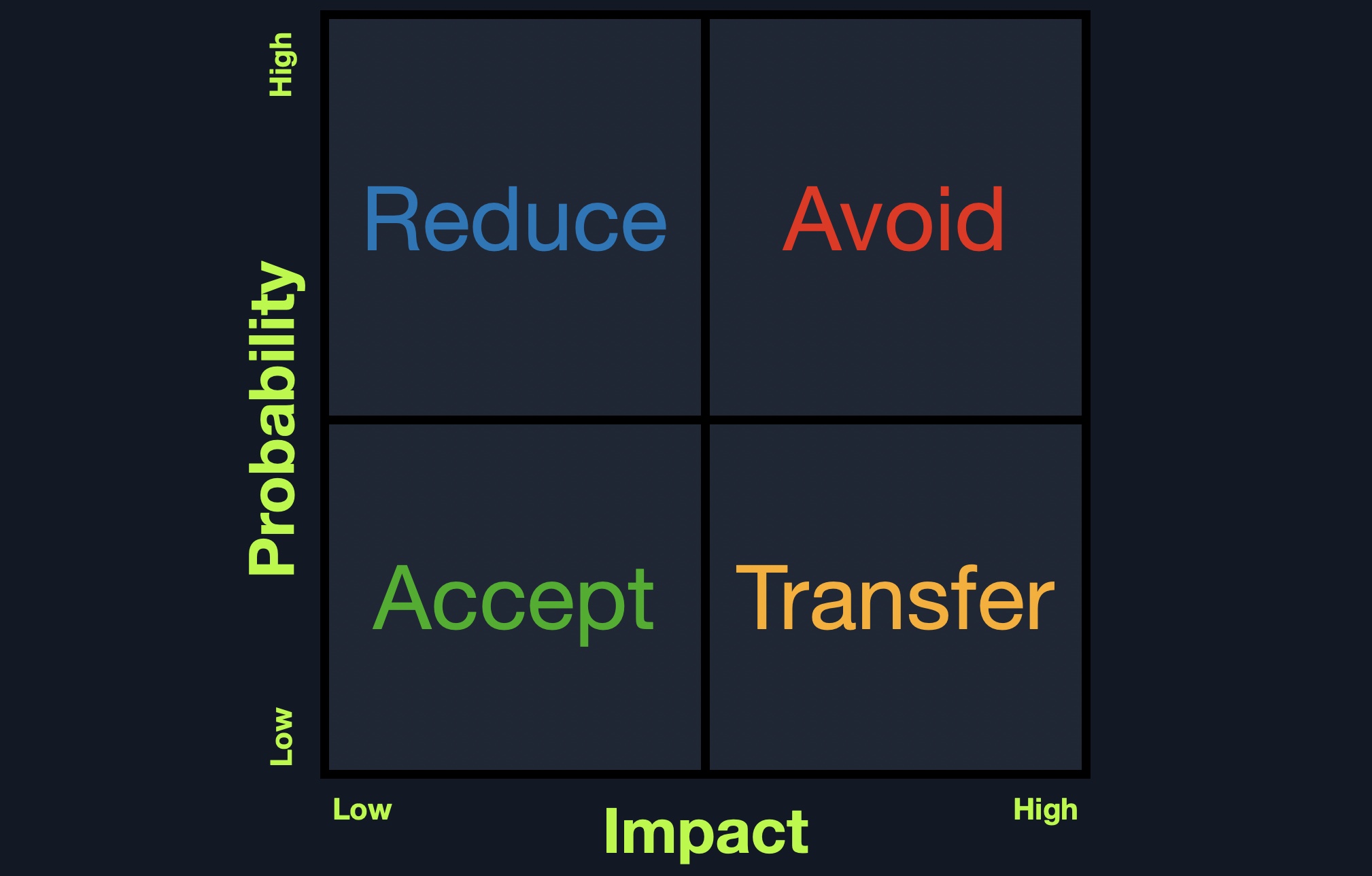
risk (low impact + high probability = medium risk), which we should always attempt to reduce risk by detecting, remediating, and proactively preventing these types of vulnerabilities.
XSS Attacks
XSS vulnerabilities can facilitate a wide range of attacks, which can
be anything that can be executed through browser JavaScript code. A
basic example of an XSS attack is having the target user unwittingly
send their session cookie to the attacker's web server. Another example
is having the target's browser execute API calls that lead to a
malicious action, like changing the user's password to a password of the
attacker's choosing. There are many other types of XSS attacks, from
Bitcoin mining to displaying ads.
As XSS attacks execute JavaScript code within the browser, they are
limited to the browser's JS engine (i.e., V8 in Chrome). They cannot
execute system-wide JavaScript code to do something like system-level
code execution. In modern browsers, they are also limited to the same
domain of the vulnerable website. Nevertheless, being able to execute
JavaScript in a user's browser may still lead to a wide variety of
attacks, as mentioned above. In addition to this, if a skilled
researcher identifies a binary vulnerability in a web browser (e.g., a
Heap overflow in Chrome), they can utilize an XSS vulnerability to
execute a JavaScript exploit on the target's browser, which eventually
breaks out of the browser's sandbox and executes code on the user's
machine.
XSS vulnerabilities may be found in almost all modern web
applications and have been actively exploited for the past two decades. A
well-known XSS example is the Samy Worm,
which was a browser-based worm that exploited a stored XSS
vulnerability in the social networking website MySpace back in 2005. It
executed when viewing an infected webpage by posting a message on the
victim's MySpace page that read, "Samy is my hero." The message itself
also contained the same JavaScript payload to re-post the same message
when viewed by others. Within a single day, more than a million MySpace
users had this message posted on their pages. Even though this specific
payload did not do any actual harm, the vulnerability could have been
utilized for much more nefarious purposes, like stealing users' credit
card information, installing key loggers on their browsers, or even
exploiting a binary vulnerability in user's web browsers (which was more
common in web browsers back then).
In 2014, a security researcher accidentally identified an XSS vulnerability in Twitter's TweetDeck dashboard. This vulnerability was exploited to create a self-retweeting tweet in Twitter, which led the tweet to be retweeted more than 38,000 times in under two minutes. Eventually, it forced Twitter to temporarily shut down TweetDeck while they patched the vulnerability.
To this day, even the most prominent web applications have XSS
vulnerabilities that can be exploited. Even Google's search engine page
had multiple XSS vulnerabilities in its search bar, the most recent of
which was in 2019
when an XSS vulnerability was found in the XML library. Furthermore,
the Apache Server, the most commonly used web server on the internet,
once reported an XSS Vulnerability
that was being actively exploited to steal user passwords of certain
companies. All of this tells us that XSS vulnerabilities should be taken
seriously, and a good amount of effort should be put towards detecting
and preventing them.
Types of XSS
There are three main types of XSS vulnerabilities:
We will cover each of these types in the upcoming sections and work
through exercises to see how each of them occurs, and then we will also
see how each of them can be utilized in attacks.
Stored XSS
Before we learn how to discover XSS vulnerabilities and utilize them
for various attacks, we must first understand the different types of XSS
vulnerabilities and their differences to know which to use in each kind
of attack.
The first and most critical type of XSS vulnerability is Stored XSS or Persistent XSS.
If our injected XSS payload gets stored in the back-end database and
retrieved upon visiting the page, this means that our XSS attack is
persistent and may affect any user that visits the page.
This makes this type of XSS the most critical, as it affects a much
wider audience since any user who visits the page would be a victim of
this attack. Furthermore, Stored XSS may not be easily removable, and
the payload may need removing from the back-end database.
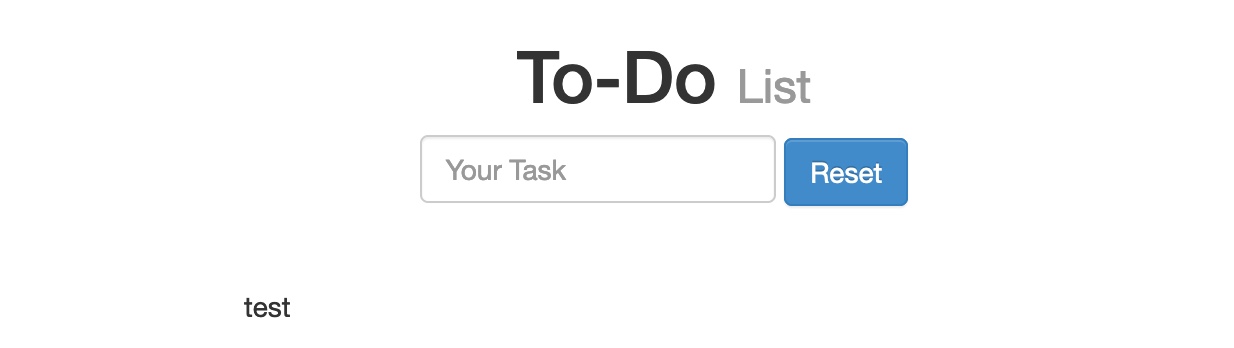
We can start the server below to view and practice a Stored XSS example. As we can see, the web page is a simple To-Do List app that we can add items to. We can try typing test and hitting enter/return to add a new item and see how the page handles it:
As we can see, our input was displayed on the page. If no
sanitization or filtering was applied to our input, the page might be
vulnerable to XSS.
XSS Testing Payloads
We can test whether the page is vulnerable to XSS with the following basic XSS payload:
Code: html
We use this payload as it is a very easy-to-spot method to know when
our XSS payload has been successfully executed. Suppose the page allows
any input and does not perform any sanitization on it. In that case, the
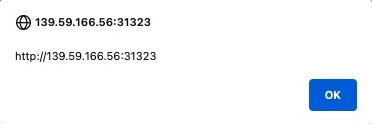
alert should pop up with the URL of the page it is being executed on,
directly after we input our payload or when we refresh the page:
As we can see, we did indeed get the alert, which means that the page
is vulnerable to XSS, since our payload executed successfully. We can
confirm this further by looking at the page source by clicking [CTRL+U] or right-clicking and selecting View Page Source, and we should see our payload in the page source:
Code: html
Tip: Many modern web applications utilize
cross-domain IFrames to handle user input, so that even if the web form
is vulnerable to XSS, it would not be a vulnerability on the main web
application. This is why we are showing the value of window.origin in the alert box, instead of a static value like 1.
In this case, the alert box would reveal the URL it is being executed
on, and will confirm which form is the vulnerable one, in case an IFrame
was being used.
As some modern browsers may block the alert() JavaScript
function in specific locations, it may be handy to know a few other
basic XSS payloads to verify the existence of XSS. One such XSS payload
is , which will stop rendering the HTML code that comes after it and display it as plaintext. Another easy-to-spot payload is <script>print()</script>
that will pop up the browser print dialog, which is unlikely to be
blocked by any browsers. Try using these payloads to see how each works.
You may use the reset button to remove any current payloads.</p><p style='color: #ccc; font-size: 1.6rem; line-height: 1.8; margin-bottom: 2rem;'>To see whether the payload is persistent and stored on the back-end,
we can refresh the page and see whether we get the alert again. If we
do, we would see that we keep getting the alert even throughout page
refreshes, confirming that this is indeed a Stored/Persistent XSS vulnerability. This is not unique to us, as any user who visits the page will trigger the XSS payload and get the same alert.</p><h2 style='color: #b74b4b; font-size: 2.8rem; margin: 3rem 0 1.5rem 0;'>Reflected XSS</h2><p style='color: #ccc; font-size: 1.6rem; line-height: 1.8; margin-bottom: 2rem;'>There are two types of Non-Persistent XSS vulnerabilities: Reflected XSS, which gets processed by the back-end server, and DOM-based XSS, which is completely processed on the client-side and never reaches the back-end server. Unlike Persistent XSS, Non-Persistent XSS
vulnerabilities are temporary and are not persistent through page
refreshes. Hence, our attacks only affect the targeted user and will not
affect other users who visit the page.</p><p style='color: #ccc; font-size: 1.6rem; line-height: 1.8; margin-bottom: 2rem;'>Reflected XSS vulnerabilities occur when our input
reaches the back-end server and gets returned to us without being
filtered or sanitized. There are many cases in which our entire input
might get returned to us, like error messages or confirmation messages.
In these cases, we may attempt using XSS payloads to see whether they
execute. However, as these are usually temporary messages, once we move
from the page, they would not execute again, and hence they are Non-Persistent.</p><p style='color: #ccc; font-size: 1.6rem; line-height: 1.8; margin-bottom: 2rem;'>We can start the server below to practice on a web page vulnerable to a Reflected XSS vulnerability. It is a similar To-Do List app to the one we practiced with in the previous section. We can try adding any test string to see how it's handled:</p><div style='text-align: center; margin: 4rem 0;'><img src='images/img_1c4151da-2648-801d-ba29-c554f54b80f9.png' style='max-width: 100%; border-radius: 1rem; border: 1px solid rgba(255,255,255,0.1); box-shadow: 0 4px 15px rgba(0,0,0,0.5);' /></div><p style='color: #ccc; font-size: 1.6rem; line-height: 1.8; margin-bottom: 2rem;'>As we can see, we get Task 'test' could not be added., which includes our input test
as part of the error message. If our input was not filtered or
sanitized, the page might be vulnerable to XSS. We can try the same XSS
payload we used in the previous section and click Add:</p><div style='text-align: center; margin: 4rem 0;'><img src='images/img_1c4151da-2648-80bc-b288-c5b102c91275.png' style='max-width: 100%; border-radius: 1rem; border: 1px solid rgba(255,255,255,0.1); box-shadow: 0 4px 15px rgba(0,0,0,0.5);' /></div><p style='color: #ccc; font-size: 1.6rem; line-height: 1.8; margin-bottom: 2rem;'>Once we click Add, we get the alert pop-up:</p><div style='text-align: center; margin: 4rem 0;'><img src='images/img_1c4151da-2648-8037-b9ce-f80f9827796d.png' style='max-width: 100%; border-radius: 1rem; border: 1px solid rgba(255,255,255,0.1); box-shadow: 0 4px 15px rgba(0,0,0,0.5);' /></div><p style='color: #ccc; font-size: 1.6rem; line-height: 1.8; margin-bottom: 2rem;'>In this case, we see that the error message now says Task '' could not be added.. Since our payload is wrapped with a <script> tag, it does not get rendered by the browser, so we get empty single quotes '' instead. We can once again view the page source to confirm that the error message includes our XSS payload:</p><p style='color: #ccc; font-size: 1.6rem; line-height: 1.8; margin-bottom: 2rem;'>Code: html</p><pre style='background: #111; padding: 2rem; border-radius: 1rem; border: 1px solid #333; overflow-x: auto; margin-bottom: 2rem;'><code style='color: #a5d6ff; font-family: monospace; font-size: 1.4rem;'><div></div><ul class="list-unstyled" id="todo"><div style="padding-left:25px">Task '<script>alert(window.origin)</script>' could not be added.</div></ul></code></pre><p style='color: #ccc; font-size: 1.6rem; line-height: 1.8; margin-bottom: 2rem;'>As we can see, the single quotes indeed contain our XSS payload '<script>alert(window.origin)</script>'.</p><p style='color: #ccc; font-size: 1.6rem; line-height: 1.8; margin-bottom: 2rem;'>If we visit the Reflected page again, the error message
no longer appears, and our XSS payload is not executed, which means that
this XSS vulnerability is indeed Non-Persistent.</p><p style='color: #ccc; font-size: 1.6rem; line-height: 1.8; margin-bottom: 2rem;'>But if the XSS vulnerability is Non-Persistent, how would we target victims with it?</p><p style='color: #ccc; font-size: 1.6rem; line-height: 1.8; margin-bottom: 2rem;'>This depends on which HTTP request is used to send our input to the server. We can check this through the Firefox Developer Tools by clicking [CTRL+Shift+I] and selecting the Network tab. Then, we can put our test payload again and click Add to send it:</p><div style='text-align: center; margin: 4rem 0;'><img src='images/img_1c4151da-2648-8056-a28f-def96ea60306.png' style='max-width: 100%; border-radius: 1rem; border: 1px solid rgba(255,255,255,0.1); box-shadow: 0 4px 15px rgba(0,0,0,0.5);' /></div><p style='color: #ccc; font-size: 1.6rem; line-height: 1.8; margin-bottom: 2rem;'>As we can see, the first row shows that our request was a GET request. GET request sends their parameters and data as part of the URL. So, to target a user, we can send them a URL containing our payload. To get the URL, we can copy the URL from the URL bar in Firefox after sending our XSS payload, or we can right-click on the GET request in the Network tab and select Copy>Copy URL. Once the victim visits this URL, the XSS payload would execute:</p><div style='text-align: center; margin: 4rem 0;'><img src='images/img_1c4151da-2648-8036-b229-c14654f5068d.png' style='max-width: 100%; border-radius: 1rem; border: 1px solid rgba(255,255,255,0.1); box-shadow: 0 4px 15px rgba(0,0,0,0.5);' /></div><h2 style='color: #b74b4b; font-size: 2.8rem; margin: 3rem 0 1.5rem 0;'>DOM XSS</h2><p style='color: #ccc; font-size: 1.6rem; line-height: 1.8; margin-bottom: 2rem;'>The third and final type of XSS is another Non-Persistent type called DOM-based XSS. While reflected XSS
sends the input data to the back-end server through HTTP requests, DOM
XSS is completely processed on the client-side through JavaScript. DOM
XSS occurs when JavaScript is used to change the page source through the
Document Object Model (DOM).</p><p style='color: #ccc; font-size: 1.6rem; line-height: 1.8; margin-bottom: 2rem;'>We can run the server below to see an example of a web application vulnerable to DOM XSS. We can try adding a test item, and we see that the web application is similar to the To-Do List web applications we previously used:</p><div style='text-align: center; margin: 4rem 0;'><img src='images/img_1c4151da-2648-8039-a5be-d269dbcda555.png' style='max-width: 100%; border-radius: 1rem; border: 1px solid rgba(255,255,255,0.1); box-shadow: 0 4px 15px rgba(0,0,0,0.5);' /></div><p style='color: #ccc; font-size: 1.6rem; line-height: 1.8; margin-bottom: 2rem;'>However, if we open the Network tab in the Firefox Developer Tools, and re-add the test item, we would notice that no HTTP requests are being made:</p><div style='text-align: center; margin: 4rem 0;'><img src='images/img_1c4151da-2648-80b8-8b56-fa6ccab11b88.png' style='max-width: 100%; border-radius: 1rem; border: 1px solid rgba(255,255,255,0.1); box-shadow: 0 4px 15px rgba(0,0,0,0.5);' /></div><p style='color: #ccc; font-size: 1.6rem; line-height: 1.8; margin-bottom: 2rem;'>We see that the input parameter in the URL is using a hashtag #
for the item we added, which means that this is a client-side parameter
that is completely processed on the browser. This indicates that the
input is being processed at the client-side through JavaScript and never
reaches the back-end; hence it is a DOM-based XSS.</p><p style='color: #ccc; font-size: 1.6rem; line-height: 1.8; margin-bottom: 2rem;'>Furthermore, if we look at the page source by hitting [CTRL+U], we will notice that our test string is nowhere to be found. This is because the JavaScript code is updating the page when we click the Add
button, which is after the page source is retrieved by our browser,
hence the base page source will not show our input, and if we refresh
the page, it will not be retained (i.e. Non-Persistent). We can still view the rendered page source with the Web Inspector tool by clicking [CTRL+SHIFT+C]:</p><div style='text-align: center; margin: 4rem 0;'><img src='images/img_1c4151da-2648-8028-811b-fc1533cf7615.png' style='max-width: 100%; border-radius: 1rem; border: 1px solid rgba(255,255,255,0.1); box-shadow: 0 4px 15px rgba(0,0,0,0.5);' /></div><h2 style='color: #b74b4b; font-size: 2.8rem; margin: 3rem 0 1.5rem 0;'>Source & Sink</h2><p style='color: #ccc; font-size: 1.6rem; line-height: 1.8; margin-bottom: 2rem;'>To further understand the nature of the DOM-based XSS vulnerability, we must understand the concept of the Source and Sink of the object displayed on the page. The Source
is the JavaScript object that takes the user input, and it can be any
input parameter like a URL parameter or an input field, as we saw above.</p><p style='color: #ccc; font-size: 1.6rem; line-height: 1.8; margin-bottom: 2rem;'>On the other hand, the Sink is the function that writes the user input to a DOM Object on the page. If the Sink
function does not properly sanitize the user input, it would be
vulnerable to an XSS attack. Some of the commonly used JavaScript
functions to write to DOM objects are:</p><ul style='margin: 0 0 1rem 3rem;'><li style='color: #ccc; font-size: 1.6rem; line-height: 1.6;'>document.write()</li></ul><ul style='margin: 0 0 1rem 3rem;'><li style='color: #ccc; font-size: 1.6rem; line-height: 1.6;'>DOM.innerHTML</li></ul><ul style='margin: 0 0 1rem 3rem;'><li style='color: #ccc; font-size: 1.6rem; line-height: 1.6;'>DOM.outerHTML</li></ul><p style='color: #ccc; font-size: 1.6rem; line-height: 1.8; margin-bottom: 2rem;'>Furthermore, some of the jQuery library functions that write to DOM objects are:</p><ul style='margin: 0 0 1rem 3rem;'><li style='color: #ccc; font-size: 1.6rem; line-height: 1.6;'>add()</li></ul><ul style='margin: 0 0 1rem 3rem;'><li style='color: #ccc; font-size: 1.6rem; line-height: 1.6;'>after()</li></ul><ul style='margin: 0 0 1rem 3rem;'><li style='color: #ccc; font-size: 1.6rem; line-height: 1.6;'>append()</li></ul><p style='color: #ccc; font-size: 1.6rem; line-height: 1.8; margin-bottom: 2rem;'>If a Sink function writes the exact input without any
sanitization (like the above functions), and no other means of
sanitization were used, then we know that the page should be vulnerable
to XSS.</p><p style='color: #ccc; font-size: 1.6rem; line-height: 1.8; margin-bottom: 2rem;'>We can look at the source code of the To-Do web application, and check script.js, and we will see that the Source is being taken from the task= parameter:</p><p style='color: #ccc; font-size: 1.6rem; line-height: 1.8; margin-bottom: 2rem;'>Code: javascript</p><pre style='background: #111; padding: 2rem; border-radius: 1rem; border: 1px solid #333; overflow-x: auto; margin-bottom: 2rem;'><code style='color: #a5d6ff; font-family: monospace; font-size: 1.4rem;'>var pos = document.URL.indexOf("task=");
var task = document.URL.substring(pos + 5, document.URL.length);
</code></pre><p style='color: #ccc; font-size: 1.6rem; line-height: 1.8; margin-bottom: 2rem;'>Right below these lines, we see that the page uses the innerHTML function to write the task variable in the todo DOM:</p><p style='color: #ccc; font-size: 1.6rem; line-height: 1.8; margin-bottom: 2rem;'>Code: javascript</p><pre style='background: #111; padding: 2rem; border-radius: 1rem; border: 1px solid #333; overflow-x: auto; margin-bottom: 2rem;'><code style='color: #a5d6ff; font-family: monospace; font-size: 1.4rem;'>document.getElementById("todo").innerHTML = "<b>Next Task:</b> " + decodeURIComponent(task);
</code></pre><p style='color: #ccc; font-size: 1.6rem; line-height: 1.8; margin-bottom: 2rem;'>So, we can see that we can control the input, and the output is not
being sanitized, so this page should be vulnerable to DOM XSS.</p><h2 style='color: #b74b4b; font-size: 2.8rem; margin: 3rem 0 1.5rem 0;'>DOM Attacks</h2><p style='color: #ccc; font-size: 1.6rem; line-height: 1.8; margin-bottom: 2rem;'>If we try the XSS payload we have been using previously, we will see that it will not execute. This is because the innerHTML function does not allow the use of the <script> tags within it as a security feature. Still, there are many other XSS payloads we use that do not contain <script> tags, like the following XSS payload:</p><p style='color: #ccc; font-size: 1.6rem; line-height: 1.8; margin-bottom: 2rem;'>Code: html</p><pre style='background: #111; padding: 2rem; border-radius: 1rem; border: 1px solid #333; overflow-x: auto; margin-bottom: 2rem;'><code style='color: #a5d6ff; font-family: monospace; font-size: 1.4rem;'><img src="" onerror=alert(window.origin)></code></pre><p style='color: #ccc; font-size: 1.6rem; line-height: 1.8; margin-bottom: 2rem;'>The above line creates a new HTML image object, which has a onerror attribute that can execute JavaScript code when the image is not found. So, as we provided an empty image link (""), our code should always get executed without having to use <script> tags:</p><p style='color: #ccc; font-size: 1.6rem; line-height: 1.8; margin-bottom: 2rem;'>
'></p><div style='text-align: center; margin: 4rem 0;'><img src='images/img_1c4151da-2648-8022-b1fc-e9bd5628a5f2.png' style='max-width: 100%; border-radius: 1rem; border: 1px solid rgba(255,255,255,0.1); box-shadow: 0 4px 15px rgba(0,0,0,0.5);' /></div><p style='color: #ccc; font-size: 1.6rem; line-height: 1.8; margin-bottom: 2rem;'>To target a user with this DOM XSS vulnerability, we can once again
copy the URL from the browser and share it with them, and once they
visit it, the JavaScript code should execute. Both of these payloads are
among the most basic XSS payloads. There are many instances where we
may need to use various payloads depending on the security of the web
application and the browser, which we will discuss in the next section.</p><h2 style='color: #b74b4b; font-size: 2.8rem; margin: 3rem 0 1.5rem 0;'>XSS Discovery</h2></div>
</div>
</section>
<script type="text/javascript" src="main.js"></script>
</body>
</html>
</plaintext></p></div></div>