Introduction to Windows Privilege Escalation
After gaining a foothold, elevating our privileges will provide more options for persistence and may reveal information stored locally that can further our access within the environment. The general goal of Windows privilege escalation is to further our access to a given system to a member of the Local Administrators group or the NT AUTHORITY\SYSTEM LocalSystem account. There may, however, be scenarios where escalating to another user on the system may be enough to reach our goal. Privilege escalation is typically a vital step during any engagement. We need to use the access obtained, or some data (such as credentials) found only once we have a session in an elevated context. In some cases, privilege escalation may be the ultimate goal of the assessment if our client hires us for a "gold image" or "workstation breakout" type assessment. Privilege escalation is often vital to continue through a network towards our ultimate objective, as well as for lateral movement.
That being said, we may need to escalate privileges for one of the following reasons:
There are many tools available to us as penetration testers to assist with privilege escalation. Still, it is also essential to understand how to perform privilege escalation checks and leverage flaws manually to the extent possible in a given scenario. We may run into situations where a client places us on a managed workstation with no internet access, heavily firewalled, and USB ports disabled, so we cannot load any tools/helper scripts. In this instance, it would be crucial to have a firm grasp of Windows privilege escalation checks using both PowerShell and Windows command-line.
Windows systems present a vast attack surface. Just some of the ways that we can escalate privileges are:
Scenario 1 - Overcoming Network Restrictions
I once was given the task to escalate privileges on a client-provided system with no internet access and blocked USB ports. Due to network access control in place, I could not plug my attack machine directly into the user network to assist me. During the assessment, I had already found a network flaw in which the printer VLAN was configured to allow outbound communication over ports 80, 443, and 445. I used manual enumeration methods to find a permissions-related flaw that allowed me to escalate privileges and perform a manual memory dump of the LSASS process. From here, I was able to mount an SMB share hosted on my attack machine on the printer VLAN and exfil the LSASS DMP file. With this file in hand, I used Mimikatz offline to retrieve the NTLM password hash for a domain admin, which I could crack offline and use to access a domain controller from the client-provided system.
Scenario 2 - Pillaging Open Shares
During another assessment, I found myself in a pretty locked-down environment that was well monitored and without any obvious configuration flaws or vulnerable services/applications in use. I found a wide-open file share, allowing all users to list its contents and download files stored on it. This share was hosting backups of virtual machines in the environment. I was explicitly interested in virtual harddrive files (.VMDK and .VHDX files). I could access this share from a Windows VM, mount the .VHDX virtual hard drive as a local drive and browse the file system. From here, I retrieved the SYSTEM, SAM, and SECURITY registry hives, moved them to my Linux attack box, and extracted the local administrator password hash using the secretsdump.py tool. The organization happened to be using a gold image, and the local administrator hash could be used to gain admin access to nearly every Windows system via a pass-the-hash attack.
Scenario 3 - Hunting Credentials and Abusing Account Privileges
In this final scenario, I was placed in a rather locked-down network with the goal of accessing critical database servers. The client provided me a laptop with a standard domain user account, and I could load tools onto it. I eventually ran the Snaffler tool to hunt file shares for sensitive information. I came across some .sql files containing low-privileged database credentials to a database on one of their database servers. I used an MSSQL client locally to connect to the database using the database credentials, enable the xp_cmdshell stored procedure and gain local command execution. Using this access as a service account, I confirmed that I had the SeImpersonatePrivilege, which can be leveraged for local privilege escalation. I downloaded a custom compiled version of Juicy Potato to the host to assist with privilege escalation, and was able to add a local admin user. Adding a user was not ideal, but my attempts to obtain a beacon/reverse shell did not work. With this access, I was able to remote into the database host and gain complete control of one of the company's clients' databases.
Why does Privilege Escalation Happen?
There is no one reason why a company's host(s) may fall victim to privilege escalation, but several possible underlying causes exist. Some typical reasons that flaws are introduced and go unnoticed are personnel and budget. Many organizations simply do not have the personnel to properly keep up with patching, vulnerability management, periodic internal assessments (self-assessments), continuous monitoring, and larger, more resource-intensive initiatives. Such initiatives may include workstation and server upgrades, as well as file share audits (to lock down directories and secure/remove sensitive files such as scripts or configuration files containing credentials).
Moving On
The scenarios above show how an understanding of Windows privilege escalation is crucial for a penetration tester. In the real world, we will rarely be attacking a single host and need to be able to think on our feet. We should be able to find creative ways to escalate privileges and ways to use this access to further our progress towards the goal of the assessment.
Practical Examples
Throughout the module, we will cover examples with accompanying command output, most of which can be reproduced on the target VMs that can be spawned within the relevant sections. You will be provided RDP credentials to interact with the target VMs and complete the section exercises and skills assessments. You can connect from the Pwnbox or your own VM (after downloading a VPN key once a machine spawns) via RDP using FreeRDP, Remmina, or the RDP client of your choice.
Connecting via FreeRDP
We can connect via command line using the command xfreerdp /v:
Introduction to Windows Privilege Escalation
sasorirose@htb[/htb]$  xfreerdp /v:10.129.43.36 /u:htb-student[21:17:27:323] [28158:28159] [INFO][com.freerdp.core] - freerdp_connect:freerdp_set_last_error_ex resetting error state
[21:17:27:323] [28158:28159] [INFO][com.freerdp.client.common.cmdline] - loading channelEx rdpdr
[21:17:27:324] [28158:28159] [INFO][com.freerdp.client.common.cmdline] - loading channelEx rdpsnd
[21:17:27:324] [28158:28159] [INFO][com.freerdp.client.common.cmdline] - loading channelEx cliprdr
[21:17:27:648] [28158:28159] [INFO][com.freerdp.primitives] - primitives autodetect, using optimized
[21:17:27:672] [28158:28159] [INFO][com.freerdp.core] - freerdp_tcp_is_hostname_resolvable:freerdp_set_last_error_ex resetting error state
[21:17:27:672] [28158:28159] [INFO][com.freerdp.core] - freerdp_tcp_connect:freerdp_set_last_error_ex resetting error state
[21:17:28:770] [28158:28159] [INFO][com.freerdp.crypto] - creating directory /home/user2/.config/freerdp
[21:17:28:770] [28158:28159] [INFO][com.freerdp.crypto] - creating directory [/home/user2/.config/freerdp/certs]
[21:17:28:771] [28158:28159] [INFO][com.freerdp.crypto] - created directory [/home/user2/.config/freerdp/server]
[21:17:28:794] [28158:28159] [WARN][com.freerdp.crypto] - Certificate verification failure 'self signed certificate (18)' at stack position 0
[21:17:28:794] [28158:28159] [WARN][com.freerdp.crypto] - CN = WINLPE-SKILLS1-SRV
[21:17:28:795] [28158:28159] [ERROR][com.freerdp.crypto] - @@@@@@@@@@@@@@@@@@@@@@@@@@@@@@@@@@@@@@@@@@@@@@@@@@@@@@@@@@@
[21:17:28:795] [28158:28159] [ERROR][com.freerdp.crypto] - @           WARNING: CERTIFICATE NAME MISMATCH!           @
[21:17:28:795] [28158:28159] [ERROR][com.freerdp.crypto] - @@@@@@@@@@@@@@@@@@@@@@@@@@@@@@@@@@@@@@@@@@@@@@@@@@@@@@@@@@@
[21:17:28:795] [28158:28159] [ERROR][com.freerdp.crypto] - The hostname used for this connection (10.129.43.36:3389)
[21:17:28:795] [28158:28159] [ERROR][com.freerdp.crypto] - does not match the name given in the certificate:
[21:17:28:795] [28158:28159] [ERROR][com.freerdp.crypto] - Common Name (CN):
[21:17:28:795] [28158:28159] [ERROR][com.freerdp.crypto] - 	WINLPE-SKILLS1-SRV
[21:17:28:795] [28158:28159] [ERROR][com.freerdp.crypto] - A valid certificate for the wrong name should NOT be trusted!
Certificate details for 10.129.43.36:3389 (RDP-Server):
	Common Name: WINLPE-SKILLS1-SRV
	Subject:     CN = WINLPE-SKILLS1-SRV
	Issuer:      CN = WINLPE-SKILLS1-SRV
	Thumbprint:  9f:f0:dd:28:f5:6f:83:db:5e:8c:5a:e9:5f:50:a4:50:2d:b3:e7:a7:af:f4:4a:8a:1a:08:f3:cb:46:c3:c3:e8
The above X.509 certificate could not be verified, possibly because you do not have
the CA certificate in your certificate store, or the certificate has expired.
Please look at the OpenSSL documentation on how to add a private CA to the store.
Do you trust the above certificate? (Y/T/N) y
Password:
Many of the module sections require tools such as open-source scripts, precompiled binaries, and exploit PoCs. Where applicable, these can be found in the C:\Tools directory on the target host. Even though most tools are provided, challenge yourself to upload files to the target (using techniques showcased in the File Transfers module) and even compile some of the tools on your own using Visual Studio.
Have fun, and don't forget to think outside the box!
- mrb3n
Useful Tools
There are many tools available to us to assist with enumerating Windows systems for common and obscure privilege escalation vectors. Below is a list of useful binaries and scripts, many of which we will cover within the coming module sections.
We can also find pre-compiled binaries of Seatbelt and SharpUp here, and standalone binaries of LaZagne here. It is recommended that we always compile our tools from the source if using them in a client environment.
Note: Depending on how we gain access to a system we may not have many directories that are writeable by our user to upload tools. It is always a safe bet to upload tools to C:\Windows\Temp because the BUILTIN\Users group has write access.
This is not an exhaustive list of tools available to us. Furthermore, we should strive to learn what each tool does if one does not work as expected, or we cannot load them onto the target system. Tools like the ones listed above are extremely useful in narrowing down our checks and focusing our enumeration. Enumerating a Windows system can be a daunting task with an immense amount of information to sift through and make sense of. Tools can make this process faster and also give us more output in an easy-to-read format. A disadvantage to this can be information overload, since some of these tools, such as winPEAS, return an incredible amount of information that is mostly not useful to us. Tools can be a double-edged sword. While they help speed up the enumeration process and provide us with highly detailed output, we could be working less efficiently if we do not know how to read the output or narrow it down to the most interesting data points. Tools can also produce false positives, so we must have a deep understanding of many possible privilege escalation techniques to troubleshoot when things go wrong or are not what they seem to be. Learning the enumeration techniques manually will help to ensure that we do not miss obvious flaws due to an issue with a tool, like a false negative or false positive.
Throughout this module, we will show manual enumeration techniques for the various examples we cover and tool output where applicable. Aside from the enumeration techniques, it is also vital to learn how to perform the exploitation steps manually and not rely on "autopwn" scripts or tools that we cannot control. It is fine (and encouraged!) to write our own tools/scripts to perform both enumeration and exploitation steps. Still, we should be confident enough in both phases to explain precisely what we are doing to our client at any stage in the process. We should also be able to operate in an environment where we cannot load tools (such as an air-gapped network or systems that do not have internet access or allow us to plug in an external device such as a USB flash drive).
These tools are not only beneficial for penetration testers but can also assist systems administrators with their jobs by helping to identify low-hanging fruit to fix before an assessment, periodically checking the security posture of a few machines, analyzing the impact of an upgrade or other changes, or performing an in-depth security review on a new gold image before deploying it into production. The tools and methods shown in this module can significantly benefit anyone in charge of systems administration, architecture, or internal security & compliance.
Like with any automation, there can be risks to using these tools. Though rare, performing excessive enumeration could cause system instability or issues with a system (or systems) that are already known to be fragile. Furthermore, these tools are well known, and most (if not all) of them will be detected and blocked by common anti-virus solutions, and most certainly, by more advanced EDR products such as Cylance or Carbon Black. Let's look at the latest release of the LaZagne tool at the time of writing version 2.4.3. Uploading the precompiled binary to Virus Total shows that 47/70 products detect it.
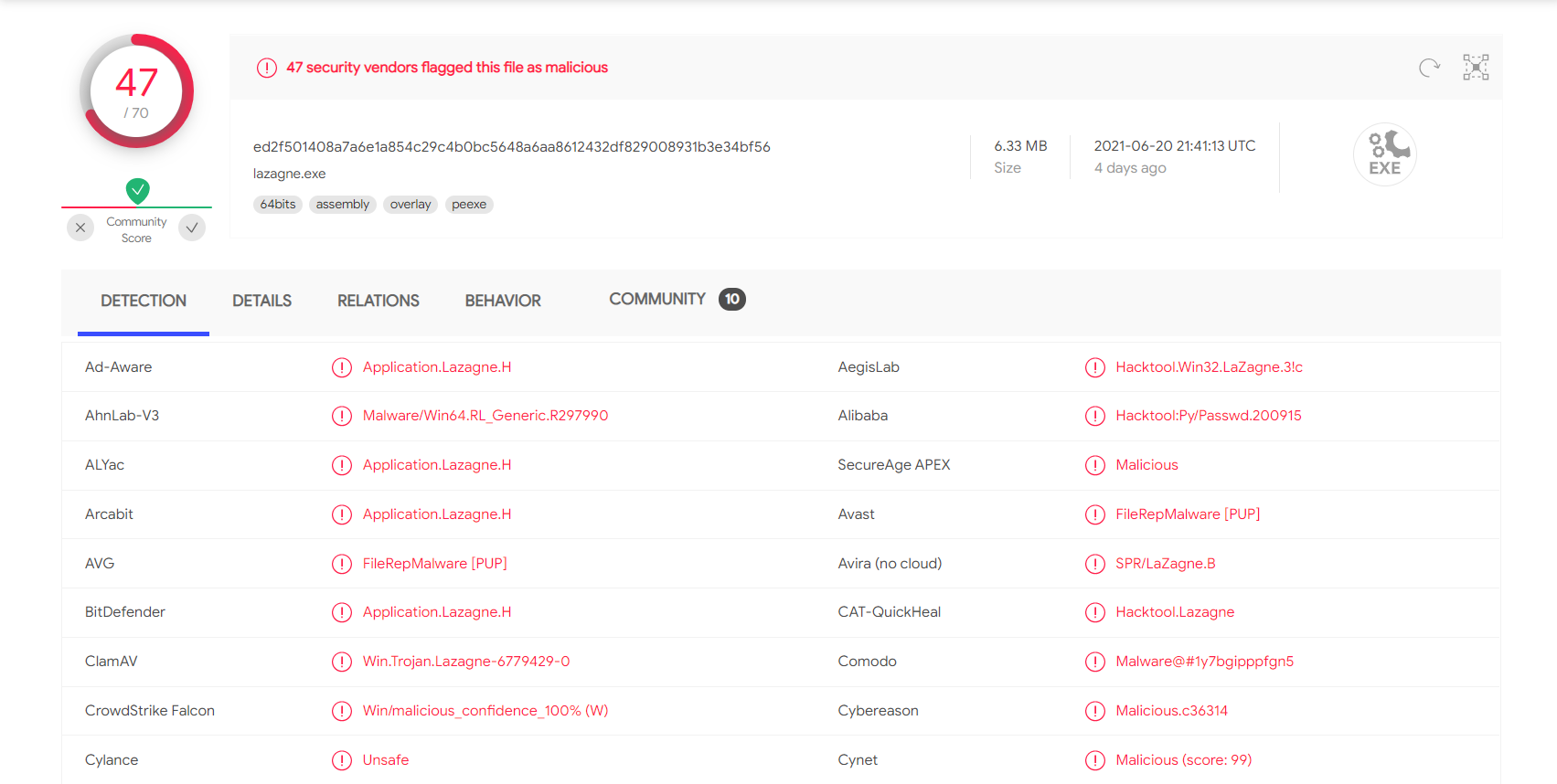
We likely would have been caught on the spot if we were attempting to run this during an evasive engagement. During other assessments, we may encounter protections that we need to bypass to run our tools. Though out of scope for this module, we can use a variety of methods to get our tools past common AV products, such as removing comments, changing function names, encrypting the executable, etc. These techniques will be taught in a later module. We will assume that our target client has temporarily set Windows Defender on the hosts we are assessing not to block our activities for this module. They are looking for as many issues as possible and are not looking to test their defenses at this stage in the game.