Introduction to Active Directory Enumeration & Attacks
Active Directory Explained
Active Directory (AD) is a directory service for Windows enterprise environments that was officially implemented in 2000 with the release of Windows Server 2000 and has been incrementally improved upon with the release of each subsequent server OS since. AD is based on the protocols x.500 and LDAP that came before it and still utilizes these protocols in some form today. It is a distributed, hierarchical structure that allows for centralized management of an organization’s resources, including users, computers, groups, network devices and file shares, group policies, devices, and trusts. AD provides authentication, accounting, and authorization functions within a Windows enterprise environment. If this is your first time learning about Active Directory or hearing these terms, check out the Introduction to Active Directory module for a more in-depth look at the structure and function of AD, AD objects, etc.
Why Should We Care About AD?
At the time of writing this module, Microsoft Active Directory holds around 43% of the market share for enterprise organizations utilizing Identity and Access management solutions. This is a huge portion of the market, and it isn't likely to go anywhere any time soon since Microsoft is improving and blending implementations with Azure AD. Another interesting stat to consider is that just in the last two years, Microsoft has had over 2000 reported vulnerabilities tied to a CVE. AD's many services and main purpose of making information easy to find and access make it a bit of a behemoth to manage and correctly harden. This exposes enterprises to vulnerabilities and exploitation from simple misconfigurations of services and permissions. Tie these misconfigurations and ease of access with common user and OS vulnerabilities, and you have a perfect storm for an attacker to take advantage of. With all of this in mind, this module will explore some of these common issues and show us how to identify, enumerate, and take advantage of their existence. We will practice enumerating AD utilizing native tools and languages such as Sysinternals, WMI, DNS, and many others. Some attacks we will also practice include Password spraying, Kerberoasting, utilizing tools such as Responder, Kerbrute, Bloodhound, and much more.
We may often find ourselves in a network with no clear path to a foothold through a remote exploit such as a vulnerable application or service. Yet, we are within an Active Directory environment, which can lead to a foothold in many ways. The general goal of gaining a foothold in a client's AD environment is to escalate privileges by moving laterally or vertically throughout the network until we accomplish the intent of the assessment. The goal can vary from client to client. It may be accessing a specific host, user's email inbox, database, or just complete domain compromise and looking for every possible path to Domain Admin level access within the testing period. Many open-source tools are available to facilitate enumerating and attacking Active Directory. To be most effective, we must understand how to perform as much of this enumeration manually as possible. More importantly, we need to understand the "why" behind certain flaws and misconfigurations. This will make us more effective as attackers and equip us to give sound recommendations to our clients on the major issues within their environment, as well as clear and actionable remediation advice.
We need to be comfortable enumerating and attacking AD from both Windows and Linux, with a limited toolset or built-in Windows tools, also known as "living off the land." It is common to run into situations where our tools fail, are being blocked, or we are conducting an assessment where the client has us work from a managed workstation or VDI instance instead of the customized Linux or Windows attack host we may have grown accustomed to. To be effective in all situations, we must be able to adapt quickly on the fly, understand the many nuances of AD and know how to access them even when severely limited in our options.
Real-World Examples
Let's look at a few scenarios to see just what is possible in a real-world AD-centric engagement:
Scenario 1 - Waiting On An Admin
During this engagement, I compromised a single host and gained SYSTEM level access. Because this was a domain-joined host, I was able to use this access to enumerate the domain. I went through all of the standard enumeration, but did not find much. There were Service Principal Names (SPNs) present within the environment, and I was able to perform a Kerberoasting attack and retrieve TGS tickets for a few accounts. I attempted to crack these with Hashcat and some of my standard wordlists and rules, but was unsuccessful at first. I ended up leaving a cracking job running overnight with a very large wordlist combined with the d3ad0ne rule that ships with Hashcat. The next morning I had a hit on one ticket and retrieved the cleartext password for a user account. This account did not give me significant access, but it did give me write access on certain file shares. I used this access to drop SCF files around the shares and left Responder going. After a while, I got a single hit, the NetNTLMv2 hash of a user. I checked through the BloodHound output and noticed that this user was actually a domain admin! Easy day from here.
Scenario 2 - Spraying The Night Away
Password spraying can be an extremely effective way to gain a foothold in a domain, but we must exercise great care not to lock out user accounts in the process. On one engagement, I found an SMB NULL session using the enum4linux tool and retrieved both a listing of all users from the domain, and the domain password policy. Knowing the password policy was crucial because I could ensure that I was staying within the parameters to not lock out any accounts and also knew that the policy was a minimum eight-character password and password complexity was enforced (meaning that a user's password required 3/4 of special character, number, uppercase, or lower case number, i.e., Welcome1). I tried several common weak passwords such as Welcome1, Password1, Password123, Spring2018, etc. but did not get any hits. Finally, I made an attempt with Spring@18 and got a hit! Using this account, I ran BloodHound and found several hosts where this user had local admin access. I noticed that a domain admin account had an active session on one of these hosts. I was able to use the Rubeus tool and extract the Kerberos TGT ticket for this domain user. From there, I was able to perform a pass-the-ticket attack and authenticate as this domain admin user. As a bonus, I was able to take over the trusting domain as well because the Domain Administrators group for the domain that I took over was a part of the Administrators group in the trusting domain via nested group membership, meaning I could use the same set of credentials to authenticate to the other domain with full administrative level access.
Scenario 3 - Fighting In The Dark
I had tried all of my standard ways to obtain a foothold on this third engagement, and nothing had worked. I decided that I would use the Kerbrute tool to attempt to enumerate valid usernames and then, if I found any, attempt a targeted password spraying attack since I did not know the password policy and didn't want to lock any accounts out. I used the linkedin2username tool to first mashup potential usernames from the company's LinkedIn page. I combined this list with several username lists from the statistically-likely-usernames GitHub repo and, after using the userenum feature of Kerbrute, ended up with 516 valid users. I knew I had to tread carefully with password spraying, so I tried with the password Welcome2021 and got a single hit! Using this account, I ran the Python version of BloodHound from my attack host and found that all domain users had RDP access to a single box. I logged into this host and used the PowerShell tool DomainPasswordSpray to spray again. I was more confident this time around because I could a) view the password policy and b) the DomainPasswordSpray tool will remove accounts close to lockout from the target list. Being that I was authenticated within the domain, I could now spray with all domain users, which gave me significantly more targets. I tried again with the common password Fall2021 and got several hits, all for users not in my initial wordlist. I checked the rights for each of these accounts and found that one was in the Help Desk group, which had GenericAll rights over the Enterprise Key Admins group. The Enterprise Key Admins group had GenericAll privileges over a domain controller, so I added the account I controlled to this group, authenticated again, and inherited these privileges. Using these rights, I performed the Shadow Credentials attack and retrieved the NT hash for the domain controller machine account. With this NT hash, I was then able to perform a DCSync attack and retrieve the NTLM password hashes for all users in the domain because a domain controller can perform replication, which is required for DCSync.
This Is The Way
These scenarios may seem overwhelming with many foreign concepts right now, but after completing this module, you will be familiar with most of them (some concepts described in these scenarios are outside the scope of this module). These show the importance of iterative enumeration, understanding our target, and adapting and thinking outside the box as we work our way through an environment. We will perform many of the parts of the attack chains described above in these module sections, and then you'll get to put your skills to the test by attacking two different AD environments at the end of this module and discovering your own attack chains. Strap in because this will be a fun, but bumpy, ride through the wild world that is enumerating and attacking Active Directory.
Practical Examples
Throughout the module, we will cover examples with accompanying command output. Most of which can be reproduced on the target VMs that can be spawned within the relevant sections. You will be provided RDP credentials to interact with some of the target VMs to learn how to enumerate and attack from a Windows host (MS01) and SSH access to a preconfigured Parrot Linux host (ATTACK01) to perform enumeration and attack examples from Linux. You can connect from the Pwnbox or your own VM (after downloading a VPN key once a machine spawns) via RDP using FreeRDP, Remmina, or the RDP client of your choice where applicable or the SSH client built into the Pwnbox or your own VM.
Connecting via FreeRDP
We can connect via command line using the command:
Introduction to Active Directory Enumeration & Attacks
sasorirose@htb[/htb]$ xfreerdp /v: /u:htb-student /p:Academy_student_AD!
Connecting via SSH
We can connect to the provided Parrot Linux attack host using the command, then enter the provided password when prompted.
Introduction to Active Directory Enumeration & Attacks
sasorirose@htb[/htb]$ ssh htb-student@
Xfreerdp to the ATTACK01 Parrot Host
We also installed an XRDP server on the ATTACK01 host to provide GUI access to the Parrot attack host. This can be used to interact with the BloodHound GUI tool which we will cover later in this section. In sections where this host spawns (where you are given SSH access) you can also connect to it using xfreerdp using the same command as you would with the Windows attack host above:
Introduction to Active Directory Enumeration & Attacks
sasorirose@htb[/htb]$ xfreerdp /v: /u:htb-student /p:HTB_@cademy_stdnt!
Most sections will provide credentials for the htb-student user on either MS01 or ATTACK01. Depending on the material and challenges, some sections will have you authenticate to a target with a different user, and alternate credentials will be provided.
Throughout the course of this module you will be presented with multiple mini Active Directory labs. Some of these labs can take 3-5 minutes to fully spawn and be accessible via RDP. We recommend scrolling to the end of each section, clicking to spawn the lab, and then start reading through the material, so the environment is up by the time you reach the interactive portions of the section.
Toolkit
We provide a Windows and Parrot Linux attack host in the accompanying lab for this module. All tools needed to perform all examples and solve all questions throughout the module sections are present on the hosts. The tools necessary for the Windows attack host, MS01 are located in the C:\Tools directory. Others, such as the Active Directory PowerShell module, will load upon opening a PowerShell console window. Tools on the Linux attack host, ATTACK01, are either installed and added to the htb-student users' PATH or present in the /opt directory. You can, of course, (and it is encouraged) compile (where needed) and upload your own tools and scripts to the attack hosts to get in the habit of doing so or hosting them on an SMB share from the Pwnbox working with the tools that way. Keep in mind that when performing an actual penetration test in a client's network, it is always best to compile the tools yourself to examine the code beforehand and ensure there is nothing malicious hiding in the compiled executable. We don't want to bring infected tools into a client's network and expose them to an outside attack.
Have fun, and don't forget to think outside of the box! AD is immense. You will not master it overnight, but keep working at it, and soon the content in this module will be second nature.
Tools of the Trade
Many of the module sections require tools such as open-source scripts or precompiled binaries. These can be found in the C:\Tools directory on the Windows hosts provided in the sections aimed at attacking from Windows. In sections that focus on attacking AD from Linux, we provide a Parrot Linux host customized for the target environment as if you were an anonymous user with an attack host within the internal network. All necessary tools and scripts are preloaded on this host (either installed or in the /opt directory). Here is a listing of many of the tools that we will cover in this module:
Scenario
We are Penetration Testers working for CAT-5 Security. After a few successful engagements shadowing with the team, the more senior members want to see how well we can do starting an assessment on our own. The team lead sent us the following email detailing what we need to accomplish.
Tasking Email
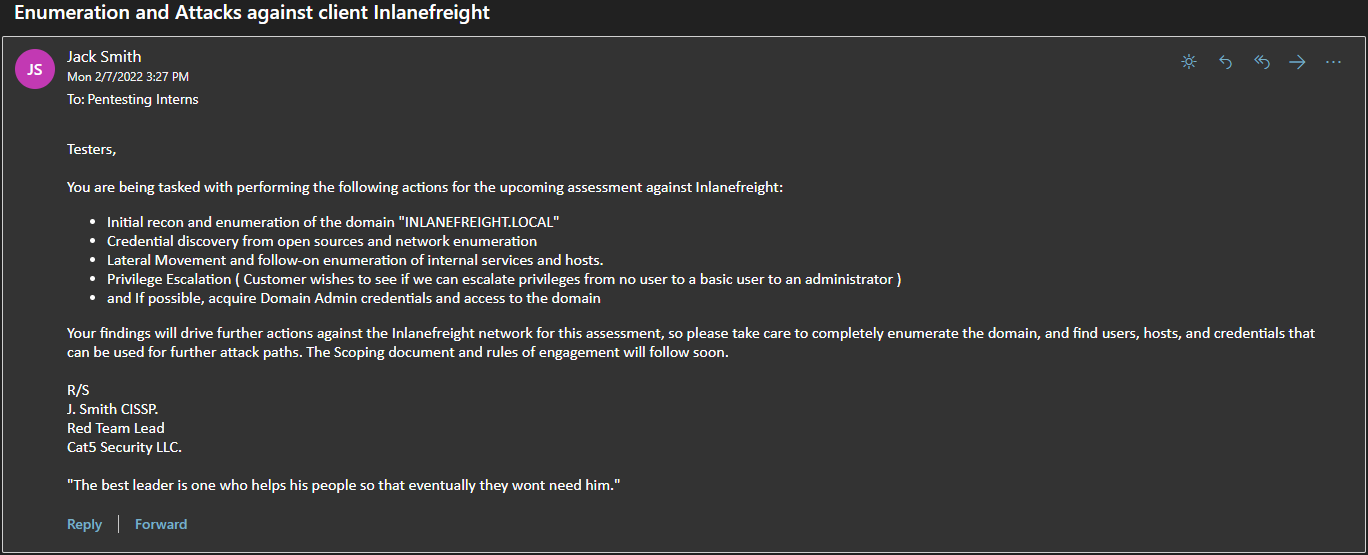
This module will allow us to practice our skills (both prior and newly minted) with these tasks. The final assessment for this module is the execution of two internal penetration tests against the company Inlanefreight. During these assessments, we will work through an internal penetration test simulating starting from an external breach position and a second one beginning with an attack box inside the internal network as clients often request. Completing the skills assessments signifies the successful completion of the tasks mentioned in the scoping document and tasking email above. In doing so, we will demonstrate a firm grasp of many automated and manual AD attack and enumeration concepts, knowledge of and experience with a wide array of tools, and the ability to interpret data gathered from an AD environment to make critical decisions to advance the assessment. The content in this module is meant to cover core enumeration concepts necessary for anyone to be successful in performing internal penetration tests in Active Directory environments. We will also cover many of the most common attack techniques in great depth while working through some more advanced concepts as a primer for AD-focused material that will be covered in more advanced modules.
Below you will find a completed scoping document for the engagement containing all pertinent information provided by the customer.
Assessment Scope
The following IPs, hosts, and domains defined below make up the scope of the assessment.
In Scope For Assessment
Out Of Scope
- Any other subdomains of INLANEFREIGHT.LOCAL
- Any subdomains of FREIGHTLOGISTICS.LOCAL
- Any phishing or social engineering attacks
- Any other IPS/domains/subdomains not explicitly mentioned
- Any types of attacks against the real-world inlanefreight.com website outside of passive enumeration shown in this module
Methods Used
The following methods are authorized for assessing Inlanefreight and its systems :
External Information Gathering (Passive Checks)
External information gathering is authorized to demonstrate the risks associated with information that can be gathered about the company from the internet. To simulate a real-world attack, CAT-5 and its assessors will conduct external information gathering from an anonymous perspective on the internet with no information provided in advance regarding Inlanefreight outside of what is provided within this document.
Cat-5 will perform passive enumeration to uncover information that may help with internal testing. Testing will employ various degrees of information gathering from open-source resources to identify publicly accessible data that may pose a risk to Inlanefreight and assist with the internal penetration test. No active enumeration, port scans, or attacks will be performed against internet-facing "real-world" IP addresses or the website located at https://www.inlanefreight.com.
Internal Testing
The internal assessment portion is designed to demonstrate the risks associated with vulnerabilities on internal hosts and services ( Active Directory specifically) by attempting to emulate attack vectors from within Inlanefreight's area of operations. The result will allow Inlanefreight to assess the risks of internal vulnerabilities and the potential impact of a successfully exploited vulnerability.
To simulate a real-world attack, Cat-5 will conduct the assessment from an untrusted insider perspective with no advance information outside of what's provided in this documentation and discovered from external testing. Testing will start from an anonymous position on the internal network with the goal of obtaining domain user credentials, enumerating the internal domain, gaining a foothold, and moving laterally and vertically to achieve compromise of all in-scope internal domains. Computer systems and network operations will not be intentionally interrupted during the test.
Password Testing
Password files captured from Inlanefreight devices, or provided by the organization, may be loaded onto offline workstations for decryption and utilized to gain further access and accomplish the assessment goals. At no time will a captured password file or the decrypted passwords be revealed to persons not officially participating in the assessment. All data will be stored securely on Cat-5 owned and approved systems and retained for a period of time defined in the official contract between Cat-5 and Inlanefreight.
We provided the above scoping documentation so we become used to seeing this style of documentation. As we progress through our Infosec Careers, especially on the offensive side, it will be common to receive scoping documents and Rules of Engagement (RoE) documents that outline these types of information.
The Stage Is Set
Now that we have our scope clearly defined for this module, we can dive into exploring Active Directory enumeration and attack vectors. Now, let's dive into performing passive external enumeration against Inlanefreight.