Intro to IDOR
Insecure Direct Object References (IDOR) vulnerabilities are among the most common web vulnerabilities and can significantly impact the vulnerable web application. IDOR vulnerabilities occur when a web application exposes a direct reference to an object, like a file or a database resource, which the end-user can directly control to obtain access to other similar objects. If any user can access any resource due to the lack of a solid access control system, the system is considered to be vulnerable.
Building a solid access control system is very challenging, which is why IDOR vulnerabilities are pervasive. In addition, automating the process of identifying weaknesses in access control systems is also quite difficult, which may lead to these vulnerabilities going unidentified until they reach production.
For example, if users request access to a file they recently uploaded, they may get a link to it such as (download.php?file_id=123). So, as the link directly references the file with (file_id=123), what would happen if we tried to access another file (which may not belong to us) with (download.php?file_id=124)? If the web application does not have a proper access control system on the back-end, we may be able to access any file by sending a request with its file_id. In many cases, we may find that the id is easily guessable, making it possible to retrieve many files or resources that we should not have access to based on our permissions.
What Makes an IDOR Vulnerability
Just exposing a direct reference to an internal object or resource is not a vulnerability in itself. However, this may make it possible to exploit another vulnerability: a weak access control system. Many web applications restrict users from accessing resources by restricting them from accessing the pages, functions, and APIs that can retrieve these resources. However, what would happen if a user somehow got access to these pages (e.g., through a shared/guessed link)? Would they still be able to access the same resources by simply having the link to access them? If the web application did not have an access control system on the back-end that compares the user's authentication to the resource's access list, they might be able to.
There are many ways of implementing a solid access control system for web applications, like having a Role-Based Access Control (RBAC) system. The main takeaway is that an IDOR vulnerability mainly exists due to the lack of an access control on the back-end. If a user had direct references to objects in a web application that lacks access control, it would be possible for attackers to view or modify other users' data.
Many developers ignore building an access control system; hence, most web applications and mobile applications are left unprotected on the back-end. In such applications, all users may have arbitrary access to all other user's data on the back-end. The only thing stopping users from accessing other user's data would be the front-end implementation of the application, which is designed to only show the user's data. In such cases, manually manipulating HTTP requests may reveal that all users have full access to all data, leading to a successful attack.
All of this makes IDOR vulnerabilities among the most critical vulnerabilities for any web or mobile application, not only due to exposing direct object references but mainly due to a lack of a solid access control system. Even a basic access control system can be challenging to develop. A comprehensive access control system covering the entire web application without interfering with its functions might be an even more difficult task. This is why IDOR/Access Control vulnerabilities are found even in very large web applications, like Facebook, Instagram, and Twitter.
Impact of IDOR Vulnerabilities
As mentioned earlier, IDOR vulnerabilities can have a significant impact on web applications. The most basic example of an IDOR vulnerability is accessing private files and resources of other users that should not be accessible to us, like personal files or credit card data, which is known as IDOR Information Disclosure Vulnerabilities. Depending on the nature of the exposed direct reference, the vulnerability may even allow the modification or deletion of other users' data, which may lead to a complete account takeover.
Once an attacker identifies the direct references, which may be database IDs or URL parameters, they can start testing specific patterns to see whether they can gain access to any data and may eventually understand how to extract or modify data for any arbitrary user.
IDOR vulnerabilities may also lead to the elevation of user privileges from a standard user to an administrator user, with IDOR Insecure Function Calls. For example, many web applications expose URL parameters or APIs for admin-only functions in the front-end code of the web application and disable these functions for non-admin users. However, if we had access to such parameters or APIs, we may call them with our standard user privileges. Suppose the back-end did not explicitly deny non-admin users from calling these functions. In that case, we may be able to perform unauthorized administrative operations, like changing users' passwords or granting users certain roles, which may eventually lead to a total takeover of the entire web application.
Identifying IDORs
URL Parameters & APIs
The very first step of exploiting IDOR vulnerabilities is identifying Direct Object References. Whenever we receive a specific file or resource, we should study the HTTP requests to look for URL parameters or APIs with an object reference (e.g. ?uid=1 or ?filename=file_1.pdf). These are mostly found in URL parameters or APIs but may also be found in other HTTP headers, like cookies.
In the most basic cases, we can try incrementing the values of the object references to retrieve other data, like (?uid=2) or (?filename=file_2.pdf). We can also use a fuzzing application to try thousands of variations and see if they return any data. Any successful hits to files that are not our own would indicate an IDOR vulnerability.
AJAX Calls
We may also be able to identify unused parameters or APIs in the front-end code in the form of JavaScript AJAX calls. Some web applications developed in JavaScript frameworks may insecurely place all function calls on the front-end and use the appropriate ones based on the user role.
For example, if we did not have an admin account, only the user-level functions would be used, while the admin functions would be disabled. However, we may still be able to find the admin functions if we look into the front-end JavaScript code and may be able to identify AJAX calls to specific end-points or APIs that contain direct object references. If we identify direct object references in the JavaScript code, we can test them for IDOR vulnerabilities.
This is not unique to admin functions, of course, but can also be any functions or calls that may not be found through monitoring HTTP requests. The following example shows a basic example of an AJAX call:
Code: javascript
function changeUserPassword() {
    $.ajax({
        url:"change_password.php",
        type: "post",
        dataType: "json",
        data: {uid: user.uid, password: user.password, is_admin: is_admin},
        success:function(result){
            //
        }
    });
}
The above function may never be called when we use the web application as a non-admin user. However, if we locate it in the front-end code, we may test it in different ways to see whether we can call it to perform changes, which would indicate that it is vulnerable to IDOR. We can do the same with back-end code if we have access to it (e.g., open-source web applications).
Understand Hashing/Encoding
Some web applications may not use simple sequential numbers as object references but may encode the reference or hash it instead. If we find such parameters using encoded or hashed values, we may still be able to exploit them if there is no access control system on the back-end.
Suppose the reference was encoded with a common encoder (e.g. base64). In that case, we could decode it and view the plaintext of the object reference, change its value, and then encode it again to access other data. For example, if we see a reference like (?filename=ZmlsZV8xMjMucGRm), we can immediately guess that the file name is base64 encoded (from its character set), which we can decode to get the original object reference of (file_123.pdf). Then, we can try encoding a different object reference (e.g. file_124.pdf) and try accessing it with the encoded object reference (?filename=ZmlsZV8xMjQucGRm), which may reveal an IDOR vulnerability if we were able to retrieve any data.
On the other hand, the object reference may be hashed, like (download.php?filename=c81e728d9d4c2f636f067f89cc14862c). At a first glance, we may think that this is a secure object reference, as it is not using any clear text or easy encoding. However, if we look at the source code, we may see what is being hashed before the API call is made:
Code: javascript
$.ajax({
    url:"download.php",
    type: "post",
    dataType: "json",
    data: {filename: CryptoJS.MD5('file_1.pdf').toString()},
    success:function(result){
        //
    }
});
In this case, we can see that code uses the filename and hashing it with CryptoJS.MD5, making it easy for us to calculate the filename for other potential files. Otherwise, we may manually try to identify the hashing algorithm being used (e.g., with hash identifier tools) and then hash the filename to see if it matches the used hash. Once we can calculate hashes for other files, we may try downloading them, which may reveal an IDOR vulnerability if we can download any files that do not belong to us.
Compare User Roles
If we want to perform more advanced IDOR attacks, we may need to register multiple users and compare their HTTP requests and object references. This may allow us to understand how the URL parameters and unique identifiers are being calculated and then calculate them for other users to gather their data.
For example, if we had access to two different users, one of which can view their salary after making the following API call:
Code: json
{
  "attributes" :
    {
      "type" : "salary",
      "url" : "/services/data/salaries/users/1"
    },
  "Id" : "1",
  "Name" : "User1"

}
The second user may not have all of these API parameters to replicate the call and should not be able to make the same call as User1. However, with these details at hand, we can try repeating the same API call while logged in as User2 to see if the web application returns anything. Such cases may work if the web application only requires a valid logged-in session to make the API call but has no access control on the back-end to compare the caller's session with the data being called.
If this is the case, and we can calculate the API parameters for other users, this would be an IDOR vulnerability. Even if we could not calculate the API parameters for other users, we would still have identified a vulnerability in the back-end access control system and may start looking for other object references to exploit.
Mass IDOR Enumeration
Exploiting IDOR vulnerabilities is easy in some instances but can be very challenging in others. Once we identify a potential IDOR, we can start testing it with basic techniques to see whether it would expose any other data. As for advanced IDOR attacks, we need to better understand how the web application works, how it calculates its object references, and how its access control system works to be able to perform advanced attacks that may not be exploitable with basic techniques.
Let's start discussing various techniques of exploiting IDOR vulnerabilities, from basic enumeration to mass data gathering, to user privilege escalation.
Insecure Parameters
Let's start with a basic example that showcases a typical IDOR vulnerability. The exercise below is an Employee Manager web application that hosts employee records:
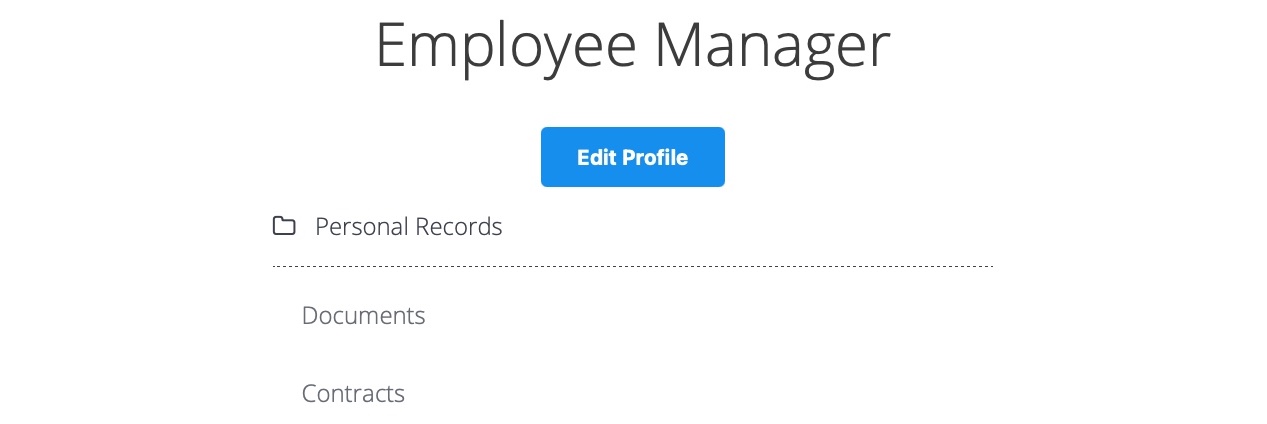
Our web application assumes that we are logged in as an employee with user id uid=1 to simplify things. This would require us to log in with credentials in a real web application, but the rest of the attack would be the same. Once we click on Documents, we are redirected to
/documents.php:

When we get to the Documents page, we see several documents that belong to our user. These can be files uploaded by our user or files set for us by another department (e.g., HR Department). Checking the file links, we see that they have individual names:
Code: html
/documents/Invoice_1_09_2021.pdf
/documents/Report_1_10_2021.pdf
We see that the files have a predictable naming pattern, as the file names appear to be using the user uid and the month/year as part of the file name, which may allow us to fuzz files for other users. This is the most basic type of IDOR vulnerability and is called static file IDOR. However, to successfully fuzz other files, we would assume that they all start with Invoice or Report, which may reveal some files but not all. So, let's look for a more solid IDOR vulnerability.
We see that the page is setting our uid with a GET parameter in the URL as (documents.php?uid=1). If the web application uses this uid GET parameter as a direct reference to the employee records it should show, we may be able to view other employees' documents by simply changing this value. If the back-end end of the web application does have a proper access control system, we will get some form of Access Denied. However, given that the web application passes as our uid in clear text as a direct reference, this may indicate poor web application design, leading to arbitrary access to employee records.
When we try changing the uid to ?uid=2, we don't notice any difference in the page output, as we are still getting the same list of documents, and may assume that it still returns our own documents:

However, we must be attentive to the page details during any web pentest and always keep an eye on the source code and page size. If we look at the linked files, or if we click on them to view them, we will notice that these are indeed different files, which appear to be the documents belonging to the employee with uid=2:
Code: html
/documents/Invoice_2_08_2020.pdf
/documents/Report_2_12_2020.pdf
This is a common mistake found in web applications suffering from IDOR vulnerabilities, as they place the parameter that controls which user documents to show under our control while having no access control system on the back-end. Another example is using a filter parameter to only display a specific user's documents (e.g. uid_filter=1), which can also be manipulated to show other users' documents or even completely removed to show all documents at once.
Mass Enumeration
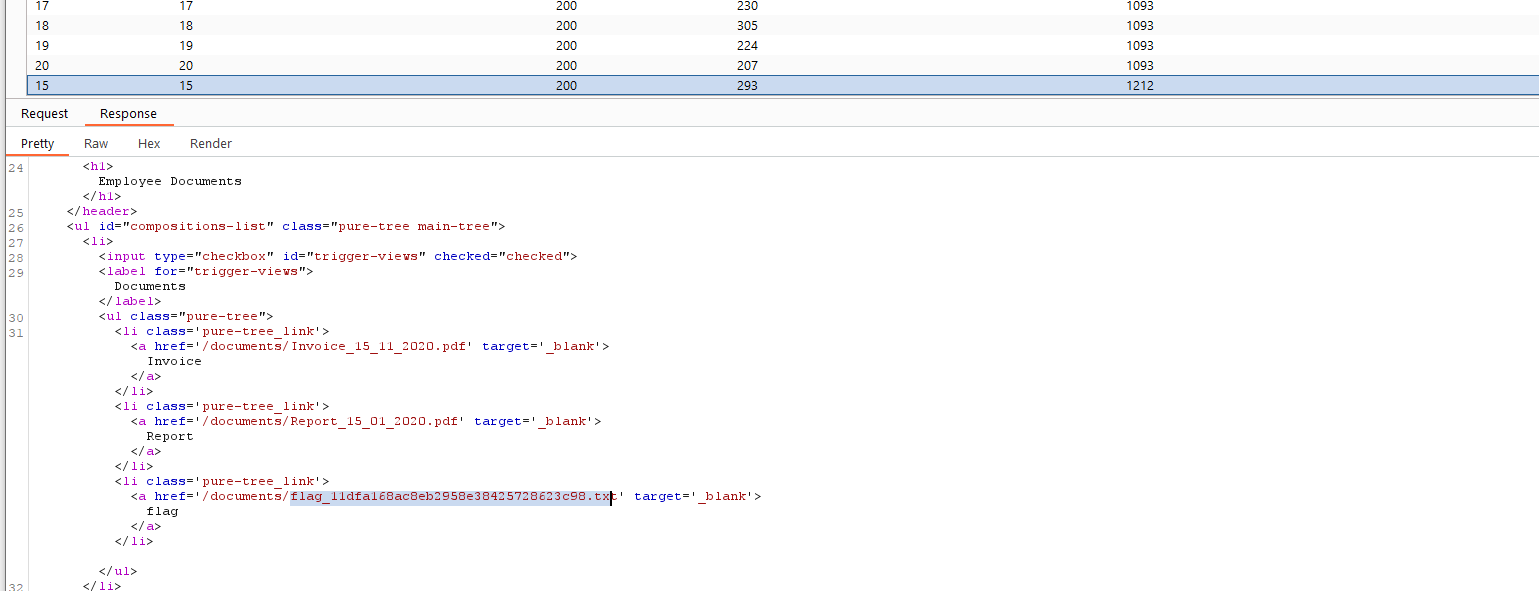
We can try manually accessing other employee documents with uid=3, uid=4, and so on. However, manually accessing files is not efficient in a real work environment with hundreds or thousands of employees. So, we can either use a tool like Burp Intruder or ZAP Fuzzer to retrieve all files or write a small bash script to download all files, which is what we will do.
We can click on [CTRL+SHIFT+C] in Firefox to enable the element inspector, and then click on any of the links to view their HTML source code, and we will get the following:
Code: html
Invoice Report We can pick any unique word to be able to grep the link of the file. In our case, we see that each link starts with
Mass IDOR Enumeration
sasorirose@htb[/htb]$ curl -s "http://SERVER_IP:PORT/documents.php?uid=3" | grep "" Invoice
Report
As we can see, we were able to capture the document links successfully. We may now use specific bash commands to trim the extra parts and only get the document links in the output. However, it is a better practice to use a Regex pattern that matches strings between /document and .pdf, which we can use with grep to only get the document links, as follows:
Mass IDOR Enumeration
sasorirose@htb[/htb]$ curl -s "http://SERVER_IP:PORT/documents.php?uid=3" | grep -oP "\/documents.*?.pdf"/documents/Invoice_3_06_2020.pdf
/documents/Report_3_01_2020.pdf
Now, we can use a simple for loop to loop over the uid parameter and return the document of all employees, and then use wget to download each document link:
Code: bash
#!/bin/bashurl="http://SERVER_IP:PORT"

for i in {1..10}; do
        for link in $(curl -s "$url/documents.php?uid=$i" | grep -oP "\/documents.*?.pdf"); do
                wget -q $url/$link
        done
done
When we run the script, it will download all documents from all employees with uids between 1-10, thus successfully exploiting the IDOR vulnerability to mass enumerate the documents of all employees. This script is one example of how we can achieve the same objective. Try using a tool like Burp Intruder or ZAP Fuzzer, or write another Bash or PowerShell script to download all documents.

Bypassing Encoded References
In the previous section, we saw an example of an IDOR that uses employee uids in clear text, making it easy to enumerate. In some cases, web applications make hashes or encode their object references, making enumeration more difficult, but it may still be possible.
Let's go back to the Employee Manager web application to test the Contracts functionality:

If we click on the Employment_contract.pdf file, it starts downloading the file. The intercepted request in Burp looks as follows:
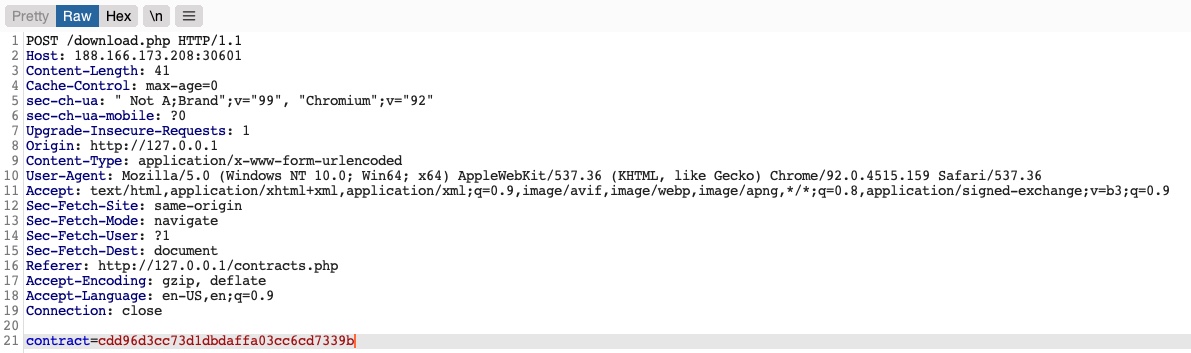
We see that it is sending a POST request to download.php with the following data:
Code: php
contract=cdd96d3cc73d1dbdaffa03cc6cd7339b
Using a download.php script to download files is a common practice to avoid directly linking to files, as that may be exploitable with multiple web attacks. In this case, the web application is not sending the direct reference in cleartext but appears to be hashing it in an md5 format. Hashes are one-way functions, so we cannot decode them to see their original values.
We can attempt to hash various values, like uid, username, filename, and many others, and see if any of their md5 hashes match the above value. If we find a match, then we can replicate it for other users and collect their files. For example, let's try to compare the md5 hash of our uid, and see if it matches the above hash:
Bypassing Encoded References
sasorirose@htb[/htb]$ echo -n 1 | md5sumc4ca4238a0b923820dcc509a6f75849b -