Limited File Uploads
So far, we have been mainly dealing with filter bypasses to obtain arbitrary file uploads through a vulnerable web application, which is the main focus of this module at this level. While file upload forms with weak filters can be exploited to upload arbitrary files, some upload forms have secure filters that may not be exploitable with the techniques we discussed. However, even if we are dealing with a limited (i.e., non-arbitrary) file upload form, which only allows us to upload specific file types, we may still be able to perform some attacks on the web application.
Certain file types, like SVG, HTML, XML, and even some image and document files, may allow us to introduce new vulnerabilities to the web application by uploading malicious versions of these files. This is why fuzzing allowed file extensions is an important exercise for any file upload attack. It enables us to explore what attacks may be achievable on the web server. So, let's explore some of these attacks.
XSS
Many file types may allow us to introduce a Stored XSS vulnerability to the web application by uploading maliciously crafted versions of them.
The most basic example is when a web application allows us to upload HTML files. Although HTML files won't allow us to execute code (e.g., PHP), it would still be possible to implement JavaScript code within them to carry an XSS or CSRF attack on whoever visits the uploaded HTML page. If the target sees a link from a website they trust, and the website is vulnerable to uploading HTML documents, it may be possible to trick them into visiting the link and carry the attack on their machines.
Another example of XSS attacks is web applications that display an image's metadata after its upload. For such web applications, we can include an XSS payload in one of the Metadata parameters that accept raw text, like the Comment or Artist parameters, as follows:
Limited File Uploads
sasorirose@htb[/htb]$ exiftool -Comment=' "> ' HTB.jpgsasorirose@htb[/htb]$ exiftool HTB.jpg...SNIP...
Comment : ">
' HTB.jpgsasorirose@htb[/htb]$ exiftool HTB.jpg...SNIP...
Comment : ">
We can see that the Comment parameter was updated to our XSS payload. When the image's metadata is displayed, the XSS payload should be triggered, and the JavaScript code will be executed to carry the XSS attack. Furthermore, if we change the image's MIME-Type to text/html, some web applications may show it as an HTML document instead of an image, in which case the XSS payload would be triggered even if the metadata wasn't directly displayed.
Finally, XSS attacks can also be carried with SVG images, along with several other attacks. Scalable Vector Graphics (SVG) images are XML-based, and they describe 2D vector graphics, which the browser renders into an image. For this reason, we can modify their XML data to include an XSS payload. For example, we can write the following to HTB.svg:
Code: xml
Once we upload the image to the web application, the XSS payload will be triggered whenever the image is displayed.
For more about XSS, you may refer to the Cross-Site Scripting (XSS) module.
Exercise: Try the above attacks with the exercise at the end of this section, and see whether the XSS payload gets triggered and displays the alert.
XXE
Similar attacks can be carried to lead to XXE exploitation. With SVG images, we can also include malicious XML data to leak the source code of the web application, and other internal documents within the server. The following example can be used for an SVG image that leaks the content of (/etc/passwd):
Code: xml
]>
Once the above SVG image is uploaded and viewed, the XML document would get processed, and we should get the info of (/etc/passwd) printed on the page or shown in the page source. Similarly, if the web application allows the upload of XML documents, then the same payload can carry the same attack when the XML data is displayed on the web application.
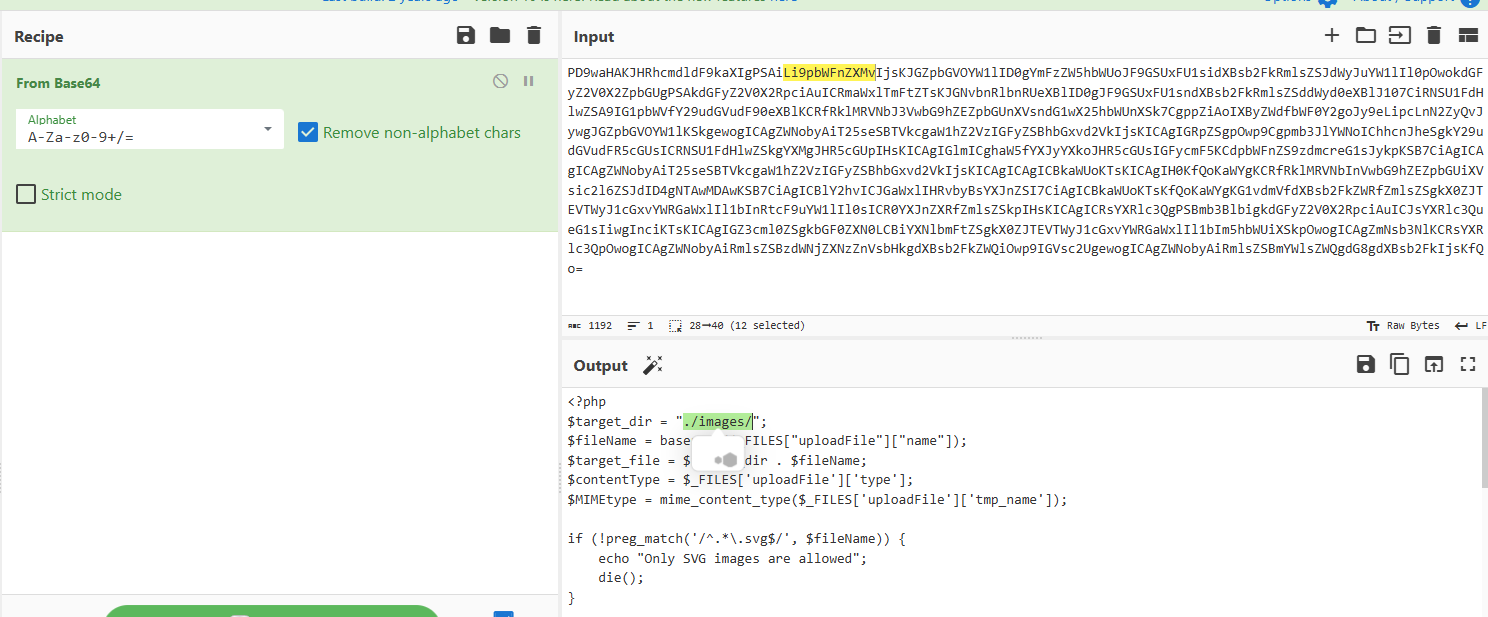
While reading systems files like /etc/passwd can be very useful for server enumeration, it can have an even more significant benefit for web penetration testing, as it allows us to read the web application's source files. Access to the source code will enable us to find more vulnerabilities to exploit within the web application through Whitebox Penetration Testing. For File Upload exploitation, it may allow us to locate the upload directory, identify allowed extensions, or find the file naming scheme, which may become handy for further exploitation.
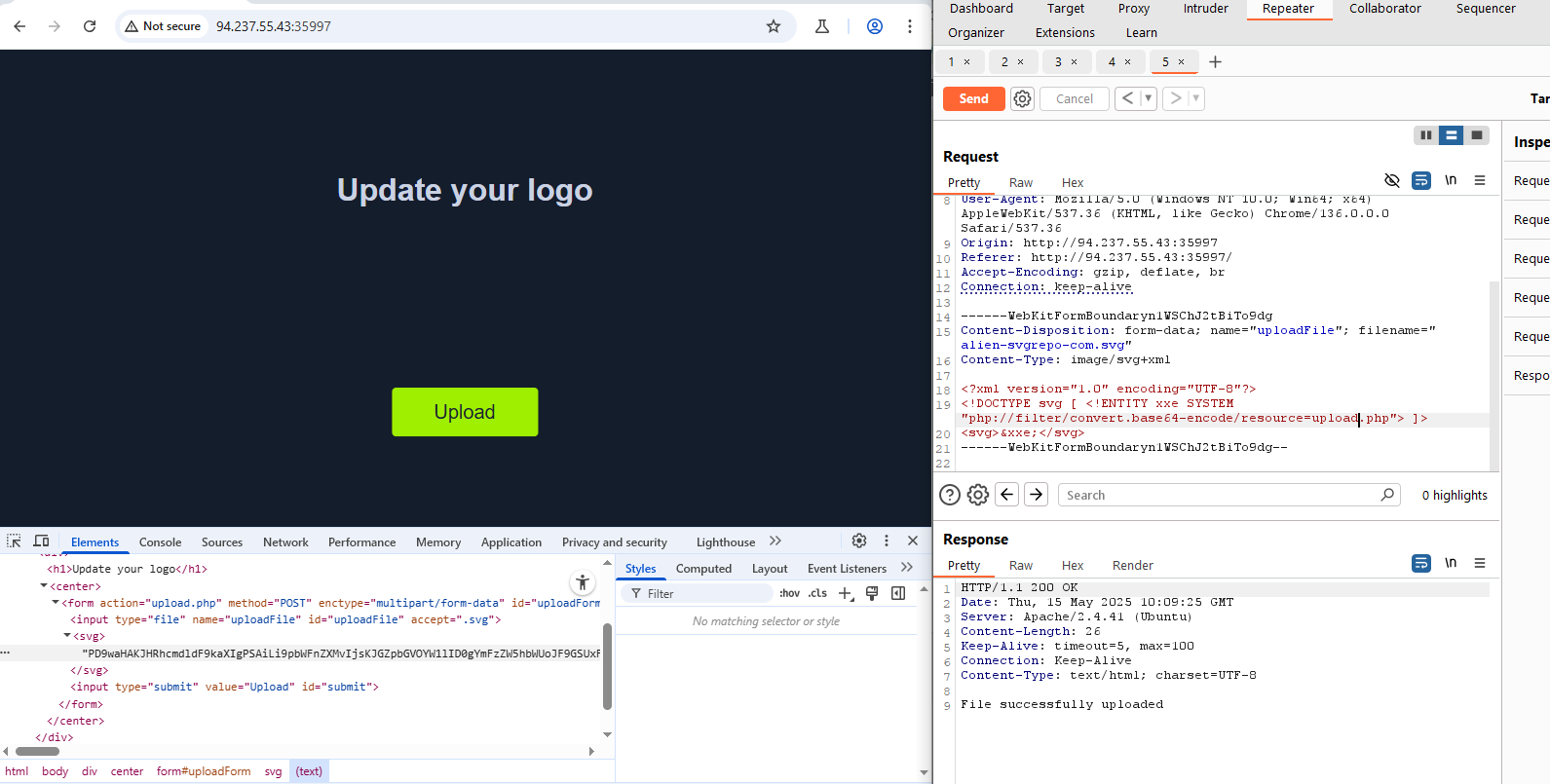
To use XXE to read source code in PHP web applications, we can use the following payload in our SVG image:
Code: xml
]>
Once the SVG image is displayed, we should get the base64 encoded content of index.php, which we can decode to read the source code. For more about XXE, you may refer to the Web Attacks module.
Using XML data is not unique to SVG images, as it is also utilized by many types of documents, like PDF, Word Documents, PowerPoint Documents, among many others. All of these documents include XML data within them to specify their format and structure. Suppose a web application used a document viewer that is vulnerable to XXE and allowed uploading any of these documents. In that case, we may also modify their XML data to include the malicious XXE elements, and we would be able to carry a blind XXE attack on the back-end web server.
Another similar attack that is also achievable through these file types is an SSRF attack. We may utilize the XXE vulnerability to enumerate the internally available services or even call private APIs to perform private actions. For more about SSRF, you may refer to the Server-side Attacks module.
DoS
Finally, many file upload vulnerabilities may lead to a Denial of Service (DOS) attack on the web server. For example, we can use the previous XXE payloads to achieve DoS attacks, as discussed in the Web Attacks module.
Furthermore, we can utilize a Decompression Bomb with file types that use data compression, like ZIP archives. If a web application automatically unzips a ZIP archive, it is possible to upload a malicious archive containing nested ZIP archives within it, which can eventually lead to many Petabytes of data, resulting in a crash on the back-end server.
Another possible DoS attack is a Pixel Flood attack with some image files that utilize image compression, like JPG or PNG. We can create any JPG image file with any image size (e.g. 500x500), and then manually modify its compression data to say it has a size of (0xffff x 0xffff), which results in an image with a perceived size of 4 Gigapixels. When the web application attempts to display the image, it will attempt to allocate all of its memory to this image, resulting in a crash on the back-end server.
In addition to these attacks, we may try a few other methods to cause a DoS on the back-end server. One way is uploading an overly large file, as some upload forms may not limit the upload file size or check for it before uploading it, which may fill up the server's hard drive and cause it to crash or slow down considerably.
If the upload function is vulnerable to directory traversal, we may also attempt uploading files to a different directory (e.g. ../../../etc/passwd), which may also cause the server to crash. Try to search for other examples of DOS attacks through a vulnerable file upload functionality.
Other Upload Attacks
In addition to arbitrary file uploads and limited file upload attacks, there are a few other techniques and attacks worth mentioning, as they may become handy in some web penetration tests or bug bounty tests. Let's discuss some of these techniques and when we may use them.
Injections in File Name
A common file upload attack uses a malicious string for the uploaded file name, which may get executed or processed if the uploaded file name is displayed (i.e., reflected) on the page. We can try injecting a command in the file name, and if the web application uses the file name within an OS command, it may lead to a command injection attack.
For example, if we name a file file$(whoami).jpg or file`whoami`.jpg or file.jpg||whoami, and then the web application attempts to move the uploaded file with an OS command (e.g. mv file /tmp), then our file name would inject the whoami command, which would get executed, leading to remote code execution. You may refer to the Command Injections module for more information.
Similarly, we may use an XSS payload in the file name (e.g. ), which would get executed on the target's machine if the file name is displayed to them. We may also inject an SQL query in the file name (e.g. file';select+sleep(5);--.jpg), which may lead to an SQL injection if the file name is insecurely used in an SQL query.
Upload Directory Disclosure
In some file upload forms, like a feedback form or a submission form, we may not have access to the link of our uploaded file and may not know the uploads directory. In such cases, we may utilize fuzzing to look for the uploads directory or even use other vulnerabilities (e.g., LFI/XXE) to find where the uploaded files are by reading the web applications source code, as we saw in the previous section. Furthermore, the Web Attacks/IDOR module discusses various methods of finding where files may be stored and identifying the file naming scheme.
Another method we can use to disclose the uploads directory is through forcing error messages, as they often reveal helpful information for further exploitation. One attack we can use to cause such errors is uploading a file with a name that already exists or sending two identical requests simultaneously. This may lead the web server to show an error that it could not write the file, which may disclose the uploads directory. We may also try uploading a file with an overly long name (e.g., 5,000 characters). If the web application does not handle this correctly, it may also error out and disclose the upload directory.
Similarly, we may try various other techniques to cause the server to error out and disclose the uploads directory, along with additional helpful information.
Windows-specific Attacks
We can also use a few Windows-Specific techniques in some of the attacks we discussed in the previous sections.
One such attack is using reserved characters, such as (|, <, >, *, or ?), which are usually reserved for special uses like wildcards. If the web application does not properly sanitize these names or wrap them within quotes, they may refer to another file (which may not exist) and cause an error that discloses the upload directory. Similarly, we may use Windows reserved names for the uploaded file name, like (CON, COM1, LPT1, or NUL), which may also cause an error as the web application will not be allowed to write a file with this name.
Finally, we may utilize the Windows 8.3 Filename Convention to overwrite existing files or refer to files that do not exist. Older versions of Windows were limited to a short length for file names, so they used a Tilde character (~) to complete the file name, which we can use to our advantage.
For example, to refer to a file called (hackthebox.txt) we can use (HAC~1.TXT) or (HAC~2.TXT), where the digit represents the order of the matching files that start with (HAC). As Windows still supports this convention, we can write a file called (e.g. WEB~.CONF) to overwrite the web.conf file. Similarly, we may write a file that replaces sensitive system files. This attack can lead to several outcomes, like causing information disclosure through errors, causing a DoS on the back-end server, or even accessing private files.
Advanced File Upload Attacks
In addition to all of the attacks we have discussed in this module, there are more advanced attacks that can be used with file upload functionalities. Any automatic processing that occurs to an uploaded file, like encoding a video, compressing a file, or renaming a file, may be exploited if not securely coded.
Some commonly used libraries may have public exploits for such vulnerabilities, like the AVI upload vulnerability leading to XXE in ffmpeg. However, when dealing with custom code and custom libraries, detecting such vulnerabilities requires more advanced knowledge and techniques, which may lead to discovering an advanced file upload vulnerability in some web applications.
There are many other advanced file upload vulnerabilities that we did not discuss in this module. Try to read some bug bounty reports to explore more advanced file upload vulnerabilities.