Network Types
Each network is structured differently and can be set up individually. For this reason, so-called types and topologies have been developed that can be used to categorize these networks. When reading about all the types of networks, it can be a bit of information overload as some network types include the geographical range. We rarely hear some of the terminologies in practice, so this section will be broken up into Common Terms and Book Terms. Book terms are good to know, as there has been a single documented case of an email server failing to deliver emails longer than 500 miles but don't be expected to be able to recite them on demand unless you are studying for a networking exam.
Common Terminology
WAN
The WAN (Wide Area Network) is commonly referred to as The Internet. When dealing with networking equipment, we'll often have a WAN Address and LAN Address. The WAN one is the address that is generally accessed by the Internet. That being said, it is not inclusive to the Internet; a WAN is just a large number of LANs joined together. Many large companies or government agencies will have an "Internal WAN" (also called Intranet, Airgap Network, etc.). Generally speaking, the primary way we identify if the network is a WAN is to use a WAN Specific routing protocol such as BGP and if the IP Schema in use is not within RFC 1918 (10.0.0.0/8, 172.16.0.0/12, 192.168.0.0/16).
LAN / WLAN
LANs (Local Area Network) and WLANs (Wireless Local Area Network) will typically assign IP Addresses designated for local use (RFC 1918, 10.0.0.0/8, 172.16.0.0/12, 192.168.0.0/16). In some cases, like some colleges or hotels, you may be assigned a routable (internet) IP Address from joining their LAN, but that is much less common. There's nothing different between a LAN or WLAN, other than WLAN's introduce the ability to transmit data without cables. It is mainly a security designation.
VPN
There are three main types Virtual Private Networks (VPN), but all three have the same goal of making the user feel as if they were plugged into a different network.
Site-To-Site VPN
Both the client and server are Network Devices, typically either Routers or Firewalls, and share entire network ranges. This is most commonly used to join company networks together over the Internet, allowing multiple locations to communicate over the Internet as if they were local.
Remote Access VPN
This involves the client's computer creating a virtual interface that behaves as if it is on a client's network. Hack The Box utilizes OpenVPN, which makes a TUN Adapter letting us access the labs. When analyzing these VPNs, an important piece to consider is the routing table that is created when joining the VPN. If the VPN only creates routes for specific networks (ex: 10.10.10.0/24), this is called a Split-Tunnel VPN, meaning the Internet connection is not going out of the VPN. This is great for Hack The Box because it provides access to the Lab without the privacy concern of monitoring your internet connection. However, for a company, split-tunnel VPN's are typically not ideal because if the machine is infected with malware, network-based detection methods will most likely not work as that traffic goes out the Internet.
SSL VPN
This is essentially a VPN that is done within our web browser and is becoming increasingly common as web browsers are becoming capable of doing anything. Typically these will stream applications or entire desktop sessions to your web browser. A great example of this would be the HackTheBox Pwnbox.
Book Terms
GAN
A worldwide network such as the Internet is known as a Global Area Network (GAN). However, the Internet is not the only computer network of this kind. Internationally active companies also maintain isolated networks that span several WANs and connect company computers worldwide. GANs use the glass fibers infrastructure of wide-area networks and interconnect them by international undersea cables or satellite transmission.
MAN
Metropolitan Area Network (MAN) is a broadband telecommunications network that connects several LANs in geographical proximity. As a rule, these are individual branches of a company connected to a MAN via leased lines. High-performance routers and high-performance connections based on glass fibers are used, which enable a significantly higher data throughput than the Internet. The transmission speed between two remote nodes is comparable to communication within a LAN.
Internationally operating network operators provide the infrastructure for MANs. Cities wired as Metropolitan Area Networks can be integrated supra-regionally in Wide Area Networks (WAN) and internationally in Global Area Networks (GAN).
PAN / WPAN
Modern end devices such as smartphones, tablets, laptops, or desktop computers can be connected ad hoc to form a network to enable data exchange. This can be done by cable in the form of a Personal Area Network (PAN).
The wireless variant Wireless Personal Area Network (WPAN) is based on Bluetooth or Wireless USB technologies. A wireless personal area network that is established via Bluetooth is called Piconet. PANs and WPANs usually extend only a few meters and are therefore not suitable for connecting devices in separate rooms or even buildings.
In the context of the Internet of Things (IoT), WPANs are used to communicate control and monitor applications with low data rates. Protocols such as Insteon, Z-Wave, and ZigBee were explicitly designed for smart homes and home automation.
Networking Topologies
A network topology is a typical arrangement and physical or logical connection of devices in a network. Computers are hosts, such as clients and servers, that actively use the network. They also include network components such as switches, bridges, and routers, which we will discuss in more detail in later sections, which have a distribution function and ensure that all network hosts can establish a logical connection with each other. The network topology determines the components to be used and the access methods to the transmission media.
The transmission medium layout used to connect devices is the physical topology of the network. For conductive or glass fiber media, this refers to the cabling plan, the positions of the nodes, and the connections between the nodes and the cabling. In contrast, the logical topology is how the signals act on the network media or how the data will be transmitted across the network from one device to the devices' physical connection.
We can divide the entire network topology area into three areas:
1. Connections
2. Nodes - Network Interface Controller (NICs)
Network nodes are the transmission medium's connection points to transmitters and receivers of electrical, optical, or radio signals in the medium. A node may be connected to a computer, but certain types may have only one microcontroller on a node or may have no programmable device at all.
3. Classifications
We can imagine a topology as a virtual form or structure of a network. This form does not necessarily correspond to the actual physical arrangement of the devices in the network. Therefore these topologies can be either physical or logical. For example, the computers on a LAN may be arranged in a circle in a bedroom, but it is very unlikely to have an actual ring topology.
Network topologies are divided into the following eight basic types:
More complex networks can be built as hybrids of two or more of the basic topologies mentioned above.
Point-to-Point
The simplest network topology with a dedicated connection between two hosts is the point-to-point topology. In this topology, a direct and straightforward physical link exists only between two hosts. These two devices can use these connections for mutual communication.
Point-to-point topologies are the basic model of traditional telephony and must not be confused with P2P (Peer-to-Peer architecture).
Point-To-Point Topology

Bus
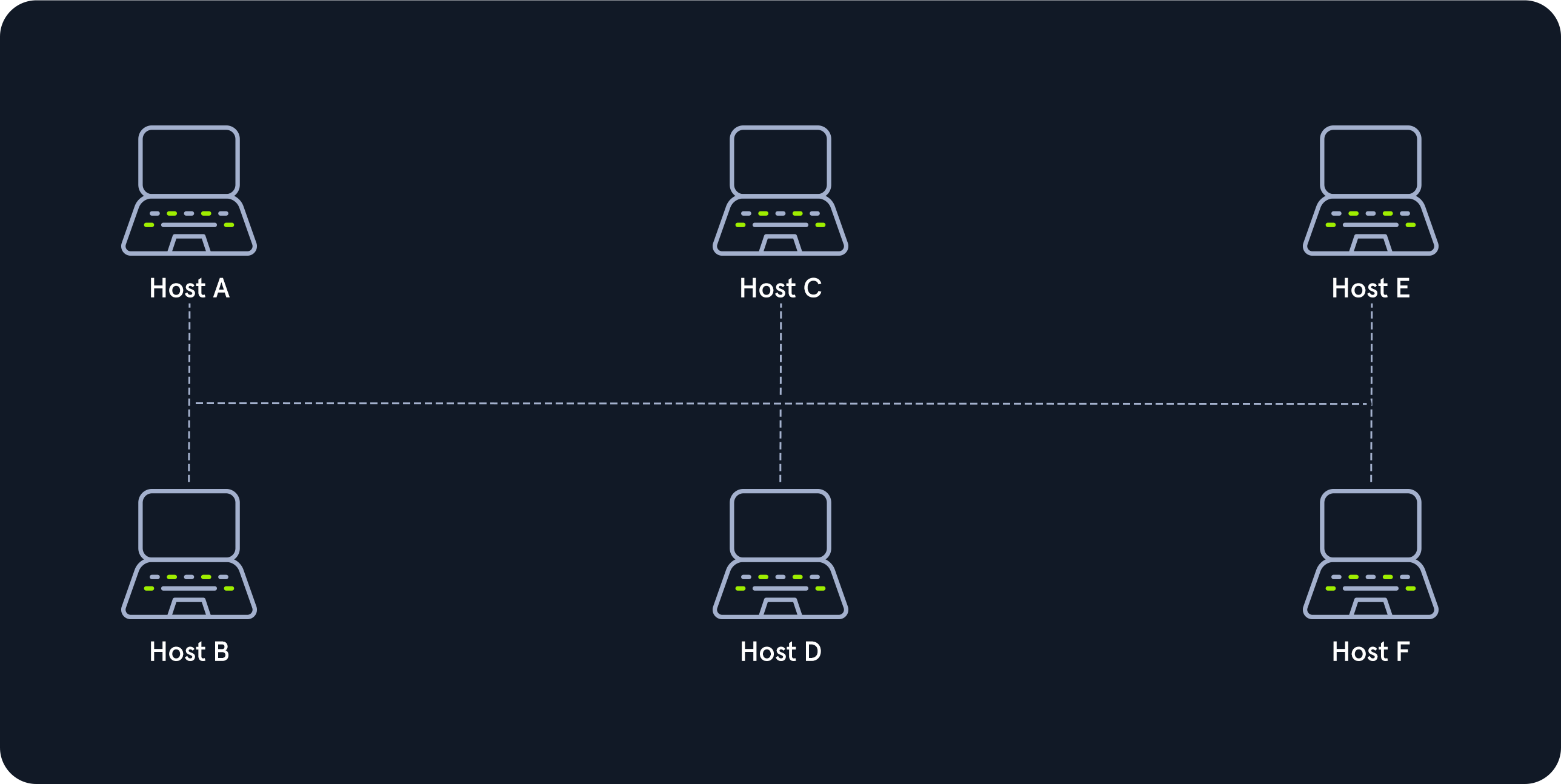
All hosts are connected via a transmission medium in the bus topology. Every host has access to the transmission medium and the signals that are transmitted over it. There is no central network component that controls the processes on it. The transmission medium for this can be, for example, a coaxial cable.
Since the medium is shared with all the others, only one host can send, and all the others can only receive and evaluate the data and see whether it is intended for itself.
Bus Topology
Star
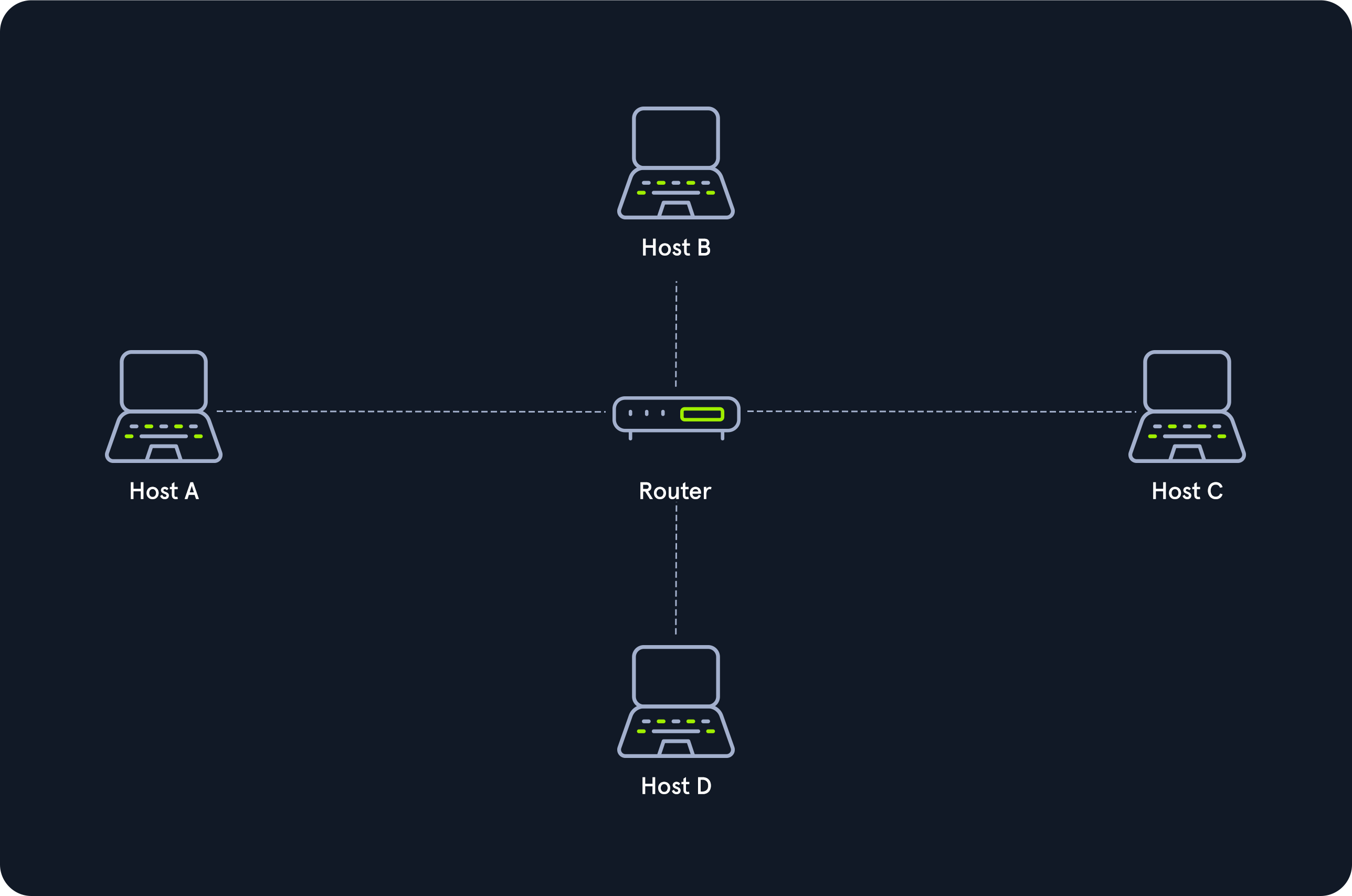
The star topology is a network component that maintains a connection to all hosts. Each host is connected to the central network component via a separate link. This is usually a router, a hub, or a switch. These handle the forwarding function for the data packets. To do this, the data packets are received and forwarded to the destination. The data traffic on the central network component can be very high since all data and connections go through it.
Star Topology
Ring
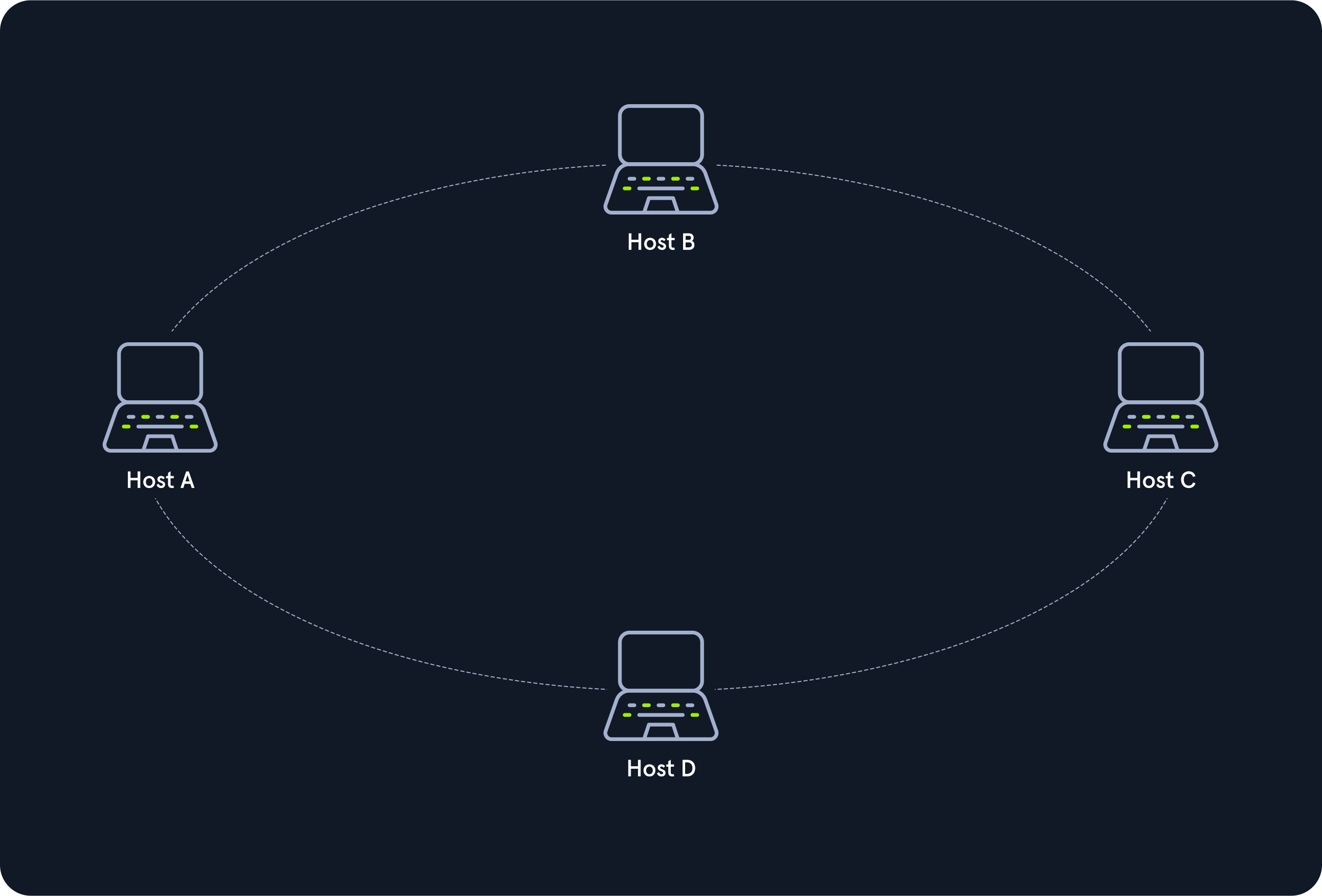
The physical ring topology is such that each host or node is connected to the ring with two cables:
- One for the incoming signals and
- the another for the outgoing ones.
This means that one cable arrives at each host and one cable leaves. The ring topology typically does not require an active network component. The control and access to the transmission medium are regulated by a protocol to which all stations adhere.
A logical ring topology is based on a physical star topology, where a distributor at the node simulates the ring by forwarding from one port to the next.
The information is transmitted in a predetermined transmission direction. Typically, the transmission medium is accessed sequentially from station to station using a retrieval system from the central station or a token. A token is a bit pattern that continually passes through a ring network in one direction, which works according to the claim token process.
Ring Topology
Mesh
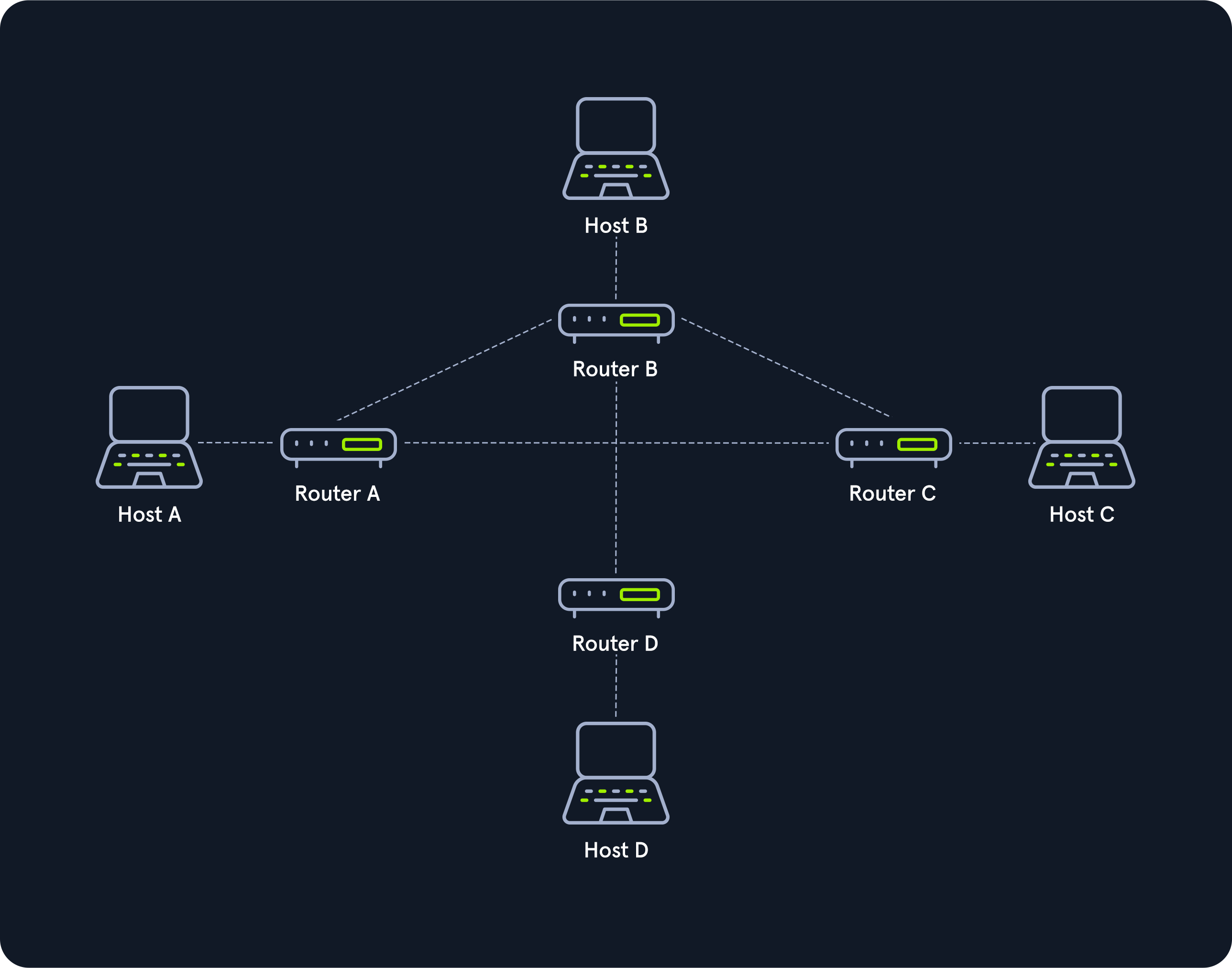
Many nodes decide about the connections on a physical level and the routing on a logical level in meshed networks. Therefore, meshed structures have no fixed topology. There are two basic structures from the basic concept: the fully meshed and the partially meshed structure.
Each host is connected to every other host in the network in a fully meshed structure. This means that the hosts are meshed with each other. This technique is primarily used in WAN or MAN to ensure high reliability and bandwidth.
In this setup, important network nodes such as routers could be networked together. If one router fails, the others can continue to work without problems, and the network can absorb the failure due to the many connections.
Each node of a fully meshed topology has the same routing functions and knows the neighboring nodes it can communicate with proximity to the network gateway and traffic loads.
In the partially meshed structure, the endpoints are connected by only one connection. In this type of network topology, specific nodes are connected to exactly one other node, and some other nodes are connected to two or more other nodes with a point-to-point connection.
Mesh Topology
Tree
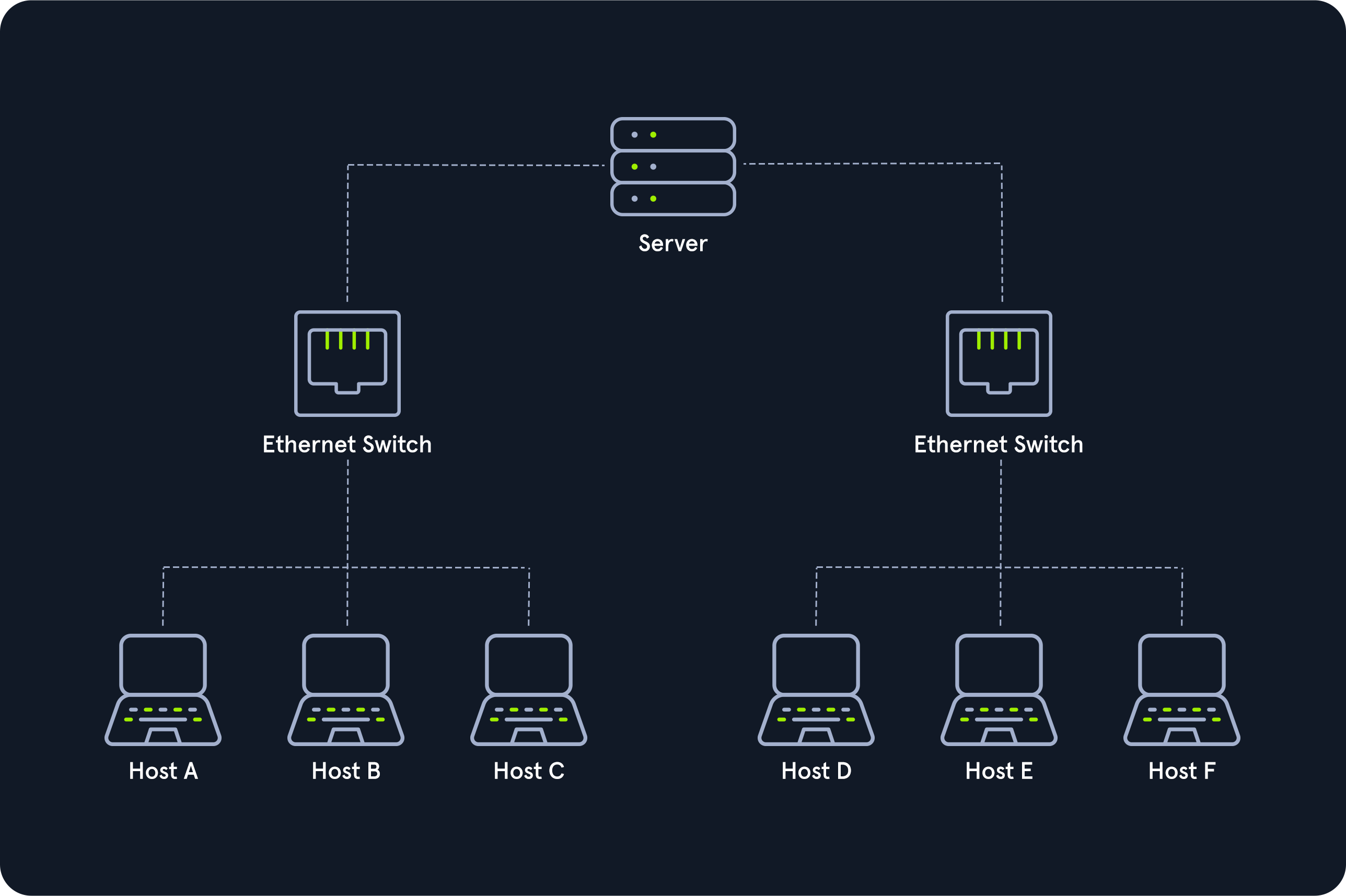
The tree topology is an extended star topology that more extensive local networks have in this structure. This is especially useful when several topologies are combined. This topology is often used, for example, in larger company buildings.
There are both logical tree structures according to the spanning tree and physical ones. Modular modern networks, based on structured cabling with a hub hierarchy, also have a tree structure. Tree topologies are also used for broadband networks and city networks (MAN).
Tree Topology
Hybrid
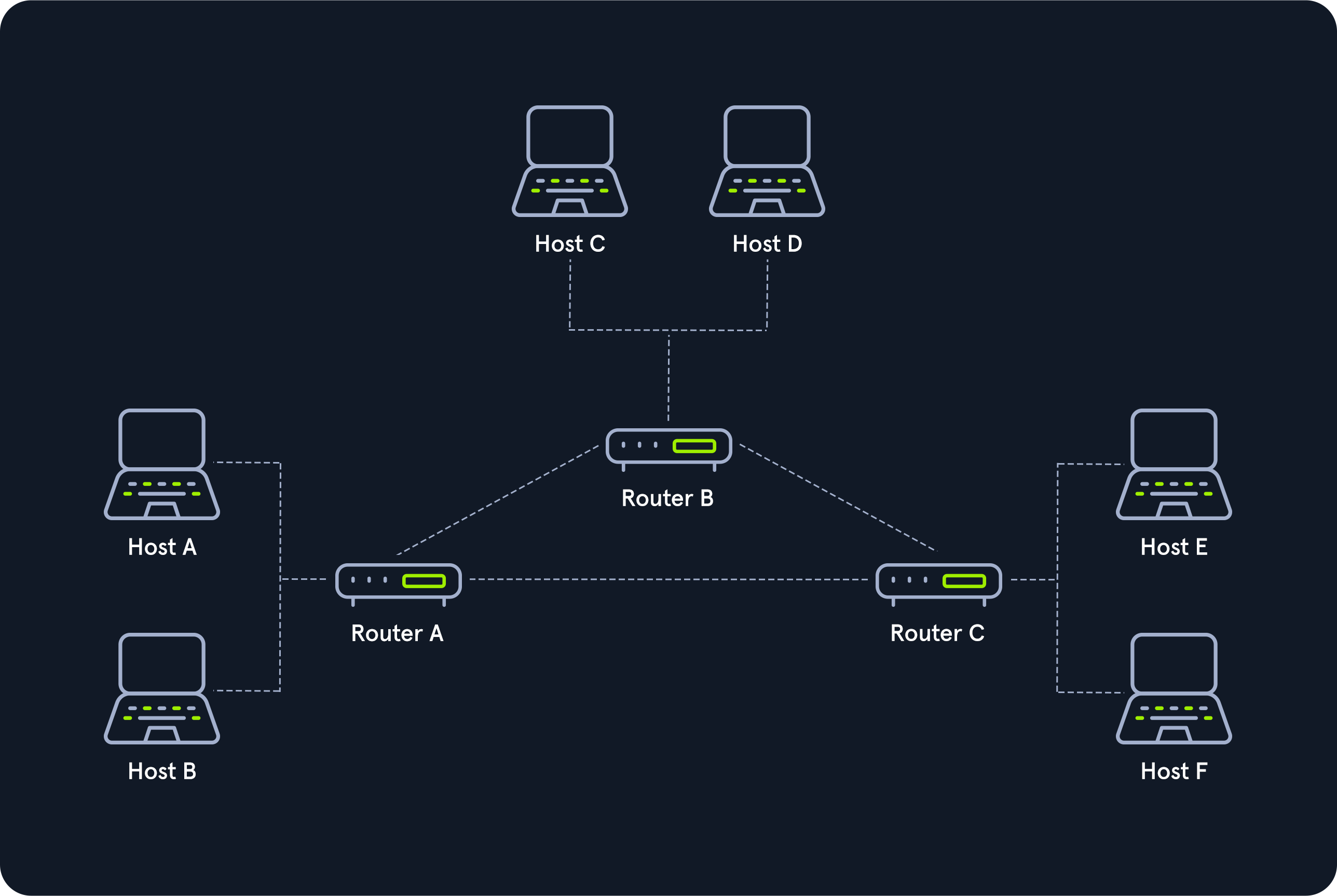
Hybrid networks combine two or more topologies so that the resulting network does not present any standard topologies. For example, a tree network can represent a hybrid topology in which star networks are connected via interconnected bus networks. However, a tree network that is linked to another tree network is still topologically a tree network. A hybrid topology is always created when two different basic network topologies are interconnected.
Hybrid Topology
Daisy Chain
In the daisy chain topology, multiple hosts are connected by placing a cable from one node to another.