Introduction to Networks
Welcome to Network Foundations! In this introductory module, we will explore the technology behind computer networking - also known as "networking" or "networks" - and why it is essential to our lives. We will mostly focus on two primary types of networks: Local Area Networks (LANs) and Wide Area Networks (WANs).
Understanding how devices are able communicate with one another, from inside our homes to across the globe, is fundamental knowledge for those looking to enter the field of cyber security. The interconnectedness of almost every device in our world today is what sets the backdrop for the ever increasing demand for security professionals.
What is a Network?
A network is a collection of interconnected devices that can communicate - sending and receiving data, and also sharing resources with each other. These individual endpoint devices, often called nodes, include computers, smartphones, printers, and servers. However, nodes alone do not comprise the entire network. The table below shows some networking key concepts.
Let's explain the above using a real-world example. Think of a group of friends chatting in a room. Each person represents a device (node), and their ability to talk and listen represents the communication links. The conversation is the data being shared.
Why Are Networks Important?
Networks, particularly since the advent of the Internet, have radically transformed society, enabling a multitude of possibilities that are now essential to our lives. Below are just a few of the benefits afforded to us by this incredible technology.
Types of Networks
Networks vary in size and scope. The two primary types are Local Area Network (LAN) and Wide Area Network (WAN).
Local Area Network (LAN)
A Local Area Network (LAN) connects devices over a short distance, such as within a home, school, or small office building. Here are some of its key characteristics:
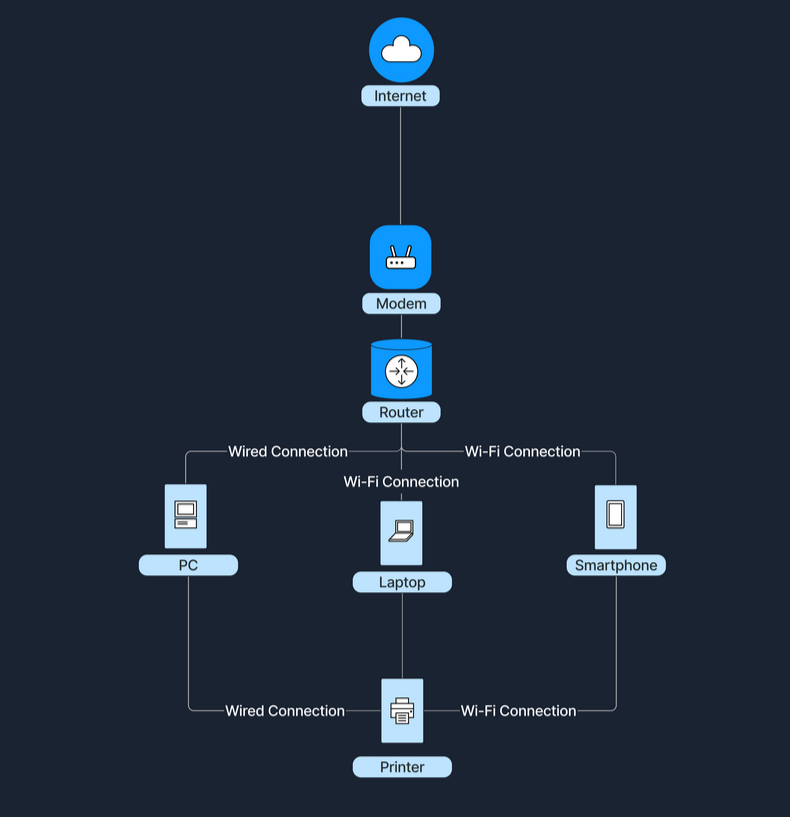
The following diagram shows how a home's Wi-Fi connects devices such as laptops, smartphones, and smart TVs, allowing them to share files and access the internet.
Wide Area Network (WAN)
A Wide Area Network (WAN) spans a large geographical area, connecting multiple LANs. Below are some of its key characteristics:
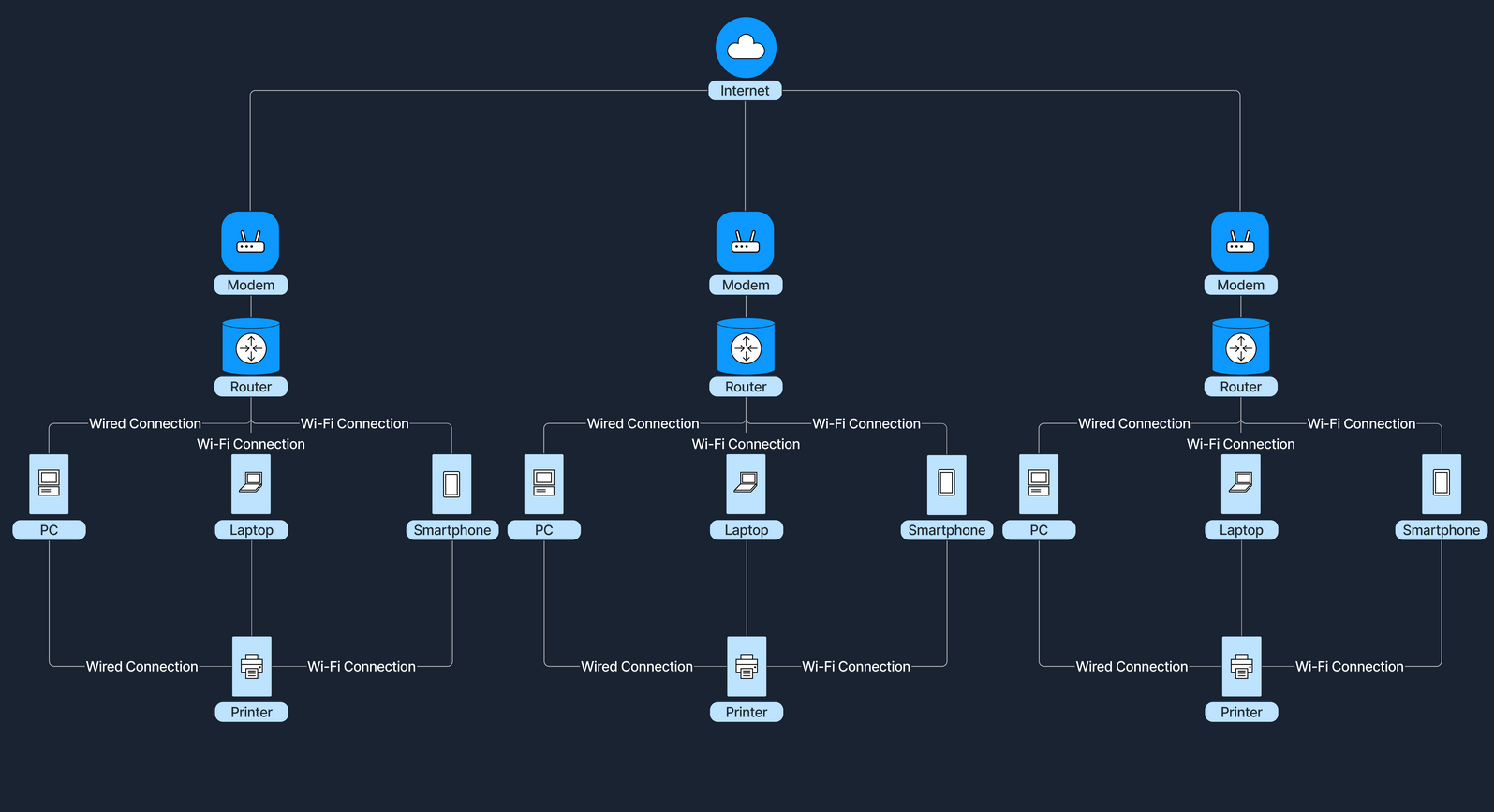
The Internet is the largest example of a WAN, connecting millions of LANs globally.
Comparing LAN and WAN
How Do LANs and WANs Work Together?
Local Area Networks (LANs) can connect to Wide Area Networks (WANs) to access broader networks beyond their immediate scope. This connectivity allows for expanded communication and resource sharing on a much larger scale.
For instance, when accessing the Internet, a home LAN connects to an Internet Service Provider's (ISP's) WAN, which grants Internet access to all devices within the home network. An ISP is a company that provides individuals and organizations with access to the Internet. In this setup, a device called a modem (modulator-demodulator) plays a crucial role. The modem acts as a bridge between your home network and the ISP's infrastructure, converting digital signals from your router into a format suitable for transmission over various media like telephone lines, cable systems, and fiber optics. This connection transforms a simple local network into a gateway to the resources available online.
In a business setting, companies link multiple office LANs via WANs to achieve unified communication and collaboration across different geographic locations. By connecting these LANs through a WAN, employees in various offices can share information, access centralized databases, and work together in real-time, enhancing productivity within the organization.
Let's consider the following scenario to illustrate how LANs and WANs work together. At home, our devices—such as laptops, smartphones, and tablets—connect to our home router, forming a LAN. This router doesn't just manage local traffic; it also communicates with our ISP's WAN. Through this connection to the WAN, our home network gains the ability to access websites and online services hosted all over the world. This seamless integration between the LAN and WAN enables us to reach global content and interact with services beyond our local network.
Network Concepts
Understanding the nuts and bolts behind networking is undoubtedly important. However, many are not aware just how ubiquitous networking become. The incredibly complex technology stack in use today - what we see across consumer electronics, multimedia devices, hardware, software and firmware - was all built in conjunction with (or on top of) the TCP/IP stack.
Furthermore, in this section we will cover a few key concepts that help to illustrate how networking fits into the wider ecosystem of technology. We will discuss the OSI and TCP/IP models, some common network protocols used as rules and standards for data exchange, and the various transmission methods that enable information to traverse efficiently and securely across the network.
OSI Model
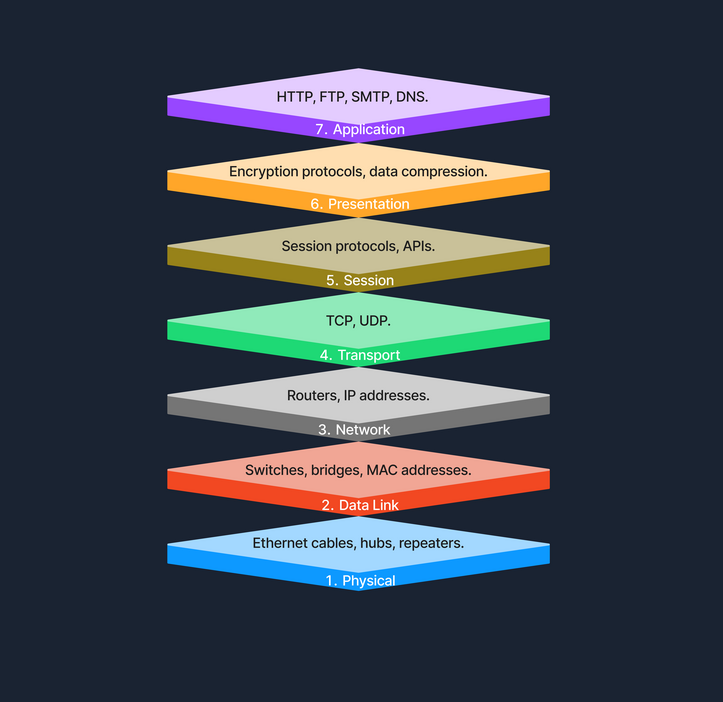
The Open Systems Interconnection (OSI) model is a conceptual framework that standardizes the functions of a telecommunication or computing system into seven abstract layers. This model helps vendors and developers create interoperable network devices and software. Below we see the seven layers of the OSI Model.
Physical Layer (Layer 1)
The Physical Layer is the first and lowest layer of the OSI model. It is responsible for transmitting raw bitstreams over a physical medium. This layer deals with the physical connection between devices, including the hardware components like Ethernet cables, hubs, and repeaters.
Data Link Layer (Layer 2)
The Data Link Layer provides node-to-node data transfer - a direct link between two physically connected nodes. It ensures that data frames are transmitted with proper synchronization, error detection, and correction. Devices such as switches and bridges operate at this layer, using MAC (Media Access Control) addresses to identify network devices.
Network Layer (Layer 3)
The Network Layer handles packet forwarding, including the routing of packets through different routers to reach the destination network. It is responsible for logical addressing and path determination, ensuring that data reaches the correct destination across multiple networks. Routers operate at this layer, using IP (Internet Protocol) addresses to identify devices and determine the most efficient path for data transmission.
Transport Layer (Layer 4)
The Transport Layer provides end-to-end communication services for applications. It is responsible for the reliable (or unreliable) delivery of data, segmentation, reassembly of messages, flow control, and error checking. Protocols like TCP (Transmission Control Protocol) and UDP (User Datagram Protocol) function at this layer. TCP offers reliable, connection-oriented transmission with error recovery, while UDP provides faster, connectionless communication without guaranteed delivery.
Session Layer (Layer 5)
The Session Layer manages sessions between applications. It establishes, maintains, and terminates connections, allowing devices to hold ongoing communications known as sessions. This layer is essential for session checkpointing and recovery, ensuring that data transfer can resume seamlessly after interruptions. Protocols and APIs (Application Programming Interfaces) operating at this layer coordinate communication between systems and applications.
Presentation Layer (Layer 6)
The Presentation Layer acts as a translator between the application layer and the network format. It handles data representation, ensuring that information sent by the application layer of one system is readable by the application layer of another. This includes data encryption and decryption, data compression, and converting data formats. Encryption protocols and data compression techniques operate at this layer to secure and optimize data transmission.
Application Layer (Layer 7)
The Application Layer is the topmost layer of the OSI model and provides network services directly to end-user applications. It enables resource sharing, remote file access, and other network services. Common protocols operating at this layer include HTTP (Hypertext Transfer Protocol) for web browsing, FTP (File Transfer Protocol) for file transfers, SMTP (Simple Mail Transfer Protocol) for email transmission, and DNS (Domain Name System) for resolving domain names to IP addresses. This layer serves as the interface between the network and the application software.
Example of Sending a File Across Network Layers
When sending a file over a network, several steps occur across different layers of the network model. The process begins at the Application Layer, which initiates the file transfer request. Following this, the Presentation Layer encrypts the file to ensure its security during transmission. The Session Layer then establishes a communication session with the receiving device. At the Transport Layer, the file is broken down into segments to ensure error-free transmission. The Network Layer takes over to determine the best route for transferring the data across the network. Next, the Data Link Layer encapsulates the data into frames, preparing it for node-to-node delivery. Finally, the Physical Layer handles the actual transmission of bits over the physical medium, completing the process.
TCP/IP Model
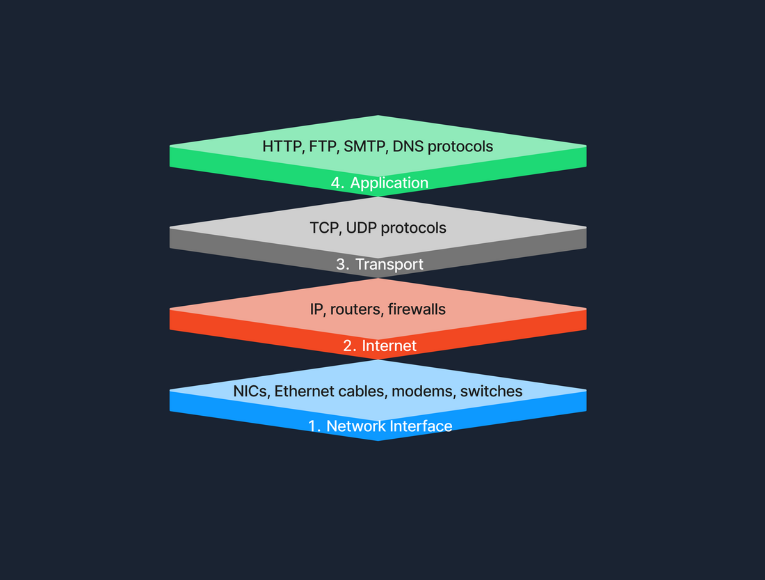
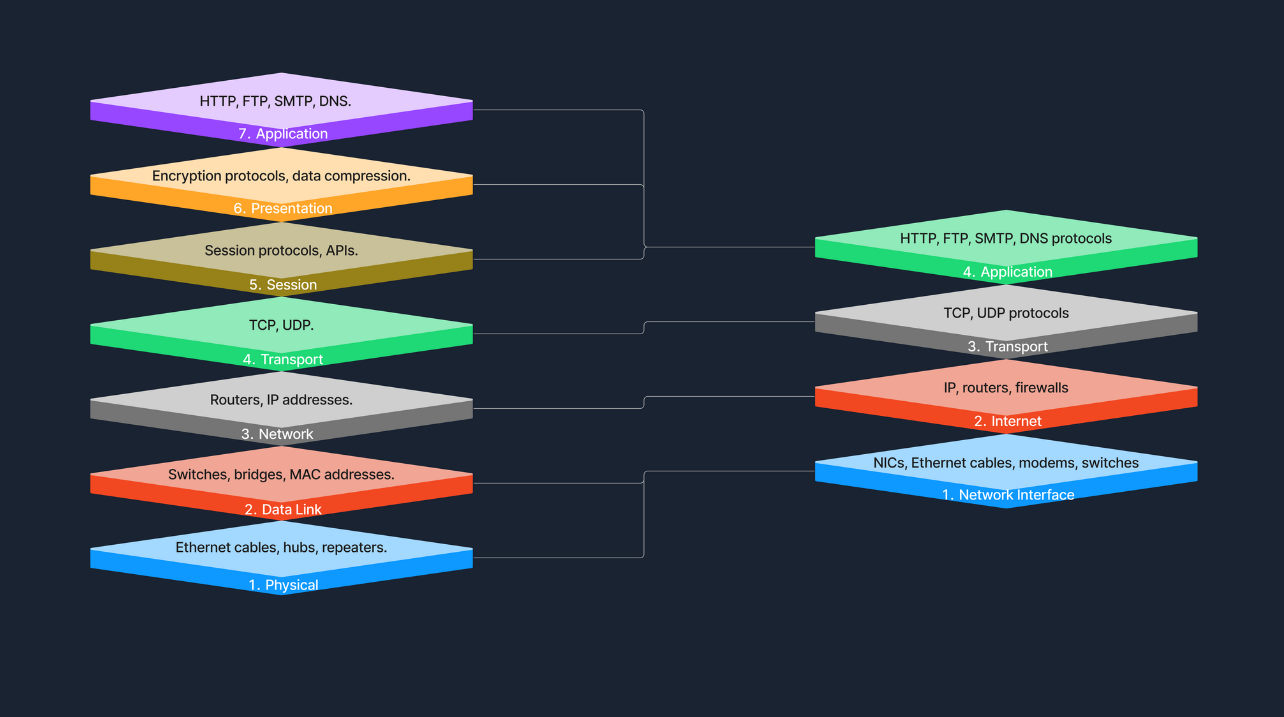
The Transmission Control Protocol/Internet Protocol (TCP/IP) model is a condensed version of the OSI model, tailored for practical implementation on the internet and other networks. Below we see the four layers of the TCP/IP Model.
Link Layer
This layer is responsible for handling the physical aspects of network hardware and media. It includes technologies such as Ethernet for wired connections and Wi-Fi for wireless connections. The Link Layer corresponds to the Physical and Data Link Layers of the OSI model, covering everything from the physical connection to data framing.
Internet Layer
The Internet Layer manages the logical addressing of devices and the routing of packets across networks. Protocols like IP (Internet Protocol) and ICMP (Internet Control Message Protocol) operate at this layer, ensuring that data reaches its intended destination by determining logical paths for packet transmission. This layer corresponds to the Network Layer in the OSI model.
Transport Layer
At the Transport Layer, the TCP/IP model provides end-to-end communication services that are essential for the functioning of the internet. This includes the use of TCP (Transmission Control Protocol) for reliable communication and UDP (User Datagram Protocol) for faster, connectionless services. This layer ensures that data packets are delivered in a sequential and error-free manner, corresponding to the Transport Layer of the OSI model.
Application Layer
The Application Layer of the TCP/IP model contains protocols that offer specific data communication services to applications. Protocols such as HTTP (Hypertext Transfer Protocol), FTP (File Transfer Protocol), and SMTP (Simple Mail Transfer Protocol) enable functionalities like web browsing, file transfers, and email services. This layer corresponds to the top three layers of the OSI model (Session, Presentation, and Application), providing interfaces and protocols necessary for data exchange between systems.
Comparison with OSI Model:
The TCP/IP model simplifies the complex structure of the OSI model by combining certain layers for practical implementation. Specifically designed around the protocols used on the internet, the TCP/IP model is more application-oriented, focusing on the needs of real-world network communication. This design makes it more effective for internet-based data exchange, meeting modern technological needs.
Example of Accessing a Website
When accessing a website, several layers of the TCP/IP model work together to facilitate the process. At the Application Layer, your browser utilizes HTTP to request the webpage. This request then moves to the Transport Layer, where TCP ensures the data is transferred reliably. The Internet Layer comes into play next, with IP taking charge of routing the data packets from our device to the web server. Finally, at the Network Interface Layer, the data is physically transmitted over the network, completing the connection that allows us to view the website.
Model Roles
In practical terms, the TCP/IP model is the backbone of network data transmission, actively employed across various networking environments. On the other hand, the OSI model, while not directly implemented, plays a crucial role as a comprehensive theoretical framework. It helps demystify the complexities of network operations, providing clear insights and a structured approach to understanding how networks function. Together, these models form a complete picture, bridging the gap between theoretical knowledge and practical application in networking.
Protocols
Protocols are standardized rules that determine the formatting and processing of data to facilitate communication between devices in a network. These protocols operate at different layers within network models, each tailored to handle specific types of data and communication needs. Here’s a look at some common network protocols and their roles in data exchange.
Common Network Protocols
Network protocols are essential for defining how data is exchanged across networks. Each protocol operates at a specific layer of the OSI model, ensuring structured and efficient data handling.
Transmission
Transmission in networking refers to the process of sending data signals over a medium from one device to another. To further understand this concept, let’s examine the different types of transmission, the modes in which these transmissions can occur, and the media that carry the signals.
Transmission Types
Transmission in networking can be categorized into two main types: analog and digital. Analog transmission uses continuous signals to represent information, commonly seen in traditional radio broadcasts. In contrast, digital transmission employs discrete signals (bits) to encode data, which is typical in modern communication technologies like computer networks and digital telephony.
Transmission Modes
Transmission modes define how data is sent between two devices. Simplex mode allows one-way communication only, such as from a keyboard to a computer, where signals travel in a single direction. Half-duplex mode permits two-way communication but not simultaneously; examples include walkie-talkies where users must take turns speaking. Full-duplex mode, used in telephone calls, supports two-way communication simultaneously, allowing both parties to speak and listen at the same time.
Transmission Media
The physical means by which data is transmitted in a network is known as transmission media, which can be wired or wireless. Wired media includes twisted pair cables, commonly used in Ethernet networks and local area network (LAN) connections; coaxial cables, used for cable TV and early Ethernet; and fiber optic cables, which transmit data as light pulses and are essential for high-speed internet backbones. Wireless media, on the other hand, encompasses radio waves for Wi-Fi and cellular networks, microwaves for satellite communications, and infrared technology used for short-range communications like remote controls. Each type of media has its specific use cases depending on the requirements of the network environment.
Components of a Network
As we continue our journey into infosec, understanding the various components that formulate a network is essential. We know that currently, devices are able to communicate with each other, share resources, and access the internet with almost uniform consistency. What exactly facilitates this? The primary components of such a network include:
Let's explore each of these in detail.
End Devices
An end device, also known as a host, is any device that ultimately ends up sending or receiving data within a network. Personal computers and smart devices (such as phones and smart TVs) are common end devices; users routinely interact with them directly to perform tasks like browsing the web, sending messages, and creating documents. In most networks, such devices play a crucial role in both data generation and data consumption, like when users stream videos or read web content. End devices serve as the primary user interface to the world wide web, enabling users to access network resources and services seamlessly, through both wired (Ethernet) and wireless (Wi-Fi) connections. Another typical example of this would be a student using a notebook to connect to a school’s Wi-Fi network, allowing them to access online learning materials, submit assignments, and communicate with instructors.