Internet Architecture
Internet Architecture describes how data is organized, transmitted, and managed across networks. Different architectural models serve different needs—some offer a straightforward client-server setup (like a website), while others rely on a more distributed approach (like file-sharing platforms). Understanding these models helps us see why networks are designed and operated the way they are. Different architectures solve different problems. Often, we see a combination of architectures creating hybrid models. Each model comes with its own set of trade-offs in terms of scalability, performance, security, and manageability. In the following paragraphs, we will describe the different architectures in more detail.
Peer-to-Peer (P2P) Architecture
In a Peer-to-Peer (P2P) network, each node, whether it's a computer or any other device, acts as both a client and a server. This setup allows nodes to communicate directly with each other, sharing resources such as files, processing power, or bandwidth, without the need for a central server. P2P networks can be fully decentralized, with no central server involved, or partially centralized, where a central server may coordinate some tasks but does not host data.
Imagine a group of friends who want to share vacation photos with each other. Instead of uploading all the photos to a single website or server, each of them sets up a folder on their own computer that can be accessed by the others. They use a file-sharing program that connects their computers directly.
First, they install a Peer-to-Peer (P2P) file-sharing application on their computer. Then, they select the folder containing the vacation photos to share with the other friends. Everyone performs the same setup on their computers. Once everyone is connected through the P2P application, they can all browse and download photos directly from each other’s shared folders, allowing for a direct exchange of files without the need for a central server.
A popular example of Peer-to-Peer (P2P) architecture is torrenting, as seen with applications like BitTorrent. In this system, anyone who has the file, referred to as a seeder, can upload it, allowing others to download it from multiple sources simultaneously.
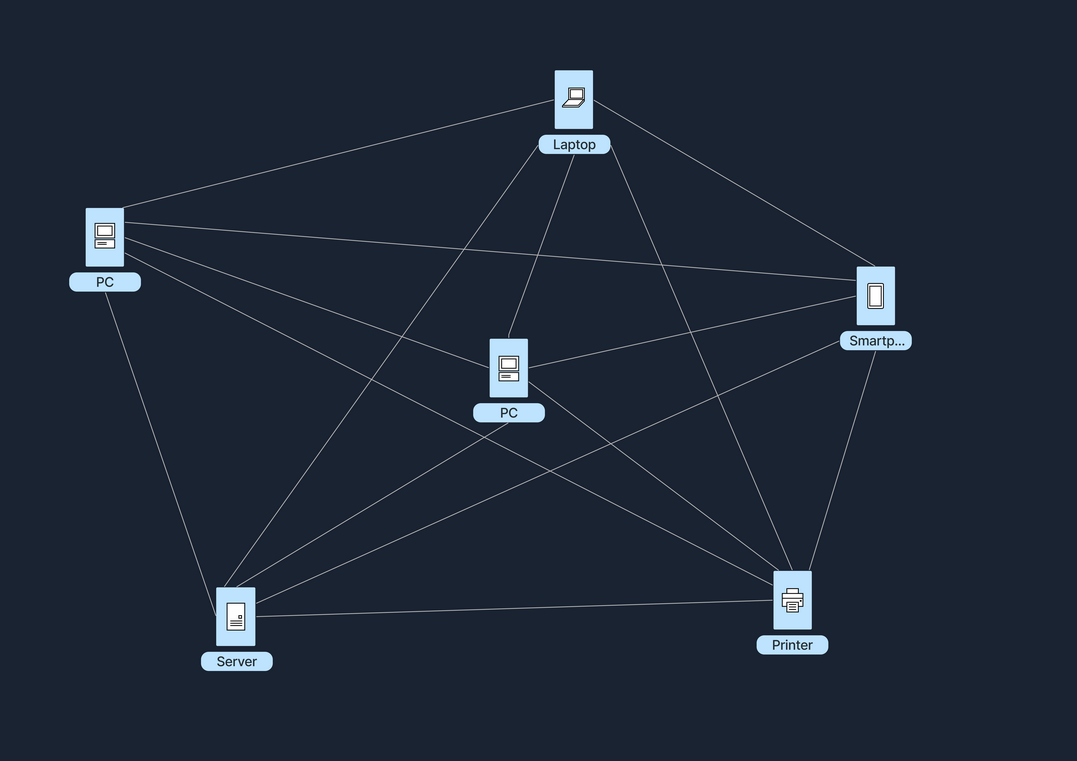
In the following table, we can see the advantages and disadvantages of a Peer-to-Peer architecture.
Client-Server Architecture
The Client-Server model is one of the most widely used architectures on the Internet. In this setup, clients, which are user devices, send requests, such as a web browser asking for a webpage, and servers respond to these requests, like a web server hosting the webpage. This model typically involves centralized servers where data and applications reside, with multiple clients connecting to these servers to access services and resources.
Let's assume we want to check the weather forecast on a website. We start by opening the web browser on our phone or computer, and proceed to type in the website's name, e.g., weatherexample.com. When we press enter, the browser sends a request over the Internet to the server that hosts weatherexample.com. This server, a powerful computer set up specifically to store the website’s data and handle requests, receives the query and processes it by locating the requested page. It then sends back the data (regarding the weather, we requested) to our browser, which receives this information and displays the webpage, allowing us to see the latest weather updates.
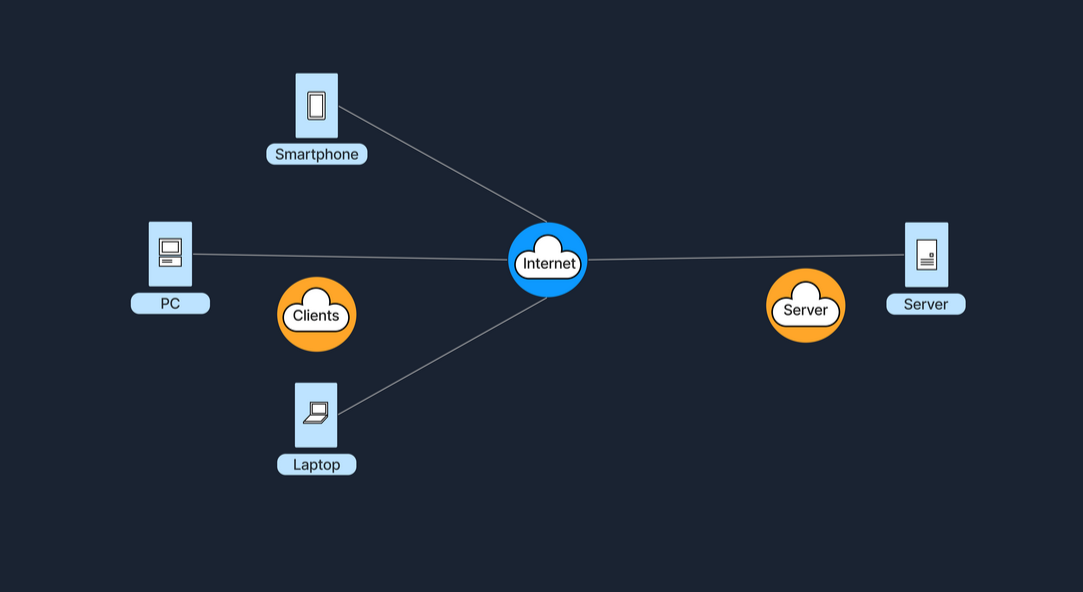
A key component of this architecture is the tier model, which organizes server roles and responsibilities into layers. This enhances scalability and manageability, as well as security and performance.
Single-Tier Architecture
In a single-tier architecture, the client, server, and database all reside on the same machine. This setup is straightforward but is rarely used for large-scale applications due to significant limitations in scalability and security.
Two-Tier Architecture
The two-tier architecture splits the application environment into a client and a server. The client handles the presentation layer, and the server manages the data layer. This model is typically seen in desktop applications where the user interface is on the user's machine, and the database is on a server. Communication usually occurs directly between the client and the server, which can be a database server with query-processing capabilities.
Note: In a typical web application, the client (browser) does not directly interact with the database server. Instead, the browser requests web pages from a **web server**, which in turn sends it's response (HTML, CSS, JavaScript) back to the browser for rendering. The web server *may* interact with an application server or database in order to formulate it's response, but in general, the scenario of a person visiting a website does not constitute a Two-Tier Architecture.
Three-Tier Architecture
A three-tier architecture introduces an additional layer between the client and the database server, known as the application server. In this model, the client manages the presentation layer, the application server handles all the business logic and processing, and the third tier is a database server. This separation provides added flexibility and scalability because each layer can be developed and maintained independently.
N-Tier Architecture
In more complex systems, an N-tier architecture is used, where N refers to any number of separate tiers used beyond three. This setup involves multiple levels of application servers, each responsible for different aspects of business logic, processing, or data management. N-tier architectures are highly scalable and allow for distributed deployment, making them ideal for web applications and services that demand robust, flexible solutions.
While tiered client-server architectures offer many improvements, they also introduce complexity in deployment and maintenance. Each tier needs to be correctly configured and secured, and communication between tiers must be efficient and secure to avoid performance bottlenecks and security vulnerabilities. In the following table, we can see the advantages and disadvantages of a Client-Server architecture in general.
Hybrid Architecture
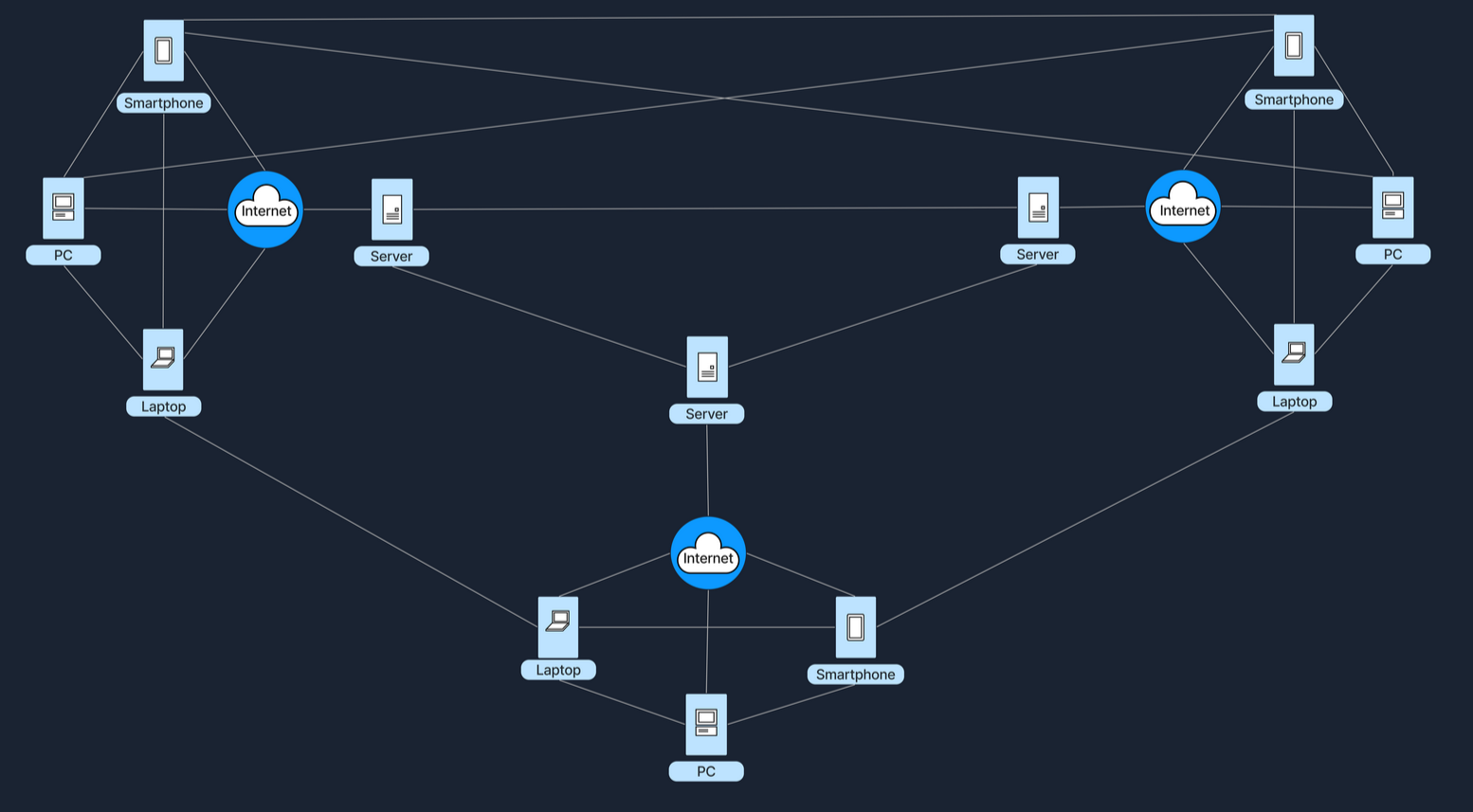
A Hybrid model blends elements of both Client-Server and Peer-to-Peer (P2P) architectures. In this setup, central servers are used to facilitate coordination and authentication tasks, while the actual data transfer occurs directly between peers. This combination leverages the strengths of both architectures to enhance efficiency and performance. The following example gives a high-level explanation of how a hybrid architecture works.
When we open a video conferencing app and log in, the credentials (username and password) are verified by central servers, which also manage the session by coordinating who is in the meeting and controlling access. Once we're logged in and the meeting begins, the actual video and audio data is transferred directly between our device and those of other participants, bypassing the central server to reduce lag and enhance video quality. This setup combines both models: it uses the central server for initial connection and control tasks, while the bulk of data transfer occurs in a peer-to-peer style, reducing the server load and leveraging direct, fast connections between peers. The following table refers to some of the advantages and disadvantages of a Hybrid Architecture.
Cloud Architecture
Cloud Architecture refers to computing infrastructure that is hosted and managed by third-party providers, such as AWS, Azure, and Google Cloud. This architecture operates on a virtualized scale following a client-server model. It provides on-demand access to resources such as servers, storage, and applications, all accessible over the Internet. In this model, users interact with these services without controlling the underlying hardware.
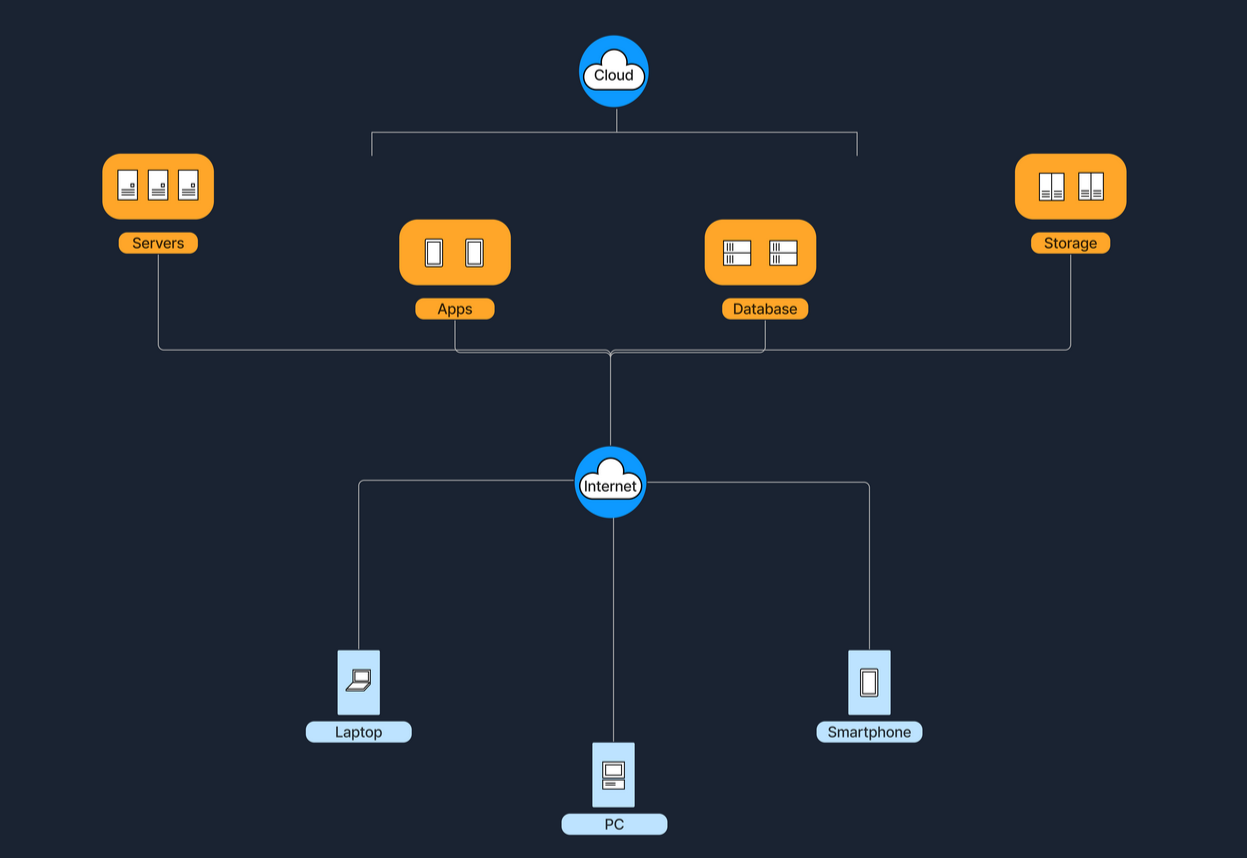
Services like Google Drive or Dropbox are some examples of Cloud Architecture operating under the SaaS (Software as a Service) model, where we access applications over the internet without managing the underlying hardware. Below are five essential characteristics that define a Cloud Architecture.
The below table shows some of the advantages and disadvantages of the Cloud Architecture.
6. Software-Defined Architecture (SDN)
Software-Defined Networking (SDN) is a modern networking approach that separates the control plane, which makes decisions about where traffic is sent, from the data plane, which actually forwards the traffic. Traditionally, network devices like routers and switches housed both of these planes. However, in SDN, the control plane is centralized within a software-based controller. This configuration allows network devices to simply execute instructions they receive from the controller. SDN provides a programmable network management environment, enabling administrators to dynamically adjust network policies and routing as required. This separation makes the network more flexible and improves how it's managed.
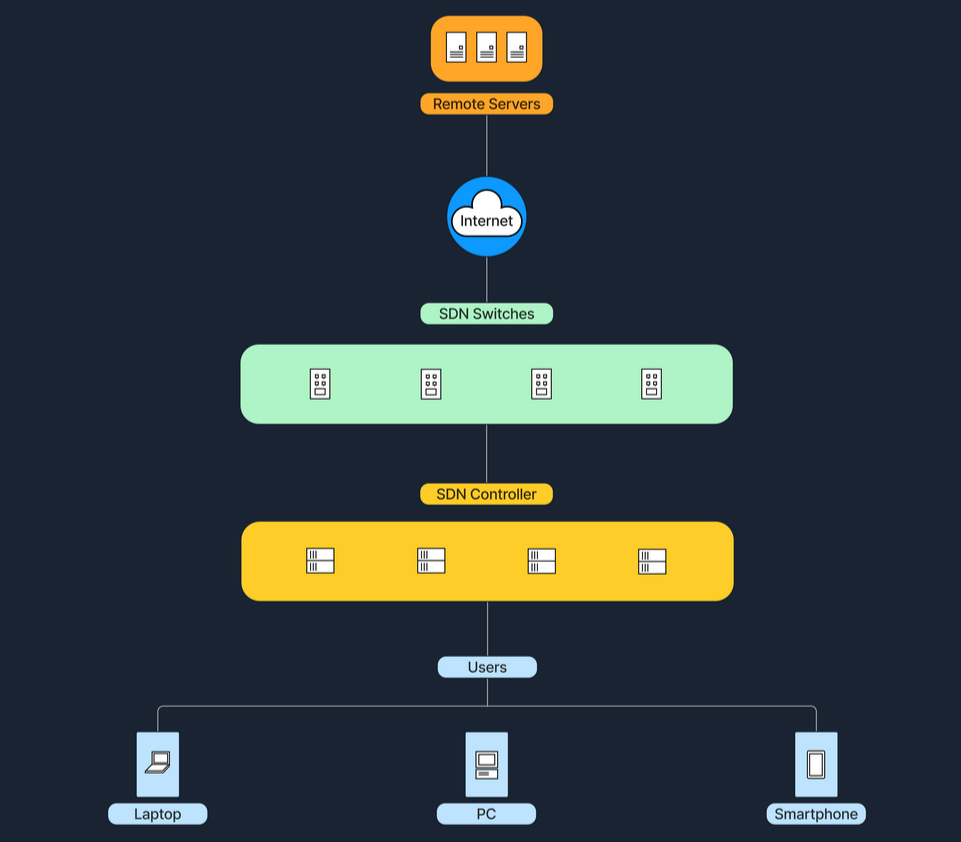
Large enterprises or cloud providers use SDN to dynamically allocate bandwidth and manage traffic flows according to real-time demands. Below is a table with the advantages and disadvantages of the Software-Defined architecture.
Key Comparisons
Below is a comparison table that outlines key characteristics of different network architectures
Conclusion
Each architecture has its unique benefits and challenges, and in practice, we often see these models blended to balance performance, scalability, and cost. Understanding these distinctions is important for anyone planning to set up or improve network systems.
Wireless Networks
A wireless network is a sophisticated communication system that employs radio waves or other wireless signals to connect various devices such as computers, smartphones, and IoT gadgets, enabling them to communicate and exchange data without the need for physical cables. This technology allows devices to connect to the internet, share files, and access services seamlessly over the air, offering flexibility and convenience in personal and professional environments.
Wireless Router
A router is a device that forwards data packets between computer networks. In a home or small office setting, a wireless router combines the functions of:
For example, at home, our smartphones, laptops, and smart TVs all connect wirelessly to our router. The router is plugged into a modem that brings internet service from the ISP (Internet Service Provider). Below are the main components of a wireless router.
Mobile Hotspot
A mobile hotspot allows a smartphone (or other hotspot devices) to share its cellular data connection via Wi-Fi. Other devices (laptops, tablets, etc.) then connect to this hotspot just like they would to a regular Wi-Fi network. A mobile hotspot uses cellular data, connecting devices to the internet via a cellular network, such as 4G or 5G. The range of a hotspot is typically limited to just a few meters. Running a hotspot can also significantly drain the battery of the device creating the hotspot. For security, access to the hotspot is usually protected by a password, similar to the security measures used for a home Wi-Fi network. To better understand this concept, we can imagine that we are traveling and don’t have access to public Wi-Fi. We can activate the hotspot on our phone and connect our laptop to our phone’s Wi-Fi signal to browse the internet.
Cell Tower
A cell tower (or cell site) is a structure where antennas and electronic communications equipment are placed to create a cellular network cell. This cell in a cellular network refers to the specific area of coverage provided by a single cell tower, which is designed to seamlessly connect with adjacent cells created by other towers. Each tower covers a certain geographic area, allowing mobile phones (and other cellular-enabled devices) to send and receive signals.
Cell towers function through a combination of radio transmitters and receivers, which are equipped with antennas to communicate over specific radio frequencies. These towers are managed by Base Station Controllers (BSC), which oversee the operation of multiple towers. BSCs handle the transfer of calls and data sessions from one tower to another when users move across different cells. Finally, these towers are connected to the core network via backhaul links, which are typically fiber optic or microwave links.
Cell towers are differentiated by their coverage capacities and categorized primarily into macro cells and micro/small cells. Macro cells consist of large towers that provide extensive coverage over several kilometers, making them ideal for rural areas where wide coverage is necessary. On the other hand, micro and small cells are smaller installations typically located in urban centers. These towers are placed in densely populated areas and fill the coverage gaps left by macro cells. To better understand the concept of a cellular network, imagine we are on a road trip, streaming music on the phone. As we move, our phone switches from one cell tower to the next to maintain connection.
Frequencies in Wireless Communications
As mentioned earlier, wireless communications utilize radio waves to enable devices to connect and communicate with each other. These radio waves are emitted at specific frequencies, known as oscillation rates, which are measured in hertz (Hz). Common frequency bands for wireless networks include:
Frequency Bands
1.2.4 GHz (Gigahertz)
– Used by older Wi-Fi standards (802.11b/g/n). Better at penetrating walls, but can be more prone to interference (e.g., microwaves, Bluetooth).
2.5 GHz
– Used by newer Wi-Fi standards (802.11a/n/ac/ax). Faster speeds, but shorter range.
3.Cellular Bands
– For 4G (LTE) and 5G. These range from lower frequencies (700 MHz) to mid-range (2.6 GHz) and even higher frequencies for some 5G services (up to 28 GHz and beyond).
Different frequencies play crucial roles in wireless communication due to their varying characteristics and the trade-offs between range and speed. Lower frequencies tend to travel farther but are limited in the amount of data they can carry, making them suitable for broader coverage with less data demand. In contrast, higher frequencies, while capable of carrying more data, have a much shorter range. Additionally, frequency bands can get congested as many devices operate on the same frequencies, leading to interference that can degrade performance. To manage and mitigate these issues, government agencies such as the FCC in the U.S. regulate frequency allocations, ensuring orderly use of the airwaves and preventing interference among users.
Different frequencies are important in wireless communication because they affect how far and how fast data travels. Lower frequencies have longer range but carry less data, while higher frequencies can carry more data but have a shorter range. Additionally, congestion from many devices using the same frequency can cause interference. To prevent this, government agencies like the FCC regulate how frequencies are used.