Introduction to Pivoting, Tunneling, and Port Forwarding
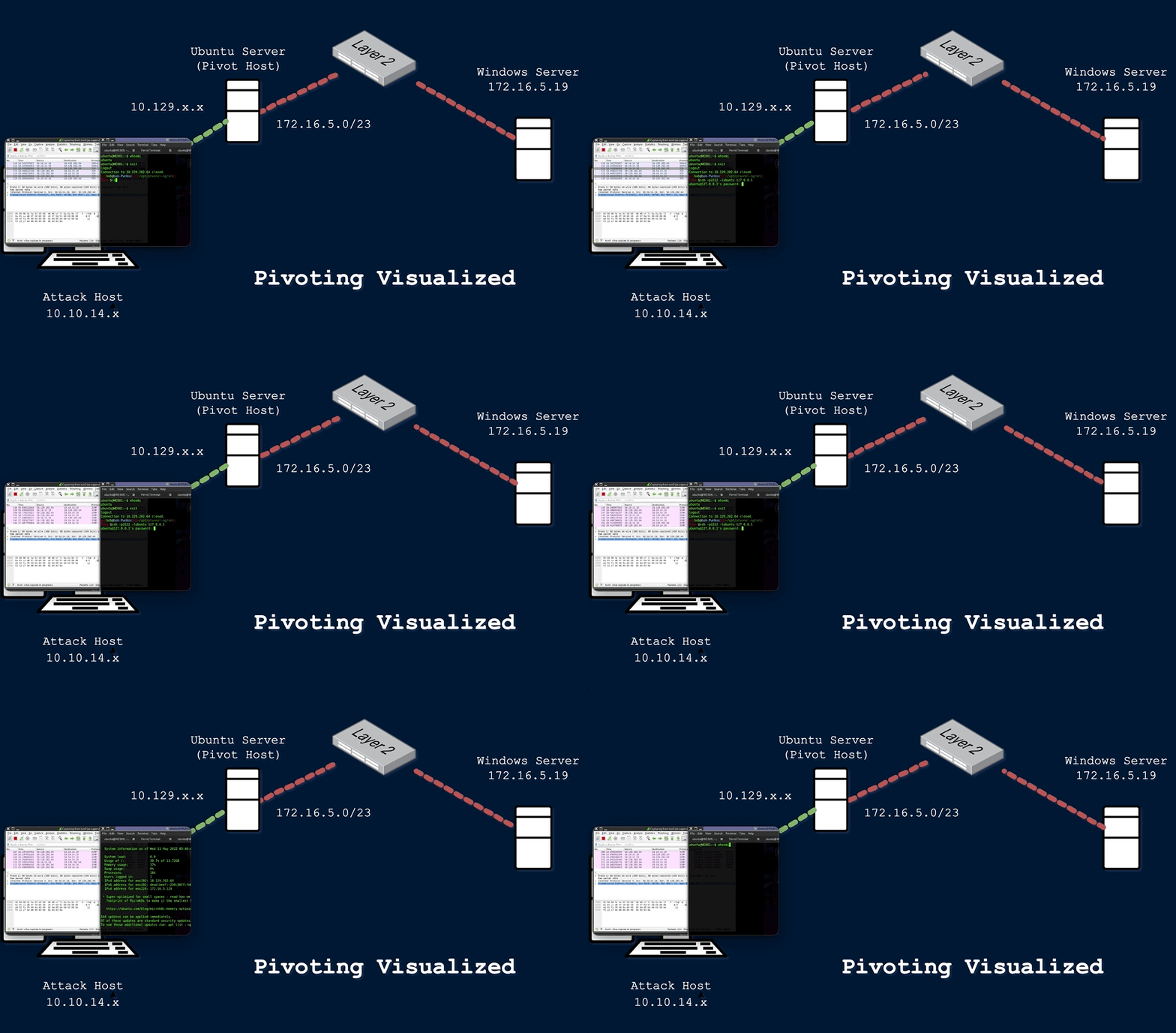
During a red team engagement, penetration test, or an Active Directory assessment, we will often find ourselves in a situation where we might have already compromised the required credentials, ssh keys, hashes, or access tokens to move onto another host, but there may be no other host directly reachable from our attack host. In such cases, we may need to use a pivot host that we have already compromised to find a way to our next target. One of the most important things to do when landing on a host for the first time is to check our privilege level, network connections, and potential VPN or other remote access software. If a host has more than one network adapter, we can likely use it to move to a different network segment. Pivoting is essentially the idea of moving to other networks through a compromised host to find more targets on different network segments.
There are many different terms used to describe a compromised host that we can use to pivot to a previously unreachable network segment. Some of the most common are:
- Pivot Host
- Proxy
- Foothold
- Beach Head system
- Jump Host
Pivoting's primary use is to defeat segmentation (both physically and virtually) to access an isolated network. Tunneling, on the other hand, is a subset of pivoting. Tunneling encapsulates network traffic into another protocol and routes traffic through it. Think of it like this:
We have a key we need to send to a partner, but we do not want anyone who sees our package to know it is a key. So we get a stuffed animal toy and hide the key inside with instructions about what it does. We then package the toy up and send it to our partner. Anyone who inspects the box will see a simple stuffed toy, not realizing it contains something else. Only our partner will know that the key is hidden inside and will learn how to access and use it once delivered.
Typical applications like VPNs or specialized browsers are just another form of tunneling network traffic.
We will inevitably come across several different terms used to describe the same thing in IT & the Infosec industry. With pivoting, we will notice that this is often referred to as Lateral Movement.
Isn't it the same thing as pivoting?
The answer to that is not exactly. Let's take a second to compare and contrast Lateral Movement with Pivoting and Tunneling, as there can be some confusion as to why some consider them different concepts.
Lateral Movement, Pivoting, and Tunneling Compared
Lateral Movement
Lateral movement can be described as a technique used to further our access to additional hosts, applications, and services within a network environment. Lateral movement can also help us gain access to specific domain resources we may need to elevate our privileges. Lateral Movement often enables privilege escalation across hosts. In addition to the explanation we have provided for this concept, we can also study how other respected organizations explain Lateral Movement. Check out these two explanations when time permits:
Palo Alto Network's Explanation
MITRE's Explanation
One practical example of Lateral Movement would be:
During an assessment, we gained initial access to the target environment and were able to gain control of the local administrator account. We performed a network scan and found three more Windows hosts in the network. We attempted to use the same local administrator credentials, and one of those devices shared the same administrator account. We used the credentials to move laterally to that other device, enabling us to compromise the domain further.
Pivoting
Utilizing multiple hosts to cross network boundaries you would not usually have access to. This is more of a targeted objective. The goal here is to allow us to move deeper into a network by compromising targeted hosts or infrastructure.
One practical example of Pivoting would be:
During one tricky engagement, the target had their network physically and logically separated. This separation made it difficult for us to move around and complete our objectives. We had to search the network and compromise a host that turned out to be the engineering workstation used to maintain and monitor equipment in the operational environment, submit reports, and perform other administrative duties in the enterprise environment. That host turned out to be dual-homed (having more than one physical NIC connected to different networks). Without it having access to both enterprise and operational networks, we would not have been able to pivot as we needed to complete our assessment.
Tunneling
We often find ourselves using various protocols to shuttle traffic in/out of a network where there is a chance of our traffic being detected. For example, using HTTP to mask our Command & Control traffic from a server we own to the victim host. The key here is obfuscation of our actions to avoid detection for as long as possible. We utilize protocols with enhanced security measures such as HTTPS over TLS or SSH over other transport protocols. These types of actions also enable tactics like the exfiltration of data out of a target network or the delivery of more payloads and instructions into the network.
One practical example of Tunneling would be:
One way we used Tunneling was to craft our traffic to hide in HTTP and HTTPS. This is a common way we maintained Command and Control (C2) of the hosts we had compromised within a network. We masked our instructions inside GET and POST requests that appeared as normal traffic and, to the untrained eye, would look like a web request or response to any old website. If the packet were formed properly, it would be forwarded to our Control server. If it were not, it would be redirected to another website, potentially throwing off the defender checking it out.
To summarize, we should look at these tactics as separate things. Lateral Movement helps us spread wide within a network, elevating our privileges, while Pivoting allows us to delve deeper into the networks accessing previously unreachable environments. Keep this comparison in mind while moving through this module.
Now that we have been introduced to the module and have defined and compared Lateral Movement, Pivoting, and Tunneling, let's dive into some of the networking concepts that enable us to perform these tactics.
The Networking Behind Pivoting
Being able to grasp the concept of pivoting well enough to succeed at it on an engagement requires a solid fundamental understanding of some key networking concepts. This section will be a quick refresher on essential foundational networking concepts to understand pivoting.
IP Addressing & NICs
Every computer that is communicating on a network needs an IP address. If it doesn't have one, it is not on a network. The IP address is assigned in software and usually obtained automatically from a DHCP server. It is also common to see computers with statically assigned IP addresses. Static IP assignment is common with:
- Servers
- Routers
- Switch virtual interfaces
- Printers
- And any devices that are providing critical services to the network
Whether assigned dynamically or statically, the IP address is assigned to a Network Interface Controller (NIC). Commonly, the NIC is referred to as a Network Interface Card or Network Adapter. A computer can have multiple NICs (physical and virtual), meaning it can have multiple IP addresses assigned, allowing it to communicate on various networks. Identifying pivoting opportunities will often depend on the specific IPs assigned to the hosts we compromise because they can indicate the networks compromised hosts can reach. This is why it is important for us to always check for additional NICs using commands like ifconfig (in macOS and Linux) and ipconfig (in Windows).
Using ifconfig
The Networking Behind Pivoting
sasorirose@htb[/htb]$ ifconfigeth0: flags=4163  mtu 1500
        inet 134.122.100.200  netmask 255.255.240.0  broadcast 134.122.111.255
        inet6 fe80::e973:b08d:7bdf:dc67  prefixlen 64  scopeid 0x20
        ether 12:ed:13:35:68:f5  txqueuelen 1000  (Ethernet)
        RX packets 8844  bytes 803773 (784.9 KiB)
        RX errors 0  dropped 0  overruns 0  frame 0
        TX packets 5698  bytes 9713896 (9.2 MiB)
        TX errors 0  dropped 0 overruns 0  carrier 0  collisions 0

eth1: flags=4163  mtu 1500
        inet 10.106.0.172  netmask 255.255.240.0  broadcast 10.106.15.255
        inet6 fe80::a5bf:1cd4:9bca:b3ae  prefixlen 64  scopeid 0x20
        ether 4e:c7:60:b0:01:8d  txqueuelen 1000  (Ethernet)
        RX packets 15  bytes 1620 (1.5 KiB)
        RX errors 0  dropped 0  overruns 0  frame 0
        TX packets 18  bytes 1858 (1.8 KiB)
        TX errors 0  dropped 0 overruns 0  carrier 0  collisions 0

lo: flags=73  mtu 65536
        inet 127.0.0.1  netmask 255.0.0.0
        inet6 ::1  prefixlen 128  scopeid 0x10
        loop  txqueuelen 1000  (Local Loopback)
        RX packets 19787  bytes 10346966 (9.8 MiB)
        RX errors 0  dropped 0  overruns 0  frame 0
        TX packets 19787  bytes 10346966 (9.8 MiB)
        TX errors 0  dropped 0 overruns 0  carrier 0  collisions 0

tun0: flags=4305  mtu 1500
        inet 10.10.15.54  netmask 255.255.254.0  destination 10.10.15.54
        inet6 fe80::c85a:5717:5e3a:38de  prefixlen 64  scopeid 0x20
        inet6 dead:beef:2::1034  prefixlen 64  scopeid 0x0
        unspec 00-00-00-00-00-00-00-00-00-00-00-00-00-00-00-00  txqueuelen 500  (UNSPEC)
        RX packets 0  bytes 0 (0.0 B)
        RX errors 0  dropped 0  overruns 0  frame 0
        TX packets 7  bytes 336 (336.0 B)
        TX errors 0  dropped 0 overruns 0  carrier 0  collisions 0
In the output above, each NIC has an identifier (eth0, eth1, lo, tun0) followed by addressing information and traffic statistics. The tunnel interface (tun0) indicates a VPN connection is active. When we connect to any of HTB's VPN servers through Pwnbox or our own attack host, we will always notice a tunnel interface gets created and assigned an IP address. The VPN allows us to access the lab network environments hosted by HTB. Keep in mind that these lab networks are not reachable without having a tunnel established. The VPN encrypts traffic and also establishes a tunnel over a public network (often the Internet), through NAT on a public-facing network appliance, and into the internal/private network. Also, notice the IP addresses assigned to each NIC. The IP assigned to eth0 (134.122.100.200) is a publicly routable IP address. Meaning ISPs will route traffic originating from this IP over the Internet. We will see public IPs on devices that are directly facing the Internet, commonly hosted in DMZs. The other NICs have private IP addresses, which are routable within internal networks but not over the public Internet. At the time of writing, anyone that wants to communicate over the Internet must have at least one public IP address assigned to an interface on the network appliance that connects to the physical infrastructure connecting to the Internet. Recall that NAT is commonly used to translate private IP addresses to public IP addresses.
Using ipconfig
The Networking Behind Pivoting
PS C:\Users\htb-student> ipconfig

Windows IP Configuration

Unknown adapter NordLynx:

   Media State . . . . . . . . . . . : Media disconnected
   Connection-specific DNS Suffix  . :

Ethernet adapter Ethernet0 2:

   Connection-specific DNS Suffix  . : .htb
   IPv6 Address. . . . . . . . . . . : dead:beef::1a9
   IPv6 Address. . . . . . . . . . . : dead:beef::f58b:6381:c648:1fb0
   Temporary IPv6 Address. . . . . . : dead:beef::dd0b:7cda:7118:3373
   Link-local IPv6 Address . . . . . : fe80::f58b:6381:c648:1fb0%8
   IPv4 Address. . . . . . . . . . . : 10.129.221.36
   Subnet Mask . . . . . . . . . . . : 255.255.0.0
   Default Gateway . . . . . . . . . : fe80::250:56ff:feb9:df81%8
                                       10.129.0.1

Ethernet adapter Ethernet:

   Media State . . . . . . . . . . . : Media disconnected
   Connection-specific DNS Suffix  . :
The output directly above is from issuing ipconfig on a Windows system. We can see that this system has multiple adapters, but only one of them has IP addresses assigned. There are IPv6 addresses and an IPv4 address. This module will primarily focus on networks running IPv4 as it remains the most common IP addressing mechanism in enterprise LANs. We will notice some adapters, like the one in the output above, will have an IPv4 and an IPv6 address assigned in a dual-stack configuration allowing resources to be reached over IPv4 or IPv6.
Every IPv4 address will have a corresponding subnet mask. If an IP address is like a phone number, the subnet mask is like the area code. Remember that the subnet mask defines the network & host portion of an IP address. When network traffic is destined for an IP address located in a different network, the computer will send the traffic to its assigned default gateway. The default gateway is usually the IP address assigned to a NIC on an appliance acting as the router for a given LAN. In the context of pivoting, we need to be mindful of what networks a host we land on can reach, so documenting as much IP addressing information as possible on an engagement can prove helpful.
Routing
It is common to think of a network appliance that connects us to the Internet when thinking about a router, but technically any computer can become a router and participate in routing. Some of the challenges we will face in this module require us to make a pivot host route traffic to another network. One way we will see this is through the use of AutoRoute, which allows our attack box to have routes to target networks that are reachable through a pivot host. One key defining characteristic of a router is that it has a routing table that it uses to forward traffic based on the destination IP address. Let's look at this on Pwnbox using the commands netstat -r or ip route.
Routing Table on Pwnbox
The Networking Behind Pivoting
sasorirose@htb[/htb]$ netstat -rKernel IP routing table
Destination     Gateway         Genmask         Flags   MSS Window  irtt Iface
default         178.62.64.1     0.0.0.0         UG        0 0          0 eth0
10.10.10.0      10.10.14.1      255.255.254.0   UG        0 0          0 tun0
10.10.14.0      0.0.0.0         255.255.254.0   U         0 0          0 tun0
10.106.0.0      0.0.0.0         255.255.240.0   U         0 0          0 eth1
10.129.0.0      10.10.14.1      255.255.0.0     UG        0 0          0 tun0
178.62.64.0     0.0.0.0         255.255.192.0   U         0 0          0 eth0
We will notice that Pwnbox, Linux distros, Windows, and many other operating systems have a routing table to assist the system in making routing decisions. When a packet is created and has a destination before it leaves the computer, the routing table is used to decide where to send it. For example, if we are trying to connect to a target with the IP 10.129.10.25, we could tell from the routing table where the packet would be sent to get there. It would be forwarded to a Gateway out of the corresponding NIC (Iface). Pwnbox is not using any routing protocols (EIGRP, OSPF, BGP, etc...) to learn each of those routes. It learned about those routes via its own directly connected interfaces (eth0, eth1, tun0). Stand-alone appliances designated as routers typically will learn routes using a combination of static route creation, dynamic routing protocols, and directly connected interfaces. Any traffic destined for networks not present in the routing table will be sent to the default route, which can also be referred to as the default gateway or gateway of last resort. When looking for opportunities to pivot, it can be helpful to look at the hosts' routing table to identify which networks we may be able to reach or which routes we may need to add.
Protocols, Services & Ports
Protocols are the rules that govern network communications. Many protocols and services have corresponding ports that act as identifiers. Logical ports aren't physical things we can touch or plug anything into. They are in software assigned to applications. When we see an IP address, we know it identifies a computer that may be reachable over a network. When we see an open port bound to that IP address, we know that it identifies an application we may be able to connect to. Connecting to specific ports that a device is listening on can often allow us to use ports & protocols that are permitted in the firewall to gain a foothold on the network.
Let's take, for example, a web server using HTTP (often listening on port 80). The administrators should not block traffic coming inbound on port 80. This would prevent anyone from visiting the website they are hosting. This is often a way into the network environment, through the same port that legitimate traffic is passing. We must not overlook the fact that a source port is also generated to keep track of established connections on the client-side of a connection. We need to remain mindful of what ports we are using to ensure that when we execute our payloads, they connect back to the intended listeners we set up. We will get creative with the use of ports throughout this module.
For further review of fundamental networking concepts, please reference the module Introduction to Networking.
A tip from LTNB0B: In this module, we will practice many different tools and techniques to pivot through hosts and forward local or remote services to our attack host to access targets connected to different networks. This module gradually increases in difficulty, providing multi-host networks to practice what is learned. I strongly encourage you to practice many different methods in creative ways as you start to understand the concepts. Maybe even try to draw out the network topologies using network diagramming tools as you face challenges. When I am looking for opportunities to pivot, I like to use tools like Draw.io to build a visual of the network environment I am in, it serves as a great documentation tool as well. This module is a lot of fun and will put your networking skills to the test. Have fun, and never stop learning!