There are many other attacks and interesting misconfigurations that we may come across during an assessment. A broad understanding of the ins and outs of AD will help us think outside the box and discover issues that others are likely to miss.
Scenario Setup
In this section, we will move back and forth between a Windows and Linux attack host as we work through the various examples. You can spawn the hosts for this section at the end of this section and RDP into the MS01 Windows attack host. For the portions of this section that require interaction from a Linux host, you can open a PowerShell console on MS01 and SSH to 172.16.5.225 with the credentials htb-student:HTB_@cademy_stdnt!.
Exchange Related Group Membership
A default installation of Microsoft Exchange within an AD environment (with no split-administration model) opens up many attack vectors, as Exchange is often granted considerable privileges within the domain (via users, groups, and ACLs). The group Exchange Windows Permissions is not listed as a protected group, but members are granted the ability to write a DACL to the domain object. This can be leveraged to give a user DCSync privileges. An attacker can add accounts to this group by leveraging a DACL misconfiguration (possible) or by leveraging a compromised account that is a member of the Account Operators group. It is common to find user accounts and even computers as members of this group. Power users and support staff in remote offices are often added to this group, allowing them to reset passwords. This GitHub repo details a few techniques for leveraging Exchange for escalating privileges in an AD environment.
The Exchange group Organization Management is another extremely powerful group (effectively the "Domain Admins" of Exchange) and can access the mailboxes of all domain users. It is not uncommon for sysadmins to be members of this group. This group also has full control of the OU called Microsoft Exchange Security Groups, which contains the group Exchange Windows Permissions.
Viewing Organization Management's Permissions
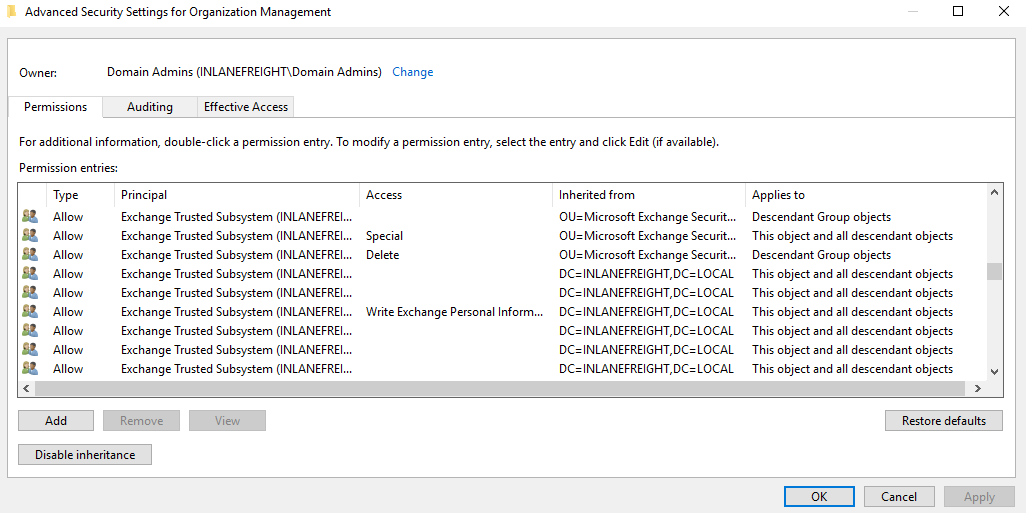
If we can compromise an Exchange server, this will often lead to Domain Admin privileges. Additionally, dumping credentials in memory from an Exchange server will produce 10s if not 100s of cleartext credentials or NTLM hashes. This is often due to users logging in to Outlook Web Access (OWA) and Exchange caching their credentials in memory after a successful login.
PrivExchange
The PrivExchange attack results from a flaw in the Exchange Server PushSubscription feature, which allows any domain user with a mailbox to force the Exchange server to authenticate to any host provided by the client over HTTP.
The Exchange service runs as SYSTEM and is over-privileged by default (i.e., has WriteDacl privileges on the domain pre-2019 Cumulative Update). This flaw can be leveraged to relay to LDAP and dump the domain NTDS database. If we cannot relay to LDAP, this can be leveraged to relay and authenticate to other hosts within the domain. This attack will take you directly to Domain Admin with any authenticated domain user account.
Printer Bug
The Printer Bug is a flaw in the MS-RPRN protocol (Print System Remote Protocol). This protocol defines the communication of print job processing and print system management between a client and a print server. To leverage this flaw, any domain user can connect to the spool's named pipe with the RpcOpenPrinter method and use the RpcRemoteFindFirstPrinterChangeNotificationEx method, and force the server to authenticate to any host provided by the client over SMB.
The spooler service runs as SYSTEM and is installed by default in Windows servers running Desktop Experience. This attack can be leveraged to relay to LDAP and grant your attacker account DCSync privileges to retrieve all password hashes from AD.
The attack can also be used to relay LDAP authentication and grant Resource-Based Constrained Delegation (RBCD) privileges for the victim to a computer account under our control, thus giving the attacker privileges to authenticate as any user on the victim's computer. This attack can be leveraged to compromise a Domain Controller in a partner domain/forest, provided you have administrative access to a Domain Controller in the first forest/domain already, and the trust allows TGT delegation, which is not by default anymore.
We can leverage the Get-SpoolStatus function from SecurityAssessment.ps1 (available on the target system) as preserved in this repository or this tool to check for machines vulnerable to the MS-PRN Printer Bug. This flaw can be used to compromise a host in another forest that has Unconstrained Delegation enabled, such as a domain controller. It can help us to attack across forest trusts once we have compromised one forest.
Enumerating for MS-PRN Printer Bug
Miscellaneous Misconfigurations
PS C:\htb> Import-Module .\SecurityAssessment.ps1
PS C:\htb> Get-SpoolStatus -ComputerName ACADEMY-EA-DC01.INLANEFREIGHT.LOCAL

ComputerName                        Status
------------                        ------
ACADEMY-EA-DC01.INLANEFREIGHT.LOCAL   True
MS14-068
This was a flaw in the Kerberos protocol, which could be leveraged along with standard domain user credentials to elevate privileges to Domain Admin. A Kerberos ticket contains information about a user, including the account name, ID, and group membership in the Privilege Attribute Certificate (PAC). The PAC is signed by the KDC using secret keys to validate that the PAC has not been tampered with after creation.
The vulnerability allowed a forged PAC to be accepted by the KDC as legitimate. This can be leveraged to create a fake PAC, presenting a user as a member of the Domain Administrators or other privileged group. It can be exploited with tools such as the Python Kerberos Exploitation Kit (PyKEK) or the Impacket toolkit. The only defense against this attack is patching. The machine Mantis on the Hack The Box platform showcases this vulnerability.
Sniffing LDAP Credentials
Many applications and printers store LDAP credentials in their web admin console to connect to the domain. These consoles are often left with weak or default passwords. Sometimes, these credentials can be viewed in cleartext. Other times, the application has a test connection function that we can use to gather credentials by changing the LDAP IP address to that of our attack host and setting up a netcat listener on LDAP port 389. When the device attempts to test the LDAP connection, it will send the credentials to our machine, often in cleartext. Accounts used for LDAP connections are often privileged, but if not, this could serve as an initial foothold in the domain. Other times, a full LDAP server is required to pull off this attack, as detailed in this post.
Enumerating DNS Records
We can use a tool such as adidnsdump to enumerate all DNS records in a domain using a valid domain user account. This is especially helpful if the naming convention for hosts returned to us in our enumeration using tools such as BloodHound is similar to SRV01934.INLANEFREIGHT.LOCAL. If all servers and workstations have a non-descriptive name, it makes it difficult for us to know what exactly to attack. If we can access DNS entries in AD, we can potentially discover interesting DNS records that point to this same server, such as JENKINS.INLANEFREIGHT.LOCAL, which we can use to better plan out our attacks.
The tool works because, by default, all users can list the child objects of a DNS zone in an AD environment. By default, querying DNS records using LDAP does not return all results. So by using the adidnsdump tool, we can resolve all records in the zone and potentially find something useful for our engagement. The background and more in-depth explanation of this tool and technique can be found in this post.
On the first run of the tool, we can see that some records are blank, namely ?,LOGISTICS,?.
Using adidnsdump
Miscellaneous Misconfigurations
sasorirose@htb[/htb]$ adidnsdump -u inlanefreight\\forend ldap://172.16.5.5

Password:

[-] Connecting to host...
[-] Binding to host
[+] Bind OK
[-] Querying zone for records
[+] Found 27 records
Viewing the Contents of the records.csv File
Miscellaneous Misconfigurations
sasorirose@htb[/htb]$ head records.csv

type,name,value
?,LOGISTICS,?
AAAA,ForestDnsZones,dead:beef::7442:c49d:e1d7:2691
AAAA,ForestDnsZones,dead:beef::231
A,ForestDnsZones,10.129.202.29
A,ForestDnsZones,172.16.5.240
A,ForestDnsZones,172.16.5.5
AAAA,DomainDnsZones,dead:beef::7442:c49d:e1d7:2691
AAAA,DomainDnsZones,dead:beef::231
A,DomainDnsZones,10.129.202.29
If we run again with the -r flag the tool will attempt to resolve unknown records by performing an A query. Now we can see that an IP address of 172.16.5.240 showed up for LOGISTICS. While this is a small example, it is worth running this tool in larger environments. We may uncover "hidden" records that can lead to discovering interesting hosts.
Using the -r Option to Resolve Unknown Records
Miscellaneous Misconfigurations
sasorirose@htb[/htb]$ adidnsdump -u inlanefreight\\forend ldap://172.16.5.5 -r

Password:

[-] Connecting to host...
[-] Binding to host
[+] Bind OK
[-] Querying zone for records
[+] Found 27 records
Finding Hidden Records in the records.csv File
Miscellaneous Misconfigurations
sasorirose@htb[/htb]$ head records.csv

type,name,value
A,LOGISTICS,172.16.5.240
AAAA,ForestDnsZones,dead:beef::7442:c49d:e1d7:2691
AAAA,ForestDnsZones,dead:beef::231
A,ForestDnsZones,10.129.202.29
A,ForestDnsZones,172.16.5.240
A,ForestDnsZones,172.16.5.5
AAAA,DomainDnsZones,dead:beef::7442:c49d:e1d7:2691
AAAA,DomainDnsZones,dead:beef::231
A,DomainDnsZones,10.129.202.29
Other Misconfigurations
There are many other misconfigurations that can be used to further your access within a domain.
Password in Description Field
Sensitive information such as account passwords are sometimes found in the user account Description or Notes fields and can be quickly enumerated using PowerView. For large domains, it is helpful to export this data to a CSV file to review offline.
Finding Passwords in the Description Field using Get-Domain User
Miscellaneous Misconfigurations
PS C:\htb> Get-DomainUser * | Select-Object samaccountname,description |Where-Object {$_.Description -ne $null}

samaccountname description
-------------- -----------
administrator  Built-in account for administering the computer/domain
guest          Built-in account for guest access to the computer/domain
krbtgt         Key Distribution Center Service Account
ldap.agent     *** DO NOT CHANGE ***  3/12/2012: Sunsh1ne4All!
PASSWD_NOTREQD Field
It is possible to come across domain accounts with the passwd_notreqd field set in the userAccountControl attribute. If this is set, the user is not subject to the current password policy length, meaning they could have a shorter password or no password at all (if empty passwords are allowed in the domain). A password may be set as blank intentionally (sometimes admins don’t want to be called out of hours to reset user passwords) or accidentally hitting enter before entering a password when changing it via the command line. Just because this flag is set on an account, it doesn't mean that no password is set, just that one may not be required. There are many reasons why this flag may be set on a user account, one being that a vendor product set this flag on certain accounts at the time of installation and never removed the flag post-install. It is worth enumerating accounts with this flag set and testing each to see if no password is required (I have seen this a couple of times on assessments). Also, include it in the client report if the goal of the assessment is to be as comprehensive as possible.
Checking for PASSWD_NOTREQD Setting using Get-DomainUser
Miscellaneous Misconfigurations
PS C:\htb> Get-DomainUser -UACFilter PASSWD_NOTREQD | Select-Object samaccountname,useraccountcontrol

samaccountname                                                         useraccountcontrol
--------------                                                         ------------------
guest                ACCOUNTDISABLE, PASSWD_NOTREQD, NORMAL_ACCOUNT, DONT_EXPIRE_PASSWORD
mlowe                                PASSWD_NOTREQD, NORMAL_ACCOUNT, DONT_EXPIRE_PASSWORD
ehamilton                            PASSWD_NOTREQD, NORMAL_ACCOUNT, DONT_EXPIRE_PASSWORD
$725000-9jb50uejje9f                       ACCOUNTDISABLE, PASSWD_NOTREQD, NORMAL_ACCOUNT
nagiosagent                                                PASSWD_NOTREQD, NORMAL_ACCOUNT
Credentials in SMB Shares and SYSVOL Scripts
The SYSVOL share can be a treasure trove of data, especially in large organizations. We may find many different batch, VBScript, and PowerShell scripts within the scripts directory, which is readable by all authenticated users in the domain. It is worth digging around this directory to hunt for passwords stored in scripts. Sometimes we will find very old scripts containing since disabled accounts or old passwords, but from time to time, we will strike gold, so we should always dig through this directory. Here, we can see an interesting script named reset_local_admin_pass.vbs.
Discovering an Interesting Script
Miscellaneous Misconfigurations
PS C:\htb> ls \\academy-ea-dc01\SYSVOL\INLANEFREIGHT.LOCAL\scripts

    Directory: \\academy-ea-dc01\SYSVOL\INLANEFREIGHT.LOCAL\scripts


Mode                LastWriteTime         Length Name
----                -------------         ------ ----
-a----       11/18/2021  10:44 AM            174 daily-runs.zip
-a----        2/28/2022   9:11 PM            203 disable-nbtns.ps1
-a----         3/7/2022   9:41 AM         144138 Logon Banner.htm
-a----         3/8/2022   2:56 PM            979 reset_local_admin_pass.vbs
Taking a closer look at the script, we see that it contains a password for the built-in local administrator on Windows hosts. In this case, it would be worth checking to see if this password is still set on any hosts in the domain. We could do this using CrackMapExec and the --local-auth flag as shown in this module's Internal Password Spraying - from Linux section.
Finding a Password in the Script
Miscellaneous Misconfigurations
PS C:\htb> cat \\academy-ea-dc01\SYSVOL\INLANEFREIGHT.LOCAL\scripts\reset_local_admin_pass.vbs

On Error Resume Next
strComputer = "."

Set oShell = CreateObject("WScript.Shell")
sUser = "Administrator"
sPwd = "!ILFREIGHT_L0cALADmin!"

Set Arg = WScript.Arguments
If  Arg.Count > 0 Then
sPwd = Arg(0) 'Pass the password as parameter to the script
End if

'Get the administrator name
Set objWMIService = GetObject("winmgmts:\\" & strComputer & "\root\cimv2")
Group Policy Preferences (GPP) Passwords
When a new GPP is created, an .xml file is created in the SYSVOL share, which is also cached locally on endpoints that the Group Policy applies to. These files can include those used to:
- Map drives (drives.xml)
- Create local users
- Create printer config files (printers.xml)
- Creating and updating services (services.xml)
- Creating scheduled tasks (scheduledtasks.xml)
- Changing local admin passwords.
These files can contain an array of configuration data and defined passwords. The cpassword attribute value is AES-256 bit encrypted, but Microsoft published the AES private key on MSDN, which can be used to decrypt the password. Any domain user can read these files as they are stored on the SYSVOL share, and all authenticated users in a domain, by default, have read access to this domain controller share.
This was patched in 2014 MS14-025 Vulnerability in GPP could allow elevation of privilege, to prevent administrators from setting passwords using GPP. The patch does not remove existing Groups.xml files with passwords from SYSVOL. If you delete the GPP policy instead of unlinking it from the OU, the cached copy on the local computer remains.
The XML looks like the following:
Viewing Groups.xml

If you retrieve the cpassword value more manually, the gpp-decrypt utility can be used to decrypt the password as follows:
Decrypting the Password with gpp-decrypt
Miscellaneous Misconfigurations
sasorirose@htb[/htb]$ gpp-decrypt VPe/o9YRyz2cksnYRbNeQj35w9KxQ5ttbvtRaAVqxaE

Password1
GPP passwords can be located by searching or manually browsing the SYSVOL share or using tools such as Get-GPPPassword.ps1, the GPP Metasploit Post Module, and other Python/Ruby scripts which will locate the GPP and return the decrypted cpassword value. CrackMapExec also has two modules for locating and retrieving GPP passwords. One quick tip to consider during engagements: Often, GPP passwords are defined for legacy accounts, and you may therefore retrieve and decrypt the password for a locked or deleted account. However, it is worth attempting to password spray internally with this password (especially if it is unique). Password re-use is widespread, and the GPP password combined with password spraying could result in further access.
Locating & Retrieving GPP Passwords with CrackMapExec
Miscellaneous Misconfigurations
sasorirose@htb[/htb]$ crackmapexec smb -L | grep gpp

[*] gpp_autologin             Searches the domain controller for registry.xml to find autologon information and returns the username and password.
[*] gpp_password              Retrieves the plaintext password and other information for accounts pushed through Group Policy Preferences.
It is also possible to find passwords in files such as Registry.xml when autologon is configured via Group Policy. This may be set up for any number of reasons for a machine to automatically log in at boot. If this is set via Group Policy and not locally on the host, then anyone on the domain can retrieve credentials stored in the Registry.xml file created for this purpose. This is a separate issue from GPP passwords as Microsoft has not taken any action to block storing these credentials on the SYSVOL in cleartext and, hence, are readable by any authenticated user in the domain. We can hunt for this using CrackMapExec with the gpp_autologin module, or using the Get-GPPAutologon.ps1 script included in PowerSploit.
Using CrackMapExec's gpp_autologin Module
Miscellaneous Misconfigurations