Apache Tomcat is an open-source web server that hosts applications written in Java. Tomcat was initially designed to run Java Servlets and Java Server Pages (JSP) scripts. However, its popularity increased in Java-based frameworks and is now widely used by frameworks such as Spring and tools such as Gradle. According to data gathered by BuiltWith there are over 220,000 live Tomcat websites at this time. Here are a few more interesting statistics:
- BuiltWith has gathered data that shows that over 904,000 websites have at one point been using Tomcat
- 1.22% of the top 1 million websites are using Tomcat, while 3.8% of the top 100k websites are
- Tomcat holds position # 13 for web servers by market share
- Some organizations that use Tomcat include Alibaba, the United States Patent and Trademark Office (USPTO), The American Red Cross, and the LA Times
Tomcat is often less apt to be exposed to the internet (though). We see it from time to time on external pentests and can make for an excellent foothold into the internal network. It is far more common to see Tomcat (and multiple instances, for that matter) during internal pentests. It'll usually occupy the first spot under "High Value Targets" within an EyeWitness report, and more often than not, at least one instance internal is configured with weak or default credentials. More on that later.
Discovery/Footprinting
During our external penetration test, we run EyeWitness and see one host listed under "High Value Targets." The tool believes the host is running Tomcat, but we must confirm to plan our attacks. If we are dealing with Tomcat on the external network, this could be an easy foothold into the internal network environment.
Tomcat servers can be identified by the Server header in the HTTP response. If the server is operating behind a reverse proxy, requesting an invalid page should reveal the server and version. Here we can see that Tomcat version 9.0.30 is in use.
http://app-dev.inlanefreight.local:8080/invalid

Custom error pages may be in use that do not leak this version information. In this case, another method of detecting a Tomcat server and version is through the /docs page.
sasorirose@htb[/htb]$ curl -s http://app-dev.inlanefreight.local:8080/docs/ | grep Tomcat

Apache Tomcat 9 (9.0.30) - Documentation Index
This is the default documentation page, which may not be removed by administrators. Here is the general folder structure of a Tomcat installation.
├── bin
├── conf
│   ├── catalina.policy
│   ├── catalina.properties
│   ├── context.xml
│   ├── tomcat-users.xml
│   ├── tomcat-users.xsd
│   └── web.xml
├── lib
├── logs
├── temp
├── webapps
│   ├── manager
│   │   ├── images
│   │   ├── META-INF
│   │   └── WEB-INF
|   |       └── web.xml
│   └── ROOT
│       └── WEB-INF
└── work
    └── Catalina
        └── localhost
The bin folder stores scripts and binaries needed to start and run a Tomcat server. The conf folder stores various configuration files used by Tomcat. The tomcat-users.xml file stores user credentials and their assigned roles. The lib folder holds the various JAR files needed for the correct functioning of Tomcat. The logs and temp folders store temporary log files. The webapps folder is the default webroot of Tomcat and hosts all the applications. The work folder acts as a cache and is used to store data during runtime.
Each folder inside webapps is expected to have the following structure.
webapps/customapp
├── images
├── index.jsp
├── META-INF
│   └── context.xml
├── status.xsd
└── WEB-INF
    ├── jsp
    |   └── admin.jsp
    └── web.xml
    └── lib
    |    └── jdbc_drivers.jar
    └── classes
        └── AdminServlet.class
The most important file among these is WEB-INF/web.xml, which is known as the deployment descriptor. This file stores information about the routes used by the application and the classes handling these routes. All compiled classes used by the application should be stored in the WEB-INF/classes folder. These classes might contain important business logic as well as sensitive information. Any vulnerability in these files can lead to total compromise of the website. The lib folder stores the libraries needed by that particular application. The jsp folder stores Jakarta Server Pages (JSP), formerly known as JavaServer Pages, which can be compared to PHP files on an Apache server.
Here’s an example web.xml file.
    AdminServlet
    com.inlanefreight.api.AdminServlet


    AdminServlet
    /admin
The web.xml configuration above defines a new servlet named AdminServlet that is mapped to the class com.inlanefreight.api.AdminServlet. Java uses the dot notation to create package names, meaning the path on disk for the class defined above would be:
- classes/com/inlanefreight/api/AdminServlet.class
Next, a new servlet mapping is created to map requests to /admin with AdminServlet. This configuration will send any request received for /admin to the AdminServlet.class class for processing. The web.xml descriptor holds a lot of sensitive information and is an important file to check when leveraging a Local File Inclusion (LFI) vulnerability.
The tomcat-users.xml file is used to allow or disallow access to the /manager and host-manager admin pages.
!-- user manager can access only manager section -->
The file shows us what each of the roles manager-gui, manager-script, manager-jmx, and manager-status provide access to. In this example, we can see that a user tomcat with the password tomcat has the manager-gui role, and a second weak password admin is set for the user account admin
Enumeration
After fingerprinting the Tomcat instance, unless it has a known vulnerability, we'll typically want to look for the /manager and the /host-manager pages. We can attempt to locate these with a tool such as Gobuster or just browse directly to them.
sasorirose@htb[/htb]$ gobuster dir -u http://web01.inlanefreight.local:8180/ -w /usr/share/dirbuster/wordlists/directory-list-2.3-small.txt

===============================================================
Gobuster v3.0.1
by OJ Reeves (@TheColonial) & Christian Mehlmauer (@_FireFart_)
===============================================================
[+] Url:            http://web01.inlanefreight.local:8180/
[+] Threads:        10
[+] Wordlist:       /usr/share/dirbuster/wordlists/directory-list-2.3-small.txt
[+] Status codes:   200,204,301,302,307,401,403
[+] User Agent:     gobuster/3.0.1
[+] Timeout:        10s
===============================================================
2021/09/21 17:34:54 Starting gobuster
===============================================================
/docs (Status: 302)
/examples (Status: 302)
/manager (Status: 302)
Progress: 49959 / 87665 (56.99%)^C
[!] Keyboard interrupt detected, terminating.
===============================================================
2021/09/21 17:44:29 Finished
===============================================================
We may be able to either log in to one of these using weak credentials such as tomcat:tomcat, admin:admin, etc. If these first few tries don't work, we can try a password brute force attack against the login page, covered in the next section. If we are successful in logging in, we can upload a Web Application Resource or Web Application ARchive (WAR) file containing a JSP web shell and obtain remote code execution on the Tomcat server.
Now that we've learned about the structure and function of Tomcat let's attack it by abusing built-in functionality and exploiting a well-known vulnerability that affected specific versions of Tomcat.
Questions:
What version of Tomcat is running on the application located at http://web01.inlanefreight.local:8180?
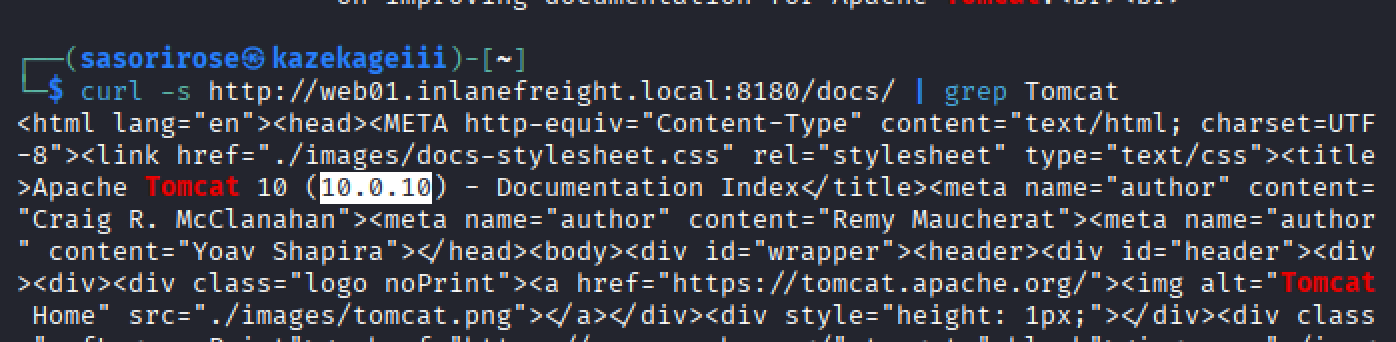
Answer: 10.0.10
What role does the admin user have in the configuration example?
Answer: admin-gui