During our penetration test our team found a Windows host running on the network and the corresponding credentials for the Administrator. It is required that we connect to the host and find the hardcoded password for the MSSQL service.
Questions:
What is the hardcoded password for the database connection in the MultimasterAPI.dll file?
RDP to with user "Administrator" and password "xcyj8izxNVzhf4z"
Reconnaissance
Nmap
└─$ cat nmap.txt
# Nmap 7.95 scan initiated Thu May  7 02:40:46 2026 as: /usr/lib/nmap/nmap -sV -sC -oN nmap.txt 10.129.95.200
Nmap scan report for 10.129.95.200
Host is up (0.29s latency).
Not shown: 985 closed tcp ports (reset)
PORT     STATE SERVICE       VERSION
53/tcp   open  domain        Simple DNS Plus
80/tcp   open  http          Microsoft IIS httpd 10.0
|_http-server-header: Microsoft-IIS/10.0
|_http-title: MegaCorp
88/tcp   open  kerberos-sec  Microsoft Windows Kerberos (server time: 2026-05-07 02:48:01Z)
135/tcp  open  msrpc         Microsoft Windows RPC
139/tcp  open  netbios-ssn   Microsoft Windows netbios-ssn
389/tcp  open  ldap          Microsoft Windows Active Directory LDAP (Domain: MEGACORP.LOCAL, Site: Default-First-Site-Name)
445/tcp  open  microsoft-ds  Windows Server 2016 Standard 14393 microsoft-ds (workgroup: MEGACORP)
464/tcp  open  kpasswd5?
593/tcp  open  ncacn_http    Microsoft Windows RPC over HTTP 1.0
636/tcp  open  tcpwrapped
1433/tcp open  ms-sql-s      Microsoft SQL Server 2017 14.00.1000.00; RTM
|_ssl-date: 2026-05-07T02:48:30+00:00; +7m04s from scanner time.
| ms-sql-info:
|   10.129.95.200:1433:
|     Version:
|       name: Microsoft SQL Server 2017 RTM
|       number: 14.00.1000.00
|       Product: Microsoft SQL Server 2017
|       Service pack level: RTM
|       Post-SP patches applied: false
|_    TCP port: 1433
| ms-sql-ntlm-info:
|   10.129.95.200:1433:
|     Target_Name: MEGACORP
|     NetBIOS_Domain_Name: MEGACORP
|     NetBIOS_Computer_Name: MULTIMASTER
|     DNS_Domain_Name: MEGACORP.LOCAL
|     DNS_Computer_Name: MULTIMASTER.MEGACORP.LOCAL
|     DNS_Tree_Name: MEGACORP.LOCAL
|_    Product_Version: 10.0.14393
| ssl-cert: Subject: commonName=SSL_Self_Signed_Fallback
| Not valid before: 2026-05-07T02:47:23
|_Not valid after:  2056-05-07T02:47:23
3268/tcp open  ldap          Microsoft Windows Active Directory LDAP (Domain: MEGACORP.LOCAL, Site: Default-First-Site-Name)
3269/tcp open  tcpwrapped
3389/tcp open  ms-wbt-server Microsoft Terminal Services
| ssl-cert: Subject: commonName=MULTIMASTER.MEGACORP.LOCAL
| Not valid before: 2026-05-06T02:46:41
|_Not valid after:  2026-11-05T02:46:41
|_ssl-date: 2026-05-07T02:48:30+00:00; +7m04s from scanner time.
| rdp-ntlm-info:
|   Target_Name: MEGACORP
|   NetBIOS_Domain_Name: MEGACORP
|   NetBIOS_Computer_Name: MULTIMASTER
|   DNS_Domain_Name: MEGACORP.LOCAL
|   DNS_Computer_Name: MULTIMASTER.MEGACORP.LOCAL
|   DNS_Tree_Name: MEGACORP.LOCAL
|   Product_Version: 10.0.14393
|_  System_Time: 2026-05-07T02:48:16+00:00
5985/tcp open  http          Microsoft HTTPAPI httpd 2.0 (SSDP/UPnP)
|_http-server-header: Microsoft-HTTPAPI/2.0
|_http-title: Not Found
Service Info: Host: MULTIMASTER; OS: Windows; CPE: cpe:/o:microsoft:windows

Host script results:
| smb2-security-mode:
|   3:1:1:
|_    Message signing enabled and required
|_clock-skew: mean: 1h07m04s, deviation: 2h38m46s, median: 7m03s
| smb2-time:
|   date: 2026-05-07T02:48:16
|_  start_date: 2026-05-07T02:46:50
| smb-security-mode:
|   account_used: guest
|   authentication_level: user
|   challenge_response: supported
|_  message_signing: required
| smb-os-discovery:
|   OS: Windows Server 2016 Standard 14393 (Windows Server 2016 Standard 6.3)
|   Computer name: MULTIMASTER
|   NetBIOS computer name: MULTIMASTER\x00
|   Domain name: MEGACORP.LOCAL
|   Forest name: MEGACORP.LOCAL
|   FQDN: MULTIMASTER.MEGACORP.LOCAL
|_  System time: 2026-05-06T19:48:19-07:00

Service detection performed. Please report any incorrect results at https://nmap.org/submit/ .
# Nmap done at Thu May  7 02:41:33 2026 -- 1 IP address (1 host up) scanned in 47.48 seconds
Rdp
xfreerdp3 /v:10.129.95.200 /u:Administrator /p:'xcyj8izxNVzhf4z' /cert:ignore /dynamic-resolutioEnumerate
Just do some simple enumerations to find available tools in the host and find target fMultimasterAPI.dll file
Get-ChildItem -Path C:\ -Filter MultimasterAPI.dll -Recurse -ErrorAction SilentlyContinue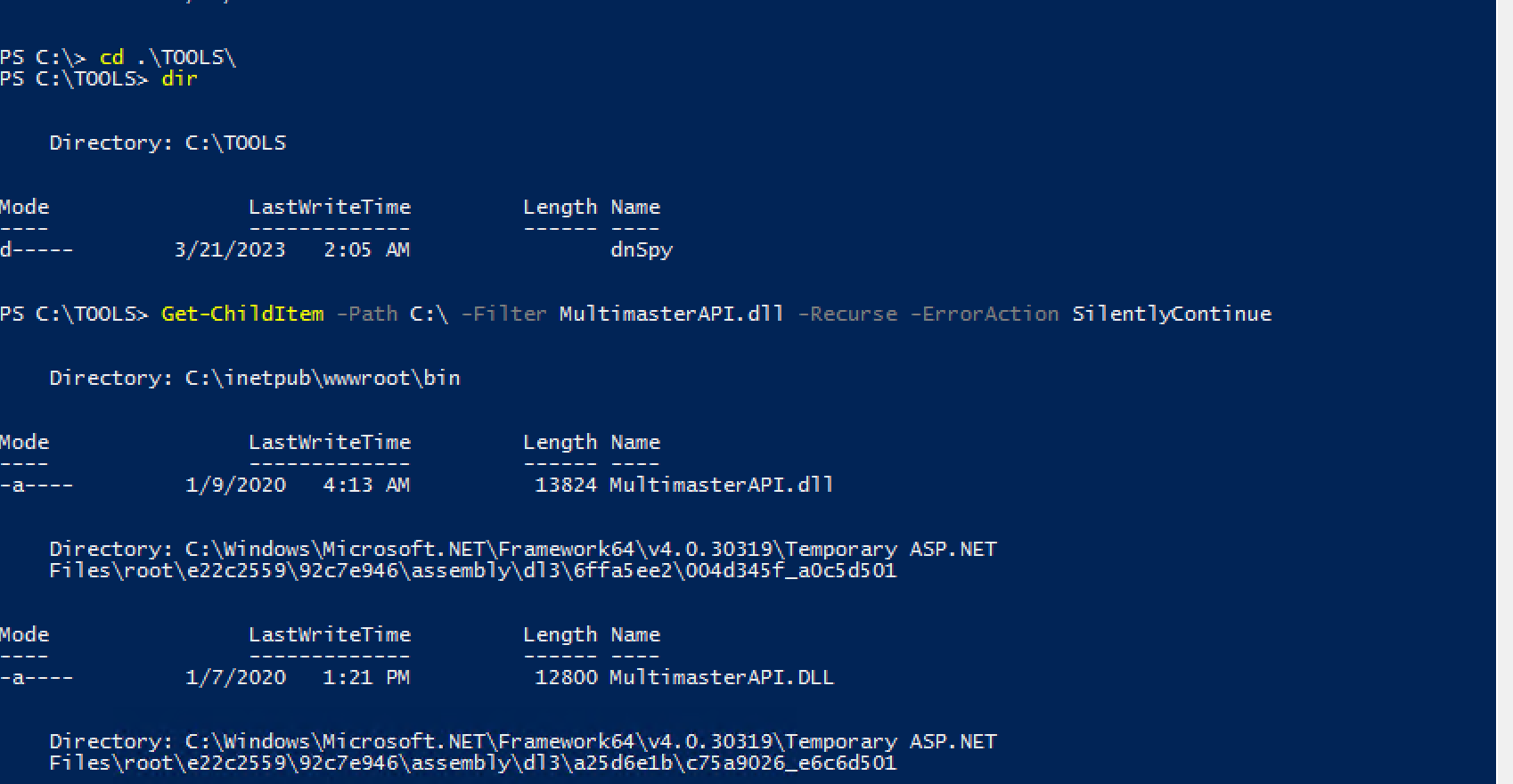
we can see it locate at C:\inetpub\wwwroot\bin directory and i opened with dnsSpy
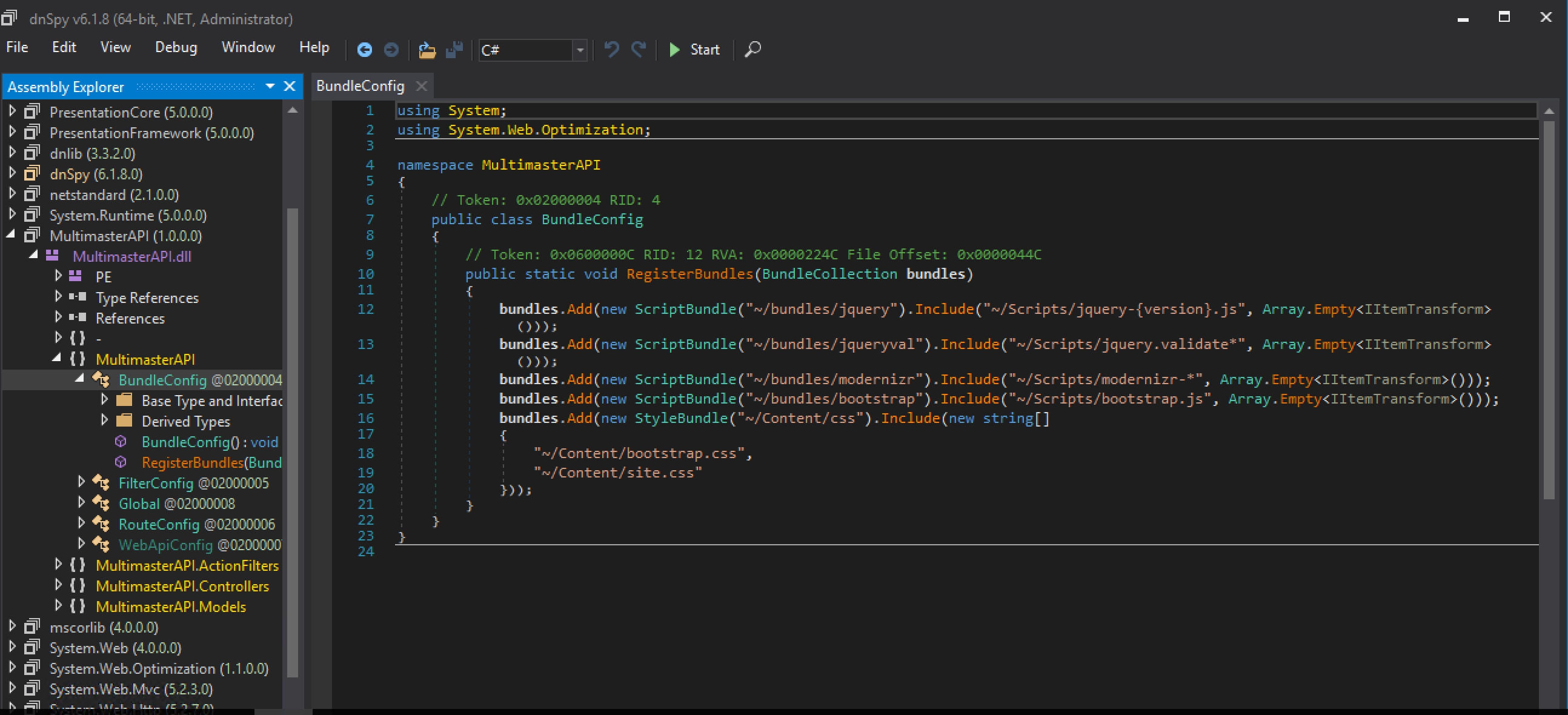
Manually Browsing (Controller is always a good choice to start for me)
Summary Methodology:
- Initial Access: Gained GUI access to the target server (MULTIMASTER) via RDP using the discovered Administrator credentials.
- File Discovery: Navigated to the IIS web root directory (typically C:\inetpub\wwwroot\) and located the compiled backend binary for the API: MultimasterAPI.dll.
- Decompilation: Opened the .NET executable using dnSpy, a standard reverse-engineering tool for .NET assemblies, to perform static code analysis.
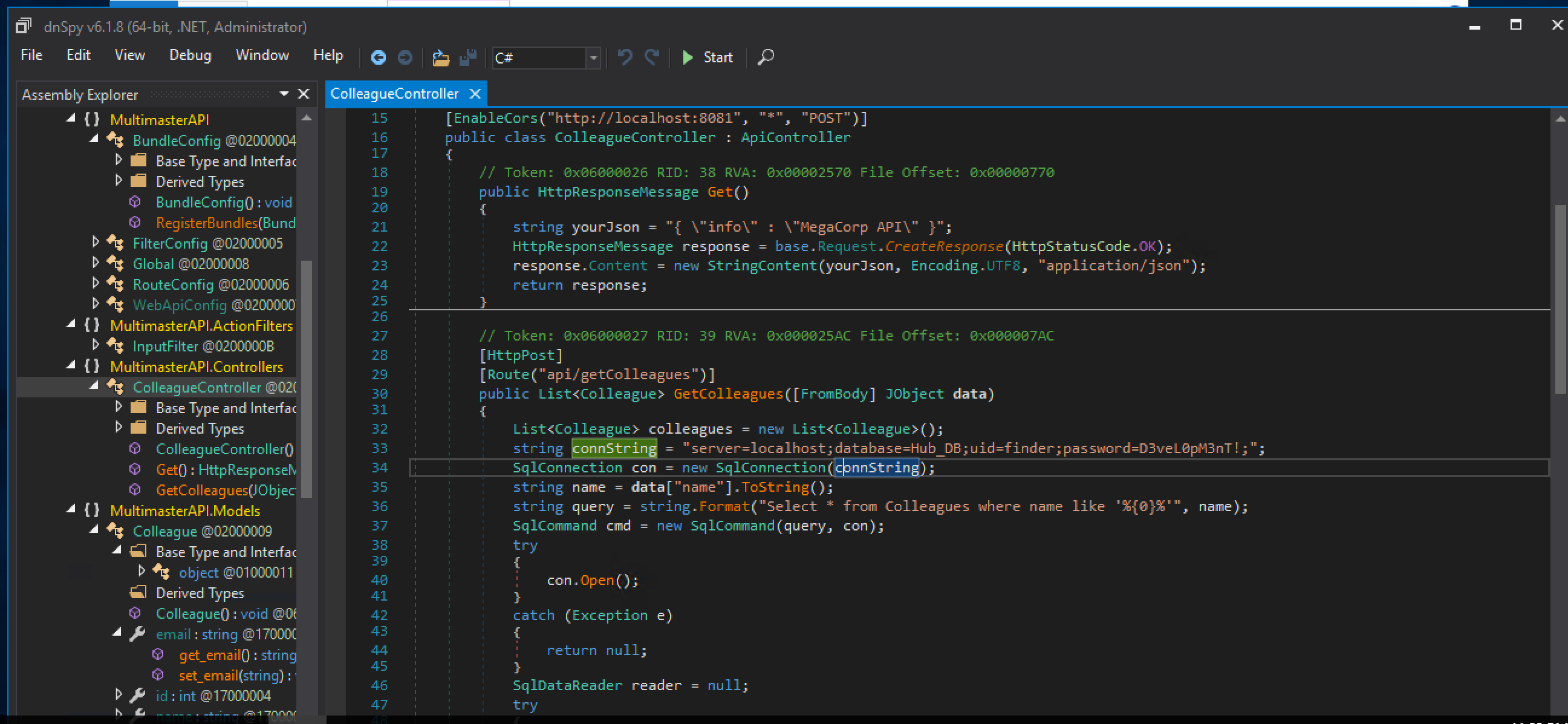
- Source Code Review: Manually browsed the assembly tree structure in dnSpy. Navigated to the MultimasterAPI.Controllers namespace and analyzed the ColleagueController class.
- Credential Discovery: Examined the GetColleagues method handling [HttpPost] requests to the api/getColleagues route. Found a hardcoded SQL connection string directly within the method used to instantiate the SqlConnection.
Code Snippet Found:
C#
string connString = "server=localhost;database=Hub_DB;uid=finder;password=D3vel0pM3nT!;"; SqlConnection con = new SqlConnection(connString);
Extracted Credentials:
- Database: Hub_DB
- Username (UID): finder
- Password: D3vel0pM3nT!
Answer: D3vel0pM3nT!